Geekzone: technology news, blogs, forums
Guest
Welcome Guest.
You haven't logged in yet. If you don't have an account you can register now.


pinguNZ

8 posts

Wannabe Geek


#323677 1-Jan-2026 14:06
Send private message quote this post

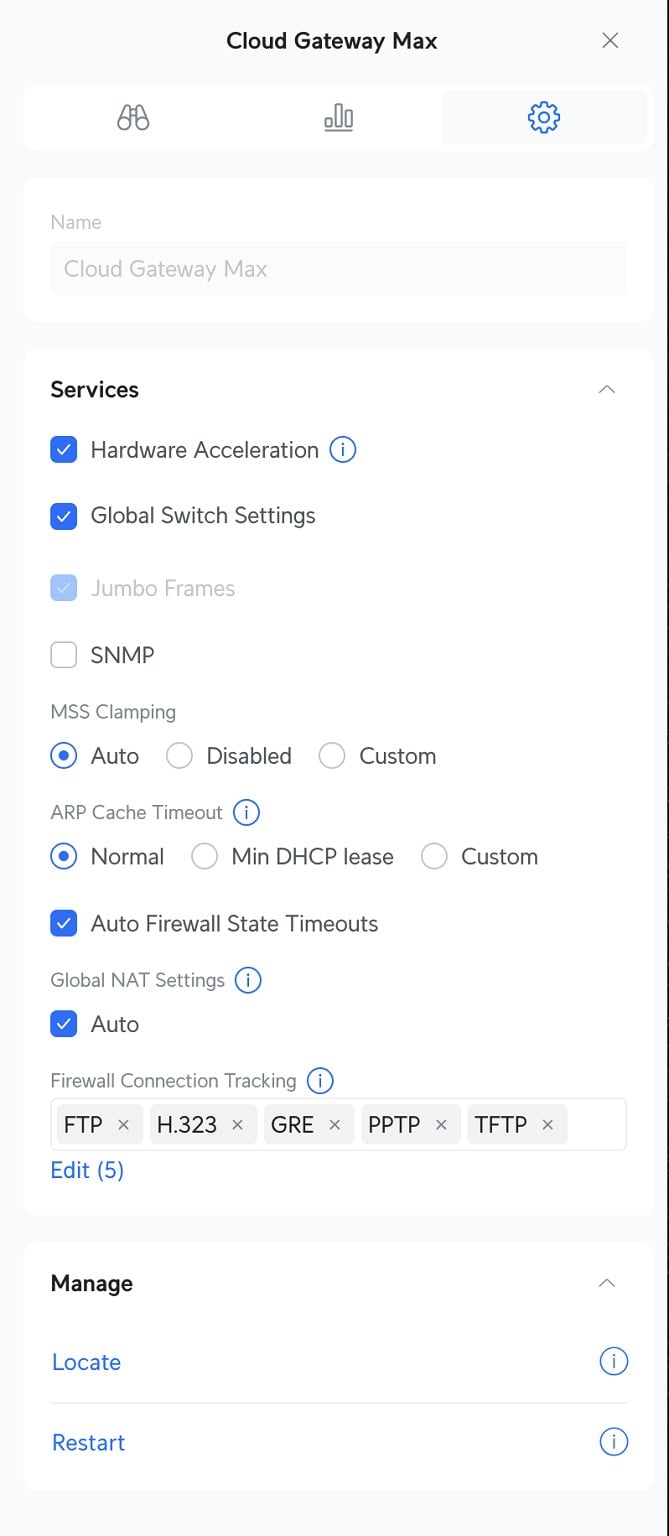
Hello! Ive been trying to setup a new fibre connection for my mum. Currently I have a Unifi router (UCG-Max) and have it configured as to what is required on the 2degrees site. However I cannot get a connection at all. Connection from Spark was cut at 6AM today.


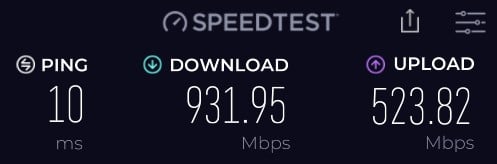
This router was setup at my old flat under a 2degrees fibre connection previously. Differences at the old flat was faster speed (900 vs 500mbps), Static IP and a newer ONT.
When I plugged this in at mums under the Spark connection I didn't need to change anything and it worked fine. Since the switch this morning I haven't been able to get it running through 2Degrees


Steps tried to resolve the new 2Degrees connection:


  1. Restarting UCG and ONT
  2. Double checking all settings compared to 2degrees site
  3. Factory Resetting UCG 
  4. Calling 2Degrees twice, they said that they can see the ONT and the modem
  5. Tried enabling the DHCP over ipv6 aswell set to 56 as per another article I found on geekzone


I'm hoping i've missed something obvious :(


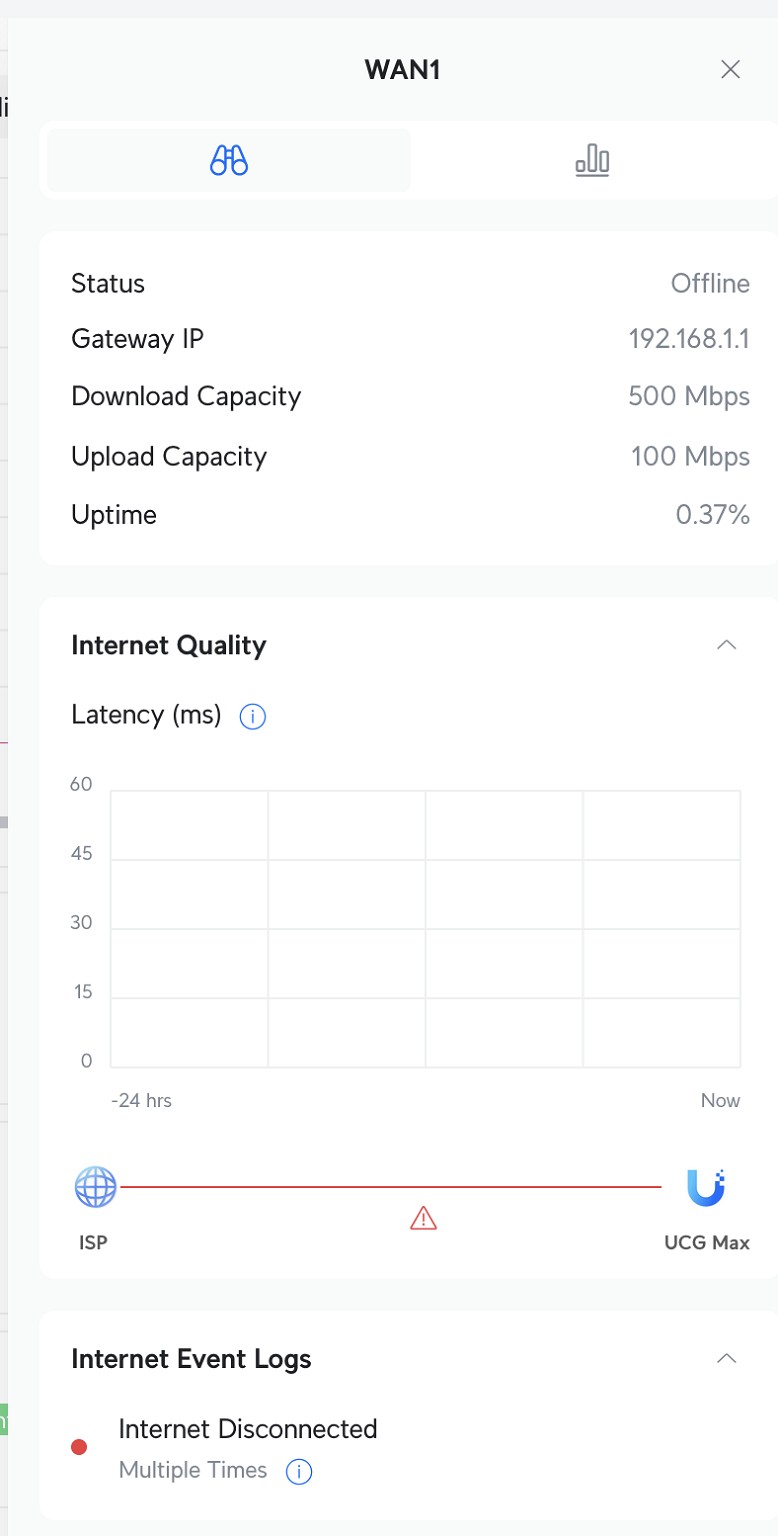
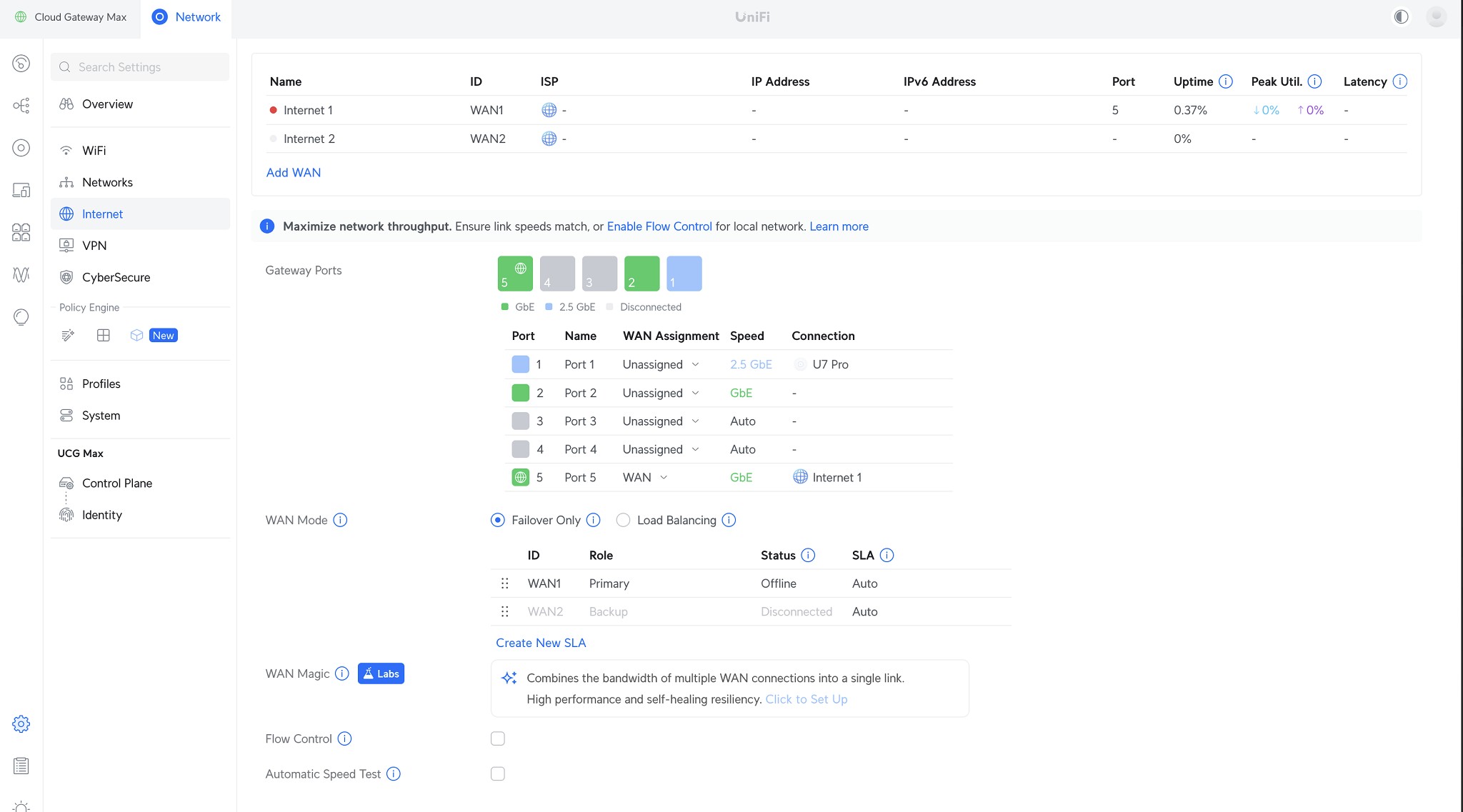
WAN settings:
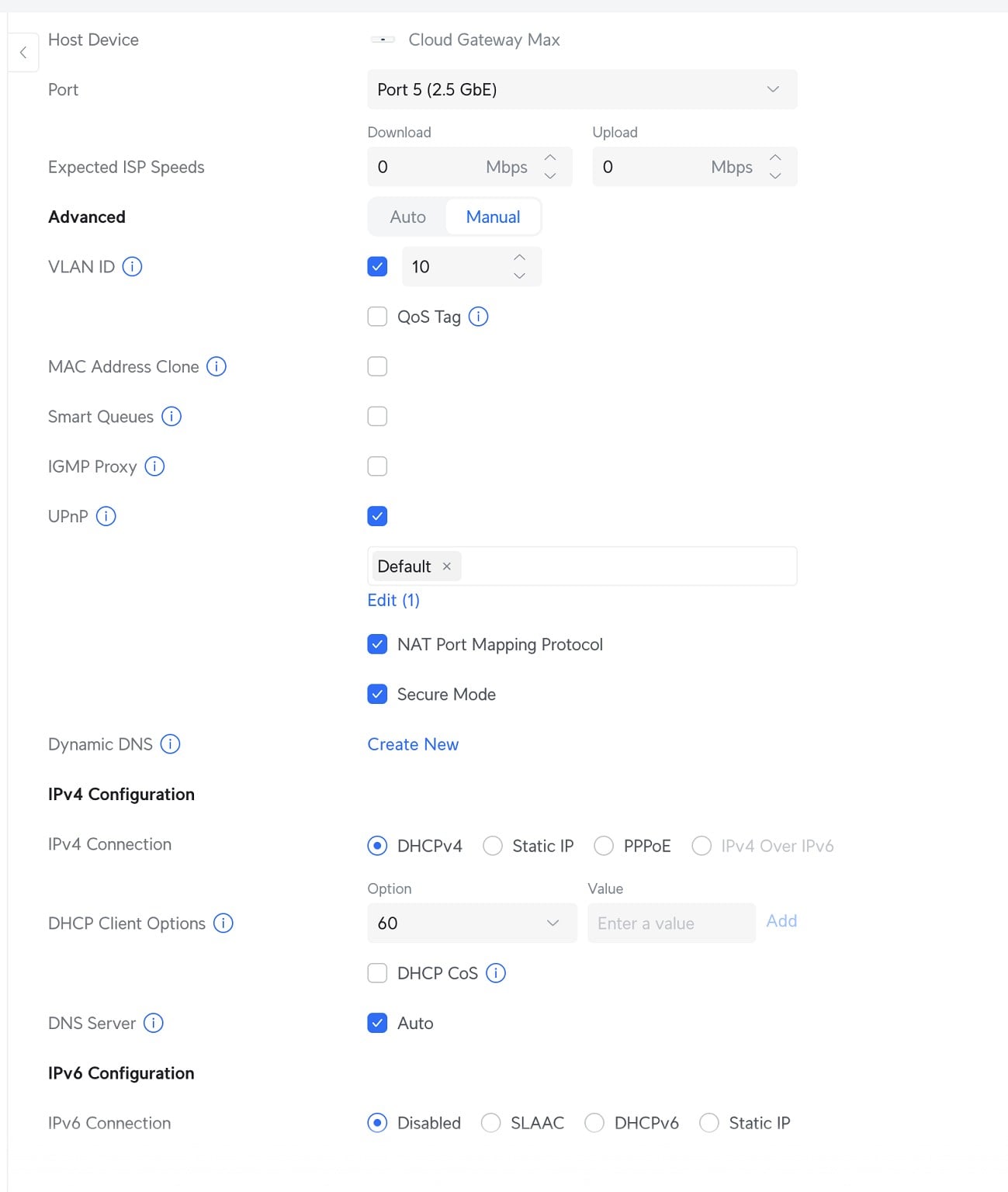


Really appreciate any assistance.


Thanks


Filter this topic showing only the reply marked as answer View this topic in a long page with up to 500 replies per page Create new topic
 1 | 2
RunningMan
9184 posts

Uber Geek
+1 received by user: 4833


  #3448657 1-Jan-2026 14:26
Send private message quote this post

Is the new connection on the same ONT port?


Jase2985
13730 posts

Uber Geek
+1 received by user: 6202

ID Verified
Lifetime subscriber

  #3448659 1-Jan-2026 14:28
Send private message quote this post

Try the other ONT LAN ports. It was likely provisioned on port 2 as the spark connection was still live on port 1


pinguNZ

8 posts

Wannabe Geek


  #3448664 1-Jan-2026 14:44
Send private message quote this post

Thanks, tested LAN2-4 on the ONT. Only LAN1 would light up orange, LAN2-4 wouldn't show any lights and the router would see the WAN port as down. I power cycled the ONT while it was plugged into LAN2 and found that it lit up green for a bit before turning off. 


From what 2Degrees were saying on the phone, they were suggesting it was supposed to be in port 1


MichaelNZ
1594 posts

Uber Geek
+1 received by user: 485

Trusted
Net Trust Ltd

  #3448679 1-Jan-2026 16:13
Send private message quote this post

pinguNZ:


Thanks, tested LAN2-4 on the ONT. Only LAN1 would light up orange, LAN2-4 wouldn't show any lights and the router would see the WAN port as down. I power cycled the ONT while it was plugged into LAN2 and found that it lit up green for a bit before turning off. 


From what 2Degrees were saying on the phone, they were suggesting it was supposed to be in port 1


Orange... hmm. What type of ONT do you have?


Other thing I noticed was you selected port 5 on your router for the WAN. By convention its usually port 1 but I don't know that gear so this could be right...


pinguNZ:


Thanks, tested LAN2-4 on the ONT. Only LAN1 would light up orange, LAN2-4 wouldn't show any lights and the router would see the WAN port as down. I power cycled the ONT while it was plugged into LAN2 and found that it lit up green for a bit before turning off. 


That is correct behaviour. It means only port 1 has a service attached. It may briefly light up on the other ports after a restart while the ONT is waiting for a config.


WFH Linux Systems and Networks Engineer in the Internet industry | Specialising in Mikrotik | APNIC member | Open to job offers | ZL2NET


Jase2985
13730 posts

Uber Geek
+1 received by user: 6202

ID Verified
Lifetime subscriber

  #3448680 1-Jan-2026 16:16
Send private message quote this post

@MichaelNZ:


Other thing I noticed was you selected port 5 on your router for the WAN. By convention its usually port 1 but I don't know that gear so this could be right...


Port 5 is the default WAN port on these devices


JemS
86 posts

Master Geek
+1 received by user: 46

ID Verified

  #3448681 1-Jan-2026 16:20
Send private message quote this post

MichaelNZ:


Other thing I noticed was you selected port 5 on your router for the WAN. By convention its usually port 1 but I don't know that gear so this could be right...


Port 5 is correct for Unifi Cloud Gateways unless changed in the UI.


Join Mercury and I’ll get bonus rewards points. Make sure you use my referral link to explore their wonderful offers. https://www.mercury.co.nz/join?m_copc=FGF50&m_rc=100211888685 


Router: UXG-Lite


AP's: 2x U6-Pro, 1x U6-Lite, 1x UK-Ultra, 1x AC Mesh Pro


Phone: S26 Ultra


Wearable: Garmin Forerunner 955


Stream your favourite shows now on Apple TV (affiliate link).
pinguNZ

8 posts

Wannabe Geek


  #3448684 1-Jan-2026 16:27
Send private message quote this post

https://www.chorus.co.nz/help/ont/type-200 it is a type 200 ONT


Can confirm port 5 on the router is the default WAN port


MichaelNZ
1594 posts

Uber Geek
+1 received by user: 485

Trusted
Net Trust Ltd

  #3448686 1-Jan-2026 16:30
Send private message quote this post

pinguNZ:


https://www.chorus.co.nz/help/ont/type-200 it is a type 200 ONT


Can confirm port 5 on the router is the default WAN port


OK. I can't see anything wrong with your config. Does it have a status page? Are you getting an IP?


WFH Linux Systems and Networks Engineer in the Internet industry | Specialising in Mikrotik | APNIC member | Open to job offers | ZL2NET


pinguNZ

8 posts

Wannabe Geek


  #3448689 1-Jan-2026 16:42
Send private message quote this post

It's not really giving me much information about the WAN IP, I believe the one in the screenshot is the router itself.


MichaelNZ
1594 posts

Uber Geek
+1 received by user: 485

Trusted
Net Trust Ltd

  #3448692 1-Jan-2026 16:46
Send private message quote this post

That GW IP of 192.168.1.1 is a bit funky. Even with CGNAT they would not hand out a 192.168.x RFC1918 range. I think you have that plugged into somewhere else?


WFH Linux Systems and Networks Engineer in the Internet industry | Specialising in Mikrotik | APNIC member | Open to job offers | ZL2NET


boosacnoodle
1268 posts

Uber Geek
+1 received by user: 855


  #3448694 1-Jan-2026 16:49
Send private message quote this post

Try reassign WAN1 on the UniFi to Port 4, then physically connect from whichever port on the ONT to Port 4 on the UniFi. This will tell us if this is an SFP issue or something else.


If this doesn't work, just keep trying different ports on the ONT until you find the right one. If after trying that it still is not working, try disabling the VLAN 10 then trying each ONT port again. Give it a minute or two between port changes.


Unrelated but you probably also want to enable Flow Control and Smart Queues.


Shop now for Dell laptops and other devices (affiliate link).
pinguNZ

8 posts

Wannabe Geek


  #3448698 1-Jan-2026 16:55
Send private message quote this post

Ive unplugged all Ethernet devices from it, except for the AP. Switched out the cable going from the wan port to the ONT and seems to be no change. 


Can confirm that 192.168.X address is the router itself.


I might just need to get another router to test.


MichaelNZ
1594 posts

Uber Geek
+1 received by user: 485

Trusted
Net Trust Ltd

  #3448699 1-Jan-2026 16:58
Send private message quote this post

pinguNZ:


Can confirm that 192.168.X address is the router itself.


Then should be on LAN side, Not "Wan 1". It looks like a config issue.


WFH Linux Systems and Networks Engineer in the Internet industry | Specialising in Mikrotik | APNIC member | Open to job offers | ZL2NET


robertsona
176 posts

Master Geek
+1 received by user: 109

Subscriber

  #3448705 1-Jan-2026 17:25
Send private message quote this post

Bit of a left field suggestion follows:


I have a UDM Pro and are with 2Degrees. We recently moved house and when the fibre connection was installed at the new place, I got some curious internet behaviour. There was a physical connection, I could log into the router remotely (I was out of town at the time), speed tests were good, but the router reported the internet as being offline, WAN was shown as disconnected and those at home certainly couldn't access any internet.


After three days of trouble shooting with 2Degrees tech support, it turned out that for some unknown reason the disconnect of the old address had been cancelled, so there were two addresses trying to access the account and, I guess, the same static IP. Once this was rectified, everything just worked.


Any chance that your old 2degrees connection could still be active?


boosacnoodle
1268 posts

Uber Geek
+1 received by user: 855


  #3448709 1-Jan-2026 17:32
Send private message quote this post

pinguNZ:


Ive unplugged all Ethernet devices from it, except for the AP. Switched out the cable going from the wan port to the ONT and seems to be no change. 


Can confirm that 192.168.X address is the router itself.


I might just need to get another router to test.


Have you tried the suggestions that were given above?


 1 | 2
Filter this topic showing only the reply marked as answer View this topic in a long page with up to 500 replies per page Create new topic


Geekzone Live »

Try automatic live updates from Geekzone directly in your browser, without refreshing the page, with Geekzone Live now.


Are you subscribed to our RSS feed? You can download the latest headlines and summaries from our stories directly to your computer or smartphone by using a feed reader.