Geekzone: technology news, blogs, forums
Guest
Welcome Guest.
You haven't logged in yet. If you don't have an account you can register now.


Filter this topic showing only the reply marked as answer View this topic in a long page with up to 500 replies per page Create new topic
1 | 2 | 3 | 4
livisun
421 posts

Ultimate Geek
+1 received by user: 26

Trusted

  #2016130 15-May-2018 09:09
Send private message

NickMack:


Hiya,


Do you have an open ticket with Care? if so, what is it. We are currently investigating this issue, so more information should be tracked via normal channels to provide us with any details of who you are, where and how you're testing etc.


livisun:


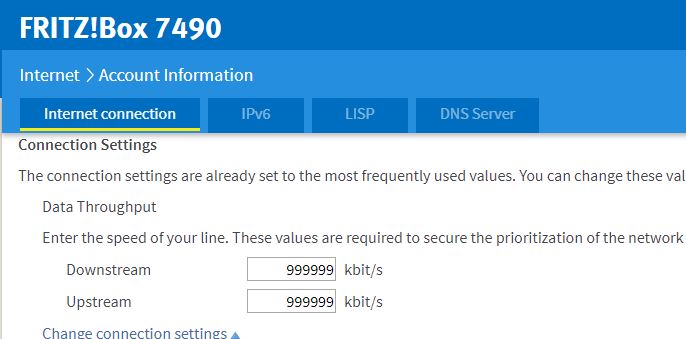
Can I also get some help also, I've checked my fritzbox 7490


Downstream is 999999 kbit/s


Upstream is 999999 kbit/s


Yes I do Nick,


Ref# 180503-000742


Item
1739 posts

Uber Geek
+1 received by user: 726

Subscriber

  #2016142 15-May-2018 09:27
Send private message

I had a similar problem when I got my Gigabit link the other month and was assured all was correct on the 2Degrees side.


In the end I did a factory reset on the Fritzbox (having manually set the max rates to 99999 already) and for some reason, this fixed it.


.

webzarp
8 posts

Wannabe Geek
Inactive user


  #2027531 2-Jun-2018 16:34
Send private message

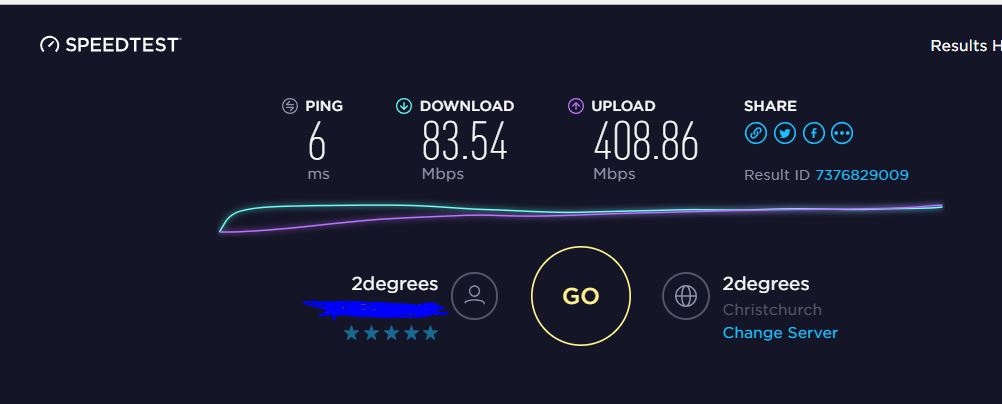
I have exactly the same issue as the OP. I asked to be connected to gigabit internet, and they originally mistakenly connected us to 100mb. We asked them to convert our plan to the faster one, and we got a text a couple of days ago saying that had been completed. We now get 90mbps down / ~400 up.


2degrees are now claiming we changed plans in the middle of the billing cycle and so we have to wait until the 22nd before we will transition on to the faster plan. If that's the case why is our upload so fast? Is this explanation likely to be accurate or are they just fobbing us off and we'll have to go through this again in 3 weeks (when our connection continues to be slow)?


Edit: I should mention I checked the QoS settings in the router and they appear fine.


martinbrice
9 posts

Wannabe Geek


  #2027744 3-Jun-2018 10:02
Send private message

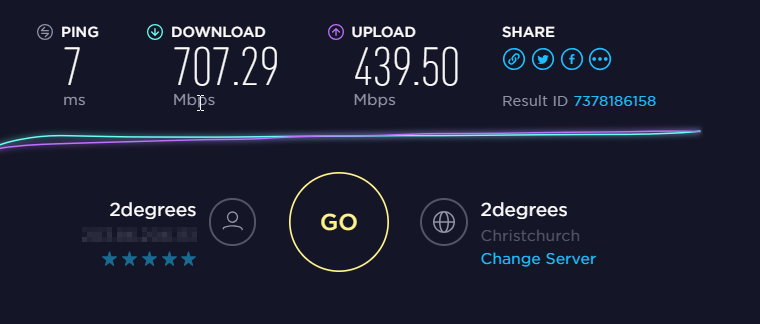
Me too. After switching to fibre I asked 2 degrees to upgrade to Ultimate Unlimited. When the next billing cycle started the upload speed went to 400mb but the download speed was still 100mb. I called customer services and they made a change on the spot. But I still don't think its right as I am on getting just under 300mb down.


freitasm
BDFL - Memuneh
80653 posts

Uber Geek
+1 received by user: 41045

Administrator
ID Verified
Trusted
Geekzone
Lifetime subscriber

  #2027749 3-Jun-2018 10:27
Send private message

I have tested with a new router. Speeds max at 250 Mbps Friday evening, about 450 Mbps daytime. Nowhere near the 900 Mbps MichaelMurfy claims he can do on his connection and nowhere near the 900 Mbps I used to get.

Everyone tells me all is OK on the connection...


Referral links: Quic Broadband (free setup code: R587125ERQ6VE) | Samsung | AliExpress | Wise | Sharesies 


Support Geekzone by subscribing (browse ads-free), or making a one-off or recurring donation through PressPatron.


NickMack
977 posts

Ultimate Geek
+1 received by user: 831

Trusted
In memoriam
Lifetime subscriber

  #2027763 3-Jun-2018 11:18
Send private message

freitasm: I have tested with a new router. Speeds max at 250 Mbps Friday evening, about 450 Mbps daytime. Nowhere near the 900 Mbps MichaelMurfy claims he can do on his connection and nowhere near the 900 Mbps I used to get.

Everyone tells me all is OK on the connection...


Thanks everyone - I've fired off some emails to the team - Can I have a couple of volunteers (PM me your account number, modem/model, confirm it's a chorus connection etc.) and who are willing to perform some testing with us. I only need 2 please.


Nick.


Move to New Zealand's best fibre broadband service (affiliate link). Free setup code: R587125ERQ6VE. Note that to use Quic Broadband you must be comfortable with configuring your own router.
martinbrice
9 posts

Wannabe Geek


  #2032244 8-Jun-2018 17:21
Send private message

Many thanks to Nick for sorting the problem for me and in super speedy time. Old FritzBox was the culprit!


freitasm
BDFL - Memuneh
80653 posts

Uber Geek
+1 received by user: 41045

Administrator
ID Verified
Trusted
Geekzone
Lifetime subscriber

  #2032245 8-Jun-2018 17:22
Send private message

The device itself or some setting?


Referral links: Quic Broadband (free setup code: R587125ERQ6VE) | Samsung | AliExpress | Wise | Sharesies 


Support Geekzone by subscribing (browse ads-free), or making a one-off or recurring donation through PressPatron.


NickMack
977 posts

Ultimate Geek
+1 received by user: 831

Trusted
In memoriam
Lifetime subscriber

  #2032261 8-Jun-2018 17:49
Send private message

Device in this specific example - Fritzbox 7390 isn't capable of 1 gig speed.


freitasm
BDFL - Memuneh
80653 posts

Uber Geek
+1 received by user: 41045

Administrator
ID Verified
Trusted
Geekzone
Lifetime subscriber

  #2032301 8-Jun-2018 18:19
Send private message

Damn... Not the case here. Thanks!


Referral links: Quic Broadband (free setup code: R587125ERQ6VE) | Samsung | AliExpress | Wise | Sharesies 


Support Geekzone by subscribing (browse ads-free), or making a one-off or recurring donation through PressPatron.


Torquenstein
103 posts

Master Geek
+1 received by user: 15


  #2032399 9-Jun-2018 00:18
Send private message

Just had the upgrade tonight from 100 to 900, only seeing 100mbps with 3-400 down. Should I be calling 2degrees?


Shop now for Dell laptops and other devices (affiliate link).
jarledb
Webhead
3319 posts

Uber Geek
+1 received by user: 1983

Moderator
ID Verified
Trusted
Lifetime subscriber

  #2032409 9-Jun-2018 02:10
Send private message

Torquenstein:


Just had the upgrade tonight from 100 to 900, only seeing 100mbps with 3-400 down. Should I be calling 2degrees?


So around 90 Mbit/s down and almost 450 up. Thats a problem with the provisioning, and you should talk to 2degrees about it.


Had the same problem myself when going to Gigabit. Actually got slower download speed after they changed the connection, and higher upload speed (like the one you are seeing).


Wonder why that is happening?


Jarle Dahl Bergersen | Referral Links: Want $50 off when you join Octopus Energy? Use this referral code
Are you happy with what you get from Geekzone? Please consider supporting us by making a donation or subscribing.


NickMack
977 posts

Ultimate Geek
+1 received by user: 831

Trusted
In memoriam
Lifetime subscriber

  #2032416 9-Jun-2018 07:45
Send private message

Looks like a profile issue - Best bet is to call into customer care.


Torquenstein
103 posts

Master Geek
+1 received by user: 15


  #2032440 9-Jun-2018 10:15
Send private message

A quick call to support, they said they made some changes in the router and rebooted it. Were not more specific.


freitasm
BDFL - Memuneh
80653 posts

Uber Geek
+1 received by user: 41045

Administrator
ID Verified
Trusted
Geekzone
Lifetime subscriber

  #2041281 20-Jun-2018 18:15
Send private message

Ok, an update.


2degrees couldn't see anything wrong with my connection. So they sent down a PC to run iPerf and monitor the connection.


As it happens, there was no problem at all with this connection. This PC can happily get up to 900 Mbps down. It is just that my two "gigabit-enabled" laptops seem to really be limited to 250 Mbps on their so-called "gigabit" ethernet - even though the router and the switch both report 1 Gbps negotiated.


I've tested with the Fritz!Box 7490 and with the Synology RT2600ac and both had no problems with this.


Sorry @NickMack, @2degreesCare. You did well, thanks for your help. I will go back to my shell then.


Referral links: Quic Broadband (free setup code: R587125ERQ6VE) | Samsung | AliExpress | Wise | Sharesies 


Support Geekzone by subscribing (browse ads-free), or making a one-off or recurring donation through PressPatron.


1 | 2 | 3 | 4
Filter this topic showing only the reply marked as answer View this topic in a long page with up to 500 replies per page Create new topic


Geekzone Live »

Try automatic live updates from Geekzone directly in your browser, without refreshing the page, with Geekzone Live now.


Are you subscribed to our RSS feed? You can download the latest headlines and summaries from our stories directly to your computer or smartphone by using a feed reader.