Geekzone: technology news, blogs, forums
Guest
Welcome Guest.
You haven't logged in yet. If you don't have an account you can register now.


Filter this topic showing only the reply marked as answer View this topic in a long page with up to 500 replies per page Create new topic
1 | 2 | 3 | 4 | 5 | 6 | 7
cyril7
9075 posts

Uber Geek
+1 received by user: 2499

ID Verified
Trusted
Subscriber

  #2363933 1-Dec-2019 12:29
Send private message

So to confirm there was ONLY your laptop connected via ethernet, nothing else wired or wireless.

Based on that and assuming the laptop is not defective in some way its possibly reasonable to assume an isam port or provisioning issue???

Cyril


Jase2985
13732 posts

Uber Geek
+1 received by user: 6205

ID Verified
Lifetime subscriber

  #2363934 1-Dec-2019 12:33
Send private message

just a test here but what happens if you disconnect everything from the fritz and turn off all wifi devices except the iphone and run the speedtest what do you get? or the macbook?


Sean2842
40 posts

Geek
+1 received by user: 5


  #2363936 1-Dec-2019 12:39
Send private message

Have you tried doing a speed test on another device? 


RunningMan
9186 posts

Uber Geek
+1 received by user: 4840


  #2363942 1-Dec-2019 12:59
Send private message

If Chorus have taken the modem to the cabinet and got the same speedtest results, that pretty much rules out the OP's internal network, short of the modem itself.


Not that familiar with the Fritz - is there any traffic shaping settings that can be activated? Short of that, as @cyril7 says, more likely in the hands of @NickMack


sbiddle
30853 posts

Uber Geek
+1 received by user: 9996

Retired Mod
Trusted
Biddle Corp
Lifetime subscriber

  #2363946 1-Dec-2019 13:09
Send private message

elisammgarcia:

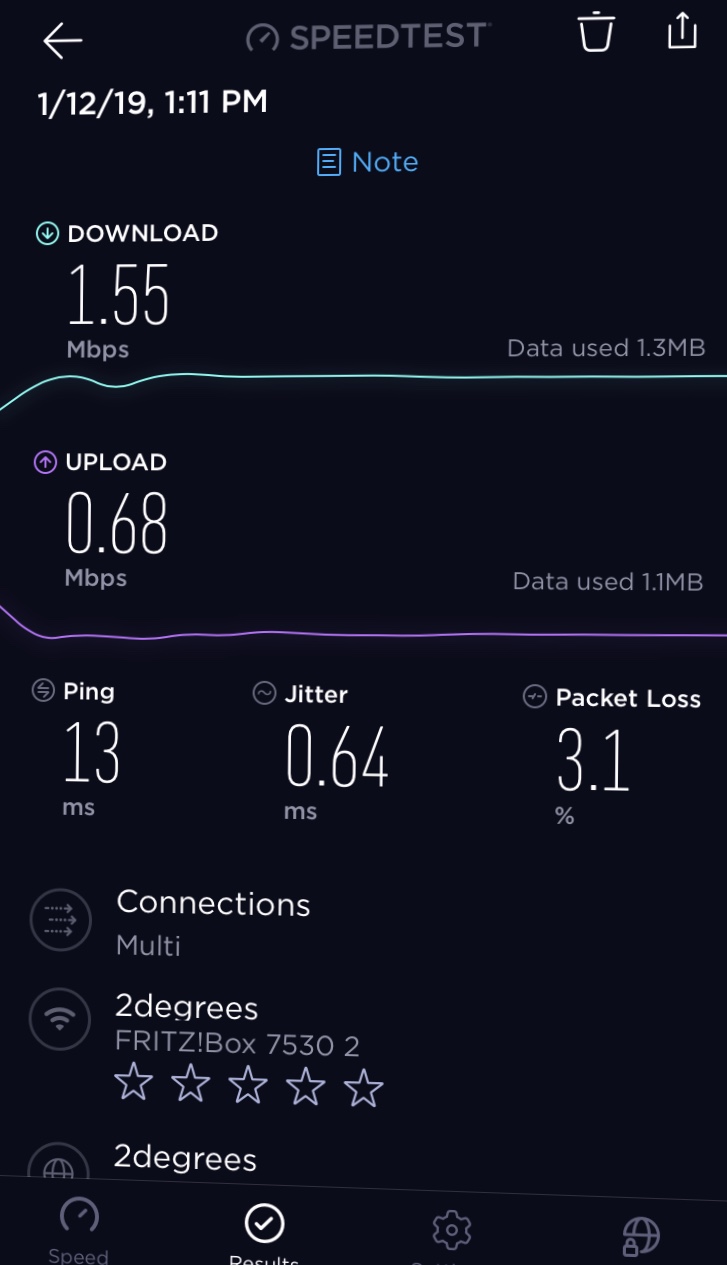
just tested my internet on ethernet cable, turned off wifi, fridge, microwave, all devices, and had my old laptop connected through ethernet cable, (laptop has been formatted) 


and these were my results 


I'm still picking possible upstream saturation due to the high ping as well.

elisammgarcia

39 posts

Geek
+1 received by user: 1


  #2363949 1-Dec-2019 13:14
Send private message


Did speed test with my iPhone , turned off all devices

And laptop is in good condition, it’s quite new

How do I make my upstream go down


Stream your favourite shows now on Apple TV (affiliate link).
cyril7
9075 posts

Uber Geek
+1 received by user: 2499

ID Verified
Trusted
Subscriber

  #2363991 1-Dec-2019 13:20
Send private message

Hi, roughly how far away is the cabinet, in cable length, which I know we can only make assumptions of a pathway.


Cyril


elisammgarcia

39 posts

Geek
+1 received by user: 1


  #2363992 1-Dec-2019 13:20
Send private message

How do I see my traffic shaping

Sean2842
40 posts

Geek
+1 received by user: 5


  #2363993 1-Dec-2019 13:20
Send private message

those speeds are getting better but due to the packet loss I'm now thinking of upstream saturation too but since you turned off every other device that seems strange


elisammgarcia

39 posts

Geek
+1 received by user: 1


  #2363994 1-Dec-2019 13:21
Send private message

cyril7:

Hi, roughly how far away is the cabinet, in cable length, which I know we can only make assumptions of a pathway.


Cyril


800m

Jase2985
13732 posts

Uber Geek
+1 received by user: 6205

ID Verified
Lifetime subscriber

  #2363995 1-Dec-2019 13:22
Send private message

Sean2842:


those speeds are getting better but due to the packet loss I'm now thinking of upstream saturation too but since you turned off every other device that seems strange


but they are getting max upload on the speed test...


Shop now on AliExpress (affiliate link).
elisammgarcia

39 posts

Geek
+1 received by user: 1


  #2363999 1-Dec-2019 13:27
Send private message

I’m the only one using the internet in the house ever

And only 2 devices connected all the time

Linux
12182 posts

Uber Geek
+1 received by user: 8476

Trusted
Lifetime subscriber

  #2364005 1-Dec-2019 13:39
Send private message

This is looking more like a port fault or something out of customers control

elisammgarcia

39 posts

Geek
+1 received by user: 1


  #2364014 1-Dec-2019 13:50
Send private message

“Yeah. It is interesting. As you told them though, we connected your router to the cabinet and got the same, using my laptop. Also with my router and my laptop. Also did the same on the customer's line at 24 Johnson rd. So the problem is clearly with the Chorus network, just not sure if it can be fixed. The problem is with the feeder cable going into the new ISAM in the Pukehina C cabinet. Seems they can't push through enough data. I think they are still trying to work out a fix. Don't bother trying to change anything at your end. It will potentially make things worse, maybe.“

From my technician


elisammgarcia

39 posts

Geek
+1 received by user: 1


  #2364015 1-Dec-2019 13:52
Send private message

The technician tried 3 different ports

1 | 2 | 3 | 4 | 5 | 6 | 7
Filter this topic showing only the reply marked as answer View this topic in a long page with up to 500 replies per page Create new topic


Geekzone Live »

Try automatic live updates from Geekzone directly in your browser, without refreshing the page, with Geekzone Live now.


Are you subscribed to our RSS feed? You can download the latest headlines and summaries from our stories directly to your computer or smartphone by using a feed reader.