Geekzone: technology news, blogs, forums
Guest
Welcome Guest.
You haven't logged in yet. If you don't have an account you can register now.


Filter this topic showing only the reply marked as answer View this topic in a long page with up to 500 replies per page Create new topic
1 | 2 | 3 | 4 | 5 | 6 | 7 | 8 | 9
Kodiack
712 posts

Ultimate Geek
+1 received by user: 351

Trusted

  #2706386 12-May-2021 08:45
Send private message

rugrat: I haven’t disabled IPv6 in the fritz modem. The green IPv6 shows at top of page in Geekzone, yet YouTube is running perfectly here. 99.9% time I’m running it in an applic, not web browser if that makes any difference.


For what it's worth, YouTube seems okay for me on my LG CX. But on my desktop I often get slow speeds to Drive, Photos, Docs/Sheets, Gmail, etc.

I do also work from home and we use Google Workspace quite extensively. Maybe I need to do some shopping around as well.


morganbrowne
161 posts

Master Geek
+1 received by user: 197

Trusted

  #2706394 12-May-2021 08:50
Send private message

Hi, as mentioned, I'd come back when I hear back from our network team, which I now have.


We’ve tried replicating the issue at our end but haven’t been able to. We've also been asking our care team but seems like there haven’t been customer reports about it to us directly, aside from the report I pulled from your feedback.


Our network team have also taken it up with Google but couldn’t find any sort of issues. We are doing some more testing which will take more time. Initially we're thinking that if you're using your own DNS servers and routers that may be the problem here but we can’t be too sure as a lot of variables come into play for end users.


We're doing more testing. 


Cheers


Morgan Browne - 2degrees Social & Digital Media Manager. 
I'm in the comms team. If you would love some help from our 100% Kiwi-based customer care team, please call them on 0800 022 022. 


Khann
28 posts

Geek
+1 received by user: 3


  #2706411 12-May-2021 09:08
Send private message

I’m one of the people having problems and I use ISP DNS with the provided Fritz modern.

That said, disabling IPv6 solves the issue.


freitasm
BDFL - Memuneh
80661 posts

Uber Geek
+1 received by user: 41083

Administrator
ID Verified
Trusted
Geekzone
Lifetime subscriber

  #2706426 12-May-2021 09:30
Send private message

arnies:


michaelmurfy:


Any update here? The responsiveness to incidents, especially networking incidents has severely degraded over the last year :(


Coincides with a GZ user leaving too? 🤔😀


Yep, seems fitting.


Referral links: Quic Broadband (free setup code: R587125ERQ6VE) | Samsung | AliExpress | Wise | Sharesies 


Support Geekzone by subscribing (browse ads-free), or making a one-off or recurring donation through PressPatron.


Noodles
487 posts

Ultimate Geek
+1 received by user: 95


  #2706524 12-May-2021 12:29
Send private message

Any updates here? This is getting to be very frustrating. Both home and work are on 2D gigabit fibre, but there's times when Youtube struggles to stream HD streams and says the network connection is only 2Mb/s whereas Speedtest shows 500Mb/s down, 350Mb/s up (due to Wi-Fi)


arnies

554 posts

Ultimate Geek
+1 received by user: 103

ID Verified

  #2706556 12-May-2021 13:37
Send private message

Noodles:


Any updates here? This is getting to be very frustrating. Both home and work are on 2D gigabit fibre, but there's times when Youtube struggles to stream HD streams and says the network connection is only 2Mb/s whereas Speedtest shows 500Mb/s down, 350Mb/s up (due to Wi-Fi)


This is the update https://www.geekzone.co.nz/forums.asp?forumid=85&topicid=284325&page_no=6#2706394


I'm not sure how 2D can't reproduce when it seems to easy to reproduce for us here.


HP


Shop now for HP laptops and other devices (affiliate link).
michaelmurfy
meow
13581 posts

Uber Geek
+1 received by user: 10914

Moderator
ID Verified
Trusted
Lifetime subscriber

  #2706558 12-May-2021 13:40
Send private message

morganbrowne:


We’ve tried replicating the issue at our end but haven’t been able to. We've also been asking our care team but seems like there haven’t been customer reports about it to us directly, aside from the report I pulled from your feedback.


Our network team have also taken it up with Google but couldn’t find any sort of issues. We are doing some more testing which will take more time. Initially we're thinking that if you're using your own DNS servers and routers that may be the problem here but we can’t be too sure as a lot of variables come into play for end users.


We're doing more testing. 


Cheers


In the past with these types of incidents 2degrees have worked directly with the customers affected to determine if the issue resides on their own network, or on 2degrees. Given this is affecting customers who are using the 2degrees provided Fritz!Box also like I say there is a wider issue here.


Service is "working" but very slowly. It is a frustrating experience. To be perfectly honest I don't think people without a technical background would be able to diagnose what the issue is to escalate this in the first place. We know the issue and it is related to IPv6 on some connections and we've had IPv6 issues before (see: https://www.geekzone.co.nz/forums.asp?forumid=85&topicid=231816) which @NickMack triaged and sorted for us.


For me, I can't disable IPv6 as I use it extensively but I can confirm that if I disable IPv6 it "resolves" the issue with Google services.


Issue still persists with the Fritz!Box 7490 on my connection.


I'm personally using 2degrees DNS servers on my network and issue still persists if I use any other DNS server so the issue doesn't seem to be related on the DNS level. Happy for somebody from the network team to contact me and diagnose it on my connection if necessary.


Michael Murphy | https://murfy.nz
Referral Links: Quic Broadband (use R122101E7CV7Q for free setup)

Are you happy with what you get from Geekzone? Please consider supporting us by subscribing.
Opinions are my own and not the views of my employer.


aseni
52 posts

Master Geek
+1 received by user: 32


  #2706576 12-May-2021 14:02
Send private message

morganbrowne:


We’ve tried replicating the issue at our end but haven’t been able to. We've also been asking our care team but seems like there haven’t been customer reports about it to us directly, aside from the report I pulled from your feedback.


Happy to provide remote access to a VM on my network if that helps with troubleshooting?  Or packet captures comparing good vs bad behaviour?


morganbrowne:


Our network team have also taken it up with Google but couldn’t find any sort of issues. We are doing some more testing which will take more time. Initially we're thinking that if you're using your own DNS servers and routers that may be the problem here but we can’t be too sure as a lot of variables come into play for end users.


For all I've seen so far, it really looks like a problem at Google's end. I can see different behaviour between sessions to the same IP address going through the same route (as far as I can tell). Seems to indicate a problem with one of the servers behind a load balancer or something like that.


Kodiack
712 posts

Ultimate Geek
+1 received by user: 351

Trusted

  #2706579 12-May-2021 14:05
Send private message

I am also happy to help provide additional troubleshooting and information.

@michaelmurfy thanks for linking that thread. This issue actually seems surprisingly similar - even down to it capping around 280 KB/s!

Thankfully the current issue doesn't seem to be near as widespread, but it is still highly problematic and it's been ongoing for a while now.

freitasm
BDFL - Memuneh
80661 posts

Uber Geek
+1 received by user: 41083

Administrator
ID Verified
Trusted
Geekzone
Lifetime subscriber

  #2706584 12-May-2021 14:12
Send private message

Not to be the pessimist (but being the pessimist), we have seen this before when Vodafone could not find problems with their cable network until they could not hide it anymore...

https://www.geekzone.co.nz/forums.asp?forumid=40&topicid=171348


Referral links: Quic Broadband (free setup code: R587125ERQ6VE) | Samsung | AliExpress | Wise | Sharesies 


Support Geekzone by subscribing (browse ads-free), or making a one-off or recurring donation through PressPatron.


NickMack
977 posts

Ultimate Geek
+1 received by user: 831

Trusted
In memoriam
Lifetime subscriber

  #2706586 12-May-2021 14:15
Send private message

michaelmurfy:


morganbrowne:


We’ve tried replicating the issue at our end but haven’t been able to. We've also been asking our care team but seems like there haven’t been customer reports about it to us directly, aside from the report I pulled from your feedback.


Our network team have also taken it up with Google but couldn’t find any sort of issues. We are doing some more testing which will take more time. Initially we're thinking that if you're using your own DNS servers and routers that may be the problem here but we can’t be too sure as a lot of variables come into play for end users.


We're doing more testing. 


Cheers


In the past with these types of incidents 2degrees have worked directly with the customers affected to determine if the issue resides on their own network, or on 2degrees. Given this is affecting customers who are using the 2degrees provided Fritz!Box also like I say there is a wider issue here.


Service is "working" but very slowly. It is a frustrating experience. To be perfectly honest I don't think people without a technical background would be able to diagnose what the issue is to escalate this in the first place. We know the issue and it is related to IPv6 on some connections and we've had IPv6 issues before (see: https://www.geekzone.co.nz/forums.asp?forumid=85&topicid=231816) which @NickMack triaged and sorted for us.


For me, I can't disable IPv6 as I use it extensively but I can confirm that if I disable IPv6 it "resolves" the issue with Google services.


Issue still persists with the Fritz!Box 7490 on my connection.


I'm personally using 2degrees DNS servers on my network and issue still persists if I use any other DNS server so the issue doesn't seem to be related on the DNS level. Happy for somebody from the network team to contact me and diagnose it on my connection if necessary.


Hi All,


As an observation/comment - Customers have been asked to supply IP Address, login Account etc. by Morgan which is being pass onto the team looking into this. Since 2degrees have been unable to reproduce this fault which many are experiencing, maybe some of you would like to provide the steps you have to reproduce (incl. specific content (URL), time/date information, and any tracing you can supply to assist) this may assist in troubleshooting further. 


Nick


@Aspired @Morganbrowne @pwner


Stream your favourite shows now on Apple TV (affiliate link).
Kodiack
712 posts

Ultimate Geek
+1 received by user: 351

Trusted

  #2706587 12-May-2021 14:16
Send private message

freitasm: Not to be the pessimist (but being the pessimist), we have seen this before when Vodafone could not find problems with their cable network until they could not hide it anymore...

https://www.geekzone.co.nz/forums.asp?forumid=40&topicid=171348


As someone who was affected by that and was on the notorious WKH node, that brings back some bad memories. At least Vodafone to their credit gave us free internet for a few months after I escalated it to TDR. I wouldn't expect similar from 2degrees given there's a "workaround".

Kodiack
712 posts

Ultimate Geek
+1 received by user: 351

Trusted

  #2706602 12-May-2021 14:53
Send private message

NickMack:


Hi All,


As an observation/comment - Customers have been asked to supply IP Address, login Account etc. by Morgan which is being pass onto the team looking into this. Since 2degrees have been unable to reproduce this fault which many are experiencing, maybe some of you would like to provide the steps you have to reproduce (incl. specific content (URL), time/date information, and any tracing you can supply to assist) this may assist in troubleshooting further. 


Nick


@Aspired @Morganbrowne @pwner


This is mostly information that's been provided already, but as a test, here's a simple bash script that will run curl forcibly over IPv6 and download Chrome for Mac.


#!/bin/bash


for i in {1..20}; do
  echo "Running iteration $i"
  curl -Lo /dev/null https://dl.google.com/chrome/mac/universal/stable/GGRO/googlechrome.dmg
done


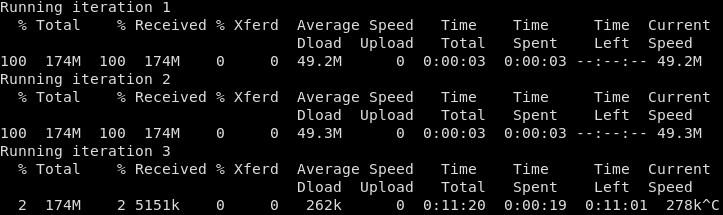
It's beyond simple, but it will pick up the issue. For me, I tend to be affected over 50% of the time (i.e. over half of the downloads cap at 280 KB/s). Another mate on IPv6 with 2d seems to be affected fewer than 1 in every 10 runs, but it is still reproducible. Here's an example run for me where it managed to have two good downloads, then was stuck at 280 KB/s for the third download attempt:


This is noticeable with pretty much every Google service, and it's proving highly problematic for my use case.


michaelmurfy
meow
13581 posts

Uber Geek
+1 received by user: 10914

Moderator
ID Verified
Trusted
Lifetime subscriber

  #2706617 12-May-2021 15:55
Send private message

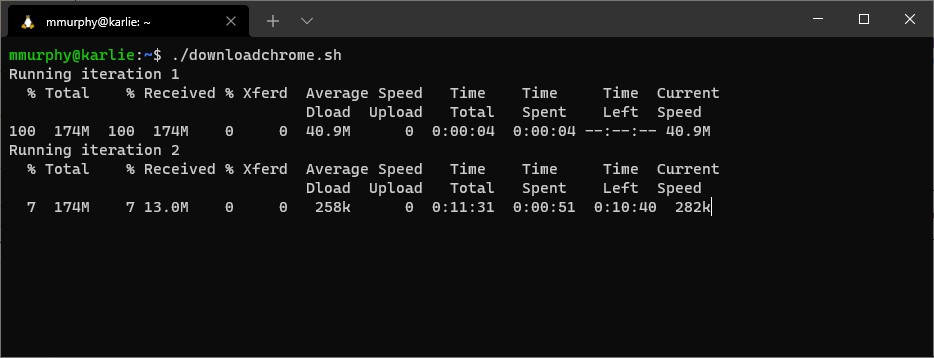
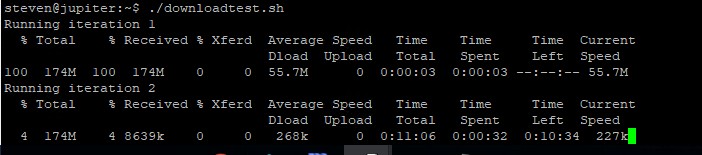
@Kodiack that's perfect! It did pick it up for me too:


Very strange it is only happening some of the time - indicates a potential cache issue with maybe one cache in a pool or something.


Michael Murphy | https://murfy.nz
Referral Links: Quic Broadband (use R122101E7CV7Q for free setup)

Are you happy with what you get from Geekzone? Please consider supporting us by subscribing.
Opinions are my own and not the views of my employer.


evilonenz
/dev/urandom
291 posts

Ultimate Geek
+1 received by user: 152

ID Verified
Trusted
Lifetime subscriber

  #2706618 12-May-2021 15:58
Send private message

@Kodiack as above, perfect little script!


Previously I got through two iterations before slow down, but more often than not, it's 50/50..


Smokeping


Referral Links:


Quic - Use code R536299EPGOCN at checkout for free setup
Contact Energy - Use code FRTQDXB for $100 credit


1 | 2 | 3 | 4 | 5 | 6 | 7 | 8 | 9
Filter this topic showing only the reply marked as answer View this topic in a long page with up to 500 replies per page Create new topic


Geekzone Live »

Try automatic live updates from Geekzone directly in your browser, without refreshing the page, with Geekzone Live now.


Are you subscribed to our RSS feed? You can download the latest headlines and summaries from our stories directly to your computer or smartphone by using a feed reader.