Geekzone: technology news, blogs, forums
Guest
Welcome Guest.
You haven't logged in yet. If you don't have an account you can register now.


Noodles

487 posts

Ultimate Geek
+1 received by user: 95


#101477 2-May-2012 17:48
Send private message

I can't seem to get an ipv6 address/subnet from Snap this afternoon. My Fritzbox is giving me this error:

IPv6 Internet connection error: Prefix assignment with error because of 0

Is there a problem with Snap's ipv6 at the moment?

View this topic in a long page with up to 500 replies per page Create new topic
 1 | 2
michaelmurfy
meow
13579 posts

Uber Geek
+1 received by user: 10910

Moderator
ID Verified
Trusted
Lifetime subscriber

  #618477 2-May-2012 17:52
Send private message

Mine doesn't seem to be on the Fritz (bad pun)


Michael Murphy | https://murfy.nz
Referral Links: Quic Broadband (use R122101E7CV7Q for free setup)

Are you happy with what you get from Geekzone? Please consider supporting us by subscribing.
Opinions are my own and not the views of my employer.


NZSimplicity
136 posts

Master Geek
+1 received by user: 11


  #618478 2-May-2012 17:52
Send private message

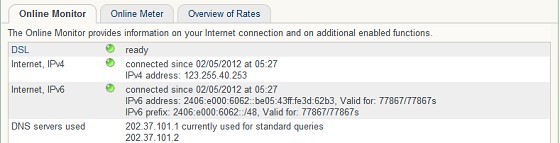
My Fritz says I connected to ipv6


http://speedtest.net/result/1910210622.png

McGee
200 posts

Master Geek


  #618483 2-May-2012 17:58
Send private message

Mine also seems to be normal, Similar to the screenie above. 


SenorNaddy
7 posts

Wannabe Geek


  #618586 2-May-2012 20:50
Send private message

I have the same issue. I however am using an openwrt router, and my log is showing that the dhcpv6 client is sending out a request for a prefix, but not receiving any response. Have emailed Snap support and am waiting for a response

SenorNaddy
7 posts

Wannabe Geek


  #618758 3-May-2012 10:49
Send private message

I have received a reply from Snap and this was their response

"as far as we are aware there are no issues with IPv6 on our network. unfortunately we are unable to offer any support for IPv6 at this stage. What you could try is simply reconfiguring your modem or verifying that IPv6 enabled."

Noodles

487 posts

Ultimate Geek
+1 received by user: 95


  #618759 3-May-2012 10:51
Send private message

Oh good. I have tried restarting my router and disabling/enabling ipv6, but no go.

Will play with it again later, it's hard to restart a router with an office full of people trying to use the internet.


Shop on-line at New World now for your groceries (affiliate link).
RalphFromSnap
776 posts

Ultimate Geek
+1 received by user: 168

Trusted
Snap Internet

  #618811 3-May-2012 12:08
Send private message

Who of you are on the new Fritz!OS or still on the old firmware?


Snap

0800 BROADBAND (276 232)
www.snap.net.nz

@SnapInternet on Twitter
Snap Internet on Facebook

Our Social Media Team:
^RO Ricky - Technical Lead
^AT Ashleigh - Retail Marketing Coordinator


Noodles

487 posts

Ultimate Geek
+1 received by user: 95


  #618814 3-May-2012 12:09
Send private message

We're using 99.05.05 (it was working before) and we did try 99.05.22, but rolled back to an older firmware

McGee
200 posts

Master Geek


  #618827 3-May-2012 12:35
Send private message

Running 99.05.22, works with both native IPv6 and native IPv4

Noodles

487 posts

Ultimate Geek
+1 received by user: 95


  #618829 3-May-2012 12:36
Send private message

I'm now seeing this message:

IPv6 Internet connection (DHCPv6) failed: No response from DHCP server (SOL)

Zeon
3926 posts

Uber Geek
+1 received by user: 759

Trusted

  #618834 3-May-2012 12:50
Send private message

So they use DHCPv6 rather than stateless auto config?


Speedtest 2019-10-14


Shop now for Lego sets and other gifts (affiliate link).
NZSimplicity
136 posts

Master Geek
+1 received by user: 11


  #618889 3-May-2012 14:14
Send private message

RalphFromSnap: Who of you are on the new Fritz!OS or still on the old firmware?


I am Firmware: FRITZ!OS 05.22 and have this:

Internet. IPv6 - connected since 01.05.2012, 07:38, IPv6 prefix: 2406:e000:600e::/48


http://speedtest.net/result/1910210622.png

philboy15
17 posts

Geek


  #618941 3-May-2012 16:24
Send private message

IPv6 connected fine on my FRITZ!Box also with the new OS

michaelmurfy
meow
13579 posts

Uber Geek
+1 received by user: 10910

Moderator
ID Verified
Trusted
Lifetime subscriber

  #619343 4-May-2012 10:18
Send private message

Mine's on the new Fritz!OS


Michael Murphy | https://murfy.nz
Referral Links: Quic Broadband (use R122101E7CV7Q for free setup)

Are you happy with what you get from Geekzone? Please consider supporting us by subscribing.
Opinions are my own and not the views of my employer.


frizianz
105 posts

Master Geek
+1 received by user: 1


  #619397 4-May-2012 11:17
Send private message

No issues for me on a Cisco SR520. Also tested on my mates fritzbox fine.


frizianz.com || twitter.com/frizianz

 1 | 2
View this topic in a long page with up to 500 replies per page Create new topic


Geekzone Live »

Try automatic live updates from Geekzone directly in your browser, without refreshing the page, with Geekzone Live now.


Are you subscribed to our RSS feed? You can download the latest headlines and summaries from our stories directly to your computer or smartphone by using a feed reader.