Geekzone: technology news, blogs, forums
Guest
Welcome Guest.
You haven't logged in yet. If you don't have an account you can register now.


3puttssuck

745 posts

Ultimate Geek
+1 received by user: 54


#138275 28-Dec-2013 09:14
Send private message

As above. This is the only site that is slow to load on my PC's or iPads. I have Fibre UFB and all others are lightning fast.
Any ideas guys.
Thanks.

View this topic in a long page with up to 500 replies per page Create new topic
 1 | 2
johnr
19282 posts

Uber Geek
+1 received by user: 2526
Inactive user


  #958203 28-Dec-2013 09:19
Send private message

Show us a trace route to geekzone


3puttssuck

745 posts

Ultimate Geek
+1 received by user: 54


  #958207 28-Dec-2013 09:25
Send private message

johnr: Show us a trace route to geekzone


Sorry John. I have no idea what that is and how to do it. Just basic pc knowledge here.

freitasm
BDFL - Memuneh
80652 posts

Uber Geek
+1 received by user: 41045

Administrator
ID Verified
Trusted
Geekzone
Lifetime subscriber

  #958212 28-Dec-2013 10:05
Send private message

It seems the usual fast for me. What ISP? Where ar you located?

On your PC, run a command prompt and type the following commands:

 
ping www.geekzone.co.nz > x.txt
tracert www.geekzone.co.nz >> x.txt
x.txt


Copy and paste the notepad to your reply here.


Referral links: Quic Broadband (free setup code: R587125ERQ6VE) | Samsung | AliExpress | Wise | Sharesies 


Support Geekzone by subscribing (browse ads-free), or making a one-off or recurring donation through PressPatron.



freitasm
BDFL - Memuneh
80652 posts

Uber Geek
+1 received by user: 41045

Administrator
ID Verified
Trusted
Geekzone
Lifetime subscriber

  #958218 28-Dec-2013 10:27
Send private message

It could also be that is not "Geekzone" exactly but something else in our pages. The Google ad server, or Analytics, or something else depending on the page. This would indicate a problem with international traffic on your ISP.

Ar eyou using ad blocker? If yes, tried whitelisting Geekzone?

It could be many things actually... You can try this:

- open a browser (Google Chrome best for this)
- On Google Chrome/Firefox press F12 top open developer tools
- Load Geekzone
- Look at the new window on NETWORK tab and you will see the times. You can tell us which element took longer to load

On Internet Explorer you first load something on the page then press F12. if using IE11 click on the Profiler icon and click the START button (the green arrow icon). Load Geekzone on the other window then back on developer tools click the STOP button (the red square button). This will give you similar information. If using older IE10, IE9 then follow the same instructions as Chrome.


Referral links: Quic Broadband (free setup code: R587125ERQ6VE) | Samsung | AliExpress | Wise | Sharesies 


Support Geekzone by subscribing (browse ads-free), or making a one-off or recurring donation through PressPatron.


3puttssuck

745 posts

Ultimate Geek
+1 received by user: 54


  #958277 28-Dec-2013 12:25
Send private message

freitasm: It seems the usual fast for me. What ISP? Where ar you located?

On your PC, run a command prompt and type the following commands:


ping www.geekzone.co.nz > x.txt
tracert www.geekzone.co.nz >> x.txt
x.txt


Copy and paste the notepad to your reply here.


Sorry my bad, I use a 2013 Macbook Air most of the time.

It's the first load and then all other page links are fine and I use Chrome.

I'm with Snap on Lightwave Deluxe 50 / 20 plan and I'm in Rolleston.

freitasm
BDFL - Memuneh
80652 posts

Uber Geek
+1 received by user: 41045

Administrator
ID Verified
Trusted
Geekzone
Lifetime subscriber

  #958285 28-Dec-2013 12:47
Send private message

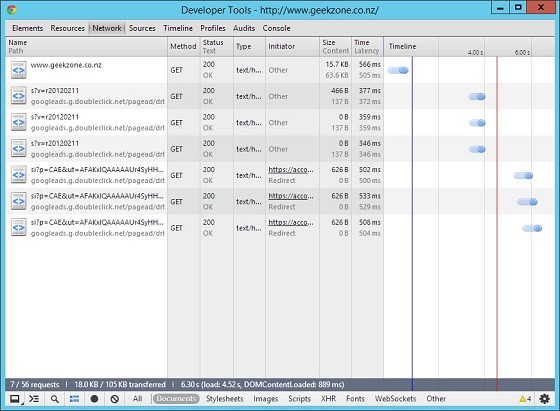
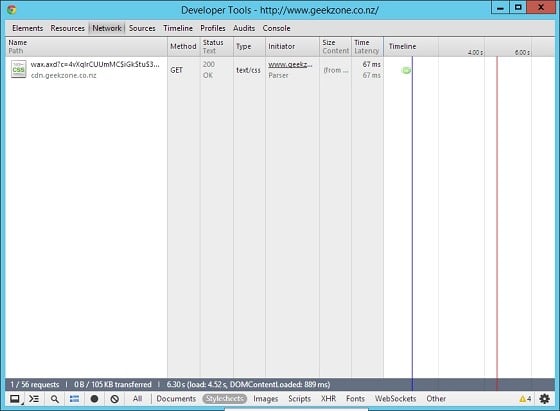
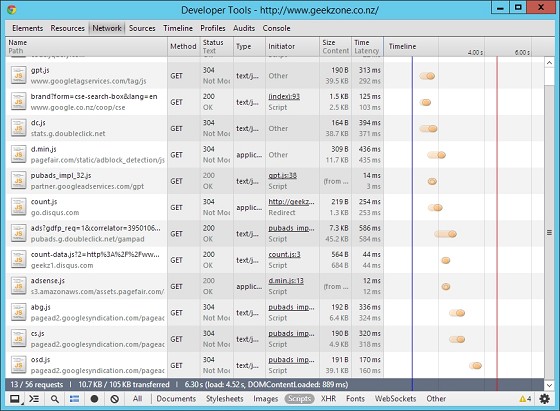
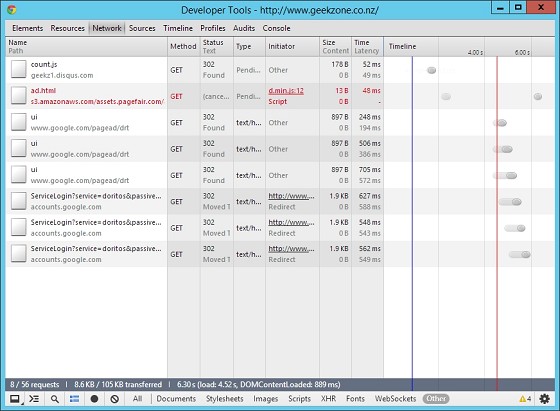
You can use the Developer Tools in Google Chrome OS X as well. I have a second connection here with Snap (ADSL2 though) and I did notice the first page load took a bit of time but all subsequent ones were pretty good. Here is the dev tools:


These show pretty normal times for a DSL connection. Below is the ping from this connection:

 
Pinging geekzone.co.nz 2400:cb00:2048:1::6ca2:cb65 with 32 bytes of data:
Reply from 2400:cb00:2048:1::6ca2:cb65: time=38ms

Ping statistics for 2400:cb00:2048:1::6ca2:cb65:
Packets: Sent = 4, Received = 4, Lost = 0 (0% loss),
Approximate round trip times in milli-seconds:
Minimum = 38ms, Maximum = 38ms, Average = 38ms


It seems pretty normal to me. What router are you using? Is it configured to check URLs when loading?

You can find Ping and Tracert on Mac OS X in the Apps | Utilities | Network Utility.


Referral links: Quic Broadband (free setup code: R587125ERQ6VE) | Samsung | AliExpress | Wise | Sharesies 


Support Geekzone by subscribing (browse ads-free), or making a one-off or recurring donation through PressPatron.


Move to New Zealand's best fibre broadband service (affiliate link). Free setup code: R587125ERQ6VE. Note that to use Quic Broadband you must be comfortable with configuring your own router.
l43a2
1784 posts

Uber Geek
+1 received by user: 591

ID Verified
Trusted

  #958290 28-Dec-2013 13:16
Send private message

im using a canadian VPN and the site loads wonderfully fast ;P


3puttssuck

745 posts

Ultimate Geek
+1 received by user: 54


  #958291 28-Dec-2013 13:17
Send private message

PING geekzone.co.nz (108.162.204.101): 56 data bytes 64 bytes from 108.162.204.101: icmp_seq=0 ttl=56 time=135.491 ms 64 bytes from 108.162.204.101: icmp_seq=1 ttl=56 time=54.921 ms 64 bytes from 108.162.204.101: icmp_seq=2 ttl=56 time=78.183 ms 64 bytes from 108.162.204.101: icmp_seq=3 ttl=56 time=100.931 ms 64 bytes from 108.162.204.101: icmp_seq=4 ttl=56 time=123.610 ms 64 bytes from 108.162.204.101: icmp_seq=5 ttl=56 time=44.300 ms 64 bytes from 108.162.204.101: icmp_seq=6 ttl=56 time=66.804 ms 64 bytes from 108.162.204.101: icmp_seq=7 ttl=56 time=89.404 ms 64 bytes from 108.162.204.101: icmp_seq=8 ttl=56 time=113.610 ms 64 bytes from 108.162.204.101: icmp_seq=9 ttl=56 time=135.756 ms   --- geekzone.co.nz ping statistics --- 10 packets transmitted, 10 packets received, 0.0% packet loss round-trip min/avg/max/stddev = 44.300/94.301/135.756/31.276 ms    

Traceroute has started…   traceroute: Warning: www.geekzone.co.nz has multiple addresses; using 108.162.204.101 traceroute to geekzone.co.nz (108.162.204.101), 64 hops max, 72 byte packets  1  fritz.box (192.168.178.1)  47.867 ms  1.321 ms  1.385 ms  2  111-69-1-254.core.snap.net.nz (111.69.1.254)  3.481 ms  3.693 ms  4.439 ms  3  32.54.69.111.static.snap.net.nz (111.69.54.32)  3.690 ms  3.112 ms  3.216 ms  4  23655.syd.equinix.com (202.167.228.156)  55.149 ms  41.578 ms  40.728 ms  5  13335.syd.equinix.com (202.167.228.154)  62.194 ms  40.947 ms  40.757 ms  6  108.162.204.101 (108.162.204.101)  40.740 ms  41.531 ms  40.617 ms


Using FritzBox 7390 as supplied by Snap.

freitasm
BDFL - Memuneh
80652 posts

Uber Geek
+1 received by user: 41045

Administrator
ID Verified
Trusted
Geekzone
Lifetime subscriber

  #958292 28-Dec-2013 13:26
Send private message

Moved to Snap forum, although Ralph is on holiday so might not see anything from Snap here until next year.

Interesting that on your connection the ping times are all over the place, while on mine it's consistently 38ms...


Referral links: Quic Broadband (free setup code: R587125ERQ6VE) | Samsung | AliExpress | Wise | Sharesies 


Support Geekzone by subscribing (browse ads-free), or making a one-off or recurring donation through PressPatron.


sidefx
3775 posts

Uber Geek
+1 received by user: 1295

Trusted

  #958323 28-Dec-2013 14:34
Send private message

Check your wifi channel?

Login the fritzbox web interface, then click WLAN -> Radio Channel. The fritzbox shows a little graph with the channel it's using and other WLAN networks\channels in use in your area.

(though this is unlikely to be the issue if all other sites are lightning fast)


"I was born not knowing and have had only a little time to change that here and there."         | Octopus Energy | Sharesies
              - Richard Feynman


hio77
'That VDSL Cat'
13036 posts

Uber Geek
+1 received by user: 3896

ID Verified
Trusted
Lizard Networks
Subscriber

  #958343 28-Dec-2013 16:07
Send private message

geekzones always pretty snappy for me, snap vdsl..

Pinging geekzone.co.nz [2400:cb00:2048:1::6ca2:cb65] with 32 bytes of data:
Reply from 2400:cb00:2048:1::6ca2:cb65: time=33ms
Reply from 2400:cb00:2048:1::6ca2:cb65: time=29ms
Reply from 2400:cb00:2048:1::6ca2:cb65: time=30ms

Ping statistics for 2400:cb00:2048:1::6ca2:cb65:
Packets: Sent = 4, Received = 4, Lost = 0 (0% loss),
Approximate round trip times in milli-seconds:
Minimum = 29ms, Maximum = 33ms, Average = 30ms

C:\Users\Halo779hio77>ping geekzone.co.nz -4

Pinging geekzone.co.nz [108.162.203.101] with 32 bytes of data:
Reply from 108.162.203.101: bytes=32 time=36ms TTL=56
Reply from 108.162.203.101: bytes=32 time=29ms TTL=56
Reply from 108.162.203.101: bytes=32 time=28ms TTL=56
Reply from 108.162.203.101: bytes=32 time=29ms TTL=56

with the amount of jitter your getting, i suspect iver wifi interference, or something real odd is happening with your connection.

less likely that your connection is simply congested since your on UFB, but its always possible too..


#include <std_disclaimer>


Any comments made are personal opinion and do not reflect directly on the position my current or past employers may have. 


Shop now for Lenovo laptops and other devices (affiliate link).
jarledb
Webhead
3319 posts

Uber Geek
+1 received by user: 1983

Moderator
ID Verified
Trusted
Lifetime subscriber

  #958370 28-Dec-2013 17:35
Send private message

Results from Snap in Napier:
61 packets transmitted, 61 packets received, 0.0% packet loss
round-trip min/avg/max/stddev = 43.214/45.088/47.008/0.949 ms

Looks normal to me, and I haven't had any problems with Geekzone today.


Jarle Dahl Bergersen | Referral Links: Want $50 off when you join Octopus Energy? Use this referral code
Are you happy with what you get from Geekzone? Please consider supporting us by making a donation or subscribing.


Batman
Mad Scientist
30014 posts

Uber Geek
+1 received by user: 6217

Trusted
Lifetime subscriber

  #958397 28-Dec-2013 19:01
Send private message

weird. running asus transformer windows 8.1 32

desktop ie 11 will not load GZ but the modern ui app ie will.

*head bang*

Batman
Mad Scientist
30014 posts

Uber Geek
+1 received by user: 6217

Trusted
Lifetime subscriber

  #958414 28-Dec-2013 20:11
Send private message

And a few minutes later was fine. Technology?!!

3puttssuck

745 posts

Ultimate Geek
+1 received by user: 54


  #961084 4-Jan-2014 13:57
Send private message

Just took 2.13 minutes to load up. I spoke to Snap yesterday and they were no help at all. The guy spoke to others and nobody could give any explanation why my ping results are all over the show. Facebook is a little slow but ALL other sites are lightning fast. Getting very annoyed.

 1 | 2
View this topic in a long page with up to 500 replies per page Create new topic


Geekzone Live »

Try automatic live updates from Geekzone directly in your browser, without refreshing the page, with Geekzone Live now.


Are you subscribed to our RSS feed? You can download the latest headlines and summaries from our stories directly to your computer or smartphone by using a feed reader.