Geekzone: technology news, blogs, forums
Guest
Welcome Guest.
You haven't logged in yet. If you don't have an account you can register now.


fizzychicken

318 posts

Ultimate Geek
+1 received by user: 86


#152458 27-Sep-2014 10:46
Send private message

In the few days I have had the Orcon White router, Ive somehow uploaded more data than I had done in the previous 3 weeks combined. Most worrying is today where I woke up and logged on at 10 am to find I had already uploaded 2.2GB of data (PC wasnt on but NAS was, though NAS is not configured for remote access).
Does anyone have any experience with setting up a firewall on the white router, there is next to no info on the NAT security page and I fully admit I do not know what I am doing when it comes to firewalls.




Create new topic
freitasm
BDFL - Memuneh
80646 posts

Uber Geek
+1 received by user: 41025

Administrator
ID Verified
Trusted
Geekzone
Lifetime subscriber

  #1138663 27-Sep-2014 10:59
Send private message

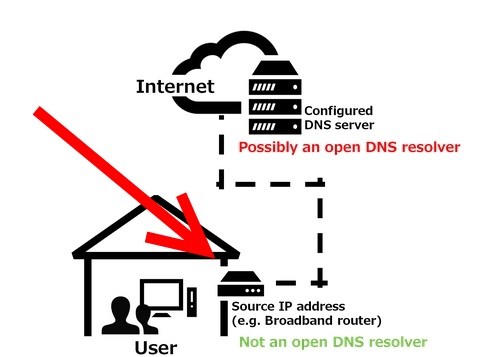
Go to http://www.openresolver.jp/en/ and scroll to bottom of page. Click the link to check your connection to see if it's an open DNS resolver.

In the result page you are looking for "SOURCE":


Let us know the result.


Referral links: Quic Broadband (free setup code: R587125ERQ6VE) | Samsung | AliExpress | Wise | Sharesies 


Support Geekzone by subscribing (browse ads-free), or making a one-off or recurring donation through PressPatron.


fizzychicken

318 posts

Ultimate Geek
+1 received by user: 86


  #1138688 27-Sep-2014 11:49
Send private message

I cant even open that site


freitasm
BDFL - Memuneh
80646 posts

Uber Geek
+1 received by user: 41025

Administrator
ID Verified
Trusted
Geekzone
Lifetime subscriber

  #1138691 27-Sep-2014 12:03
Send private message


Referral links: Quic Broadband (free setup code: R587125ERQ6VE) | Samsung | AliExpress | Wise | Sharesies 


Support Geekzone by subscribing (browse ads-free), or making a one-off or recurring donation through PressPatron.


sbiddle
30853 posts

Uber Geek
+1 received by user: 9996

Retired Mod
Trusted
Biddle Corp
Lifetime subscriber

  #1138694 27-Sep-2014 12:06
Send private message

The router has a firewall enabled and will not respond to DNS requests unless you've purposely chosen to disable it.


fizzychicken

318 posts

Ultimate Geek
+1 received by user: 86


  #1138724 27-Sep-2014 12:42
Send private message

freitasm: Try this page then: http://www.thinkbroadband.com/tools/dnscheck.html 


Success! We detected your IP address as 121.98.90.234 and did not find an open DNS resolver running.


FireEngine
1223 posts

Uber Geek
+1 received by user: 221

Trusted

  #1138745 27-Sep-2014 14:14
Send private message

Looked at your pattern and with one exception it looks like an increase in the number of days where you have approx 1.2GB download - a film more often maybe? The exception was a single day of 3.9GB but 200MB upload so that still doesn't indicate any kind of reflection attack going, either by volume or data direction.

As we swapped out the router for a connection issue I'd suggest we have fixed it and the additional download is what was being attempted before???


Regards FireEngine


Shop now for Dyson appliances (affiliate link).
fizzychicken

318 posts

Ultimate Geek
+1 received by user: 86


  #1138750 27-Sep-2014 14:29
Send private message

Yeah I think Ill just have to look out for everything, the 3.25GB upload on the 25th and 2.3GB upload today are what concerned me, especially considering I havent seeded any download and seed speed during download was limited to 5KB/s, I also havent offered any file/service externally. My download data looks legit for what I've done myself.

thanks all


Create new topic


Geekzone Live »

Try automatic live updates from Geekzone directly in your browser, without refreshing the page, with Geekzone Live now.


Are you subscribed to our RSS feed? You can download the latest headlines and summaries from our stories directly to your computer or smartphone by using a feed reader.