Geekzone: technology news, blogs, forums
Guest
Welcome Guest.
You haven't logged in yet. If you don't have an account you can register now.


Wade

2225 posts

Uber Geek
+1 received by user: 373


#177283 28-Jul-2015 19:13
Send private message

If i am to switch over to Unlimited VDSL with Home Phone Plus, am i able to configure my mobile to receive landline calls? and if so this will still work on mobile when I'm away form home?

Create new topic
eXDee
4033 posts

Uber Geek
+1 received by user: 1070

Trusted

  #1353728 28-Jul-2015 19:47
Send private message

Just tested with my Xperia Z2. Can successfully connect android SIP to connect1.plus.snap.net.nz, make and receive calls over wifi or data.


n4

n4
959 posts

Ultimate Geek
+1 received by user: 74


  #1353751 28-Jul-2015 20:05
Send private message

I think you can do this via the Fritz!App Fon app as well (without knowing the SIP auth details).


Samsung Note20 Ultra, on 2degrees


Wade

2225 posts

Uber Geek
+1 received by user: 373


  #1353762 28-Jul-2015 20:12
Send private message

Awesome!! And sorry for my VOIP/SIP ignorance but I can set up three different mobiles as same?

Situation is I would like any one of three people in the household to be able to answer the "landline" on their own mobile. trying to hunt down a cordless to answer a call and then only to find a near flat battery drives me mad lol


n4

n4
959 posts

Ultimate Geek
+1 received by user: 74


  #1353773 28-Jul-2015 20:23
Send private message

Wade: Awesome!! And sorry for my VOIP/SIP ignorance but I can set up three different mobiles as same?

Situation is I would like any one of three people in the household to be able to answer the "landline" on their own mobile. trying to hunt down a cordless to answer a call and then only to find a near flat battery drives me mad lol


The Fon app would be good for that as you can set it up only to register when you're on the home wifi. Not sure about multiple registrations but should work.


Samsung Note20 Ultra, on 2degrees


Wade

2225 posts

Uber Geek
+1 received by user: 373


  #1353794 28-Jul-2015 20:48
Send private message

Cheers all!!

Sounds like it will all work as I hope

Graymond
145 posts

Master Geek
+1 received by user: 12


  #1361962 10-Aug-2015 11:00
Send private message

I have recently moved from mobile broadband to home broadband, no problems, however a big problem with home phone plus.
I have tried two new cordless phones with no connection success, first was a Uniden and the second that I still am trying with is a Panasonic KX-TGC220NZ, have gone through all the recommended procedures that I am aware of with no success, so much for the comments promoting this service...."With 2degrees Home Phone Plus, simply plug your existing home phone into your modem and then use it as you would an old school landline"
Any help would be greatly appreciated.


Graymond


Windows Version 11.0

"To err is human, but to really foul things up requires a computer." Anon


Shop now on AliExpress (affiliate link).
Graymond
145 posts

Master Geek
+1 received by user: 12


#1362226 10-Aug-2015 16:34
Send private message

As a last resort ( of course ) I rang the help line, and found that our number had not been entered into the system, tut tut 2Degrees, all is now working.


Graymond


Windows Version 11.0

"To err is human, but to really foul things up requires a computer." Anon


Wade

2225 posts

Uber Geek
+1 received by user: 373


  #1369035 19-Aug-2015 09:01
Send private message

eXDee: Just tested with my Xperia Z2. Can successfully connect android SIP to connect1.plus.snap.net.nz, make and receive calls over wifi or data.


Well, i have managed to pair a DECT phone direct to Fritz!box and set up Fritz1App Fon on three mobiles, although I can't find any option within the advanced menu to use over mobile data

I can't get sip to work either, keep getting following message,  "Account registration unsuccessful: (transaction terminated): will try later"

Any advice?

KrazyKid
1247 posts

Uber Geek
+1 received by user: 616


  #1369170 19-Aug-2015 10:54
Send private message

I've got my android connected to my home line on the fritz box via Wifi at home


I use the CsipSimple app and followed some setup instructions I found in the fritz documentation for the fritz box


I set it up with the basic wizard in csipsimple and that work fine. After a while I noted that csip lost connection sometimes when returning to my home wifi and redoing the setup in the advanced wizard seems to have fixed that issue.


I haven't tries the mobile data yet, but it looks like fritz offer an equivalent to a DDNS server and suggest you user there service to connect to your fritz box over mobile data

n4

n4
959 posts

Ultimate Geek
+1 received by user: 74


  #1370208 19-Aug-2015 12:22
Send private message

Wade:
eXDee: Just tested with my Xperia Z2. Can successfully connect android SIP to connect1.plus.snap.net.nz, make and receive calls over wifi or data.


Well, i have managed to pair a DECT phone direct to Fritz!box and set up Fritz1App Fon on three mobiles, although I can't find any option within the advanced menu to use over mobile data


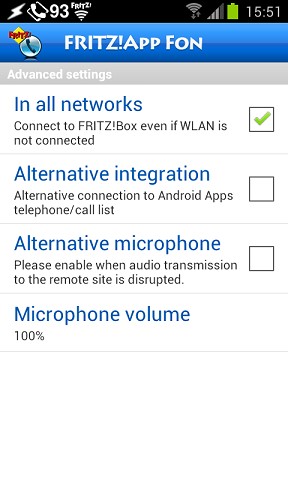
Menu-Settings-Menu-Advanced-'In all networks' (Tick)

However you will need to setup 'myfritz' with the fritzbox and create a user with the right permissions.


Samsung Note20 Ultra, on 2degrees


Wade

2225 posts

Uber Geek
+1 received by user: 373


  #1370235 19-Aug-2015 13:09
Send private message

n4:
Wade:
eXDee: Just tested with my Xperia Z2. Can successfully connect android SIP to connect1.plus.snap.net.nz, make and receive calls over wifi or data.


Well, i have managed to pair a DECT phone direct to Fritz!box and set up Fritz1App Fon on three mobiles, although I can't find any option within the advanced menu to use over mobile data


Menu-Settings-Menu-Advanced-'In all networks' (Tick)

However you will need to setup 'myfritz' with the fritzbox and create a user with the right permissions.


The 'In all networks' option is not there at all, maybe it presents in the app once i setup fritz!box, will have a play tonight, thanks for the reply


Shop now on Samsung phones, tablets, TVs and more (affiliate link).
fe31nz
1294 posts

Uber Geek
+1 received by user: 423


  #1370633 19-Aug-2015 23:43
Send private message

Once you are in the Settings screen, hit the Menu button again to get the Advanced option.

Wade

2225 posts

Uber Geek
+1 received by user: 373


  #1370674 20-Aug-2015 08:42
Send private message

fe31nz: Once you are in the Settings screen, hit the Menu button again to get the Advanced option.


This is all that i see in the advanced menu?


fe31nz
1294 posts

Uber Geek
+1 received by user: 423


  #1370933 20-Aug-2015 15:58
Send private message

You must have a different verson of the Fon app.  I am running 1.88.1 and this is what I get:


Wade

2225 posts

Uber Geek
+1 received by user: 373


  #1370983 20-Aug-2015 16:35
Send private message

Weird, mine is 1.88.1 also


Create new topic


Geekzone Live »

Try automatic live updates from Geekzone directly in your browser, without refreshing the page, with Geekzone Live now.


Are you subscribed to our RSS feed? You can download the latest headlines and summaries from our stories directly to your computer or smartphone by using a feed reader.