Geekzone: technology news, blogs, forums
Guest
Welcome Guest.
You haven't logged in yet. If you don't have an account you can register now.


KiwiAuck

9 posts

Wannabe Geek


#206198 13-Dec-2016 21:13
Send private message

Hi Everyone,


I was just wondering if anyone could help with my VDSL speed issues, it doesnt seem like chorus or my republic can... its been a month!


Basically 2months ago i changed form Vodafone, to save some dollars big mistake! don't do it haha.


My internet was fine until 4 weeks ago it just died... currently never go above 2Mbps and pings over a 1000!! I've been emailing my republic for 2 weeks, i've tried a new router, cables and done a tracer test and ping test via CMD for them. But they seem to be getting no where... whats worse is they wont offer a refund if its a chorus fault as its not them. I uploaded some of the results. 


Can anyone tell me more about whats happening? Is it a fault with them or in my house? I guess i just want to call them up again and have more to fire at them, if i wasn't in a 2yr contract i would be gone for sure! maybe i can get out...


View this topic in a long page with up to 500 replies per page Create new topic
 1 | 2
RunningMan
9185 posts

Uber Geek
+1 received by user: 4836


  #1687370 13-Dec-2016 21:22
Send private message

 Those screenshots are too small to see anything.


Please post your VDSL modem line stats - attenuation, sync rate.


sbiddle
30853 posts

Uber Geek
+1 received by user: 9996

Retired Mod
Trusted
Biddle Corp
Lifetime subscriber

  #1687373 13-Dec-2016 21:24
Send private message

What are your modem stats and do you have a master filter installed?


At a first glance ping results like that would indicate a high probability of your connection being saturated. Do you torrent and leave things running or have an insecure firewall/router that's being subjected to a DNS amplification attack?


KiwiAuck

9 posts

Wannabe Geek


  #1687374 13-Dec-2016 21:29
Send private message

just did another tracert


Tracing route to dns-1.myrepublic.co.nz [103.237.40.66]
over a maximum of 30 hops:


1 1 ms 1 ms 2 ms mydevice.lan [192.168.1.1]
2 1532 ms 1540 ms 1622 ms 101-100-136-3.myrepublic.co.nz [101.100.136.3]
3 1673 ms 1716 ms 1740 ms dns-1.myrepublic.co.nz [103.237.40.66]


Trace complete.


KiwiAuck

9 posts

Wannabe Geek


  #1687375 13-Dec-2016 21:31
Send private message

Thanks for the replys!! will check the firewalls theres about 5 computers on the network.


Currently theres no filter i thought that was just for if you have a phone also? i have never used it before.


Linux
12178 posts

Uber Geek
+1 received by user: 8472

Trusted
Lifetime subscriber

  #1687377 13-Dec-2016 21:34
Send private message

Do you have more than one telephone jack point in the house?


Linux


KiwiAuck

9 posts

Wannabe Geek


  #1687378 13-Dec-2016 21:35
Send private message

I have no utorrent running also and i have tried it with only one computer on it still gives the same results. It has windows 10 with defender running


Thanks for the help, ill do my best to answer but a lot of this is new to me.


Shop on-line at New World now for your groceries (affiliate link).
KiwiAuck

9 posts

Wannabe Geek


  #1687379 13-Dec-2016 21:36
Send private message

Hi Linux


only the one connected, the others have been bypassed or the wires need to be changed at the entry point to the house.


Cheers


Jase2985
13730 posts

Uber Geek
+1 received by user: 6202

ID Verified
Lifetime subscriber

  #1687479 14-Dec-2016 05:12
Send private message

please post you modem stats


hio77
'That VDSL Cat'
13036 posts

Uber Geek
+1 received by user: 3896

ID Verified
Trusted
Lizard Networks
Subscriber

  #1687482 14-Dec-2016 06:54
Send private message

Jase2985:


please post you modem stats


Exactly this.


@OP we need to see your modem stats to go any further in advice.


At a first look, appears to be upstream congestion.


#include <std_disclaimer>


Any comments made are personal opinion and do not reflect directly on the position my current or past employers may have. 


sbiddle
30853 posts

Uber Geek
+1 received by user: 9996

Retired Mod
Trusted
Biddle Corp
Lifetime subscriber

  #1687483 14-Dec-2016 07:09
Send private message

Until you post your modem stats this thread is going nowhere and nobody can help you in any way. Ping tests are pretty meaningless right now and if anything only point to it being a problem at your end rather than anything to do with your ISP.


KiwiAuck

9 posts

Wannabe Geek


  #1687834 14-Dec-2016 18:42
Send private message

Hi,


Sorry had to get home to find out the stats... It think ive got the right thing??


Thanks heaps!!


DSL Status


Up


DSL Enabled


DSL Uptime


6hours 33minutes 15seconds


DSL Type


VDSL2


DSL Mode


Fast


Maximum Line rate


2.4 Mbps 29.15 Mbps


Line Rate


2.09 Mbps 29.13 Mbps


Data Transferred


128.93 MBytes 515.65 MBytes


Output Power


1.3 dBm 15.3 dBm


Line Attenuation


6.7, 32.5 dB 15.3, 38.1,N/A dB


Noise Margin


8.9 dB 9.2 dB


Shop now for Dell laptops and other devices (affiliate link).
hio77
'That VDSL Cat'
13036 posts

Uber Geek
+1 received by user: 3896

ID Verified
Trusted
Lizard Networks
Subscriber

  #1687835 14-Dec-2016 18:45
Send private message

Right.. now we can progress.


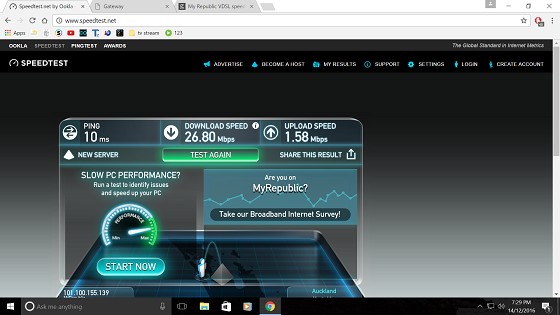
Please run an isolation test, Connect a single device up to your RGW (so no wireless), ensure you have no background processes running (eg icloud syncing).


Run a new speedtest, Post results.


you should get about 26/2 on a test with those stats. (Conservative numbers on overhead i know)


#include <std_disclaimer>


Any comments made are personal opinion and do not reflect directly on the position my current or past employers may have. 


KiwiAuck

9 posts

Wannabe Geek


  #1687877 14-Dec-2016 19:33
Send private message

Thanks heaps for your help!


this is the speedtest best for ages!


hio77
'That VDSL Cat'
13036 posts

Uber Geek
+1 received by user: 3896

ID Verified
Trusted
Lizard Networks
Subscriber

  #1687878 14-Dec-2016 19:34
Send private message

now that is looking much better!


Restore your network to normal, Test again. See if something changes.


#include <std_disclaimer>


Any comments made are personal opinion and do not reflect directly on the position my current or past employers may have. 


RunningMan
9185 posts

Uber Geek
+1 received by user: 4836


  #1687881 14-Dec-2016 19:43
Send private message

If you start adding devices, and your connection faults, it's almost certainly congestion, most probably on the upstream. Look for a device uploading all the time, culprits are likely to be torrent, cloud backups etc.


 1 | 2
View this topic in a long page with up to 500 replies per page Create new topic


Geekzone Live »

Try automatic live updates from Geekzone directly in your browser, without refreshing the page, with Geekzone Live now.


Are you subscribed to our RSS feed? You can download the latest headlines and summaries from our stories directly to your computer or smartphone by using a feed reader.