Geekzone: technology news, blogs, forums
Guest
Welcome Guest.
You haven't logged in yet. If you don't have an account you can register now.


rugrat

3139 posts

Uber Geek
+1 received by user: 943

Lifetime subscriber

#240432 7-Sep-2018 13:32
Send private message

Does it take time for speed to come up.

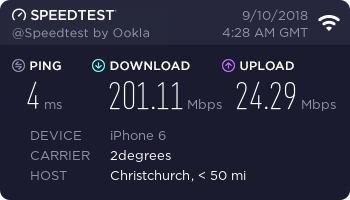
Get about 92 Mbs, on Christchurch one so should be 150-200.

Testing on iPhone 5G , will try wired after couple days if no change, but could get full 100 on iPhone with Spark wifi.

Only thing I changed on fritz is wifi name for 5G, as they both had same name before, so couldn’t control which one phone connected to.

I looked at the 6 nines in the sticky, the fritz box by default has this greyed out as connected to internet directly is ticked, if I change it to external modem then I can put in the 9’s, should I do this?

Cheers, other then that give it a few days.

Create new topic
mrgsm021
1538 posts

Uber Geek
+1 received by user: 310

ID Verified
Trusted

  #2085629 7-Sep-2018 13:36
Send private message

I am assuming this is a UFB fibre connection you have on 2D?


Speed test should always be performed over Ethernet, which will provide best indication of speed.


Linux
12173 posts

Uber Geek
+1 received by user: 8467

Trusted
Lifetime subscriber

  #2085630 7-Sep-2018 13:37
Send private message

You should be testing over Ethernet full stop and it's not 5G but 5Ghz

5G is mobile technology

John

Edit: Fibre technology does not use DLM like copper so full speed or close to full speed once line is fully provisioned

rugrat

3139 posts

Uber Geek
+1 received by user: 943

Lifetime subscriber

  #2085648 7-Sep-2018 13:56
Send private message

91.60 down 23.91 up test on Ethernet. Ping 9 ms.

Test to 2degrees Christchurch.

Will give provisioning a few days thanks


Linux
12173 posts

Uber Geek
+1 received by user: 8467

Trusted
Lifetime subscriber

  #2085650 7-Sep-2018 13:57
Send private message

If @NickMack has some time maybe he could check out the setup

John

sbiddle
30853 posts

Uber Geek
+1 received by user: 9996

Retired Mod
Trusted
Biddle Corp
Lifetime subscriber

  #2085658 7-Sep-2018 14:09
Send private message

Are you sure you didn't use a 2pr Ethernet cable? That looks very much like you're only connected using 100Mbps FE rather than Gigabit.


sbiddle
30853 posts

Uber Geek
+1 received by user: 9996

Retired Mod
Trusted
Biddle Corp
Lifetime subscriber

  #2085661 7-Sep-2018 14:10
Send private message

The Fritzbox also has band steering so will automatically switch your devices to the best band. Having separate 2.4Ghz and 5GHz SSIDs can cause lots of issues as you have to keep switching depending on the size of your house.


Want to support Geekzone and browse the site without the ads? Subscribe to Geekzone now (monthly, annual and lifetime options).
NickMack
977 posts

Ultimate Geek
+1 received by user: 831

Trusted
In memoriam
Lifetime subscriber

  #2085666 7-Sep-2018 14:13
Send private message

rugrat: Does it take time for speed to come up.

Get about 92 Mbs, on Christchurch one so should be 150-200.

Testing on iPhone 5G , will try wired after couple days if no change, but could get full 100 on iPhone with Spark wifi.

Only thing I changed on fritz is wifi name for 5G, as they both had same name before, so couldn’t control which one phone connected to.

I looked at the 6 nines in the sticky, the fritz box by default has this greyed out as connected to internet directly is ticked, if I change it to external modem then I can put in the 9’s, should I do this?

Cheers, other then that give it a few days.

 

Hi ya, 


A few things to check in here - https://www.geekzone.co.nz/forums.asp?forumid=85&topicid=239862, a few considerations included in this link for testing on devices, OS's etc. This is a simple check to make sure the service is provisioned correctly by calling into Customer care (Wait times are ~6 mins at the mo) on 0800 022 022.


Nick.


djtOtago
1181 posts

Uber Geek
+1 received by user: 605


  #2085667 7-Sep-2018 14:13
Send private message

Also make sure you don't have the Fritzbox's "Green Mode" turned on.


Green Mode saves power by reducing the speed of data transmission on the LAN port to 100 Mbit/s.
The settings for Green mode are available in the "LAN Settings" area in the "Home Network / Home Network Overview / Network Settings" menu.


rugrat

3139 posts

Uber Geek
+1 received by user: 943

Lifetime subscriber

  #2085673 7-Sep-2018 14:19
Send private message

I just logged into 2degrees broadband page and got


Broadband Connection Pending


Hi there, your broadband service hasn't been connected yet, but once it's activated, you'll be able to view and manage your broadband account here.


Phone not ringing in or out either, I'll give them some time. Have the green IPv6 at top of geekzone page now :)


Will try different cables once that log in page changes.


NickMack
977 posts

Ultimate Geek
+1 received by user: 831

Trusted
In memoriam
Lifetime subscriber

  #2085678 7-Sep-2018 14:25
Send private message

rugrat:


I just logged into 2degrees broadband page and got


Broadband Connection Pending


Hi there, your broadband service hasn't been connected yet, but once it's activated, you'll be able to view and manage your broadband account here.


Phone not ringing in or out either, I'll give them some time. Have the green IPv6 at top of geekzone page now :)


Will try different cables once that log in page changes.


Appreciate the eagerness to get online - If you call Customer Care they should be able to speed this process up outside of the automation.


Nick


Tracer
343 posts

Ultimate Geek
+1 received by user: 151


  #2086115 8-Sep-2018 14:26
Send private message

I had the same thing the day the ONT was installed (a few days ahead of the plan 2D knew about). Once I called 2D helpdesk, they started some internal process, and soon after I went from 100 down/500 up, to ~750 down/500 up (I think my router + PPPoE is the current limitation).


Shop on-line at New World now for your groceries (affiliate link).
rugrat

3139 posts

Uber Geek
+1 received by user: 943

Lifetime subscriber

  #2086159 8-Sep-2018 17:49
Send private message

Update, they fixed phone straight away, so that's working now.


Incoming calls worked, not outgoing calls - they changed some settings in fritz, so guessing someone put in wrong setting before mailing it out.


Speed - still being set up, so profile not all done yet etc, asked me to give it a few days and then ring back if no change.


Thanks.


rugrat

3139 posts

Uber Geek
+1 received by user: 943

Lifetime subscriber

  #2087032 10-Sep-2018 16:40
Send private message

Yeee haaaa


Create new topic


Geekzone Live »

Try automatic live updates from Geekzone directly in your browser, without refreshing the page, with Geekzone Live now.


Are you subscribed to our RSS feed? You can download the latest headlines and summaries from our stories directly to your computer or smartphone by using a feed reader.