Geekzone: technology news, blogs, forums
Guest
Welcome Guest.
You haven't logged in yet. If you don't have an account you can register now.


tech1234

12 posts

Geek
+1 received by user: 1
Inactive user


#240910 2-Oct-2018 12:29
Send private message

Just recently moved to a VDSL area and Signed up with Orcon. Never seem to get any higher than 18 Mbs down and 800 ks up. I've disconnected everything in the house and am connected straight to the line in. I'm only about 1km to the cabinet.  Orcon do not seem too concerned when I call them, seems like its normal. Am I expecting too much? Feels like it should be faster for VDSL



View this topic in a long page with up to 500 replies per page Create new topic
 1 | 2
Linux
12185 posts

Uber Geek
+1 received by user: 8479

Trusted
Lifetime subscriber

  #2099939 2-Oct-2018 12:31
Send private message

1km is about the limit for VDSL maybe 1.2km


John


bameron
305 posts

Ultimate Geek
+1 received by user: 105

Trusted
2degrees

  #2099943 2-Oct-2018 12:38
Send private message

Hi there,


As John touched on, those are about the speeds we'd expect for that sort of distance. Also bear in mind that during the first 10~ days of getting connected your VDSL connection will be going through a process called dynamic line management where the speeds will fluctuate as different profiles are tested - so avoid turning off your modem for the first 10 days or so as this will interrupt the process.


Cheers,


Cam


tech1234

12 posts

Geek
+1 received by user: 1
Inactive user


  #2100070 2-Oct-2018 14:04
Send private message

Thanks for that. One other question as regards this dynamic line management. Is this a process that begins after each time I reset the modem or is it a once only process. I have been resetting the modem many times over the past few 2 months as I've been sorting out the house wiring.


Thanks,


Denis


bameron
305 posts

Ultimate Geek
+1 received by user: 105

Trusted
2degrees

  #2100073 2-Oct-2018 14:06
Send private message

tech1234:


Thanks for that. One other question as regards this dynamic line management. Is this a process that begins after each time I reset the modem or is it a once only process. I have been resetting the modem many times over the past few 2 months as I've been sorting out the house wiring.


Thanks,


Denis


If it's been as long as that, you likely won't need to worry about DLM.


hio77
'That VDSL Cat'
13036 posts

Uber Geek
+1 received by user: 3896

ID Verified
Trusted
Lizard Networks
Subscriber

  #2100088 2-Oct-2018 14:20
Send private message

For an urban line, 1KM may end up being 1.5KM+ of actual cable.


your speeds sound inline with expectations. maybe slightly slower than average but you may have simply lost the copper lottery and gotten a pair that's simply got a lot of crosstalk etc on it.


Unlikely your provider can do anything about it. Does not sound like a case where there would be a valid fault to be argued.


#include <std_disclaimer>


Any comments made are personal opinion and do not reflect directly on the position my current or past employers may have. 


tech1234

12 posts

Geek
+1 received by user: 1
Inactive user


  #2100090 2-Oct-2018 14:21
Send private message

So just to clarify, the profile that would have been set in the first 10 days after my installation by dynamic line management would not have taken into account any subsequent adjustments I made to my house wiring.


Does it not have to be initialised (begun) again or is it a continous process?


Denis


Want to support Geekzone and browse the site without the ads? Subscribe to Geekzone now (monthly, annual and lifetime options).
hio77
'That VDSL Cat'
13036 posts

Uber Geek
+1 received by user: 3896

ID Verified
Trusted
Lizard Networks
Subscriber

  #2100092 2-Oct-2018 14:23
Send private message

tech1234:


So just to clarify, the profile that would have been set in the first 10 days after my installation by dynamic line management would not have taken into account any subsequent adjustments I made to my house wiring.


Does it not have to be initialised (begun) again or is it a continous process?


Denis


DLM is always working, when a line is preforming to expectations it tends to go dormant.


If a condition changes on the line then it will start tunning again.


the 10 day period it simply does the polling at a much more rapid rate.


How about posting your line stats?


#include <std_disclaimer>


Any comments made are personal opinion and do not reflect directly on the position my current or past employers may have. 


tech1234

12 posts

Geek
+1 received by user: 1
Inactive user


  #2100119 2-Oct-2018 14:57
Send private message


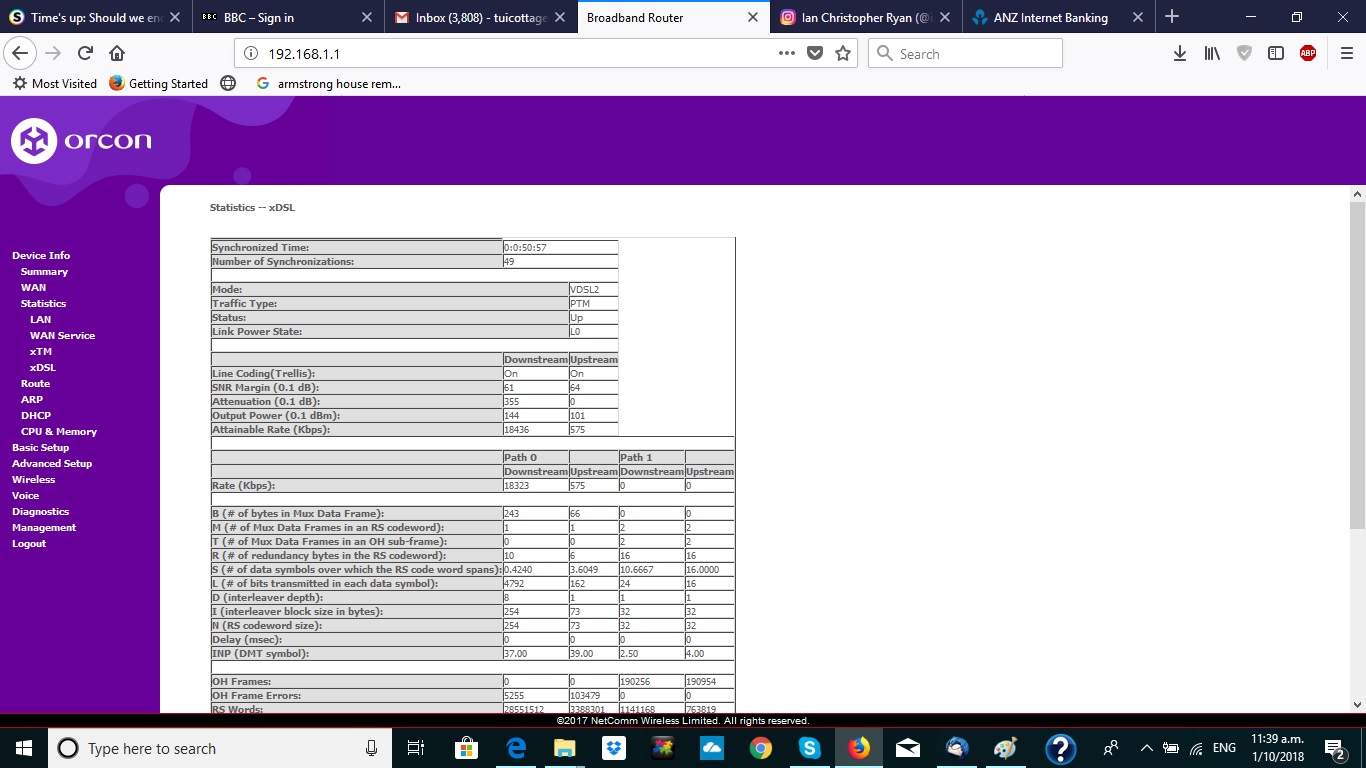
Not sure if I have managed to insert the stats correctly here , these were saved before I reset the modem after being away for 3 weeks,


Denis


wratterus
1687 posts

Uber Geek
+1 received by user: 678


  #2100122 2-Oct-2018 15:03
Send private message

Yuck. Assuming you've sorted the building wiring out (master splitter, new cabling to the modem) IMO you'd be better off on ADSL. 


I've got near identical stats to you on VDSL. ADSL for me has a higher upload speed, and is much more stable. Sacrificing 2Mbit or so download is well worth it. 


hio77
'That VDSL Cat'
13036 posts

Uber Geek
+1 received by user: 3896

ID Verified
Trusted
Lizard Networks
Subscriber

  #2100132 2-Oct-2018 15:11
Send private message

That's closer to 2.5KM of cable.


ddDLM has already tunned down to 6dB power levels look on point.


Your on a Vectored line, G.INP is active.


the gotcha with this is, every line has to be 17a which has lower power levels, particularly on upstream US0 (which is why it's slower than ADSL).


Probably find your gaining about 2mbit downstream


#include <std_disclaimer>


Any comments made are personal opinion and do not reflect directly on the position my current or past employers may have. 


tech1234

12 posts

Geek
+1 received by user: 1
Inactive user


  #2100173 2-Oct-2018 16:03
Send private message

Wow, really lots of information there but just opening up some new questions,


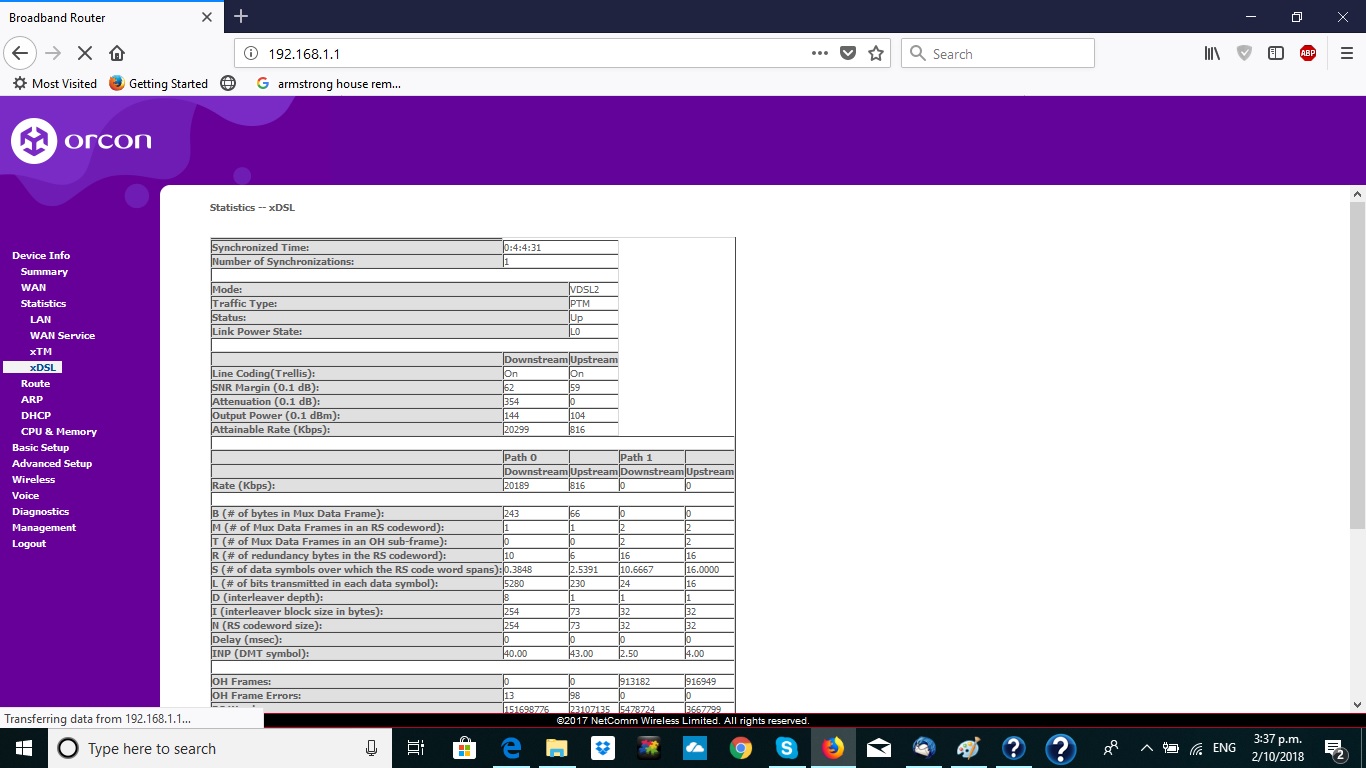
These are the stats after I tidied up the wiring and reset the modem,


Shows a little improvement,


I understood that a master filter would not be needed as I am on naked broadband?


We are rural so am fairly sure it is not 2.5km to the cabinet , would the calculations be affected by a bad copper pair from the cabinet?


The previous house owners had 2 telephone lines so there is I assume a spare pair, how difficult/expensive is it to have them connected as a test?


Appreciate all the help and advice,


Denis


Want to support Geekzone and browse the site without the ads? Subscribe to Geekzone now (monthly, annual and lifetime options).
hio77
'That VDSL Cat'
13036 posts

Uber Geek
+1 received by user: 3896

ID Verified
Trusted
Lizard Networks
Subscriber

  #2100185 2-Oct-2018 16:13
Send private message

DM me the address and i'll dig up what i can see for distance and sanity check it against neighbouring connections.


it would not surprise me if 20 dropping to 18 is noise (say an electric fence) with SRA to avoid a resync.


Master filters are good to have, but not an requirement. the main thing is to have a direct link from cabinet to modem (or atleast best you can do)


If you have say, multiple jackpoints they will still cause reflections thus a degeneration in line speed.


There is no way 35.4dB is less than 2KM away. Especially for Rural, us rural folk tend to get thicker copper which attenuations less.


#include <std_disclaimer>


Any comments made are personal opinion and do not reflect directly on the position my current or past employers may have. 


RunningMan
9186 posts

Uber Geek
+1 received by user: 4840


  #2100208 2-Oct-2018 16:49
Send private message

49 resyncs in 3 weeks is more than DLM doing it's thing. That suggests a physical wiring issue.


A master splitter is still often needed on a naked connection as it isolates all the unused wiring for other jackpoints that interfere with xDSL frequency transmission.


How exactly did you tidy up the wiring?


tech1234

12 posts

Geek
+1 received by user: 1
Inactive user


  #2100231 2-Oct-2018 17:36
Send private message

RunningMan:


49 resyncs in 3 weeks is more than DLM doing it's thing. That suggests a physical wiring issue.


A master splitter is still often needed on a naked connection as it isolates all the unused wiring for other jackpoints that interfere with xDSL frequency transmission.


How exactly did you tidy up the wiring?


Disconnected every jack point and recrimped all  connections and connected straight to the modem,


However hio77 has checked and I am further from the cabinet than I estimated , over 2km so possibly as good as I can get


Denis


hio77
'That VDSL Cat'
13036 posts

Uber Geek
+1 received by user: 3896

ID Verified
Trusted
Lizard Networks
Subscriber

  #2100241 2-Oct-2018 17:54
Send private message

RunningMan:


49 resyncs in 3 weeks is more than DLM doing it's thing. That suggests a physical wiring issue.


A master splitter is still often needed on a naked connection as it isolates all the unused wiring for other jackpoints that interfere with xDSL frequency transmission.


How exactly did you tidy up the wiring?


Resyncs seem to be related to the OP cleaning things up.


the distance is in the 2KM mark, even assuming best traveled. i still feel attenuation is a little high (which could say a fault) but it's really hard to say.. There is no active connection for a ton of distance to validate off.


It's a very easy one to NFF without really looking.


Unless as you noted, it's re-syncing alot on it's own... Then that's a vector to pull off.


#include <std_disclaimer>


Any comments made are personal opinion and do not reflect directly on the position my current or past employers may have. 


 1 | 2
View this topic in a long page with up to 500 replies per page Create new topic


Geekzone Live »

Try automatic live updates from Geekzone directly in your browser, without refreshing the page, with Geekzone Live now.


Are you subscribed to our RSS feed? You can download the latest headlines and summaries from our stories directly to your computer or smartphone by using a feed reader.