Geekzone: technology news, blogs, forums
Guest
Welcome Guest.
You haven't logged in yet. If you don't have an account you can register now.


timmmay

20858 posts

Uber Geek
+1 received by user: 5350

Trusted
Lifetime subscriber

#280690 3-Jan-2021 19:47
Send private message

A friend of mine has a two story house, with the Fritzbox 7490 not providing good WiFi everywhere. PB Tech recommended an Orbi which cost $678, which looks like a good device generally. Typically the Orbi would replace the Fritzbox. However, my friend uses a Fritz phone with the Fritzbox plugged into her home phone system so looks like they might need to use the Orbi in AP mode. This tutorial from Netgear says that you can't use the app to manage the Orbi, so you probably lose many of the advanced features. 


Questions:


  1. Can you use the 2degrees phone service with the Orbi directly?
  2. Is there an alternative way to set the Orbi up, keep the advanced features, and the 2degrees phone service? Or does it have to be set up in WAP mode?
  3. Should my friend just return the Orbi for something else? If so, what? I'd have thought a powerline network product with a WAP built into the client would do the job fine for less than $200. Given PBTech recommended a product that's not suitable I think they should be able to return it under consumer guarantees. They'd rather not bother returning it.


Filter this topic showing only the reply marked as answer Create new topic
Jase2985
13730 posts

Uber Geek
+1 received by user: 6202

ID Verified
Lifetime subscriber

  #2629837 3-Jan-2021 20:00
Send private message

get another couple of fritzboxes and used them in mesh mode


Linux
12173 posts

Uber Geek
+1 received by user: 8469

Trusted
Lifetime subscriber

  #2629838 3-Jan-2021 20:02
Send private message

The Fritzbox mesh works well


michaelmurfy
meow
13579 posts

Uber Geek
+1 received by user: 10910

Moderator
ID Verified
Trusted
Lifetime subscriber

  #2629840 3-Jan-2021 20:04
Send private message

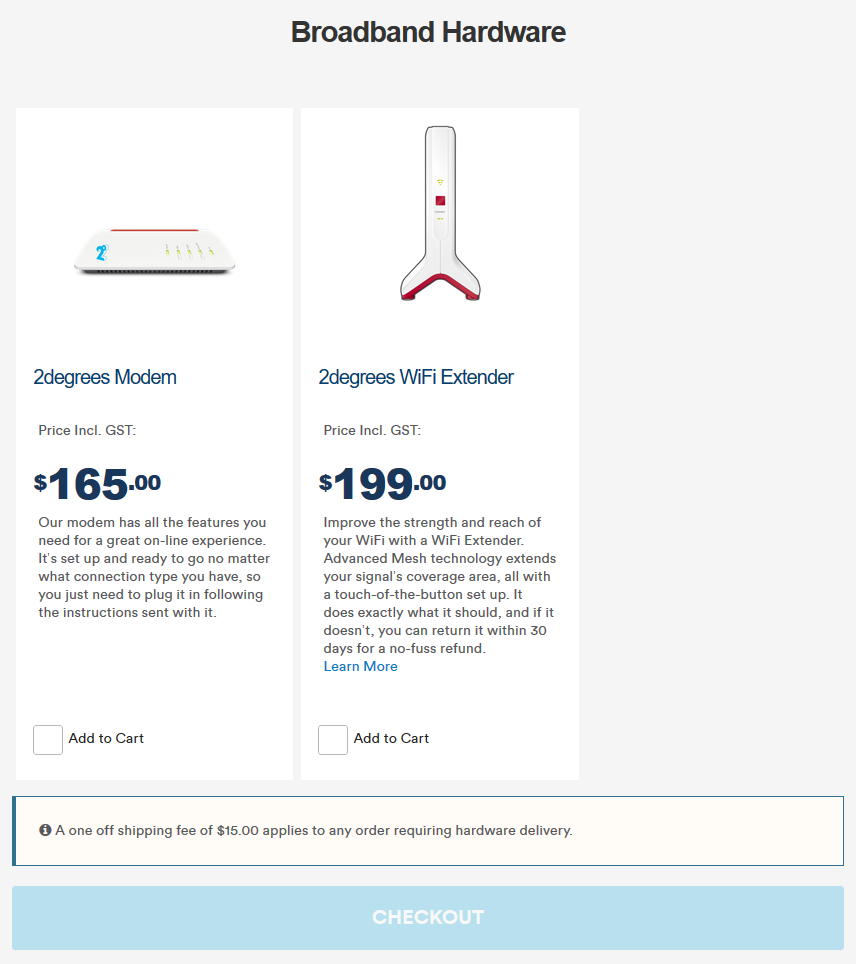
The Fritz!Box does mesh mode (just like the Orbi) and 2degrees sell the goods to make this work:


Another way is to purchase a Fritz!Box 7490 or above from the likes of Trademe and pair them up with the main router in mesh mode. If you use routers then this also extends DECT range (or activates the phone ports on those routers) else if you use the WiFi extenders this just simply meshes with the main router without doing phone.


Instructions: https://en.avm.de/service/fritzbox/fritzbox-7490/knowledge-base/publication/show/3354_Setting-up-the-FRITZ-Box-as-a-Mesh-Repeater/


Michael Murphy | https://murfy.nz
Referral Links: Quic Broadband (use R122101E7CV7Q for free setup)

Are you happy with what you get from Geekzone? Please consider supporting us by subscribing.
Opinions are my own and not the views of my employer.


liquidcore
187 posts

Master Geek
+1 received by user: 71

ID Verified

  #2629841 3-Jan-2021 20:11
Send private message

I have the RBK50 but have a naked 2d connection, so I'll try answer as best as I can (somebody please correct me if I'm wrong!)

1) No, the Orbi itself has no functionality to even allow you to input SIP credentials and I am not sure whether 2d would even give the credentials out?

2) What 'advanced' features are your friends requiring? Compared to the Fritzbox, the functionality of the Orbi is far more limited and the performance is far poorer - with a PPPoE connection (and with no other functions like Circle or Armour enabled), it cannot route gigabit - the best I've been able to get is around 600 - 700mbps (wired).

3) I think for simplicity, I would consider running two Fritzbox in mesh configuration - these can be purchased through 2d at a discounted price, or they can be picked up from TradeMe for cheap. If that fails, PB Tech also sells the 7590, albeit at a much higher price but they might be more willing to accept the refund for the Orbi?

Jiriteach
1139 posts

Uber Geek
+1 received by user: 373

ID Verified
Trusted
Lifetime subscriber

  #2629861 3-Jan-2021 20:18
Send private message

timmmay:


A friend of mine has a two story house, with the Fritzbox 7490 not providing good WiFi everywhere. PB Tech recommended an Orbi which cost $678, which looks like a good device generally. Typically the Orbi would replace the Fritzbox. However, my friend uses a Fritz phone with the Fritzbox plugged into her home phone system so looks like they might need to use the Orbi in AP mode. This tutorial from Netgear says that you can't use the app to manage the Orbi, so you probably lose many of the advanced features. 


Questions:


  1. Can you use the 2degrees phone service with the Orbi directly?
  2. Is there an alternative way to set the Orbi up, keep the advanced features, and the 2degrees phone service? Or does it have to be set up in WAP mode?
  3. Should my friend just return the Orbi for something else? If so, what? I'd have thought a powerline network product with a WAP built into the client would do the job fine for less than $200. Given PBTech recommended a product that's not suitable I think they should be able to return it under consumer guarantees. They'd rather not bother returning it.


Answers to your questions - 


1. Not on the Orbi directly. You'll have to install a ATA behind the Orbi.
2. Yes - set it up as the main router using PPPoE through to 2degrees. It works well BUT on full gig connections I have seen speeds max ~ 700mb/s as opposed to achieving full gig like you would with a FB. And you would have to have an ATA behind this for the phone line. 


The simplest approach and one that I reverted to is to use the FB as the main router as setup the Orbi for mesh wifi as AP's. Its how my network is currently run except I use an EdgeRouter now. You wont loose anything useful that the Orbi offers that the FB cannot offer plus it has a built-in ATA. 
Re - managing the Orbi via the app - what do you want to manage? I am still able to use the app and view all of the devices connected/firmware updates etc. else just use the web interface but again - with the FB as the main router - you rarely have to touch the Orbi. Im running 1 Orbi router and 3 satellites and its solid behind my EdgeRouter.


-- opinions expressed by me are solely my own. ie - personal


Shop now for Lego sets and other gifts (affiliate link).
timmmay

20858 posts

Uber Geek
+1 received by user: 5350

Trusted
Lifetime subscriber

  #2629864 3-Jan-2021 20:29
Send private message

Thanks all for the thoughts, and @Jiriteach for answering my questions :) Sounds like the Orbi in WAP mode will be ok, given they already own it and don't really want to bother returning it.


If they decided to go to Fritz mesh with the $200 extender, is this more of a repeater type arrangement that works over standard 2.4GHz WiFi, or does it have a second frequency for backhaul between the Fritz and the extender then WiFi coming from the second device? Just because my understanding is repeaters usually bad, though I know mesh usually isn't the same as a repeater. @michaelmurfy


michaelmurfy
meow
13579 posts

Uber Geek
+1 received by user: 10910

Moderator
ID Verified
Trusted
Lifetime subscriber

  #2629866 3-Jan-2021 20:42
Send private message

This is a mesh unit so doesn’t impact the wifi in the same way. You’re able to do Ethernet backhaul too.

Not a dedicated channel but will show up as the same wifi network and clients will roam seamlessly also. If you’re using it in wireless mesh mode then it is important to put the mesh unit somewhere where it has a good 5GHz connection back to the main router.

But seriously. For price, this is your best option. The fritzbox 7490 will work no worries and are cheap on Trademe.


Michael Murphy | https://murfy.nz
Referral Links: Quic Broadband (use R122101E7CV7Q for free setup)

Are you happy with what you get from Geekzone? Please consider supporting us by subscribing.
Opinions are my own and not the views of my employer.


freitasm
BDFL - Memuneh
80646 posts

Uber Geek
+1 received by user: 41029

Administrator
ID Verified
Trusted
Geekzone
Lifetime subscriber

  #2629867 3-Jan-2021 20:43
Send private message

I would use one or two extra FritzBox in mesh mode. Why introduce a different system that will require extra configuration to work, since keeping the phone is a requirement?


Referral links: Quic Broadband (free setup code: R587125ERQ6VE) | Samsung | AliExpress | Wise | Sharesies 


Support Geekzone by subscribing (browse ads-free), or making a one-off or recurring donation through PressPatron.


timmmay

20858 posts

Uber Geek
+1 received by user: 5350

Trusted
Lifetime subscriber

  #2629870 3-Jan-2021 21:15
Send private message

Ethernet backhaul is impractical. Is the wireless extended better / easier than setting up a second router? If so that will be the winner, if they can be bothered returning the Orbi.


freitasm
BDFL - Memuneh
80646 posts

Uber Geek
+1 received by user: 41029

Administrator
ID Verified
Trusted
Geekzone
Lifetime subscriber

  #2629913 3-Jan-2021 21:17
Send private message

Same thing either or either.


Referral links: Quic Broadband (free setup code: R587125ERQ6VE) | Samsung | AliExpress | Wise | Sharesies 


Support Geekzone by subscribing (browse ads-free), or making a one-off or recurring donation through PressPatron.


Support Geekzone with one-off or recurring donations Donate via PressPatron.
timmmay

20858 posts

Uber Geek
+1 received by user: 5350

Trusted
Lifetime subscriber

  #2629917 3-Jan-2021 21:29
Send private message

Great. I've sent that recommendation to them, they can either stick with the Orbi (which cost them about $300) or go for the Fritz. Thanks all, very useful as always :)


Filter this topic showing only the reply marked as answer Create new topic


Geekzone Live »

Try automatic live updates from Geekzone directly in your browser, without refreshing the page, with Geekzone Live now.


Are you subscribed to our RSS feed? You can download the latest headlines and summaries from our stories directly to your computer or smartphone by using a feed reader.