Geekzone: technology news, blogs, forums
Guest
Welcome Guest.
You haven't logged in yet. If you don't have an account you can register now.


sud0

283 posts

Ultimate Geek
+1 received by user: 117

ID Verified
Lifetime subscriber

#288844 27-Jul-2021 13:16
Send private message

Hi,


has anyone setup IPV6 on Mikrotik with Orcon? I have a Mikrotik router and I am trying to enable IPV6 on my network, but have no luck.


I followed some steps to enable IPV6 but it is not working...


my interfaces:
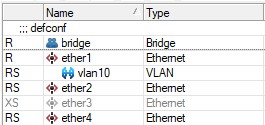


  • ether1 = external
  • ether2 and ether4 belongs to the bridge (LAN)


dhcp client is enabled:
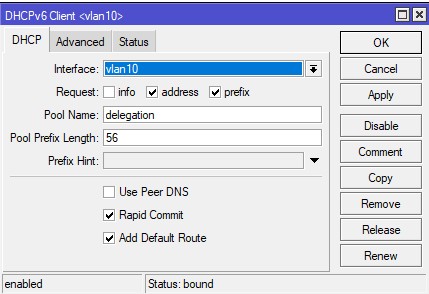


if I select the ether1 interface; it keeps searching:
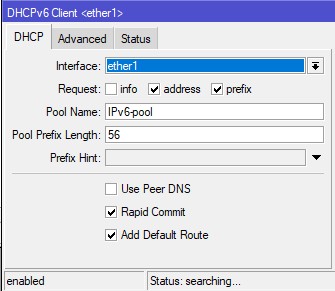


According to this URL, the Pool Prefix length should be 56.


Appreciate any suggestions/help. Thanks!



Lucas


lpossamai.me


Create new topic
sud0

283 posts

Ultimate Geek
+1 received by user: 117

ID Verified
Lifetime subscriber

  #2750701 27-Jul-2021 14:28
Send private message

Looks like I was able to get it working. All I needed to do was to manually add an IPV6 address on my bridge (LAN) network. Cheers!


Lucas


lpossamai.me


moongravity
5 posts

Wannabe Geek
+1 received by user: 3


  #2762515 18-Aug-2021 15:03
Send private message

Hi


I'm just trying to do the same thing, and I think I have the same problem. Could you show me how you did this?


Cheers


MadEngineer
4591 posts

Uber Geek
+1 received by user: 2570

Trusted

  #2790272 5-Oct-2021 22:18
Send private message

I’ll take a look at my config tomorrow and let you know how I have mine set up. PM or @ tag me if I forget.


You're not on Atlantis anymore, Duncan Idaho.


KiwiSurfer
1722 posts

Uber Geek
+1 received by user: 993

ID Verified
Lifetime subscriber

  #2790290 6-Oct-2021 04:45
Send private message

I had trouble getting IPv6 working on my Microtik as well. Would appreciate any tips. Thanks! :)


KiwiSurfer
1722 posts

Uber Geek
+1 received by user: 993

ID Verified
Lifetime subscriber

  #2790293 6-Oct-2021 05:36
Send private message

Just managed to fix it on my Microtik.


Some areas to look at:-


IPv6 > DHCP Client: Ensure this is set up and has a lease from Vocus. Give this client a pool name. This was all fine in my previous config.


IPv6 > Addresses: Add an address from the pool set up in your DHCP client on your interface(s). Just adding an address and accepting the defaults seemed to do the trick.


IPv6 > ND: Ensure this is enabled on your interface(s). I had this disabled -- possibly I turned it off when I couldn't get it to work last time I attempted IPv6.


I think I had the IPv6 address on the bridge missing which might have been the missing piece of the puzzle.


MadEngineer
4591 posts

Uber Geek
+1 received by user: 2570

Trusted

  #2790743 6-Oct-2021 19:19
Send private message

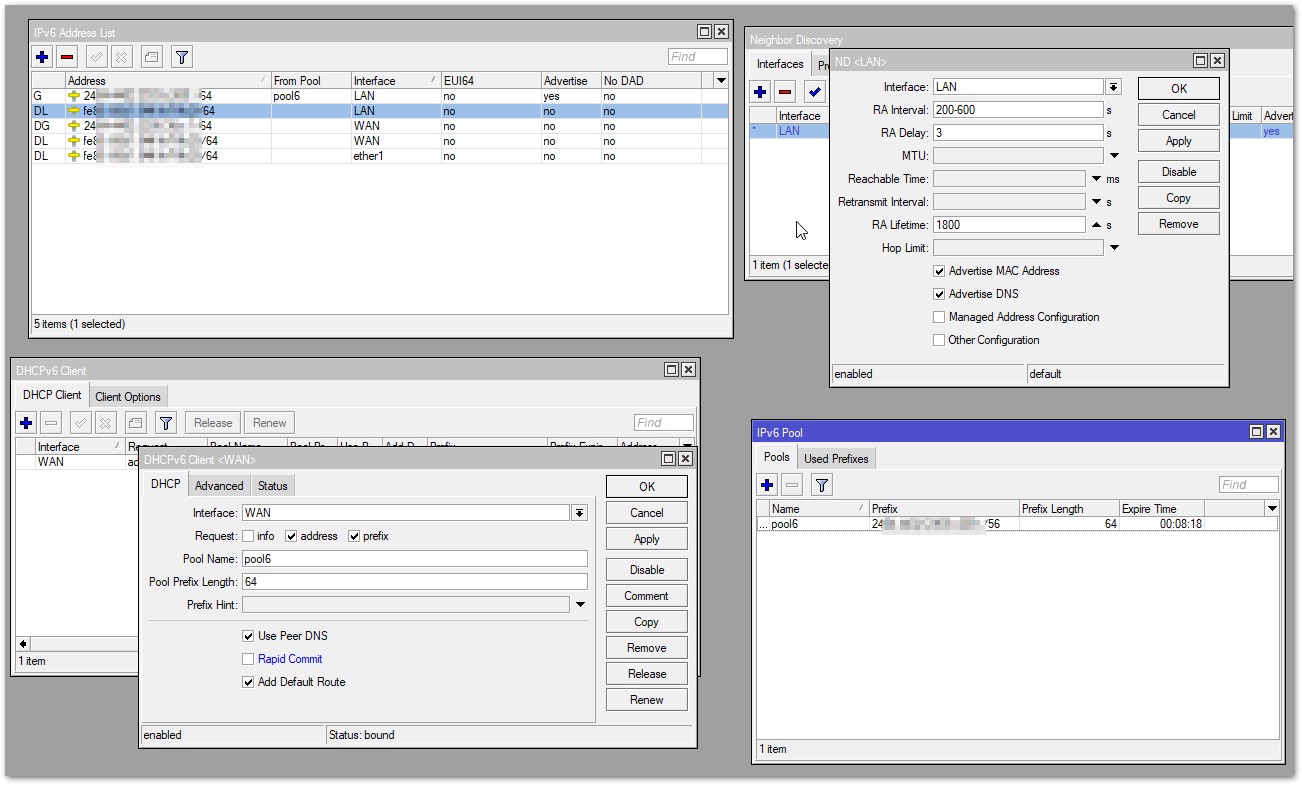
Here's mine in a picture


You're not on Atlantis anymore, Duncan Idaho.


Shop now for Lenovo laptops and other devices (affiliate link).
AndyB50
6 posts

Wannabe Geek
+1 received by user: 3


  #2792290 9-Oct-2021 15:55
Send private message

Hi all,


Just seen this thread and thought it might be helpful to add a general comment.


In my experience the limitation when using IPv6 has always been device support.


The main device support issue being that Android (which includes Android Smart TVs) does not support DHCPv6- only SLAAC. It seems that even in 2021 Google has plans to add DHCPv6 into Android support. 


The implication of that is you must use a 64 Bit Prefix (/64 subnet) on your LAN side. For Orcon (in this case) you may be given a 56 Bit Prefix (or /56 subnet) this needs to be subnetted to a /64 subnet on the LAN side if you want Android devices to use global IPv6 addresses (note:- link-local address starting FE80: will still be created if the LAN prefix is something other than 64 Bits).


I found this link:-


https://www.networkacademy.io/ccna/ipv6/stateless-address-autoconfiguration-slaac


Which describes the SLAAC setup quite well. For it to work as expected a /64 prefix is required. The other 64 bits of the IPv6 address are built from the MAC address of the device.


It can be frustrating trying to setup and test IPv6 if you happen to use an Android device- everything may look correctly setup on your router but the device you are using just will not use global IPv6 if a 64 Bit prefix is not used. As noted above you will still get a link-local address but that isn’t much use for internet traffic.


Good luck everyone- I hope this helps at least one other person or saves them some time 😀


Kind Regards,


AndyB.


KiwiSurfer
1722 posts

Uber Geek
+1 received by user: 993

ID Verified
Lifetime subscriber

  #2792314 9-Oct-2021 16:15
Send private message

You should not be using DHCPv6 to give out addresses on your local LAN to devices such as phones, laptops, smart TVs, etc. IPv6 can sort this automatically. The Microtik configuration I have set up (which is more or less as described in this thread) does this with no trouble at all for all our IPv6 capable devices including my Android phones.


To save confusion:


  1. DHCPv6 is needed for the WAN side and the WAN side only. On your Microtik router, configure a DHCPv6 client to get your IPv6 configuration from your RSP (e.g. Vocus). This is really only to get the address and prefix details from Vocus to set up an IPv6 address for the WAN side of your router and a routable prefix for your LAN side.
  2. DHCPv6 is not needed for the LAN side. Do not use a DHCPv6 server to assign IPv6 configuration to your LAN hosts. If you configure as per the above posts this is already done automatically. To be clear, this is separate from IPv4 which does require a DHCPv4 server to be set up in the router due to IPv4 not supporting automatic address assignment like IPv6 does.

AndyB50
6 posts

Wannabe Geek
+1 received by user: 3


  #2792321 9-Oct-2021 16:33
Send private message

Hi KiwiSurfer,


Good clarification!


As you say in point 1 DHCPv6 is required for the WAN.


However, you can still use a DHCPv6 server on the LAN side (depending on router support).


As you suggest probably not used for the supplied Orcon routers (in which case SLAAC is used as described in my post) but it is important to use that /64 prefix advertisement.


Hope that makes sense.


Kind Regards,


Andy B.


KiwiSurfer
1722 posts

Uber Geek
+1 received by user: 993

ID Verified
Lifetime subscriber

  #2792329 9-Oct-2021 16:52
Send private message

This thread is specifically about Microtik routers, so I did not suggest anything about supplied routers.


You could indeed use a DHCPv6 server on the LAN side but there is no reason to do so. DHCP is only needed for the WAN side, that is all.


My Microtik setup gets a /56 from the WAN side using a DHCPv6 client. When adding a IPv6 address to the LAN side on the Microtik, the default address is '::/64' and the advertising option is enabled by default. One only needs to select the pool previously configured in the DHCPv6 client (e.g. I call mine 'ipv6-pool). So by accepting the default options and selecting the correct pool, my Microtik has been set up exactly as you described -- it advertises a /64 subnet from the /56 it obtained from Vocus. SLAAC then works just fine with all IPv6 devices.


moongravity
5 posts

Wannabe Geek
+1 received by user: 3


  #2833642 16-Dec-2021 18:49
Send private message

Thanks everyone I have it working stable now without a v6 server, now I understand a bit more. I did have to enable EUI-64 in the address to my LAN bridge was all.


Create new topic


Geekzone Live »

Try automatic live updates from Geekzone directly in your browser, without refreshing the page, with Geekzone Live now.


Are you subscribed to our RSS feed? You can download the latest headlines and summaries from our stories directly to your computer or smartphone by using a feed reader.