Geekzone: technology news, blogs, forums
Guest
Welcome Guest.
You haven't logged in yet. If you don't have an account you can register now.


ShoarW

1 post

Wannabe Geek


#288868 28-Jul-2021 20:07
Send private message

Hey Folks,


I'm having a problem that I'm struggling to understand, speeds within NZ are perfectly fine and will net me up to the full 1Gbps speed as seen here and up to 600mbps to Australia as seen here but when approaching USA/Europe sites they're just downright unacceptable. Normally I'd be able to jump onto a VPN and gain the full speed because usually it'll be bad routing or some other stuff - but now even in a VPN I am still limited by shoddy speeds that surely it must be an issue outside of my control.


Is anyone experiencing similar issues? This has been an ongoing issue for me for the last ~3 months. I was definitely reaching peak speeds of 60MB/s  (480Mbps) to external servers in Europe before.


Any help would be great - thanks.


Edit: My links aren't showing up:


NZ: https://www.speedtest.net/result/11793965841


AUS: https://www.speedtest.net/result/11793979674


Europe: https://www.speedtest.net/result/11793972112


USA: https://www.speedtest.net/result/11793983843


Create new topic
Jiriteach
1139 posts

Uber Geek
+1 received by user: 373

ID Verified
Trusted
Lifetime subscriber

  #2751476 28-Jul-2021 21:48
Send private message

Here's mine - I'm in Wellington.
Downloads are fine. Uploads are terrible! 


-- opinions expressed by me are solely my own. ie - personal


michaelmurfy
meow
13581 posts

Uber Geek
+1 received by user: 10914

Moderator
ID Verified
Trusted
Lifetime subscriber

  #2751500 28-Jul-2021 22:50
Send private message

We've had many, many posts related to this sort of thing.

1) Have you tested by other computers (on Ethernet)?
2) Have you booted into Linux (make an Ubuntu live USB stick) and tested speed via that to ensure it is not a driver or environmental problem?
3) Run the following if you're on Windows:


Open up the Command Prompt or Powershell under Administrator mode and type the following:


netsh int tcp set global autotuninglevel=normal


Then reboot - see if this improves your speed.


Lastly - what router are you using?


Michael Murphy | https://murfy.nz
Referral Links: Quic Broadband (use R122101E7CV7Q for free setup)

Are you happy with what you get from Geekzone? Please consider supporting us by subscribing.
Opinions are my own and not the views of my employer.


Jiriteach
1139 posts

Uber Geek
+1 received by user: 373

ID Verified
Trusted
Lifetime subscriber

  #2751749 29-Jul-2021 12:18
Send private message

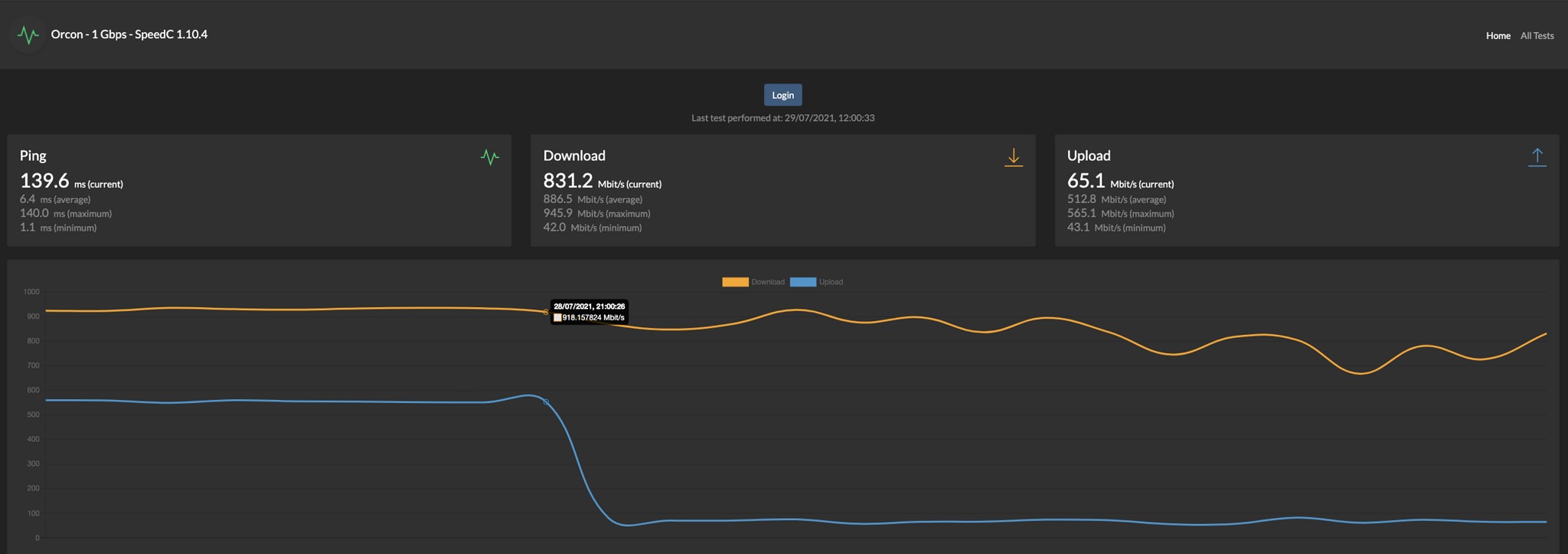
Was interested to check so added the 2degrees US server to my Speedcheck which runs hourly. You can see speeds for downloads are really good. Uploads seems strange but also very consistent so not sure if thats the 2degrees speedtest server or something else. Results before that drop are from servers in NZ.
Looks like the isse you are having might be local to you.


-- opinions expressed by me are solely my own. ie - personal


Vicx
167 posts

Master Geek
+1 received by user: 1


  #2751752 29-Jul-2021 12:32
Send private message

I'm also getting slow down speeds on Orcon 100/20. PC connected by cat6 cable, used to get 100mbps down now a consistent 45mbps, even my mobile over wifi also gets a 45mbps but that used to get 75mbps so it's not my pc or mobile. Power cycled the ONT and modem, no joy.


michaelmurfy
meow
13581 posts

Uber Geek
+1 received by user: 10914

Moderator
ID Verified
Trusted
Lifetime subscriber

  #2751754 29-Jul-2021 12:37
Send private message

It looks like @Jiriteach has essentially confirmed this may be a network issue but can everyone also attempt to run the Powershell command above if you're using Windows too to see if this helps?


Michael Murphy | https://murfy.nz
Referral Links: Quic Broadband (use R122101E7CV7Q for free setup)

Are you happy with what you get from Geekzone? Please consider supporting us by subscribing.
Opinions are my own and not the views of my employer.


Create new topic


Geekzone Live »

Try automatic live updates from Geekzone directly in your browser, without refreshing the page, with Geekzone Live now.


Are you subscribed to our RSS feed? You can download the latest headlines and summaries from our stories directly to your computer or smartphone by using a feed reader.