Geekzone: technology news, blogs, forums
Guest
Welcome Guest.
You haven't logged in yet. If you don't have an account you can register now.


Invoker

15 posts

Geek
+1 received by user: 1


#289865 4-Oct-2021 20:17
Send private message

Hi All


I've recently switch from Contract Fibre to 2degrees and have a significant amount of internet issues. I started having internet issues late August and switched to 2degrees on the 15th of Sep. After switching my internet issues are:


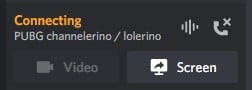
  • Can't connect to game and chat clients such as League of Legends and Discord. Discord shows as perpetually connecting and league client wont load at all. This issue would occur over ethernet and across multiple PCs and laptops. This occurs for hours at a time
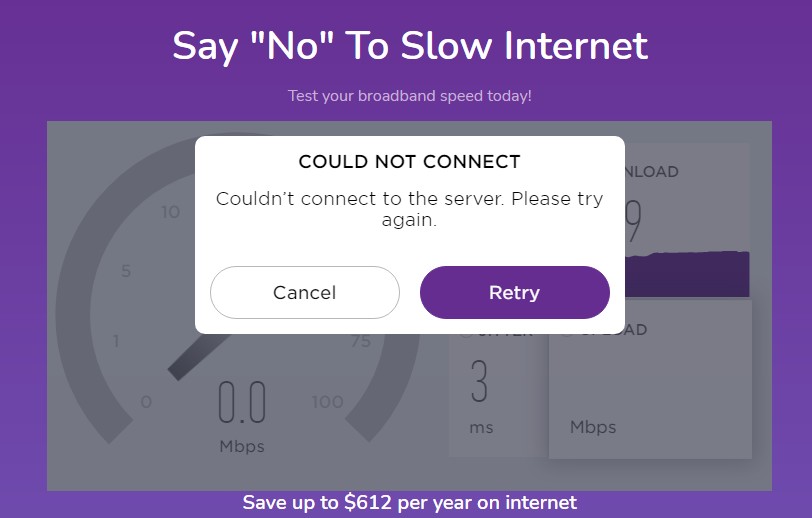
  • Slow and sluggish net. My internet speed would slow down to a crawl with webpages not loading. Speedtest would not load or when it does I would get 4-5Mbps. I usually get 40Mbps over Wifi or 97Mbps over ethernet when the net is good.
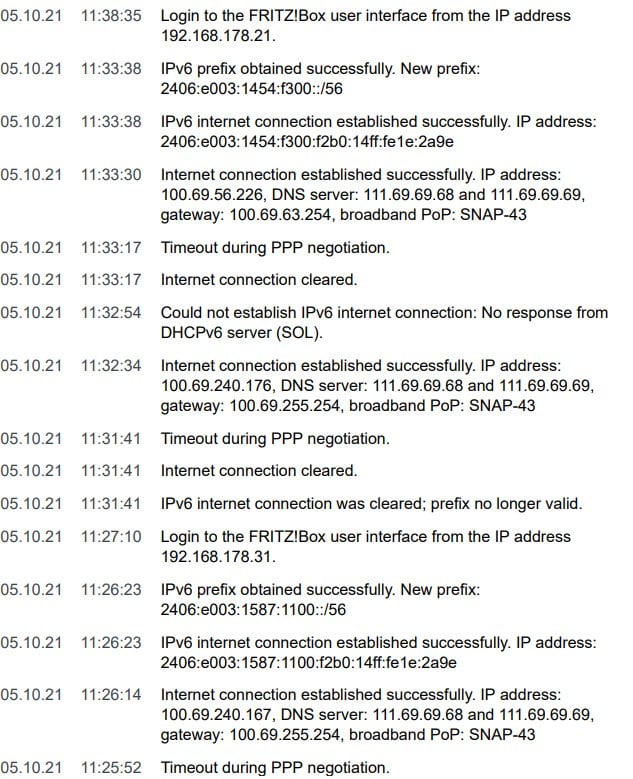
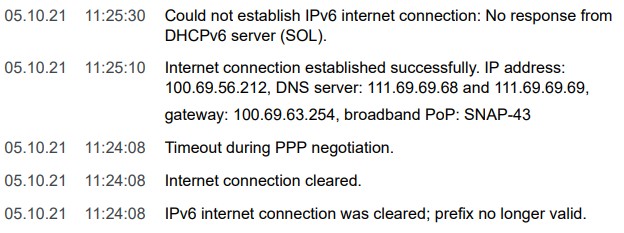
  • Intermittent disconnects. My net would drop between 6am to 10am and 6pm to 10pm a couple of times a day for 2min. Event log in the Fritzbox shows PPP timeout and a reset of the IVP6 address. This occurs frequently.
  • The above issues occur throughout all PCs regardless of WiFi or ethernet connection. The Fritzbox  and ONT lights all indicate completely healthy function when the above issues occur. I am using the default settings in the Fritzbox. 

I have tried:


  • Performing a factory reset of my new Fritzbox 7560
  • Calling 2degrees and clearing the connection on their end
  • Clearing the router on my end

Nothing seems to work for long and I am at wits end. My internet issues are intermittent and have been ongoing from late August. 


Is there anything I can do to remedy the issues? 


Regards


Filter this topic showing only the reply marked as answer View this topic in a long page with up to 500 replies per page Create new topic
 1 | 2
ascroft
437 posts

Ultimate Geek
+1 received by user: 177


  #2789335 4-Oct-2021 20:42
Send private message

What devices have you tested it with? (One turned on at a time)


Are you sure its not some rogue process on your device?


Mark


"Artificial Intelligence" - aka Machine Learning 2.0


Invoker

15 posts

Geek
+1 received by user: 1


  #2789384 4-Oct-2021 21:00
Send private message

I've tested it on my PC, my flatmates PC and my work laptop. Same internet issues, all on ethernet. 


l43a2
1784 posts

Uber Geek
+1 received by user: 591

ID Verified
Trusted

  #2789437 4-Oct-2021 21:08
Send private message

2.4ghz wifi.


sbiddle
30853 posts

Uber Geek
+1 received by user: 9996

Retired Mod
Trusted
Biddle Corp
Lifetime subscriber

  #2789444 4-Oct-2021 21:24
Send private message

So lets get this straight - you had issues with your setup with Contact and then moved to 2D with a new router and still have the same issues?


If so this isn't a 2D issue or even anything to do with Contact and will be something on your network or device.


Linux
12173 posts

Uber Geek
+1 received by user: 8469

Trusted
Lifetime subscriber

  #2789456 4-Oct-2021 22:48
Send private message

This reads like I have a network issue

michaelmurfy
meow
13579 posts

Uber Geek
+1 received by user: 10910

Moderator
ID Verified
Trusted
Lifetime subscriber

  #2789465 4-Oct-2021 23:33
Send private message

I would factory reset your router - you've got something wrong there especially with the limited speed.

Follow through the sticky: https://www.geekzone.co.nz/forums.asp?forumid=85&topicid=239862


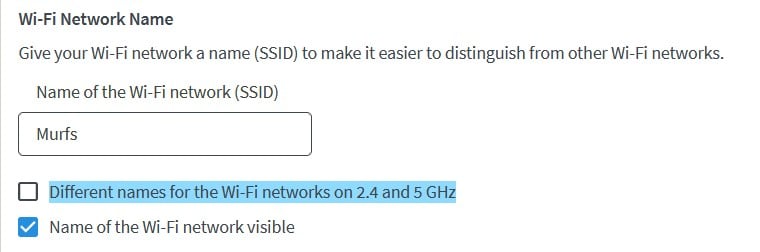
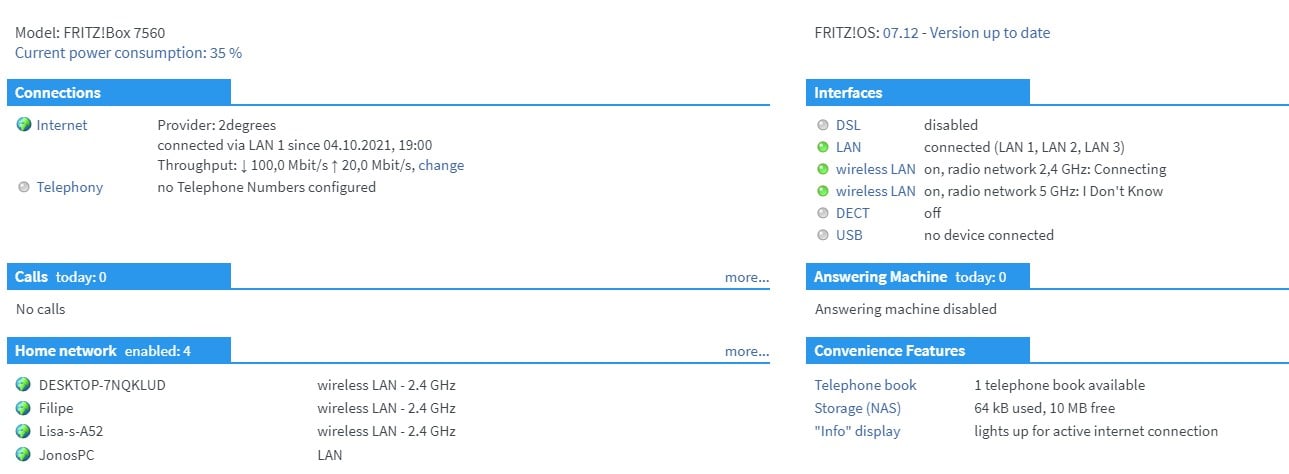
And also, ensure your WiFi networks are the same by unticking this - I don't know why you're separating them out with the main devices on 2.4GHz WiFi:


Michael Murphy | https://murfy.nz
Referral Links: Quic Broadband (use R122101E7CV7Q for free setup)

Are you happy with what you get from Geekzone? Please consider supporting us by subscribing.
Opinions are my own and not the views of my employer.


Shop now for Lego sets and other gifts (affiliate link).
wlgspotter
334 posts

Ultimate Geek
+1 received by user: 40

ID Verified
Lifetime subscriber

  #2789527 5-Oct-2021 07:55
Send private message

michaelmurfy:

I would factory reset your router - you've got something wrong there especially with the limited speed.

Follow through the sticky: https://www.geekzone.co.nz/forums.asp?forumid=85&topicid=239862


And also, ensure your WiFi networks are the same by unticking this - I don't know why you're separating them out with the main devices on 2.4GHz WiFi:


Agree with what Michael indicated, and if I were you I would do the following (in the order below)

- Ensure both the 2.4GHz and 5GHz WiFi are broadcasting the same SSID by I ticking the option shown in Michael’s post. This allows the FriztBox to band steer clients to the best possible frequency band

- Do another full factory reset. But before doing so, take a config backup first, then factory reset it but upon factory reset don’t restore from the backup but manually reconfigure the FritzBox. The backup is for use at the last resort if abs when upon reset you can’t get things to work at all that it would at least, hopefully, give you service and connectivity again. You could then check and try again, but the key is still to manually reconfigure upon a reset.

- Finally, may not be totally related but worth a shot - upgrade the firmware on your FritzBox. The version on your 7560 is a few sub-versions old. The current version, at least on my 7490, is 7.28 - I think it should be the same version number for 7560 too. The current version includes some enhancements and bug fixes so may worth a try. Update to newer firmware by checking on the FritzBox’s System menu options.

wlgspotter
334 posts

Ultimate Geek
+1 received by user: 40

ID Verified
Lifetime subscriber

  #2789592 5-Oct-2021 09:18
Send private message

wlgspotter:
michaelmurfy:


I would factory reset your router - you've got something wrong there especially with the limited speed.

Follow through the sticky: https://www.geekzone.co.nz/forums.asp?forumid=85&topicid=239862


And also, ensure your WiFi networks are the same by unticking this - I don't know why you're separating them out with the main devices on 2.4GHz WiFi:


Agree with what Michael indicated, and if I were you I would do the following (in the order below)

- Ensure both the 2.4GHz and 5GHz WiFi are broadcasting the same SSID by I ticking the option shown in Michael’s post. This allows the FriztBox to band steer clients to the best possible frequency band

- Do another full factory reset. But before doing so, take a config backup first, then factory reset it but upon factory reset don’t restore from the backup but manually reconfigure the FritzBox. The backup is for use at the last resort if abs when upon reset you can’t get things to work at all that it would at least, hopefully, give you service and connectivity again. You could then check and try again, but the key is still to manually reconfigure upon a reset.

- Finally, may not be totally related but worth a shot - upgrade the firmware on your FritzBox. The version on your 7560 is a few sub-versions old. The current version, at least on my 7490, is 7.28 - I think it should be the same version number for 7560 too. The current version includes some enhancements and bug fixes so may worth a try. Update to newer firmware by checking on the FritzBox’s System menu options.


Actually for my 1st point above I meant by "unticking" the option shown in Michael's post as per his recommendation...


Invoker

15 posts

Geek
+1 received by user: 1


  #2789607 5-Oct-2021 09:34
Send private message

wlgspotter:
michaelmurfy:


I would factory reset your router - you've got something wrong there especially with the limited speed.

Follow through the sticky: https://www.geekzone.co.nz/forums.asp?forumid=85&topicid=239862


And also, ensure your WiFi networks are the same by unticking this - I don't know why you're separating them out with the main devices on 2.4GHz WiFi:


Agree with what Michael indicated, and if I were you I would do the following (in the order below)

- Ensure both the 2.4GHz and 5GHz WiFi are broadcasting the same SSID by I ticking the option shown in Michael’s post. This allows the FriztBox to band steer clients to the best possible frequency band

- Do another full factory reset. But before doing so, take a config backup first, then factory reset it but upon factory reset don’t restore from the backup but manually reconfigure the FritzBox. The backup is for use at the last resort if abs when upon reset you can’t get things to work at all that it would at least, hopefully, give you service and connectivity again. You could then check and try again, but the key is still to manually reconfigure upon a reset.

- Finally, may not be totally related but worth a shot - upgrade the firmware on your FritzBox. The version on your 7560 is a few sub-versions old. The current version, at least on my 7490, is 7.28 - I think it should be the same version number for 7560 too. The current version includes some enhancements and bug fixes so may worth a try. Update to newer firmware by checking on the FritzBox’s System menu options.


Thanks I'll give the above a shot and see if it helps.


Invoker

15 posts

Geek
+1 received by user: 1


  #2789721 5-Oct-2021 11:52
Send private message

I've applied a factory reset and updated my Fritzbox OS to 7.28. I am using one SSID for my WiFi now. 


However, my internet still dropped out for 3-4min at 11:25am and 11:33am. My event logs for the two disconnection events are below. 


michaelmurfy
meow
13579 posts

Uber Geek
+1 received by user: 10910

Moderator
ID Verified
Trusted
Lifetime subscriber

  #2789723 5-Oct-2021 11:54
Send private message

1) Replace the Ethernet cable between your ONT and Router.
2) Call 2degrees and log a fault now you've tried all troubleshooting.


Looks like it is your ONT having issues.


Michael Murphy | https://murfy.nz
Referral Links: Quic Broadband (use R122101E7CV7Q for free setup)

Are you happy with what you get from Geekzone? Please consider supporting us by subscribing.
Opinions are my own and not the views of my employer.


HP


Shop now for HP laptops and other devices (affiliate link).
yitz
2238 posts

Uber Geek
+1 received by user: 594


  #2789725 5-Oct-2021 11:59
Send private message

You don't happen to have a Lenovo dock in the mix or share the network with this person lol


https://www.geekzone.co.nz/forums.asp?forumid=85&topicid=289708 


Invoker

15 posts

Geek
+1 received by user: 1


  #2789737 5-Oct-2021 12:15
Send private message

yitz:


You don't happen to have a Lenovo dock in the mix or share the network with this person lol


https://www.geekzone.co.nz/forums.asp?forumid=85&topicid=289708 


Nope no Lenovo products in the mix.


Invoker

15 posts

Geek
+1 received by user: 1


  #2789740 5-Oct-2021 12:19
Send private message

michaelmurfy:


1) Replace the Ethernet cable between your ONT and Router.
2) Call 2degrees and log a fault now you've tried all troubleshooting.


Looks like it is your ONT having issues.


I've replaced the ethernet cable between the ONT and router several times. Problem still persists


Just tried calling 2d support; their call center is down due to excessive load... just my luck. Will call again when their support center is up


yitz
2238 posts

Uber Geek
+1 received by user: 594


  #2789753 5-Oct-2021 12:44
Send private message

Were you using the Fritzbox when you were on Contact Broadband (I recall they issue Netcomms) or only since switching to 2degrees?


I am wondering if there is some interoperability issue between Fritzbox and specific ONTs after perhaps an update?


 1 | 2
Filter this topic showing only the reply marked as answer View this topic in a long page with up to 500 replies per page Create new topic


Geekzone Live »

Try automatic live updates from Geekzone directly in your browser, without refreshing the page, with Geekzone Live now.


Are you subscribed to our RSS feed? You can download the latest headlines and summaries from our stories directly to your computer or smartphone by using a feed reader.