Geekzone: technology news, blogs, forums
Guest
Welcome Guest.
You haven't logged in yet. If you don't have an account you can register now.


Tomahawk66

181 posts

Master Geek
+1 received by user: 13


#289957 12-Oct-2021 07:15
Send private message

Until two days ago I have been thrilled with the speeds I get via my copper broadband line with Slingshot. I have unlimited broadband. I can easily stream movies and watch them in 1080dp. I use a cat 6 cable to connect. No wi fi. Two days ago I started having issues, web pages started timing out. Last night I ran CC Cleaner to clear cookies etc. Ran Malwarebytes to check for viruses etc. Did a full system anti-virus scan. Nothing came up on any of them. I have taken the phone jack out of the wall and put it back in again. I have turned the whole router off over night in the hope that re starting it this morning might make it go properly again. Nope!


I couldn't even log into my Slingshot account because it timed out just before. Am hoping this will actually go through.


Can anyone offer any ideas?


Thank you.


Filter this topic showing only the reply marked as answer View this topic in a long page with up to 500 replies per page Create new topic
 1 | 2 | 3 | 4 | 5 | 6 | ... | 10
sbiddle
30853 posts

Uber Geek
+1 received by user: 9996

Retired Mod
Trusted
Biddle Corp
Lifetime subscriber

  #2793528 12-Oct-2021 07:29
Send private message

Are you on ADSL or VDSL? What is your sync rate as shown in your modem status page?


Tomahawk66

181 posts

Master Geek
+1 received by user: 13


  #2793533 12-Oct-2021 08:08
Send private message

sbiddle:


Are you on ADSL or VDSL? What is your sync rate as shown in your modem status page?


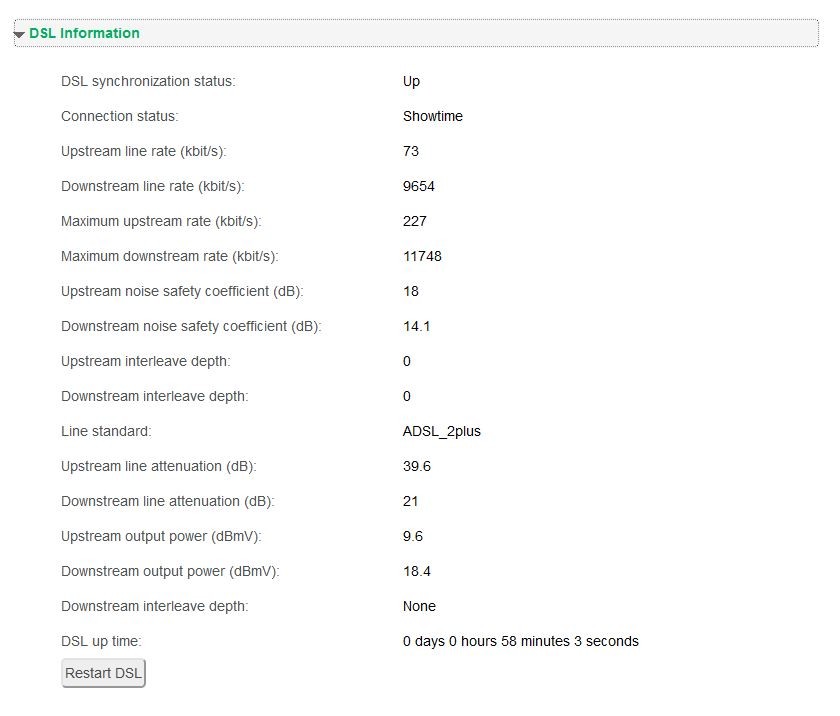
ADSL not sure where to find the sync rate. Have looked... Have taken these screen shots. I rebooted the modem via the modem page just before in the hope it might help


RunningMan
9184 posts

Uber Geek
+1 received by user: 4833


  #2793534 12-Oct-2021 08:12
Send private message

There is a physical line problem. 73kb/s upstream line rate is the key here. Probably one line of the pair is disconnected or broken somewhere.


Are you able to do some isolation testing to confirm if the wiring in your house is OK?


Tomahawk66

181 posts

Master Geek
+1 received by user: 13


  #2793536 12-Oct-2021 08:17
Send private message

RunningMan:


There is a physical line problem. 73kb/s upstream line rate is the key here. Probably one line of the pair is disconnected or broken somewhere.


Are you able to do some isolation testing to confirm if the wiring in your house is OK?


Should I try putting in a different ethernet cable? I have the modem down stairs and run two Ethernet cables off it to two separate computers, the one I am using now, and the other one upstairs. Both computers are now not connecting properly. Why would a cable suddenly go 'bad', so to speak.


SomeoneSomewhere
1882 posts

Uber Geek
+1 received by user: 1086

Lifetime subscriber

  #2793537 12-Oct-2021 08:24
Send private message

Because there's a few km of copper cable buried (or overhead) between your house and the exchange. Lots of joints, lots of movement, lots of water. Things corrode.


Ideally you want to connect the modem directly to the incoming phone line, at the 'demarc' (demarcation point; the box that is the line between what you own and what chorus owns).


If the fault stays, it's a Chorus problem; call your ISP.


If the fault goes away, it's a problem with the phone lines in your house.

RunningMan
9184 posts

Uber Geek
+1 received by user: 4833


  #2793538 12-Oct-2021 08:25
Send private message

It's the ADSL line that plugs into a phone jack that is bad, not the ethernet connection between computer and modem. How many phone jacks do you have? What sort of filter(s) do you use?


Shop now for Lenovo laptops and other devices (affiliate link).
darylblake
1172 posts

Uber Geek
+1 received by user: 410

Trusted

  #2793539 12-Oct-2021 08:26
Send private message

Sounds like a home wiring issue. Not with ethernet cables. But with the actual phone line / copper wiring. If it has been good before, you may want to get someone in to clear it up and do some testing. Changing an ethernet cable probably wont help your particular situation.


RunningMan
9184 posts

Uber Geek
+1 received by user: 4833


  #2793540 12-Oct-2021 08:29
Send private message

@PeterReader used to automatically post some helpful info:


Hello... Our robot found some keywords in your post, so here is an automated reply with some important things to note regarding broadband speeds.


If you are posting regarding DSL speeds please check that


  • you have reset your modem and router 
  • your PC (or other PCs in your LAN) is not downloading large files when you are testing - you are not being throttled by your ISP due to going over the monthly cap 
  • your tests are always done on an ethernet connection to the router - do not use wireless for testing 
  • you read this topic and follow the instructions there.

Make sure you provide information for other users to help you. If you have not already done it, please EDIT your post and add this now:


  • Your ISP and plan 
  • Type of connection (ADSL, ADSL2, VDSL) 
  • Your modem DSL stats (do not worry about posting Speedtest, we need sync rate, attenuation and noise margin) 
  • Your general location (or street) 
  • If you are rural or urban 
  • If you know your connection is to an exchange, cabinet or conklin 
  • If your connection is to a ULL or wholesale service 
  • If you have done an isolation test as per the link above 

Most of the problems with speed are likely to be related to internal wiring issues. Read this discussion to find out more about this. Your ISP is not intentionally slowing you down today (unless you are on a managed plan). Also if this is the school holidays it's likely you will notice slower than usual speed due to more users online.


A master splitter is required for VDSL2 and in most cases will improve speeds on DSL connections. Regular disconnections can be a monitored alarm or a set top box trying to connect. If there's an alarm connected to your line even if you don't have an alarm contract it may still try to connect so it's worth checking.


I recommend you read these two blog posts:


In your case, the DSL line stats show a very clear problem with the upload connection (which will also affect download). This is a physical line problem, so it's a matter of working out if it is your problem (wiring inside your house) or the ISP's problem (wiring from outside your house back to the phone exchange).


SomeoneSomewhere
1882 posts

Uber Geek
+1 received by user: 1086

Lifetime subscriber

  #2793542 12-Oct-2021 08:33
Send private message

And to clarify, this can only be a phone line issue. It can't be anything like ethernet or wifi after the router. The 'sync rate' is the third and fourth lines in the picture you posted.

Bung
6733 posts

Uber Geek
+1 received by user: 2926

Subscriber

  #2793543 12-Oct-2021 08:36
Send private message

RunningMan is referring to the line back to the exchange. The line could go bad at any of the connections on that path. How is your house connected, underground cable or an aerial lead from a pole? How much internal wiring is there from the modem to the line's test point or demarcation?


Tomahawk66

181 posts

Master Geek
+1 received by user: 13


  #2793544 12-Oct-2021 08:38
Send private message

RunningMan:


It's the ADSL line that plugs into a phone jack that is bad, not the ethernet connection between computer and modem. How many phone jacks do you have? What sort of filter(s) do you use?


There are two phone jacks in my house. The one upstairs has nothing plugged in to it as my land line phone piggy backs off the base unit. The filter I have is the one I got years ago from Telecom. I will try to find the other one I have that used to be in the jack point upstairs and see if that makes a difference. In the past when I have had issues it has Always been an issue with the provider.... that takes yonkers to figure out... someone doing something random somewhere in the exchange that some how effected me. I have already taken out the filter from the wall etc and taken the two connections out of the filter and put them back in again and restarted everything. But I will try to find another line filter.


Shop now for Dyson appliances (affiliate link).
Tomahawk66

181 posts

Master Geek
+1 received by user: 13


  #2793546 12-Oct-2021 08:41
Send private message

SomeoneSomewhere: And to clarify, this can only be a phone line issue. It can't be anything like ethernet or wifi after the router. The 'sync rate' is the third and fourth lines in the picture you posted.


thank you


dt

dt
1152 posts

Uber Geek
+1 received by user: 371
Inactive user


  #2793548 12-Oct-2021 08:46
Send private message

We are all a good bunch of people here but you can probably delete your second imagine showing your IPV4 address, not something you really want to advertise online and your line stats are enough to work with :) 


Tomahawk66

181 posts

Master Geek
+1 received by user: 13


  #2793550 12-Oct-2021 08:46
Send private message

SomeoneSomewhere: Ideally you want to connect the modem directly to the incoming phone line, at the 'demarc' (demarcation point; the box that is the line between what you own and what chorus owns). If the fault stays, it's a Chorus problem; call your ISP. If the fault goes away, it's a problem with the phone lines in your house.


Sorry to be a dunce but do you mean take the phone connection out of the line filter so just the modem line is in the filter that is then connected into the jack point on the wall ?


SomeoneSomewhere
1882 posts

Uber Geek
+1 received by user: 1086

Lifetime subscriber

  #2793551 12-Oct-2021 08:48
Send private message

There's a box where the exterior cable enters your house. Ideally, you get some scotchloks, disconnect the rest of the house, and connect the modem up straight to the incoming line. That completely isolates the rest of your house from being a problem.


I think we used to have a guide, but this thread is all I've found: https://www.geekzone.co.nz/forums.asp?forumid=49&topicid=96226


It's a while since we had a good 'faulty DSL' post.

 1 | 2 | 3 | 4 | 5 | 6 | ... | 10
Filter this topic showing only the reply marked as answer View this topic in a long page with up to 500 replies per page Create new topic


Geekzone Live »

Try automatic live updates from Geekzone directly in your browser, without refreshing the page, with Geekzone Live now.


Are you subscribed to our RSS feed? You can download the latest headlines and summaries from our stories directly to your computer or smartphone by using a feed reader.