Geekzone: technology news, blogs, forums
Guest
Welcome Guest.
You haven't logged in yet. If you don't have an account you can register now.


afalout

14 posts

Geek
+1 received by user: 2


#290584 21-Nov-2021 15:52
Send private message

Folks,


Under "Account Information, there should be a IPv6 tab:
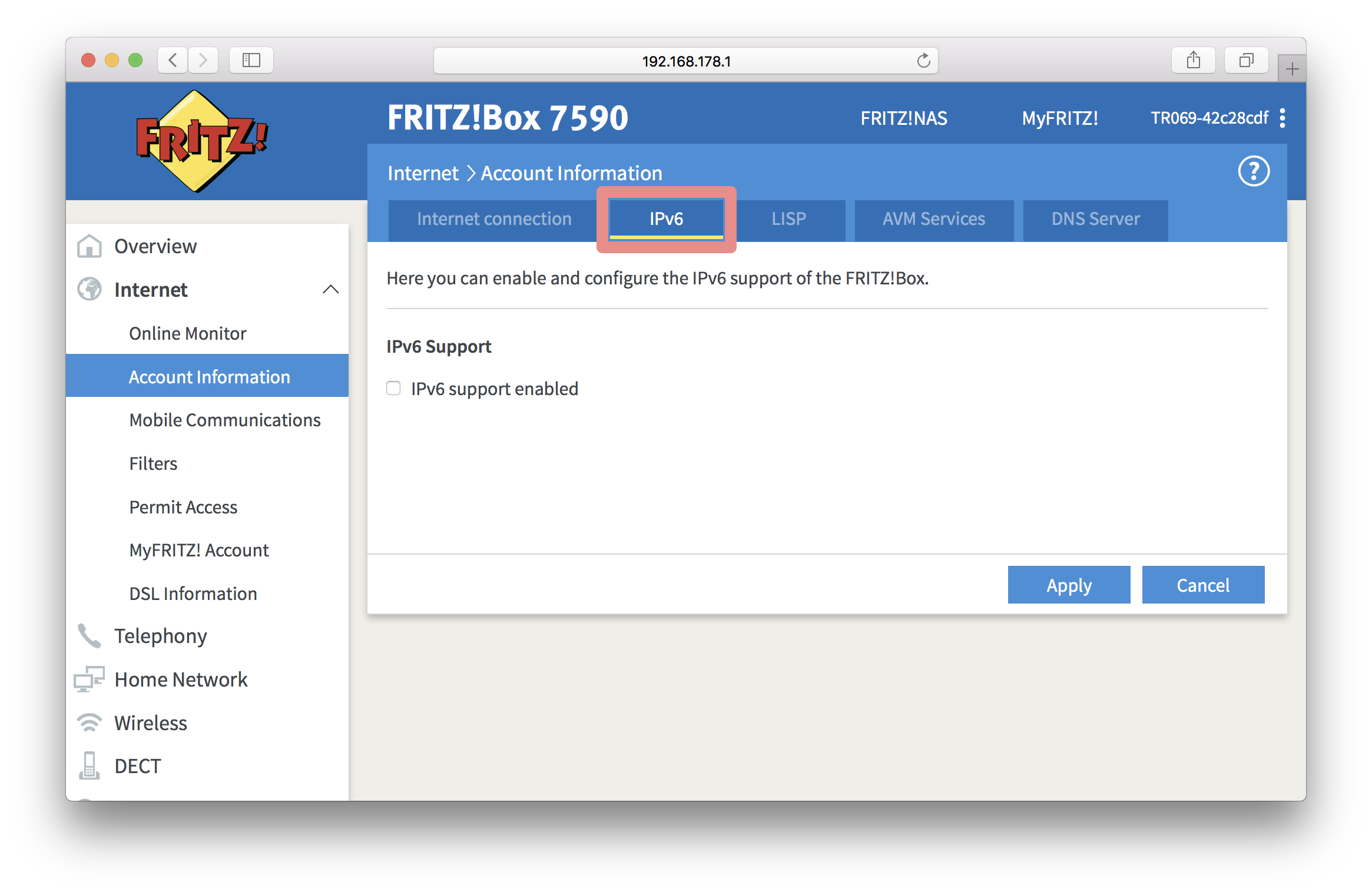
 

How do I enable IPv6 on my FRITZ!Box


Unfortunately it disappeared when I switched from 7490 to 7530 router:


Support helpfully suggested that I disconnect the power plug and wait for 40 seconds exactly, before plugging it back in. (How do they even come up with this stuff I wonder...)


Did anyone see this happen?


Considering just how buggy the settings backup file load is, I suspected some options got lost when I migrated config from old box to the now one (same FW, 7.29) so tried resetting back to factory settings, but no luck.


Ive found on some German site that there is a "ipv6_hidden" option somewhere in the config on the machine, but before I start hacking this, wanted to ask here first...


Any suggestions very gratefully received.


Andrej


PS. On 2D fiber ultimate with static IP



Create new topic
timmmay
20923 posts

Uber Geek
+1 received by user: 5395

Trusted
Lifetime subscriber

  #2816692 21-Nov-2021 16:11
Send private message

Call 2deg support back. I know they're quite busy right now, like most places I think they're shortstaffed, but they're generally quite capable and helpful.


darkasdes2
452 posts

Ultimate Geek
+1 received by user: 84


  #2816742 21-Nov-2021 20:15
Send private message

I had the same issue as well when I got a new Fritzbox from 2 Degrees and eventually I was told by the technical team that they have disabled the ability to turn IPV6 off as they are moving their authentication system to IPV6.


afalout

14 posts

Geek
+1 received by user: 2


  #2816747 21-Nov-2021 20:35
Send private message

darkasdes2:


I had the same issue as well when I got a new Fritzbox from 2 Degrees and eventually I was told by the technical team that they have disabled the ability to turn IPV6 off as they are moving their authentication system to IPV6.


Thanks for your reply, darkasdes2


Speechless. All the IPv6 configuration options are on that page!


Can anyone else please confirm this is the case with there recently provided Fritz!box sourced from 2degrees?


If this is indeed intentional, I suppose the only way out is to get my own router?


Thanks!


michaelmurfy
meow
13664 posts

Uber Geek
+1 received by user: 11069

Moderator
ID Verified
Trusted
Lifetime subscriber

  #2816749 21-Nov-2021 20:38
Send private message

Unless if you’ve got good reason to disable IPv6 then don’t. It is a common thing to think that IPv6 causes issues but in reality 99% of all these cases are not related to IPv6 at all. It is more common for things like gaming consoles and Apple devices as an example to prefer IPv6. It is also better for privacy. I’ve also been using v6 since around 2010.

So yeah - enable IPv6 and keep it enabled as by disabling it you’re holding back an ISP from freeing up v4 space by shifting services exclusively to v6 - this part is not a “what if it’ll happen” but rather a when it’ll happen. I’ve already seen providers shift their DNS to v6 only.

If you want a better understanding of how v6 works then I recommend doing this quick course: https://ipv6.he.net/certification/ - you also get a pretty great shirt out of it.


Michael Murphy | https://murfy.nz
Referral Links: Quic Broadband (use R122101E7CV7Q for free setup)

Are you happy with what you get from Geekzone? Please consider supporting us by subscribing.
Opinions are my own and not the views of my employer.


afalout

14 posts

Geek
+1 received by user: 2


  #2816760 21-Nov-2021 20:49
Send private message

michaelmurfy, thanks for your reply.


I am not trying to DISABLE IPv6, I am trying to CONFIGURE it so that it can work correctly with IPv6 services we are using.


Without access to that tab, I can not do that.


Thanks,


Andrej


duffles
102 posts

Master Geek
+1 received by user: 77

Trusted
2degrees

  #2821499 30-Nov-2021 11:52
Send private message

Hey mate,


Your screenshots look a bit off. You mention moving between a 7490 and a 7530 but these images are 7590 to 7530. Is this a typo or are you using generic images pulled from Google?
When loading config from an older Fritz to a new one, the firmware on the new Fritz one needs to be the same firmware or later. Otherwise you'll have issues.
On your 7530, is the 'View' (bottom left corner) on Advanced? I haven't looked in a while but if it's set to Basic view, this might hide some useful stuff.


Also worth mentioning that if you've got a modem from 2degrees and you root it to change hard coded config, this voids the warranty. The Fritz throws a message in the GUI to say that this has been done too and if this is a loan modem, you probably get where I'm going with this.. Something to probably consider before start hacking up code.


I would suggest that you factory reset the box to start back at square one. Without doing anything with config files, your box should contact 2degrees and pull down its default config so your service will come online. Then check the IPv6 tab. If it's there, it may be something weird going on with the config file.
If it's not there, maybe give the call centre a bell to see if you can have the box replaced since I don't think any 2d config hides anything on this tab.


Cheers


They say he carved that spoon himself.. From a bigger spoon..
Any comment made here is my own and should not be taken as that of my employer. You've seen one of these statements before.


Create new topic


Geekzone Live »

Try automatic live updates from Geekzone directly in your browser, without refreshing the page, with Geekzone Live now.


Are you subscribed to our RSS feed? You can download the latest headlines and summaries from our stories directly to your computer or smartphone by using a feed reader.