Geekzone: technology news, blogs, forums
Guest
Welcome Guest.
You haven't logged in yet. If you don't have an account you can register now.


liquidcore

187 posts

Master Geek
+1 received by user: 71

ID Verified

#293524 27-Jan-2022 23:48
Send private message

Hi all,

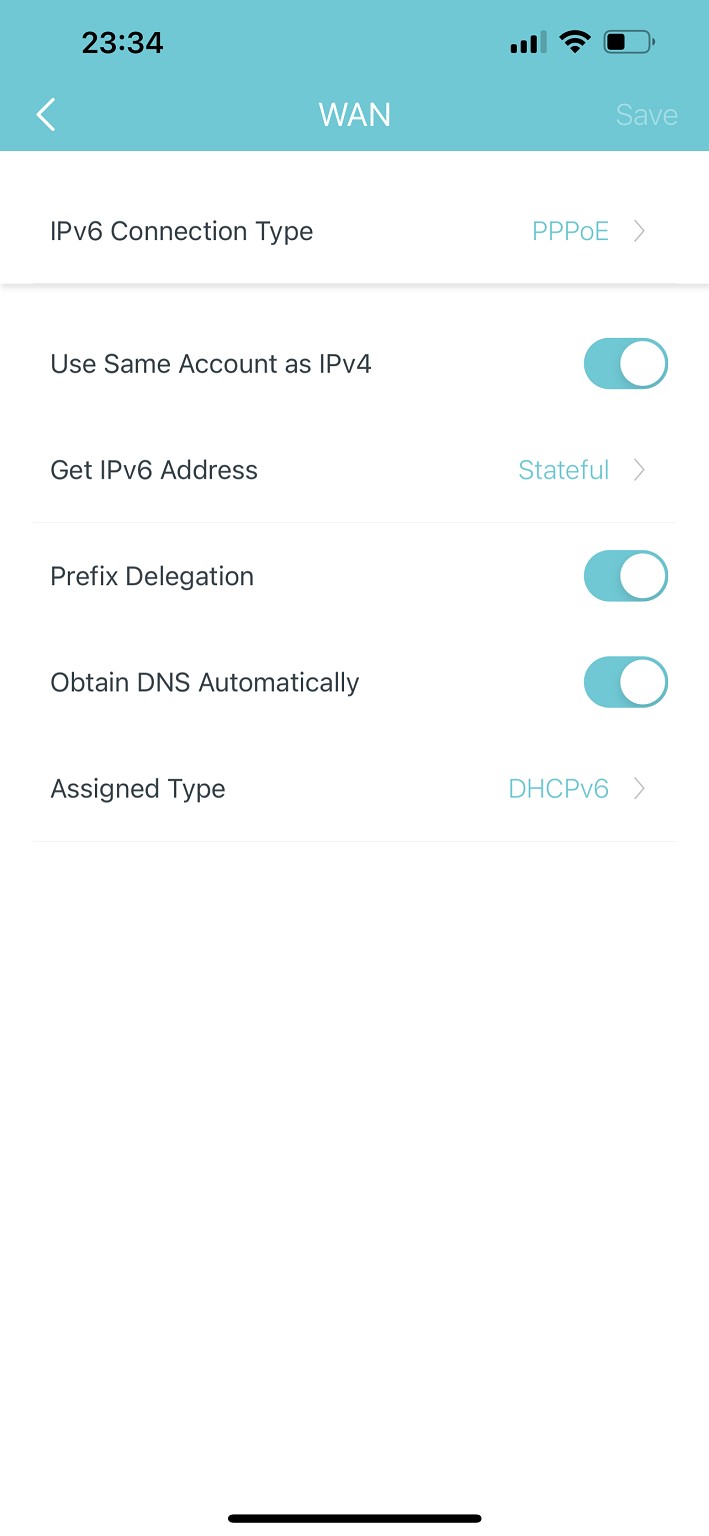
Switched from the Orbi RBK50 to Deco X55 and can’t seem to get IPv6 to work. I’ve had a look at previous threads but they unfortunately haven’t helped.

The closest I have gotten is with the settings in the screenshot below whereby it obtains the DNS servers, but no IP address.

Any help with what the settings should be would be much appreciated!

Options for “IPv6 Connection Type”: Dynamic IP, PPPoE, 6to4 tunnel, Bridge

Options for “Get IPv6 Address”: Auto, Stateful, Stateless, Non-Address

Options for “Assigned Type”: ND Proxy, SLAAC+Stateless DHCP, DHCPv6, SLAAC+RDNSS


Create new topic
liquidcore

187 posts

Master Geek
+1 received by user: 71

ID Verified

  #2857441 28-Jan-2022 00:09
Send private message

Argh, never mind - figured it out!

There must be a bug in the firmware - the “Use same account as IPv4” option doesn’t work. I got it working by toggling off that setting and manually entering the credentials…

Create new topic


Geekzone Live »

Try automatic live updates from Geekzone directly in your browser, without refreshing the page, with Geekzone Live now.


Are you subscribed to our RSS feed? You can download the latest headlines and summaries from our stories directly to your computer or smartphone by using a feed reader.
