Geekzone: technology news, blogs, forums
Guest
Welcome Guest.
You haven't logged in yet. If you don't have an account you can register now.


msukiwi

2443 posts

Uber Geek
+1 received by user: 2126

Lifetime subscriber

#298645 3-Jul-2022 21:34
Send private message

Nothing (As expected) on the 2D Network Status page!
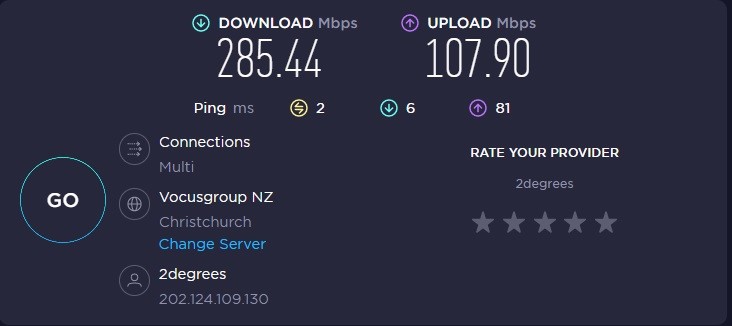



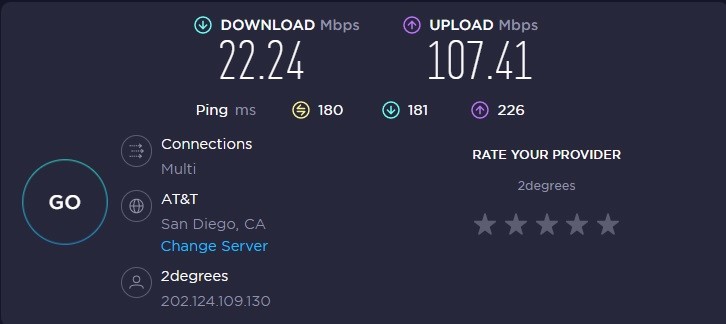
DSL Speeds on Download to AUS or USA etc, Auckland is CRAP. Christchurch is OK – which proves MY part! Weird!


Something is badly wrong!


Filter this topic showing only the reply marked as answer Create new topic
liquidcore
187 posts

Master Geek
+1 received by user: 71

ID Verified

  #2937991 3-Jul-2022 21:42
Send private message

Done on WiFi to Sydney - seems fine here.


msukiwi

2443 posts

Uber Geek
+1 received by user: 2126

Lifetime subscriber

  #2937993 3-Jul-2022 21:48
Send private message

I'm in Christchurch. Where are you?


insane
3324 posts

Uber Geek
+1 received by user: 1006

ID Verified
Trusted
2degrees
Subscriber

  #2937994 3-Jul-2022 21:56
Send private message

Even a minute amount of packet loss anywhere could have that type effect.

If the problem is consistent throughout the day I'd be checking my Ethernet cables etc and testing on another device. Hopefully those tests weren't done over wifi either.


liquidcore
187 posts

Master Geek
+1 received by user: 71

ID Verified

  #2937995 3-Jul-2022 21:56
Send private message

Auckland

msukiwi

2443 posts

Uber Geek
+1 received by user: 2126

Lifetime subscriber

  #2937997 3-Jul-2022 22:08
Send private message

insane: Even a minute amount of packet loss anywhere could have that type effect.

If the problem is consistent throughout the day I'd be checking my Ethernet cables etc and testing on another device. Hopefully those tests weren't done over wifi either.


Wired direct to 2D Fritzbox.


Same "result" with another Computer via local network to another Fritzbox port.


michaelmurfy
meow
13579 posts

Uber Geek
+1 received by user: 10910

Moderator
ID Verified
Trusted
Lifetime subscriber

  #2937999 3-Jul-2022 22:11
Send private message

Let me guess... Windows?


If you're using Windows open up the Command Prompt or Powershell under Administrator mode and type the following:


netsh int tcp set global autotuninglevel=normal


Then reboot - see if this improves your speed.


From the sticky: https://www.geekzone.co.nz/forums.asp?forumid=81&topicid=239862


Also, my connection is totally fine. Sounds like Windows TCP Tuning slowing you down to me. You could also try testing from another device (on Ethernet) or even booting your computer into Linux and testing that way.


Michael Murphy | https://murfy.nz
Referral Links: Quic Broadband (use R122101E7CV7Q for free setup)

Are you happy with what you get from Geekzone? Please consider supporting us by subscribing.
Opinions are my own and not the views of my employer.


HP


Shop now for HP laptops and other devices (affiliate link).
insane
3324 posts

Uber Geek
+1 received by user: 1006

ID Verified
Trusted
2degrees
Subscriber

  #2938002 3-Jul-2022 22:31
Send private message

michaelmurfy:

Let me guess... Windows?


If you're using Windows open up the Command Prompt or Powershell under Administrator mode and type the following:


netsh int tcp set global autotuninglevel=normal


Then reboot - see if this improves your speed.


From the sticky: https://www.geekzone.co.nz/forums.asp?forumid=81&topicid=239862


Also, my connection is totally fine. Sounds like Windows TCP Tuning slowing you down to me. You could also try testing from another device (on Ethernet) or even booting your computer into Linux and testing that way.


Since you mentioned... This might interest you and others too. Perhaps not exactly designed for home use, but speaks to the issue you mentioned.

https://www.tillered.io/

^OP, no harm checking in with 2D, they might see something happening on your handover or the BNG you're connected via. Otherwise perhaps the Fritz box is on the fritz?

msukiwi

2443 posts

Uber Geek
+1 received by user: 2126

Lifetime subscriber

  #2938020 4-Jul-2022 07:33
Send private message

OK, so the answer is that it is unique to here!


Thanks.....will investigate further here.......only thing common to both PC's is the Fritzbox!


msukiwi

2443 posts

Uber Geek
+1 received by user: 2126

Lifetime subscriber

  #2938773 6-Jul-2022 12:26
Send private message

I have just replaced my main ethernet switch and problem solved! Weird.


jonathan18
7415 posts

Uber Geek
+1 received by user: 2850

ID Verified
Trusted

  #2938788 6-Jul-2022 12:56
Send private message

msukiwi:

I have just replaced my main ethernet switch and problem solved! Weird.


Yeah, a switch seems so boring and is usually so dependable, but when it goes rogue… I has a similar experience where our NAS stopped functioning properly, and the TV’s Ethernet connection was incredibly unreliable. In the end it was shown to be the switch, so problem solved with a new one…

Filter this topic showing only the reply marked as answer Create new topic


Geekzone Live »

Try automatic live updates from Geekzone directly in your browser, without refreshing the page, with Geekzone Live now.


Are you subscribed to our RSS feed? You can download the latest headlines and summaries from our stories directly to your computer or smartphone by using a feed reader.