Geekzone: technology news, blogs, forums
Guest
Welcome Guest.
You haven't logged in yet. If you don't have an account you can register now.


sud0

283 posts

Ultimate Geek
+1 received by user: 117

ID Verified
Lifetime subscriber

#299275 25-Aug-2022 14:18
Send private message

Similar to https://www.geekzone.co.nz/forums.asp?forumid=39&topicid=299260


---


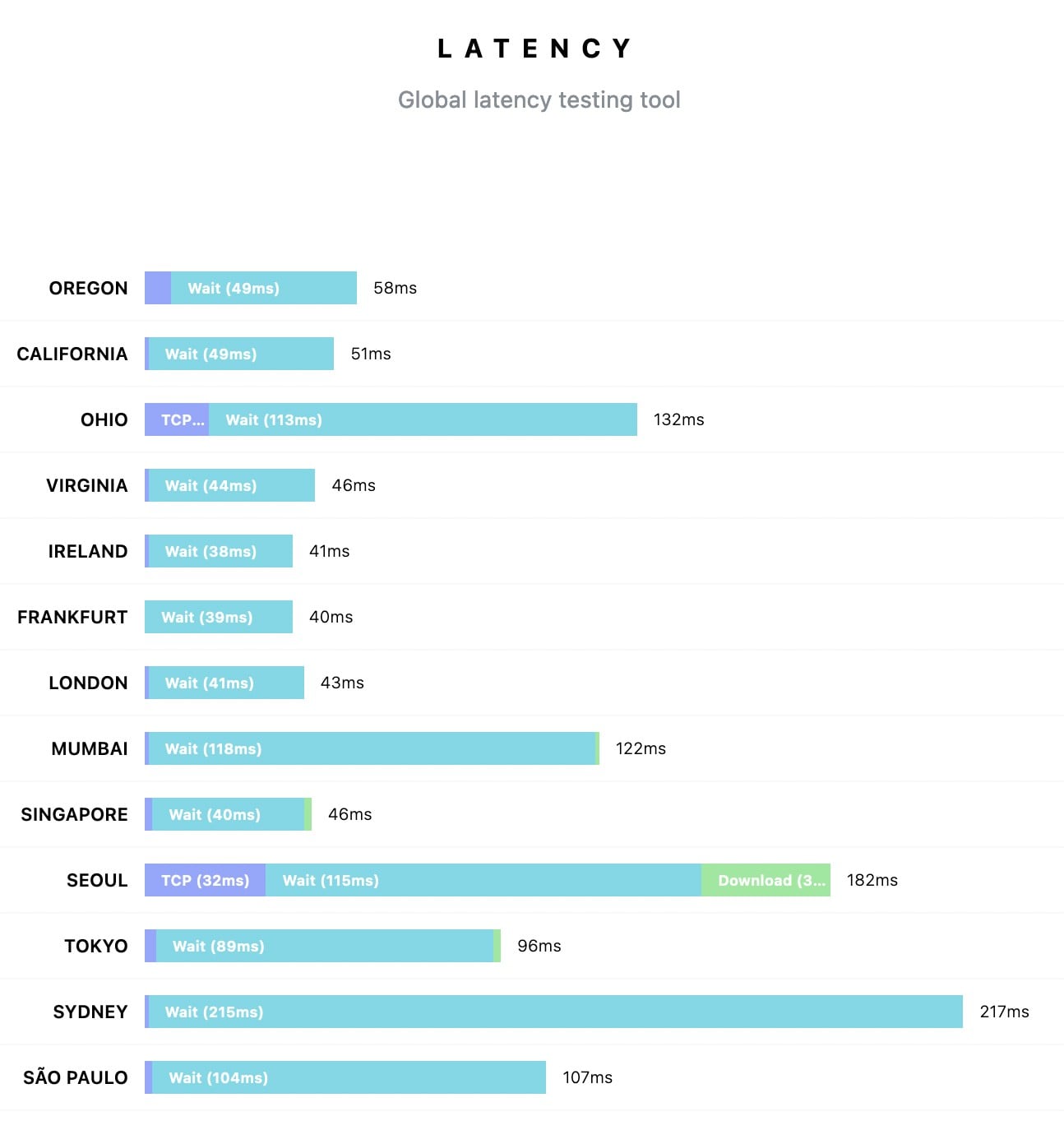
The latency of my Fiber connection to AU has gotten really worse in the past few weeks. Probably due to a Routing change. I know this kind of action is common, usually done when there is a fault - but is there anything I can do? Called 2Degrees but they won't do anything. Perhaps someone here works there and could help? 😀



Lucas


lpossamai.me


Create new topic
pwner
423 posts

Ultimate Geek
+1 received by user: 96

Trusted
2degrees

  #2959325 25-Aug-2022 14:22
Send private message

there was an issue with Southern Cross cable yesterday if the test was done then. 


Otherwise are you able to identify what IPs this uses in Sydney?


Any posts are personal comments and not that of my employer


sud0

283 posts

Ultimate Geek
+1 received by user: 117

ID Verified
Lifetime subscriber

  #2959332 25-Aug-2022 14:38
Send private message

pwner:


there was an issue with Southern Cross cable yesterday if the test was done then. 


Otherwise are you able to identify what IPs this uses in Sydney?


Test done today, but it started a couple of days ago.


And I'm using https://latency.apex.sh to test. The test in the screenshot was done to google.com.


Lucas


lpossamai.me


michaelmurfy
meow
13579 posts

Uber Geek
+1 received by user: 10910

Moderator
ID Verified
Trusted
Lifetime subscriber

  #2959337 25-Aug-2022 14:54
Send private message

Looks normal to me also. Getting the expected latency.


I am pretty sure that test doesn't go from the client. For example, I get ~30ms to google.com and yet that tool gets 217ms.


Michael Murphy | https://murfy.nz
Referral Links: Quic Broadband (use R122101E7CV7Q for free setup)

Are you happy with what you get from Geekzone? Please consider supporting us by subscribing.
Opinions are my own and not the views of my employer.


Jase2985
13730 posts

Uber Geek
+1 received by user: 6202

ID Verified
Lifetime subscriber

  #2959338 25-Aug-2022 14:57
Send private message

sud0:


pwner:


there was an issue with Southern Cross cable yesterday if the test was done then. 


Otherwise are you able to identify what IPs this uses in Sydney?


Test done today, but it started a couple of days ago.


And I'm using https://latency.apex.sh to test. The test in the screenshot was done to google.com.


sure its not that site? its 207ms in there and from command prompt its 27ms


sud0

283 posts

Ultimate Geek
+1 received by user: 117

ID Verified
Lifetime subscriber

  #2959341 25-Aug-2022 15:01
Send private message

michaelmurfy:


Looks normal to me also. Getting the expected latency.


I am pretty sure that test doesn't go from the client. For example, I get ~30ms to google.com and yet that tool gets 217ms.


It's not normal. It used to be ~25ms. I can't game now :(


From my PC:


❯ ping google.com
PING google.com (142.250.71.78): 56 data bytes
64 bytes from 142.250.71.78: icmp_seq=0 ttl=119 time=182.399 ms
64 bytes from 142.250.71.78: icmp_seq=1 ttl=119 time=183.285 ms
64 bytes from 142.250.71.78: icmp_seq=2 ttl=119 time=182.002 ms


❯ ping 139.218.121.24
PING 139.218.121.24 (139.218.121.24): 56 data bytes
64 bytes from 139.218.121.24: icmp_seq=0 ttl=51 time=120.923 ms
64 bytes from 139.218.121.24: icmp_seq=1 ttl=51 time=121.102 ms
64 bytes from 139.218.121.24: icmp_seq=2 ttl=51 time=123.519 ms
64 bytes from 139.218.121.24: icmp_seq=3 ttl=51 time=122.734 ms


Lucas


lpossamai.me


duffles
102 posts

Master Geek
+1 received by user: 77

Trusted
2degrees

  #2959380 25-Aug-2022 16:20
Send private message

From 2d UFB (300/100) in CHC, testing via WLAN (yes, I know, I shouldn't):


Tracing route to 24.121.218.139.sta.wbroadband.net.au [139.218.121.24]
over a maximum of 30 hops:


  1     2 ms     1 ms     2 ms  fritz.box [192.168.178.1]
  2     5 ms     4 ms     3 ms  111.69.7.12
  3    22 ms    19 ms    20 ms  as23655.auckland.megaport.com [43.243.22.49]
  4    21 ms    20 ms    21 ms  as4826.auckland.megaport.com [43.243.22.18]
  5    50 ms    48 ms    49 ms  114.31.202.40
  6    52 ms     *       50 ms  114.31.202.38
  7    56 ms    49 ms    49 ms  114.31.202.58
  8    50 ms    49 ms    50 ms  114.31.192.67
  9    50 ms    47 ms    48 ms  114.31.200.185
 10     *        *        *     Request timed out.
 11    95 ms    94 ms    95 ms  po1-14.lns09.mlganxd.wa.vocus.network [203.134.115.52]
 12   139 ms   138 ms   137 ms  24.121.218.139.sta.wbroadband.net.au [139.218.121.24]


Trace complete.


-


Pinging 139.218.121.24 with 32 bytes of data:
Reply from 139.218.121.24: bytes=32 time=140ms TTL=51
Reply from 139.218.121.24: bytes=32 time=138ms TTL=51


Ping statistics for 139.218.121.24:
    Packets: Sent = 4, Received = 4, Lost = 0 (0% loss),
Approximate round trip times in milli-seconds:
    Minimum = 138ms, Maximum = 140ms, Average = 138ms


Seems reasonable?


They say he carved that spoon himself.. From a bigger spoon..
Any comment made here is my own and should not be taken as that of my employer. You've seen one of these statements before.


Stream your favourite shows now on Apple TV (affiliate link).
Mahon
473 posts

Ultimate Geek
+1 received by user: 214


  #2959393 25-Aug-2022 16:50
Send private message

As far as I am aware its always been about the 50 mark to Sydney. Some of your results surprise me especially to California where I have never been able to get under 150ms. Lately its been closer to 300....


sud0

283 posts

Ultimate Geek
+1 received by user: 117

ID Verified
Lifetime subscriber

  #2959401 25-Aug-2022 17:08
Send private message

Mahon:


As far as I am aware its always been about the 50 mark to Sydney. Some of your results surprise me especially to California where I have never been able to get under 150ms. Lately its been closer to 300....


Yep.. it's always been less than 50ms to Sydney for sure, and more than 150ms to the US. But not it's the opposite and it's kind of annoying because I can't game!


Lucas


lpossamai.me


sud0

283 posts

Ultimate Geek
+1 received by user: 117

ID Verified
Lifetime subscriber

  #2959402 25-Aug-2022 17:09
Send private message

duffles:


From 2d UFB (300/100) in CHC, testing via WLAN (yes, I know, I shouldn't):


Tracing route to 24.121.218.139.sta.wbroadband.net.au [139.218.121.24]
over a maximum of 30 hops:


  1     2 ms     1 ms     2 ms  fritz.box [192.168.178.1]
  2     5 ms     4 ms     3 ms  111.69.7.12
  3    22 ms    19 ms    20 ms  as23655.auckland.megaport.com [43.243.22.49]
  4    21 ms    20 ms    21 ms  as4826.auckland.megaport.com [43.243.22.18]
  5    50 ms    48 ms    49 ms  114.31.202.40
  6    52 ms     *       50 ms  114.31.202.38
  7    56 ms    49 ms    49 ms  114.31.202.58
  8    50 ms    49 ms    50 ms  114.31.192.67
  9    50 ms    47 ms    48 ms  114.31.200.185
 10     *        *        *     Request timed out.
 11    95 ms    94 ms    95 ms  po1-14.lns09.mlganxd.wa.vocus.network [203.134.115.52]
 12   139 ms   138 ms   137 ms  24.121.218.139.sta.wbroadband.net.au [139.218.121.24]


Trace complete.


-


Pinging 139.218.121.24 with 32 bytes of data:
Reply from 139.218.121.24: bytes=32 time=140ms TTL=51
Reply from 139.218.121.24: bytes=32 time=138ms TTL=51


Ping statistics for 139.218.121.24:
    Packets: Sent = 4, Received = 4, Lost = 0 (0% loss),
Approximate round trip times in milli-seconds:
    Minimum = 138ms, Maximum = 140ms, Average = 138ms


Seems reasonable?


Anything above 100ms to AU is too much. It should be less than 30ms.


Lucas


lpossamai.me


Jase2985
13730 posts

Uber Geek
+1 received by user: 6202

ID Verified
Lifetime subscriber

  #2959528 25-Aug-2022 19:59
Send private message

sud0:


It's not normal. It used to be ~25ms. I can't game now :(


From my PC:


❯ ping google.com
PING google.com (142.250.71.78): 56 data bytes
64 bytes from 142.250.71.78: icmp_seq=0 ttl=119 time=182.399 ms
64 bytes from 142.250.71.78: icmp_seq=1 ttl=119 time=183.285 ms
64 bytes from 142.250.71.78: icmp_seq=2 ttl=119 time=182.002 ms


❯ ping 139.218.121.24
PING 139.218.121.24 (139.218.121.24): 56 data bytes
64 bytes from 139.218.121.24: icmp_seq=0 ttl=51 time=120.923 ms
64 bytes from 139.218.121.24: icmp_seq=1 ttl=51 time=121.102 ms
64 bytes from 139.218.121.24: icmp_seq=2 ttl=51 time=123.519 ms
64 bytes from 139.218.121.24: icmp_seq=3 ttl=51 time=122.734 ms


not saying its good but its a bit of a difference from the site you posted


The second sites issue is in Australia, heads to WA, then somewhere else


Mahon
473 posts

Ultimate Geek
+1 received by user: 214


  #2959601 25-Aug-2022 22:06
Send private message

sud0:


duffles:


From 2d UFB (300/100) in CHC, testing via WLAN (yes, I know, I shouldn't):


Tracing route to 24.121.218.139.sta.wbroadband.net.au [139.218.121.24]
over a maximum of 30 hops:


  1     2 ms     1 ms     2 ms  fritz.box [192.168.178.1]
  2     5 ms     4 ms     3 ms  111.69.7.12
  3    22 ms    19 ms    20 ms  as23655.auckland.megaport.com [43.243.22.49]
  4    21 ms    20 ms    21 ms  as4826.auckland.megaport.com [43.243.22.18]
  5    50 ms    48 ms    49 ms  114.31.202.40
  6    52 ms     *       50 ms  114.31.202.38
  7    56 ms    49 ms    49 ms  114.31.202.58
  8    50 ms    49 ms    50 ms  114.31.192.67
  9    50 ms    47 ms    48 ms  114.31.200.185
 10     *        *        *     Request timed out.
 11    95 ms    94 ms    95 ms  po1-14.lns09.mlganxd.wa.vocus.network [203.134.115.52]
 12   139 ms   138 ms   137 ms  24.121.218.139.sta.wbroadband.net.au [139.218.121.24]


Trace complete.


-


Pinging 139.218.121.24 with 32 bytes of data:
Reply from 139.218.121.24: bytes=32 time=140ms TTL=51
Reply from 139.218.121.24: bytes=32 time=138ms TTL=51


Ping statistics for 139.218.121.24:
    Packets: Sent = 4, Received = 4, Lost = 0 (0% loss),
Approximate round trip times in milli-seconds:
    Minimum = 138ms, Maximum = 140ms, Average = 138ms


Seems reasonable?


Anything above 100ms to AU is too much. It should be less than 30ms.


I have never ever seen it as low as 30, in fact it would almost be impossible?


Move to New Zealand's best fibre broadband service (affiliate link). Free setup code: R587125ERQ6VE. Note that to use Quic Broadband you must be comfortable with configuring your own router.
sud0

283 posts

Ultimate Geek
+1 received by user: 117

ID Verified
Lifetime subscriber

  #2959661 26-Aug-2022 09:16
Send private message


I have never ever seen it as low as 30, in fact it would almost be impossible?


It was usually somewhere around 25ms to 35ms for me.


Lucas


lpossamai.me


pwner
423 posts

Ultimate Geek
+1 received by user: 96

Trusted
2degrees

  #2959678 26-Aug-2022 09:58
Send private message

Try again now


Any posts are personal comments and not that of my employer


Linux
12173 posts

Uber Geek
+1 received by user: 8469

Trusted
Lifetime subscriber

  #2959680 26-Aug-2022 10:13
Send private message

pwner:


Try again now


@sud0


michaelmurfy
meow
13579 posts

Uber Geek
+1 received by user: 10910

Moderator
ID Verified
Trusted
Lifetime subscriber

  #2959689 26-Aug-2022 10:26
Send private message


Michael Murphy | https://murfy.nz
Referral Links: Quic Broadband (use R122101E7CV7Q for free setup)

Are you happy with what you get from Geekzone? Please consider supporting us by subscribing.
Opinions are my own and not the views of my employer.


Create new topic


Geekzone Live »

Try automatic live updates from Geekzone directly in your browser, without refreshing the page, with Geekzone Live now.


Are you subscribed to our RSS feed? You can download the latest headlines and summaries from our stories directly to your computer or smartphone by using a feed reader.