Geekzone: technology news, blogs, forums
Guest
Welcome Guest.
You haven't logged in yet. If you don't have an account you can register now.


FailedWOF

48 posts

Geek
+1 received by user: 28


#299297 26-Aug-2022 23:51
Send private message

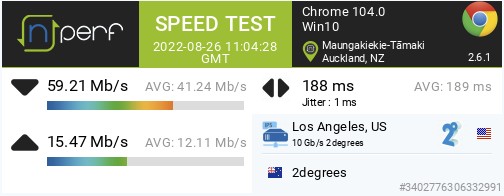
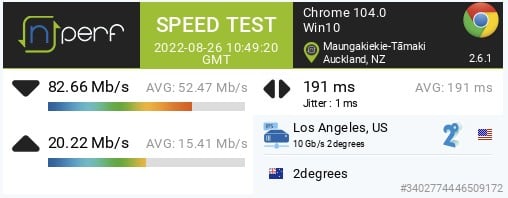
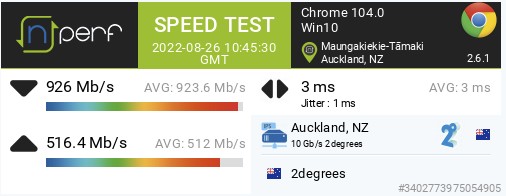
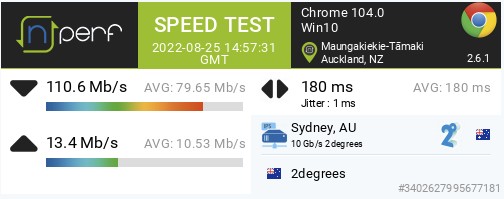
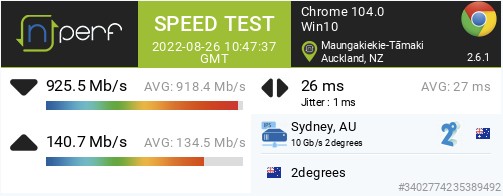
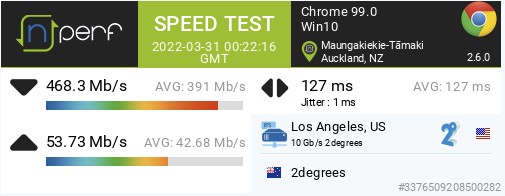
Is anyone else seeing poor speeds from/to the US? It was really noticeable last night trying to update my test OPNsense instance - package downloads were going at a snails pace (LeaseWeb San Francisco mirror). NPerf speed tests are to the 2D servers in Auckland, Sydney, and LA.


US - 26/08/2022 23:04 NZST


US - 26/08/2022 22:49 NZST


US - 26/08/2022 02:56 NZST
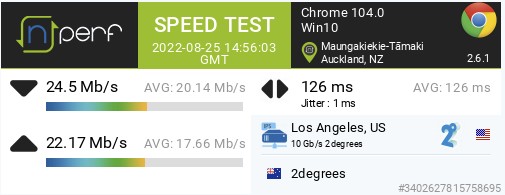


It doesn't seem related to US latency issues as the slowest speed test also had the lowest latency. NZ is fine. AU was also having issues last nite, but looks like it has been fixed.


NZ - 26/08/2022 22:45 NZST


AU - 26/08/2022 02:57 NZST


AU - 26/08/2022 22:47 NZST


Compare this to a speed test back in March and the drop is significant - 87% on download and 60% on upload. 


US - 31/03/2022 12:22 NZST


Create new topic
michaelmurfy
meow
13579 posts

Uber Geek
+1 received by user: 10910

Moderator
ID Verified
Trusted
Lifetime subscriber

  #2960069 27-Aug-2022 00:21
Send private message

Nope, I am getting ~900Mbit to the US on 2degrees currently so this is 100% just you.


Since you're using Windows it is highly likely you're running into the "classic" rubbish state of Windows TCP tuning. Follow though this: https://www.geekzone.co.nz/forums.asp?forumId=66&topicId=239862


If you're using Windows open up the Command Prompt or Powershell under Administrator mode and type the following:


netsh int tcp set global autotuninglevel=normal


Then reboot - see if this improves your speed.


It may be worth mentioning what router you're using too. And booting into Linux and testing via that.


Michael Murphy | https://murfy.nz
Referral Links: Quic Broadband (use R122101E7CV7Q for free setup)

Are you happy with what you get from Geekzone? Please consider supporting us by subscribing.
Opinions are my own and not the views of my employer.


timmmay
20858 posts

Uber Geek
+1 received by user: 5350

Trusted
Lifetime subscriber

  #2960092 27-Aug-2022 08:12
Send private message

Seems fine on 300 / 100, 2degrees fiber.


nzkc
1634 posts

Uber Geek
+1 received by user: 1041


  #2960130 27-Aug-2022 11:01
Send private message

Depends what you mean by bad. I certainly do not get line speed (am on 900/500), or even close to it. I seem to get a bit over 200Mb/s to most US servers (randomly selected) on speedtest. But then got a good result to Wave in San Francisco of 534/153, though the latency was shocking to this server compared to other US ones 🤷. Couple of other tests got similar results as well. Im certainly not unhappy with the performance as I dont expect line speed internationally.


Guess it might depend on location as I think others who have replied are Wellington. I'm in Auckland. And of course the test server selected.


FWIW: Ive tested from a wired linux host (and also wireless and get same results but my wifi is good). I get line speeds to various NZ servers. 


So I don't think its necessarily "just you" - could be a bunch of things.


nzkc
1634 posts

Uber Geek
+1 received by user: 1041


  #2960132 27-Aug-2022 11:07
Send private message

As a comparison to Timmmay, I tried the same Eugene, OR server.


First result was pretty terribad:


Tried again then got:


I put that difference down to being "just the internet".


FailedWOF

48 posts

Geek
+1 received by user: 28


  #2960159 27-Aug-2022 12:45
Send private message

michaelmurfy:


Nope, I am getting ~900Mbit to the US on 2degrees currently so this is 100% just you.


Since you're using Windows it is highly likely you're running into the "classic" rubbish state of Windows TCP tuning. Follow though this: https://www.geekzone.co.nz/forums.asp?forumId=66&topicId=239862


It may be worth mentioning what router you're using too. And booting into Linux and testing via that.


Well aware of the Windows tcp stack "features", and autotuning was already set to normal.


Connection is 1000/500, in Auckland. Router is pfSense 22.05 on ESXi 7.03U3c. Host is an i5-4570, 10gig everywhere (although gig to the ONT of course) with the path going through a Dell 8024F and a Mikrotik CRS309-1G-8S+. iPerf routed/inter-vlan is 4.3gbps, switched/intra-vlan and to the pfSense subnet gateway pegs at 9.9gbps. I had also switched things over to an OPNsense 22.7.2 instance I've been testing, with no significant change.


Getting 900mbps+ to the AKL and SYD 2degrees nperf servers. Speedtest.net via Chrome 880 and 750 respectively. Speedtest native CLI on Ubuntu 20.04 was not significantly different to - 800+mbps from AKL and SYD. But was significantly slower from LAX and SFO.


      Server: 2degrees - Auckland (id: 5539)
         ISP: 2degrees
Idle Latency:     2.98 ms   (jitter: 0.10ms, low: 2.89ms, high: 3.08ms)
    Download:   882.73 Mbps (data used: 441.4 MB)


      Server: 2degrees - Sydney (id: 18392)
         ISP: 2degrees
Idle Latency:    26.09 ms   (jitter: 0.21ms, low: 25.75ms, high: 26.18ms)
    Download:   890.12 Mbps (data used: 1.1 GB)


      Server: Spectrum - Los Angeles, CA (id: 16974)
         ISP: 2degrees
Idle Latency:   160.91 ms   (jitter: 0.30ms, low: 160.04ms, high: 161.01ms)
    Download:     2.51 Mbps (data used: 3.1 MB)


      Server: Frontier - Los Angeles, CA (id: 14236)
         ISP: 2degrees
Idle Latency:   158.89 ms   (jitter: 0.41ms, low: 158.22ms, high: 159.08ms)
    Download:    12.50 Mbps (data used: 22.1 MB)


      Server: Comcast - San Francisco, CA (id: 1783)
         ISP: 2degrees
Idle Latency:   184.00 ms   (jitter: 0.11ms, low: 183.87ms, high: 184.06ms)
    Download:     5.70 Mbps (data used: 7.1 MB)


@nzkc: by bad I mean 80mbps peak/52mbps max average yesterday, vs 468mbps peak/391mbps average in a test I ran back in March. Your first test results looks about what I was seeing, although it was consistent rather than just a one off.


Good news though, something seems to have fixed itself overnight. At least for now.


pwner
423 posts

Ultimate Geek
+1 received by user: 96

Trusted
2degrees

  #2960745 29-Aug-2022 11:53
Send private message

looks like it would have been an upstream issue which they have now resolved without any action on our side. 

as the internet is a whole lot of interconnected networks, these sort of things aren't always in our direct control.


if it happens again, let us know, but geekzone isn't the fastest way if it is something urgent, best to call up.


Any posts are personal comments and not that of my employer


Create new topic


Geekzone Live »

Try automatic live updates from Geekzone directly in your browser, without refreshing the page, with Geekzone Live now.


Are you subscribed to our RSS feed? You can download the latest headlines and summaries from our stories directly to your computer or smartphone by using a feed reader.