Geekzone: technology news, blogs, forums
Guest
Welcome Guest.
You haven't logged in yet. If you don't have an account you can register now.


decibel

335 posts

Ultimate Geek
+1 received by user: 224


#310595 4-Nov-2023 15:05
Send private message

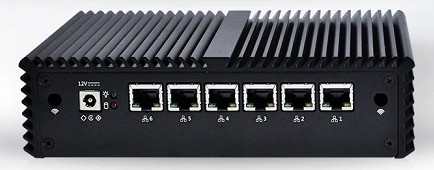
For some time I have had a Qotom box running OPNsense (23.7.7) behind a Fritzbox from 2 degrees. (now Vocus)
This makes it all double-NATed and though it all works OK, it is a bit messy.


Trying to do away with the Fritzbox has proved harder than I had hoped.
I followed the advice of @l43a2  , @monolithNZZ and others with these settings -


WAN Connection Type: DHCP (Automatic IP/Dynamic IP/IP over Ethernet)
    802.1Q: Enabled
    VLAN ID (802.1Q): 10
    802.1P (Priority): 0
    IP Version: IPv4 or IPv6
    MTU Size: 1492 or 1500


The options in OPNsense are - 
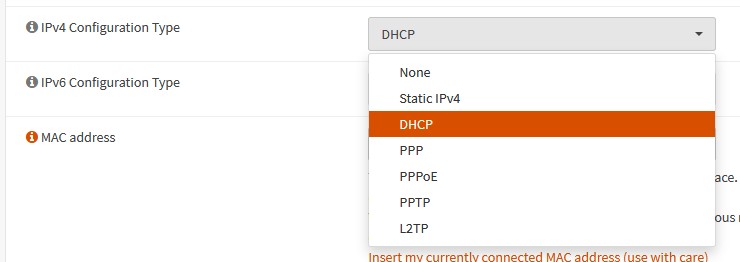


I even tried entering my public IP address (I have static IPv4 and v6 addresses) but to no avail.


Is anyone here using OPNsense (or pfsense) on Vocus?


Filter this topic showing only the reply marked as answer View this topic in a long page with up to 500 replies per page Create new topic
 1 | 2
Chills
175 posts

Master Geek
+1 received by user: 99

Subscriber

  #3155810 4-Nov-2023 16:01
Send private message

What issue are you experiencing (is it not even connecting or something of the sorts?) and how long have you been having the issue?


decibel

335 posts

Ultimate Geek
+1 received by user: 224


  #3155866 4-Nov-2023 16:52
Send private message

Sorry - I cannot get an IP address from Vocus; just totally dead.


Plug the ISP's router back in and all comes alive.  


Have tried with and without VLAN ID 10


I suspect something in the settings of the OPNsense but I have tried everything I can think of.


Chills
175 posts

Master Geek
+1 received by user: 99

Subscriber

  #3155873 4-Nov-2023 17:23
Send private message

Hmm, weird. I do know that usually IP Addresses won’t be assigned straight from the ONT hence the router. What’s your setup? (ONT > blah > blah etc)


Ruphus
469 posts

Ultimate Geek
+1 received by user: 181


  #3155909 4-Nov-2023 18:51
Send private message

After you created the VLAN in OPNsense, did you update the WAN assignment to use the new VLAN?


decibel

335 posts

Ultimate Geek
+1 received by user: 224


  #3155920 4-Nov-2023 19:09
Send private message

Chills: Hmm, weird. I do know that usually IP Addresses won’t be assigned straight from the ONT hence the router. What’s your setup? (ONT > blah > blah etc)


Original setup - 


ONT > Fritzbox > OPNsense > PC.                - this works fine, the connection between ONT and Fritzbox is set to VLAN ID 10


New setup -


ONT > OPNsense > PC                      - this does NOT work, the OPNsense box is set to VLAN ID 10.


MaxineN
Max
2049 posts

Uber Geek
+1 received by user: 1663

ID Verified
Trusted
Subscriber

  #3155922 4-Nov-2023 19:12
Send private message

You need to create your WAN interface but it needs to have nothing set (E.G none).


You then need to create your VLAN interface and attach it to your WAN interface.


You'll have a new VLAN interface in assignments where it's parented to your WAN. This is where you set your RSPs settings(I.E DHCP).


Then it should work.


Ramblings from a mysterious lady who's into tech. Warning I may often create zingers.


Shop now on AliExpress (affiliate link).
decibel

335 posts

Ultimate Geek
+1 received by user: 224


  #3155923 4-Nov-2023 19:12
Send private message

Ruphus:


After you created the VLAN in OPNsense, did you update the WAN assignment to use the new VLAN?


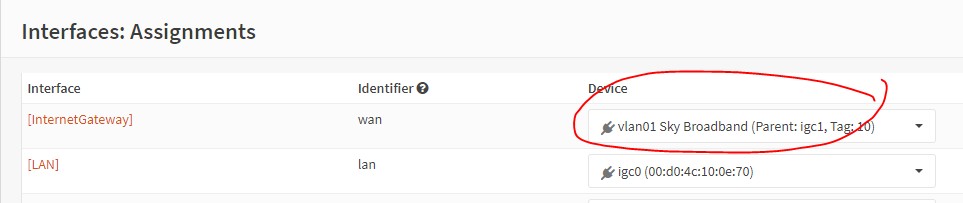
Yes, this is set under "Interfaces" > "Other types" > "VLAN"  and then added a new VLAN  with the Parent set to the WAN's ethernet port.


I am assuming that this is the only place where this needs to be set.


RunningMan
9186 posts

Uber Geek
+1 received by user: 4840


  #3155924 4-Nov-2023 19:14
Send private message

Has the entire 2D network been converted to using IPoE, or is the Fritz still using a PPPoE WAN connection? If so, try PPPoE instead of DHCP.


shanes
270 posts

Ultimate Geek
+1 received by user: 84

Lifetime subscriber

  #3155931 4-Nov-2023 19:25
Send private message

decibel:


Ruphus:


After you created the VLAN in OPNsense, did you update the WAN assignment to use the new VLAN?


Yes, this is set under "Interfaces" > "Other types" > "VLAN"  and then added a new VLAN  with the Parent set to the WAN's ethernet port.


I am assuming that this is the only place where this needs to be set.


Have you set the new VLAN as the wan Device under "Interfaces" > "Assignments"


shanes
270 posts

Ultimate Geek
+1 received by user: 84

Lifetime subscriber

  #3155936 4-Nov-2023 19:29
Send private message

decibel:


Ruphus:


After you created the VLAN in OPNsense, did you update the WAN assignment to use the new VLAN?


Yes, this is set under "Interfaces" > "Other types" > "VLAN"  and then added a new VLAN  with the Parent set to the WAN's ethernet port.


I am assuming that this is the only place where this needs to be set.


decibel

335 posts

Ultimate Geek
+1 received by user: 224


#3155943 4-Nov-2023 19:44
Send private message

shanes:


Have you set the new VLAN as the wan Device under "Interfaces" > "Assignments"


Thank you - I strongly suspect that this is the answer;  however, my wife has just arrived home and is currently on her computer.


There is no way on earth that I am going to get a chance to test this until tomorrow.  👍


Shop on-line at New World now for your groceries (affiliate link).
decibel

335 posts

Ultimate Geek
+1 received by user: 224


  #3155945 4-Nov-2023 19:45
Send private message

MaxineN:


You need to create your WAN interface but it needs to have nothing set (E.G none).


You then need to create your VLAN interface and attach it to your WAN interface.


You'll have a new VLAN interface in assignments where it's parented to your WAN. This is where you set your RSPs settings(I.E DHCP).


Then it should work.


Thank you Maxine.


Chills
175 posts

Master Geek
+1 received by user: 99

Subscriber

  #3155970 4-Nov-2023 20:50
Send private message

RunningMan:


Has the entire 2D network been converted to using IPoE, or is the Fritz still using a PPPoE WAN connection? If so, try PPPoE instead of DHCP.


The old system is still using PPPoE, however the new system is IPoE. Customers are getting migrated daily, slowly phasing out the old system.


For OP: To find out if you're on the old or new system, you would've received an email mentioning "We've made some upgrades" and your account number will end in 25.


decibel

335 posts

Ultimate Geek
+1 received by user: 224


  #3156250 5-Nov-2023 14:36
Send private message

Thank you everyone; as several of you suspected, I had not updated the WAN assignment to use the new VLAN.


Also, had to nudge it to auto-detect the new upstream gateway.


All go and WAF remains high.


decibel

335 posts

Ultimate Geek
+1 received by user: 224


  #3158394 11-Nov-2023 20:17
Send private message

Now this becomes more interesting -  before all this started, around the time my Fritzbox had a firmware update and I was switched to Vocus; I had noticed that SamKnows had been reporting little micro-outages several times a day but never long enough or often enough to cause any problems.


Yesterday, I looked at the SamKnows page and what did I see -


Other than removing the Fritzbox, the only difference is the removal of a Cisco switch between the Fritzbox and the original location of the OPNsense firewall.


More testing needed.


 1 | 2
Filter this topic showing only the reply marked as answer View this topic in a long page with up to 500 replies per page Create new topic


Geekzone Live »

Try automatic live updates from Geekzone directly in your browser, without refreshing the page, with Geekzone Live now.


Are you subscribed to our RSS feed? You can download the latest headlines and summaries from our stories directly to your computer or smartphone by using a feed reader.