Geekzone: technology news, blogs, forums
Guest
Welcome Guest.
You haven't logged in yet. If you don't have an account you can register now.


djotter

38 posts

Geek
+1 received by user: 4

Trusted

#317547 25-Oct-2024 08:56
Send private message

I am having trouble with my 2degrees internet connection.


My network topography
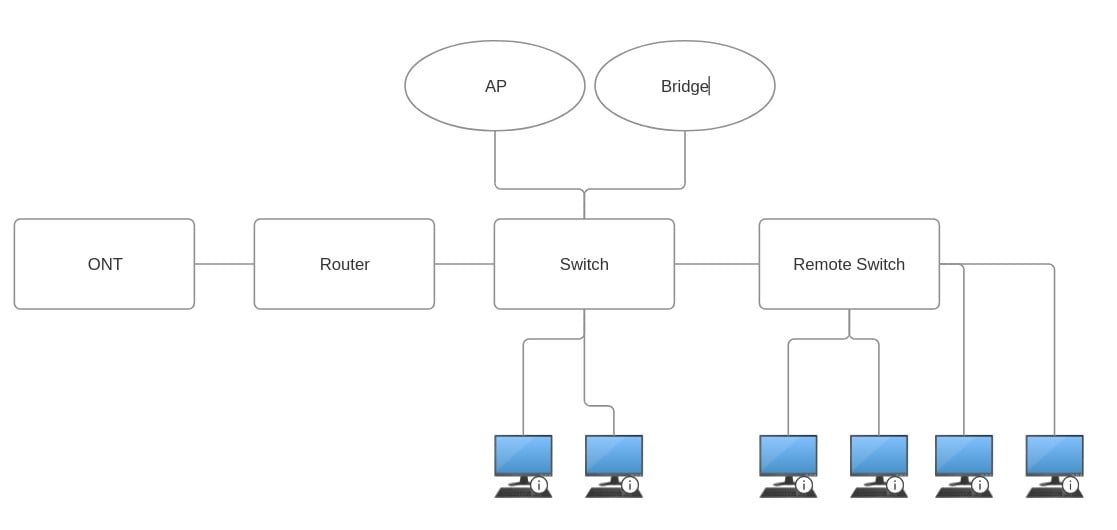


ONT - Huawei HG8240H


Router - Ubiquiti EdgerouterX (powered from POE injector) or Skinny Smart Modem (Arcadyan VRV9517)


Switch - Ubiquiti USW-Lite-8-POE


AP - Ubiquiti U6-Pro (powdered from POE switch)


Bridge Ubiquiti NBE-M5-16 (powered from POE injector)


Remote switch - Ubiquiti USW-FLEX-MINI (powdered from POE switch)


I have intermittent access to web traffic that cycles on a 30 second period. This has been happening since about mid-September. Prior to this the connection was working great for 10 months.


I observe this in the following situations


  1. Internet browsing through a web browser on desktop; Firefox.
  2. Internet browsing through a web browser on mobile devices; Firefox, Samsung Browser.
  3. Browsing on apps like Reddit, Facebook, Trademe, Aliexpress.
  4. Can't play online games without dropouts.


Error message on web browser:
Unable to connect


An error occurred during a connection to www.google.com.


I have called 2degrees support multiple times and done the following:


  1. Get my ONT serial number (I wasn't home at the time, so had to call back when I was home again, but no one ever asked for it again, so I really wonder the value of this request or if it was just busy-work to get me off the phone).
  2. They run "diagnostics" from their side and see no errors.
  3. Replace the ethernet cables between my ONT and Router, and Router and Switch.
  4. Network equipment is in a cupboard, so maybe overheating. Equipment is warm, but not hot Left the cupboard open all day and noticed no differences.
  5. Lodged a fault. I got an email with "Hi there, Just a quick note to let you know that we’ve fixed your fault". I called them up to get some more details and found that the ticket was closed with no fault found. That email is quite misleading.
  6. Pay $20 to get a 2degrees modem because they cannot help me further if I don't do this.


Things I have tried/observed


  1. I was able to ping my router and ping an external server using ping -t for half an hour with no responses over 20 ms and no errors from a desktop on my network. During this time browsing was intermittent.
  2. Replaced my router. I was using the Skinny Smart Modem, but started to get these issues and switched to the Ubiquiti EdgerouterX to see if that would help.
  3. Attached a desktop PC direct to the router (bypass the switches).
  4. I can connect with my work laptop (uses secure remote access) and have uninterrupted connectivity.
  5. Updated firmware on all Ubiquiti equipment.


I am at a loss as to what to do next. My contract with 2degrees ends this month, would another provider make any difference? Any other suggestions or ways to diagnose?


(EDIT: trying to fix formatting because I have tried to post this a few times due to connectivity errors so copied this post to a document so I didn't lose it)


Filter this topic showing only the reply marked as answer Create new topic
thewabbit
135 posts

Master Geek
+1 received by user: 42

ID Verified

  #3301310 25-Oct-2024 09:05
Send private message

Hmmm, i've noticed similar behavior in the last week or but had put it down to my 15 year old switch (which I was planning on replacing over labor weekend)


I'm currently running an ER-4 but was also going to move to TP Link VPN router as my wireless network and replacement switch are Omada units


djotter

38 posts

Geek
+1 received by user: 4

Trusted

  #3302219 28-Oct-2024 07:00
Send private message

I have noticed that if a connection is established, it doesn't drop out, but I am unable to make new connections on the 30 second cycle.


e.g. the secure remote connection link on my work laptop as I stated, but also, I had a multi-GB download on Steam that went start-to-finish without interruption.


This has to be a software/configuration issue on the ISP side, right?


CYaBro
4708 posts

Uber Geek
+1 received by user: 1182

ID Verified
Trusted

  #3302220 28-Oct-2024 07:14
Send private message

Tried different DNS servers?


Opinions are my own and not the views of my employer.


muppet
2642 posts

Uber Geek
+1 received by user: 1660

Trusted

  #3302235 28-Oct-2024 09:06
Send private message

Do you have a static/public IP, or are you on a 2D CGNAT'd connection?


Your symptoms sound like port exhaustion on the CGNAT platform unable to allocate you anymore sessions because you've used too many. Why you'd have used too many could be you've got someone running bittorrent, or you've got heaps of users on your network, or you've got a compromised machine that's being very spammy from a network ports point of view.


Does your router have the ability to show you how many sessions/flows it's got going through it?  If so, when you start having issues, can you count how many?


The fact that existing sessions keep working but you can't establish new ones is the CGNAT giveaway - that and ICMP works just fine as well.


Another thing you can try to debug it would be to plug your laptop directly into the ONT (not the router as you've done), Tag the Ethernet port with VLAN10 and browse just using your latpop for a few hours.


But yes, I'd get your ISP involved, esp if you're on a CGNAT service with them.


Audiophiles are such twits! They buy such pointless stuff: Gold plated cables, $2000 power cords. Idiots.


OOOHHHH HYPERFIBRE!


timmmay
20858 posts

Uber Geek
+1 received by user: 5350

Trusted
Lifetime subscriber

  #3302236 28-Oct-2024 09:10
Send private message

My first thing was to check what DNS servers you're using. Also, are you using Pi Hole or anything similar?


djotter

38 posts

Geek
+1 received by user: 4

Trusted

  #3302258 28-Oct-2024 10:25
Send private message

CYaBro: Tried different DNS servers?


I have tried


1.1.1.1 / 1.0.0.1


8.8.8.8 / 8.8.4.4


And leaving the dns name server as blank which routed via a CALLPLUS DNS server


Shop now on Samsung phones, tablets, TVs and more (affiliate link).
djotter

38 posts

Geek
+1 received by user: 4

Trusted

  #3302259 28-Oct-2024 10:26
Send private message

timmmay:


My first thing was to check what DNS servers you're using. Also, are you using Pi Hole or anything similar?


Not using Pi Hole, I have tried the Google, Cloudflare, and default (blank in router settings) name servers.


djotter

38 posts

Geek
+1 received by user: 4

Trusted

  #3302263 28-Oct-2024 10:46
Send private message

muppet:


Do you have a static/public IP, or are you on a 2D CGNAT'd connection?


Your symptoms sound like port exhaustion on the CGNAT platform unable to allocate you anymore sessions because you've used too many. Why you'd have used too many could be you've got someone running bittorrent, or you've got heaps of users on your network, or you've got a compromised machine that's being very spammy from a network ports point of view.


Does your router have the ability to show you how many sessions/flows it's got going through it?  If so, when you start having issues, can you count how many?


The fact that existing sessions keep working but you can't establish new ones is the CGNAT giveaway - that and ICMP works just fine as well.


Another thing you can try to debug it would be to plug your laptop directly into the ONT (not the router as you've done), Tag the Ethernet port with VLAN10 and browse just using your latpop for a few hours.


But yes, I'd get your ISP involved, esp if you're on a CGNAT service with them.


I am on CG-NAT and running bittorrent.


I could find the session count on the Skinny Smart Modem, but can't find it in the EdgerouterX. So from memory, I think it had 12000.


I have shut down the PC running bittorent and the issues have gone away :D


Thanks for the tips. I will trim out some old torrents and reduce the amount of concurrent connections.


richms
29098 posts

Uber Geek
+1 received by user: 10208

Trusted
Lifetime subscriber

  #3302484 28-Oct-2024 14:27
Send private message

djotter:


I am on CG-NAT and running bittorrent.


I could find the session count on the Skinny Smart Modem, but can't find it in the EdgerouterX. So from memory, I think it had 12000.


I have shut down the PC running bittorent and the issues have gone away :D


Thanks for the tips. I will trim out some old torrents and reduce the amount of concurrent connections.


This has come up a few times recently. Should the number of open connections be something that cgnat ISPs should have to disclose and have better troubleshooting for?


Seems the OP has wasted quite a bit of time over this.


Richard rich.ms

michaelmurfy
meow
13579 posts

Uber Geek
+1 received by user: 10910

Moderator
ID Verified
Trusted
Lifetime subscriber

  #3302605 29-Oct-2024 00:57
Send private message

richms:


This has come up a few times recently. Should the number of open connections be something that cgnat ISPs should have to disclose and have better troubleshooting for?


Seems the OP has wasted quite a bit of time over this.


I'm not quite sure how many customers per IP on 2degrees CG-NAT but it does seem like quite a bit of a limitation. This has also been going on for quite a while too and isn't a great customer experience (not to mention, does give CG-NAT a bad name).


@Sounddude happen to know what's up here?


Michael Murphy | https://murfy.nz
Referral Links: Quic Broadband (use R122101E7CV7Q for free setup)

Are you happy with what you get from Geekzone? Please consider supporting us by subscribing.
Opinions are my own and not the views of my employer.


sidefx
3775 posts

Uber Geek
+1 received by user: 1295

Trusted

  #3304060 1-Nov-2024 11:01
Send private message

Pretty sure we're suffering from the same issue in our household, and have very few torrents, if any, active most of the time.  Would a 5 person household with 2 people WFH fulltime and 3 teens\kids gaming (+various other always on devices, IoT, etc) have the same issue?  


It's extremely annoying and TBH if the only option is an extra $10 for static IP I'll probably shop around for another ISP. 


"I was born not knowing and have had only a little time to change that here and there."         | Octopus Energy | Sharesies
              - Richard Feynman


Shop now on AliExpress (affiliate link).
Sounddude
I fix stuff!
1935 posts

Uber Geek
+1 received by user: 640

Trusted
2degrees
Lifetime subscriber

  #3304064 1-Nov-2024 11:37
Send private message

michaelmurfy:


@Sounddude happen to know what's up here?


Sorry, late reply but have the team doing some checks on this.


Filter this topic showing only the reply marked as answer Create new topic


Geekzone Live »

Try automatic live updates from Geekzone directly in your browser, without refreshing the page, with Geekzone Live now.


Are you subscribed to our RSS feed? You can download the latest headlines and summaries from our stories directly to your computer or smartphone by using a feed reader.