Geekzone: technology news, blogs, forums
Guest
Welcome Guest.
You haven't logged in yet. If you don't have an account you can register now.


Rudster

120 posts

Master Geek
+1 received by user: 18


#318294 4-Jan-2025 23:19

Hello,


I have been facing ongoing fibre network issues for the last 2 weeks. Outside of the other mobile issues of the past 6 months.


Essentially services like Prime Video would fail to load from time to time. This evening if ended up being the website "https://pages.github.com" failing to load on any device on my network.Given how many documentation sites are backed by github pages, it has been causing me issues.


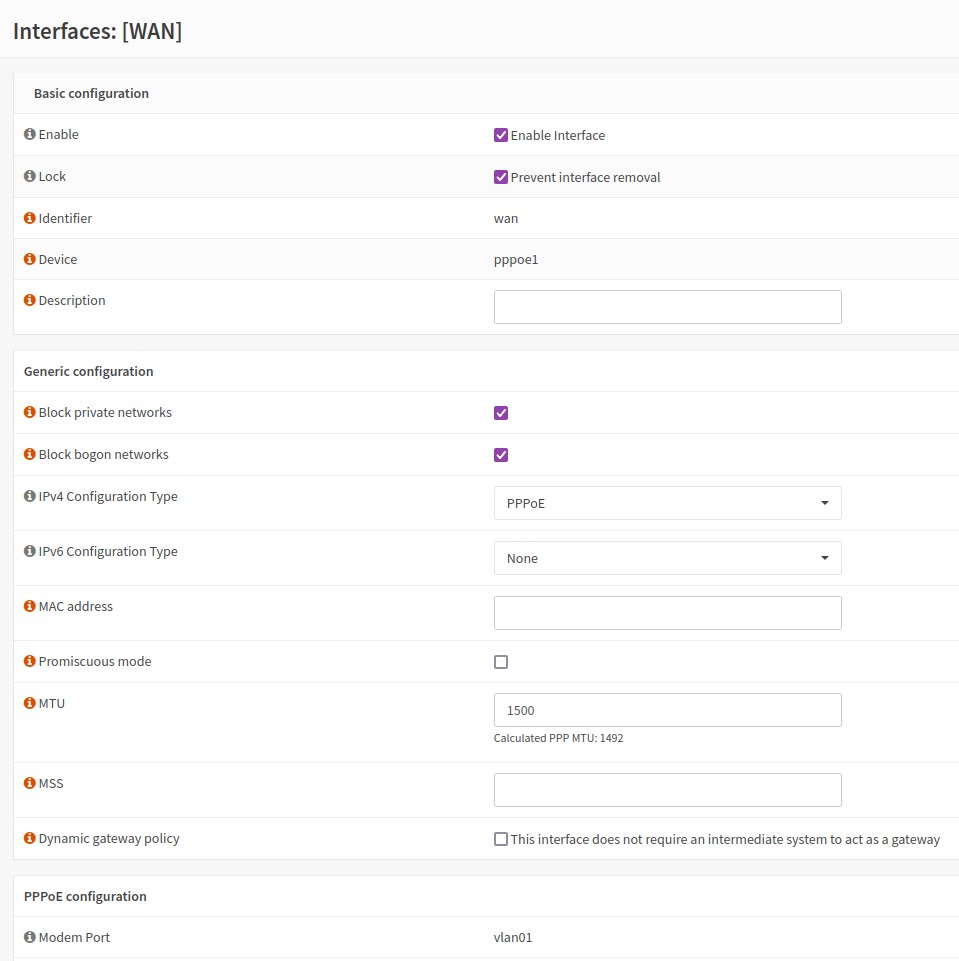
I have successfully mitigated it. It required dropping my MTU on my router (OPNSense) from 1492 to 1484. While I'm glad I could mitigate the issue, I'm curious as to why this is suddenly an issue? I was seeing heavy packet loss and high latency to a bunch of IP addresses with TCP handshake issues all over the place.


I'm hoping this fixes my temperamental networking issues as well but anyone have any ideas on why I would need to set this lower than the official 2Degrees documentation?


https://www.2degrees.nz/help/broadband-help/modem-settings/byo-modem-help


Cheers!


View this topic in a long page with up to 500 replies per page Create new topic
 1 | 2 | 3 | 4 | 5 | 6 | ... | 8
fe31nz
1319 posts

Uber Geek
+1 received by user: 446


  #3327573 5-Jan-2025 00:23
Send private message

There is something wrong if you can not use MTU 1500 on an IPoE (DHCP) fibre connection.  Let alone have to go below 1492.  But it does depend on just where those numbers are being applied.  MTU 1500 is the standard size of the entire packet on an Ethernet connection, including all the IP headers, but not the Ethernet headers.  Using MTU 1492 used to be necessary when you had a PPP connection to your ISP, as the PPP protocol needs 8 bytes of headers.  But fibre connections in NZ are overprovisioned so that they will carry MTU 1508 packets, allowing the MTU for the Ethernet WAN connection on your router to be set to MTU 1508, the VLAN connection to be set to MTU 1508 and the PPP connection running over that to be set to MTU 1500.  The extra bytes for VLAN headers are at the Ethernet level, so do not count in the MTU settings.  And I believe the VLAN headers are stripped / added at the ONT port and not sent on the fibre as such - the ONT uses them in other ways than VLAN on your network.


OPNSense should allow you to do pings directly from the router, so you should be able to use the ping packet size settings to find out exactly what MTU works on your WAN connection to 2Degrees.  Remember to do it for both IPv4 and IPv6.  And you can probably also run Wireshark or tshark or tcpdump to capture problem traffic directly on the WAN port and see exactly what is happening, especially the ICMP/ICMPv6 reply packets.


I am on 2Degrees on a static IP address and am using MTU 1508 and PPPoE for my IPv4, with IPv6 running on IPoE.  For some reason when 2Degrees moved me over to their new network, I could not get IPv4 to run on DHCP and have not tried again since.  There were other problems with the move that have since been fixed (such as the landline phone voicemail not working), so it may be that my IPv4 DHCP problem has been fixed too, but as PPP is working fine I have not wanted to spend the time trying DHCP again.


Rudster

120 posts

Master Geek
+1 received by user: 18


  #3327575 5-Jan-2025 01:16

So a little more background. I have had this connection for roughly 5 years now. As such it has not changed in that time. So I'm still using the original PPP which would explain 1492 on the WAN interface. I also have a static IP, and the connection requires vlan tagging. I have heard that supposedly one could use DHCP but up until recently, it was not broken so why fix?


I do also provide a username and password for the PPPoE config which was required back when I set this up. Not sure if it is anymore.


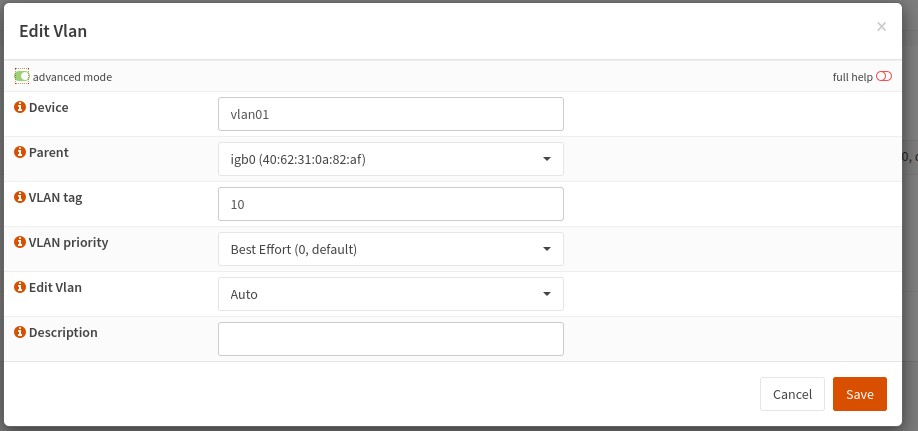
Looking at the vlan tagged 10, I see nothing about MTU, 


In addition I also have IPV6 disabled. I had problems with IPV6 not working on OPNSense way back when I set it up and so I just disabled it. Have not had a need for it since.


Testing packet sizes from OPNSense, I'm getting some odd errors to the problematic IP     185.199.108.153


At 1464 and above, I get "sendto: Message too long"


At 1456, I get 100% packet loss but no error


At 1448, Pings go through but I have a 4.3% packet loss, but that may just be me stopping it before packets respond.


Something does seem really wrong here.


Network can handle up to an MTU of 1456 to 1.1.1.1


fe31nz
1319 posts

Uber Geek
+1 received by user: 446


  #3327579 5-Jan-2025 05:01
Send private message

OK, if you are using PPP then the correct settings for the WAN port are MTU 1508 for the Ethernet connection, MTU 1508 for the VLAN 10 connection and MTU 1500 for the PPP connection.  They probably do not list those settings on their web site any more as new connections will all be IPoE/DHCP.


Your problem site at 185.199.108.153 is simply a bad site or router on the route to that site, not a problem at your end.  I can ping it with "ping -s 1448 185.199.108.153", but not with "ping -s 1449 185.199.108.153".  I do not get any ICMP error packets back when it fails to ping.  If I do a traceroute to 185.199.108.153 and ping some of the routers along that route that respond to pings, they can handle full size pings.  So it should be reported to github.com so they can fix it.


root@mypvr:~# traceroute 185.199.108.153
traceroute to 185.199.108.153 (185.199.108.153), 64 hops max
  1   10.0.2.251  0.532ms  0.103ms  0.106ms
  2   *  *  *
  3   101.98.0.66  9.141ms  8.132ms  9.004ms
  4   101.98.5.93  20.238ms  19.059ms  19.273ms
  5   *  *  *
  6   124.150.165.62  43.680ms  44.416ms  43.419ms
  7   124.150.165.2  44.773ms  43.518ms  44.146ms
  8   218.100.52.44  43.566ms  43.163ms  46.000ms
  9   45.64.201.2  48.465ms  43.972ms  44.520ms
 10   *  *  *
 11   *  *  *
 12   *  *  *
 13   *  *  *
^C


root@mypvr:~# ping -s 1473 218.100.52.44
PING 218.100.52.44 (218.100.52.44) 1473(1501) bytes of data.
1481 bytes from 218.100.52.44: icmp_seq=1 ttl=61 time=35.5 ms
1481 bytes from 218.100.52.44: icmp_seq=2 ttl=61 time=30.6 ms
1481 bytes from 218.100.52.44: icmp_seq=3 ttl=61 time=30.7 ms
^C


gives this in tshark on my ER4 router:


vbash-4.1# tshark -tad -P -w pppoe0.pcap -i pppoe0 host 218.100.52.44
Running as user "root" and group "root". This could be dangerous.
Capturing on 'pppoe0'
    1 2025-01-05 04:48:59.545502756 203.86.202.190 ? 218.100.52.44 IPv4 1516 Fragmented IP protocol (proto=ICMP 1, off=0, ID=467b)
    2 2025-01-05 04:48:59.580590075 218.100.52.44 ? 203.86.202.190 IPv4 1516 Fragmented IP protocol (proto=ICMP 1, off=0, ID=7f94)
    3 2025-01-05 04:49:00.547195249 203.86.202.190 ? 218.100.52.44 IPv4 1516 Fragmented IP protocol (proto=ICMP 1, off=0, ID=48f8)
    4 2025-01-05 04:49:00.547215302 203.86.202.190 ? 218.100.52.44 ICMP 37 Echo (ping) request  id=0x8e49, seq=2/512, ttl=63
    5 2025-01-05 04:49:00.577269895 218.100.52.44 ? 203.86.202.190 IPv4 1516 Fragmented IP protocol (proto=ICMP 1, off=0, ID=7f94)
    6 2025-01-05 04:49:00.577272792 218.100.52.44 ? 203.86.202.190 ICMP 37 Echo (ping) reply    id=0x8e49, seq=1/256, ttl=62
    7 2025-01-05 04:49:01.549218030 203.86.202.190 ? 218.100.52.44 IPv4 1516 Fragmented IP protocol (proto=ICMP 1, off=0, ID=4b78)
    8 2025-01-05 04:49:01.549238655 203.86.202.190 ? 218.100.52.44 ICMP 37 Echo (ping) request  id=0x8e49, seq=3/768, ttl=63
    9 2025-01-05 04:49:01.579347138 218.100.52.44 ? 203.86.202.190 IPv4 1516 Fragmented IP protocol (proto=ICMP 1, off=0, ID=7f94)
   10 2025-01-05 04:49:01.579350328 218.100.52.44 ? 203.86.202.190 ICMP 37 Echo (ping) reply    id=0x8e49, seq=3/768, ttl=62 (request in 8)


So the ping replies are being fragmented, despite the "do not fragment" bit being set in the ping requests.


root@mypvr:~# ping -s 1472 218.100.52.44
PING 218.100.52.44 (218.100.52.44) 1472(1500) bytes of data.
1480 bytes from 218.100.52.44: icmp_seq=1 ttl=61 time=31.1 ms
1480 bytes from 218.100.52.44: icmp_seq=2 ttl=61 time=32.8 ms
1480 bytes from 218.100.52.44: icmp_seq=3 ttl=61 time=31.8 ms
^C


At 1472 ping size, the replies are not fragmented:


   11 2025-01-05 04:49:07.175345228 203.86.202.190 ? 218.100.52.44 ICMP 1516 Echo (ping) request  id=0x8e5a, seq=1/256, ttl=63
   12 2025-01-05 04:49:07.205726675 218.100.52.44 ? 203.86.202.190 ICMP 1516 Echo (ping) reply    id=0x8e5a, seq=1/256, ttl=62 (request in 11)
   13 2025-01-05 04:49:08.176848998 203.86.202.190 ? 218.100.52.44 ICMP 1516 Echo (ping) request  id=0x8e5a, seq=2/512, ttl=63
   14 2025-01-05 04:49:08.209120681 218.100.52.44 ? 203.86.202.190 ICMP 1516 Echo (ping) reply    id=0x8e5a, seq=2/512, ttl=62 (request in 13)
   15 2025-01-05 04:49:09.179076111 203.86.202.190 ? 218.100.52.44 ICMP 1516 Echo (ping) request  id=0x8e5a, seq=3/768, ttl=63
   16 2025-01-05 04:49:09.210316431 218.100.52.44 ? 203.86.202.190 ICMP 1516 Echo (ping) reply    id=0x8e5a, seq=3/768, ttl=62 (request in 15)


RunningMan
9426 posts

Uber Geek
+1 received by user: 5122


  #3327606 5-Jan-2025 09:20
Send private message

Have a read of this thread. The symptoms sound similar, but that was a really unusual fault. Easily ruled in or out though by testing the different packet lengths.


Rudster

120 posts

Master Geek
+1 received by user: 18


  #3327669 5-Jan-2025 11:11

So I have done more debugging.


Updating the MTU to 1508 on my WAN/VLAN10 interface just broke the internet. I could not get AWS to load completely. Some components such as billing came through but otherwise the site was non functional.


Updating to 1500 resolved those issues so something differs between our connections here.


I ran a traceroute and replicated your results above


traceroute to 185.199.108.153 (185.199.108.153), 30 hops max, 60 byte packets
 1  _gateway (192.168.10.1)  0.259 ms  0.230 ms  0.259 ms
 2  * * *
 3  ext.cpcak4-r1.tranzpeer.net (101.98.0.66)  1.713 ms  1.773 ms  1.766 ms
 4  default-rdns.vocus.co.nz (101.98.5.93)  14.306 ms  16.089 ms  16.081 ms
 5  * * *
 6  124.150.165.62 (124.150.165.62)  38.647 ms  37.605 ms  37.573 ms
 7  124.150.165.2 (124.150.165.2)  39.124 ms  38.717 ms  40.312 ms
 8  as18407.nsw.ix.asn.au (218.100.52.44)  40.045 ms  40.572 ms  40.023 ms
 9  45.64.201.2 (45.64.201.2)  38.671 ms  39.781 ms  40.536 ms


I think we can confirm that whatever the issue is with the github pages site, it appears to be aligned between our connections?


Can you confirm if you can actually reach https://pages.github.com ?


Next step I wanted to check RuenningMan's comment.


I spun up an EC2 in ap-southeast-2 AWS and ran


ping -M do -s 1464 <MY_IP>
PING <MY_IP> (<MY_IP>) 1464(1492) bytes of data.
1472 bytes from <MY_IP>: icmp_seq=1 ttl=54 time=27.4 ms


ping -M do -s 1465 <MY_IP>
PING <MY_IP> (<MY_IP>) 1465(1493) bytes of data.
ping: local error: message too long, mtu=1492


Which lines up with my initial discovery that I had to set the MTU to 1484 on my WAN/VLAN


So looking at this, It looks like there is an issue with my line?


Rudster

120 posts

Master Geek
+1 received by user: 18


  #3327777 5-Jan-2025 12:09

Scratch that, ping test is consistent. 1464 (1492 bytes) with 1500 mtu (1492 pppoe)


So that would indicate the issue is likely between 2D and github?


Shop now for Lego sets and other gifts (affiliate link).
yitz
2327 posts

Uber Geek
+1 received by user: 620


  #3327861 5-Jan-2025 16:18
Send private message

Rudster:


 4  default-rdns.vocus.co.nz (101.98.5.93)  14.306 ms  16.089 ms  16.081 ms
 5  * * *
 6  124.150.165.62 (124.150.165.62)  38.647 ms  37.605 ms  37.573 ms
 7  124.150.165.2 (124.150.165.2)  39.124 ms  38.717 ms  40.312 ms
 8  as18407.nsw.ix.asn.au (218.100.52.44)  40.045 ms  40.572 ms  40.023 ms
 9  45.64.201.2 (45.64.201.2)  38.671 ms  39.781 ms  40.536 ms


Looks like the DIA filter there so could be other factors at play here as it's not your normal path onto the Internet.


fe31nz
1319 posts

Uber Geek
+1 received by user: 446


  #3327874 5-Jan-2025 17:57
Send private message

Rudster:


So I have done more debugging.


Updating the MTU to 1508 on my WAN/VLAN10 interface just broke the internet. I could not get AWS to load completely. Some components such as billing came through but otherwise the site was non functional.


Updating to 1500 resolved those issues so something differs between our connections here.


I ran a traceroute and replicated your results above


traceroute to 185.199.108.153 (185.199.108.153), 30 hops max, 60 byte packets
 1  _gateway (192.168.10.1)  0.259 ms  0.230 ms  0.259 ms
 2  * * *
 3  ext.cpcak4-r1.tranzpeer.net (101.98.0.66)  1.713 ms  1.773 ms  1.766 ms
 4  default-rdns.vocus.co.nz (101.98.5.93)  14.306 ms  16.089 ms  16.081 ms
 5  * * *
 6  124.150.165.62 (124.150.165.62)  38.647 ms  37.605 ms  37.573 ms
 7  124.150.165.2 (124.150.165.2)  39.124 ms  38.717 ms  40.312 ms
 8  as18407.nsw.ix.asn.au (218.100.52.44)  40.045 ms  40.572 ms  40.023 ms
 9  45.64.201.2 (45.64.201.2)  38.671 ms  39.781 ms  40.536 ms


I think we can confirm that whatever the issue is with the github pages site, it appears to be aligned between our connections?


Can you confirm if you can actually reach https://pages.github.com ?


I have no problem with accessing https://pages.github.com, but as I have IPv6 working and that site is fully IPv6 enabled, I will be connecting to it using IPv6.  Do not attempt to enable IPv6 yourself until you can get the MTU 1508 settings working - IPv6 over PPP is broken by a bug in PPP unless it is able to pass full MTU 1500 packets on the PPP connection.  There is a workaround for this, but I do not know if OPNSense can do it - you have to set the maximum MTU setting in the IPv6 Router Advertisment packets to 1492 I think.  I was able to do that in my ER4 before the overprovisioning was available, so I know it works.  But it is a pretty specific feature of IPv6 that is not often supported in routers.


What version of OPNSense are you using?  I found that there have been problems with the OPNSense and FreeBSD MTU implementation that were supposed to have been fixed in 2023:


https://forum.opnsense.org/index.php?topic=35518.0


If you could get MTU 1508 working and then enable IPv6, that would be a good workaround for the IPv4 problems with https://pages.github.com.


lsdda
1 post

Wannabe Geek


#3327992 5-Jan-2025 23:44
Send private message

I've been experiencing the same issue over the past few weeks. I'm also on 2degrees and was unable to access GitHub Pages. At first, I thought it might be due to a bad update on my computer, but the problem persisted.


After some trial and error, I changed my MTU setting to 1280, and now everything is working fine again. My network knowledge is limited so I don't even know where to look for the cause.


Rudster

120 posts

Master Geek
+1 received by user: 18


  #3328337 6-Jan-2025 16:24

I'm using latest for opnsense.

I'll raise something with 2degrees but I have not had luck getting responses from their support team this past year.
Otherwise I'm not sure what else I can do. MTU of 1508 is broken in my connection, so I cannot use ipv6 with pppoe.

I'll try plugging in a spare router I have just to eliminate an opnsense issue.


yitz
2327 posts

Uber Geek
+1 received by user: 620


  #3328339 6-Jan-2025 16:50
Send private message

If you redirect pages.github.com to the next IPv4 address up 185.199.108.154 (say using a hosts file) do you still get issues?


That would be a way to test if the DIA filter is causing issues with its deep packet inspection and reassembly as only traffic to .153 is intercepted, I believe they use the GRE tunnel protocol at least in the past but I'm not up to date with how it all works now.


On a wholesale 2degrees PPPoE connection (1492 bytes MTU size) with MSS clamping enabled on the NAT I can visit https://pages.github.com fine at .153 or .154 addresses. Is there a specific functionality other than successful page load to test? My page load was using TCP (I don't know it uses QUIC on some browsers) MSS 1452 bytes.


Support Geekzone with one-off or recurring donations Donate via PressPatron.
Rudster

120 posts

Master Geek
+1 received by user: 18


  #3328366 6-Jan-2025 18:46

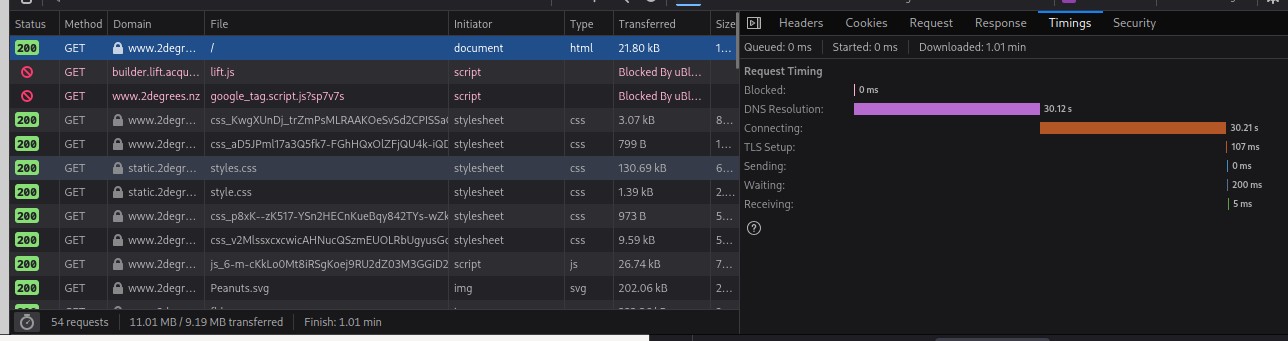
I have tried updating the hosts file. I initially thought it was a DNS issue as I had recently changed the networks DNS config. But reversing it, and messing with browsers config made no change. Mobile devices, windows, and linux. Switching to 2D 4G and it works. 

The only last thing that I don't understand is if I use the lynx browser, it works. If I curl, it's fine. But Chrome and Firefox both have issues. And it's device agnostic.


Edit: Retested lynx, and it loaded but it took a solid 10 seconds to setup connection. I am also having issue with https://www.2degrees.nz


Rudster

120 posts

Master Geek
+1 received by user: 18


  #3328369 6-Jan-2025 18:56

 ping -M do -s 1456 www.2degrees.nz
PING dsu09xgs6muxj.cloudfront.net (54.192.177.24) 1456(1484) bytes of data.
1464 bytes from server-54-192-177-24.akl50.r.cloudfront.net (54.192.177.24): icmp_seq=1 ttl=248 time=1.71 ms
1464 bytes from server-54-192-177-24.akl50.r.cloudfront.net (54.192.177.24): icmp_seq=2 ttl=248 time=2.25 ms
^C
--- dsu09xgs6muxj.cloudfront.net ping statistics ---
2 packets transmitted, 2 received, 0% packet loss, time 1001ms
rtt min/avg/max/mdev = 1.706/1.978/2.251/0.272 ms


 ping -M do -s 1457 www.2degrees.nz
PING dsu09xgs6muxj.cloudfront.net (54.192.177.24) 1457(1485) bytes of data.
ping: sendmsg: Message too long
^C
--- dsu09xgs6muxj.cloudfront.net ping statistics ---
2 packets transmitted, 0 received, +2 errors, 100% packet loss, time 1023ms


Rudster

120 posts

Master Geek
+1 received by user: 18


  #3328377 6-Jan-2025 19:43

Final test for today.


Set MTU to 1508 as recommended, and tested destinations.


1.1.1.1 (Known Good)


ap-southeast-2.console.aws.amazon.com (Known Issue)


www.2degrees.nz (Known Issue)


ping -M do -s 1472 ap-southeast-2.console.aws.amazon.com
PING a9faf713df4858b6a.awsglobalaccelerator.com (99.83.249.255) 1472(1500) bytes of data.
^C
--- a9faf713df4858b6a.awsglobalaccelerator.com ping statistics ---
6 packets transmitted, 0 received, 100% packet loss, time 5078ms


ping -M do -s 1472 1.1.1.1
PING 1.1.1.1 (1.1.1.1) 1472(1500) bytes of data.
1480 bytes from 1.1.1.1: icmp_seq=1 ttl=58 time=1.36 ms
1480 bytes from 1.1.1.1: icmp_seq=2 ttl=58 time=1.47 ms
1480 bytes from 1.1.1.1: icmp_seq=3 ttl=58 time=4.74 ms
^C
--- 1.1.1.1 ping statistics ---
3 packets transmitted, 3 received, 0% packet loss, time 2003ms
rtt min/avg/max/mdev = 1.362/2.524/4.744/1.570 ms


ping -M do -s 1457 www.2degrees.nz
PING dsu09xgs6muxj.cloudfront.net (54.192.177.45) 1457(1485) bytes of data.
^C
--- dsu09xgs6muxj.cloudfront.net ping statistics ---
8 packets transmitted, 0 received, 100% packet loss, time 7107ms


yitz
2327 posts

Uber Geek
+1 received by user: 620


  #3328494 6-Jan-2025 22:39
Send private message

30 seconds sounds like a common time out period. Are you sure one of your round-robin DNS resolvers hasn't died?


Also I'm pretty sure fe31nz only advised testing 1508 byte MTU over IPv6 paths but you are testing IPv4 and have said IPv6 is disabled on your LAN.


I'm not familiar with OPNSense but with the MSS field blank in your screenshot and choosing to stay IPv4 only you might want to look into MSS clamping on a PPPoE setup.


 1 | 2 | 3 | 4 | 5 | 6 | ... | 8
View this topic in a long page with up to 500 replies per page Create new topic


Geekzone Live »

Try automatic live updates from Geekzone directly in your browser, without refreshing the page, with Geekzone Live now.


Are you subscribed to our RSS feed? You can download the latest headlines and summaries from our stories directly to your computer or smartphone by using a feed reader.