Geekzone: technology news, blogs, forums
Guest
Welcome Guest.
You haven't logged in yet. If you don't have an account you can register now.


freitasm

BDFL - Memuneh
80646 posts

Uber Geek
+1 received by user: 41024

Administrator
ID Verified
Trusted
Geekzone
Lifetime subscriber

#323281 14-Nov-2025 08:15
Send private message

This is a strange one. At home, 2degrees mobile, very good broadband, Wi-Fi is solid.


My Android phone is showing the VoWiFi icon. A call comes in, and I answer it. I can straight away hear the other side, but the calling side can't hear me for five to eight seconds, or so it appear.


Interestingly, wife's received a call on her phone yesterday, and the same happened.


I don't receive many calls - nine calls so far in November - so hard to say if this happens a lot.


Both phones are OPPO, different models. We have a small 2degrees tower (Johnsonville West) about 300m from us.


Is anyone seeing this?


@SaltyNZ any suggestions?



Referral links: Quic Broadband (free setup code: R587125ERQ6VE) | Samsung | AliExpress | Wise | Sharesies 


Support Geekzone by subscribing (browse ads-free), or making a one-off or recurring donation through PressPatron.


Create new topic
SaltyNZ
8862 posts

Uber Geek
+1 received by user: 9539

Trusted
2degrees
Lifetime subscriber

  #3434370 14-Nov-2025 08:22
Send private message

I'm not aware of any issues currently but if you DM me the numbers we can have a look.


iPad Pro 11" + iPhone 15 Pro Max + 2degrees 4tw!


These comments are my own and do not represent the opinions of 2degrees.


nztim
4012 posts

Uber Geek
+1 received by user: 2710

ID Verified
Trusted
TEAMnetwork
Subscriber

  #3434383 14-Nov-2025 08:50
Send private message

I have had issues with more than two VoWiFi on the same connection to the same provider; this is because it uses IPsec where the source port (500) destination port (500) and destination IP were the same for both phones and the router failed to keep the NAT connection tracking working for both.


1 phone on Spark and the Other on ONE worked because the destination IP of the IPSec server was different


however, my Wife's and My personal phone on ONE it Didn't.


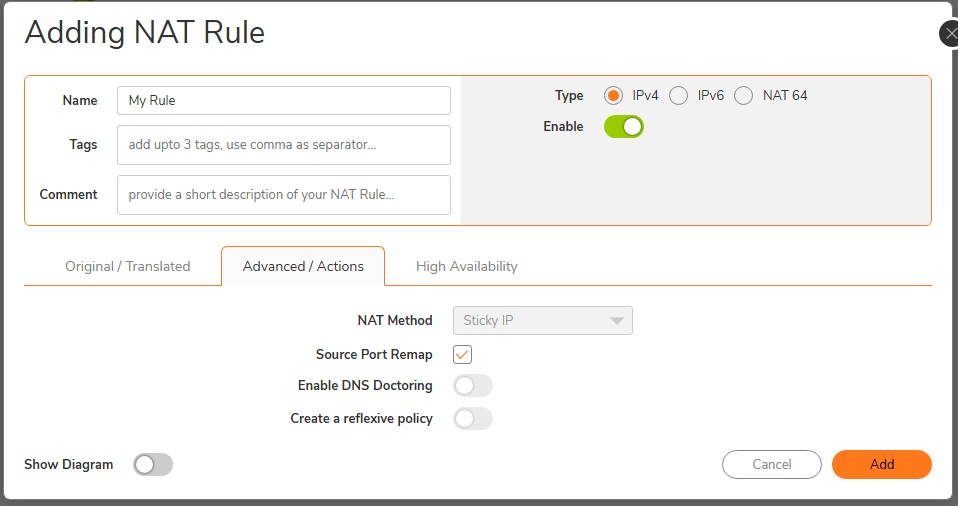
I fixed this by having the router (SonicWALL) remap the source port for outbound Nat sessions for the VoWIiFi call servers


You can test this is what is causing the issue by having only a single phone on VoWifi on your network and seeing if it works


Any views expressed on these forums are my own and don't necessarily reflect those of my employer. 


freitasm

BDFL - Memuneh
80646 posts

Uber Geek
+1 received by user: 41024

Administrator
ID Verified
Trusted
Geekzone
Lifetime subscriber

  #3434385 14-Nov-2025 08:56
Send private message

This could be the case. I will have to check daughter's phone is set to VoWiFi as well. Wife wasn't at home when I received one of the calls yesterday, but daughter was.


More later.


Referral links: Quic Broadband (free setup code: R587125ERQ6VE) | Samsung | AliExpress | Wise | Sharesies 


Support Geekzone by subscribing (browse ads-free), or making a one-off or recurring donation through PressPatron.


freitasm

BDFL - Memuneh
80646 posts

Uber Geek
+1 received by user: 41024

Administrator
ID Verified
Trusted
Geekzone
Lifetime subscriber

  #3434401 14-Nov-2025 09:51
Send private message

An update: this could be handset related. More investigation to follow.


Thanks, @SaltyNZ


Referral links: Quic Broadband (free setup code: R587125ERQ6VE) | Samsung | AliExpress | Wise | Sharesies 


Support Geekzone by subscribing (browse ads-free), or making a one-off or recurring donation through PressPatron.


boosacnoodle
1268 posts

Uber Geek
+1 received by user: 855


  #3434846 15-Nov-2025 19:46
Send private message

You could’ve described exactly the issue I am facing with Spark Wi-Fi calling on iOS. I’m now wondering if, as said here, this is because we have multiple phones with it enabled on the same network. I’m using UniFi network gear, if that makes any difference.


The issue for me is receiving a call and then spending up to 6 or 7 seconds where neither side can talk nor hear each other. 


freitasm

BDFL - Memuneh
80646 posts

Uber Geek
+1 received by user: 41024

Administrator
ID Verified
Trusted
Geekzone
Lifetime subscriber

  #3434848 15-Nov-2025 19:50
Send private message

In my case it appears the phone we are using may have not implemented VoWiFi correctly.


Referral links: Quic Broadband (free setup code: R587125ERQ6VE) | Samsung | AliExpress | Wise | Sharesies 


Support Geekzone by subscribing (browse ads-free), or making a one-off or recurring donation through PressPatron.


Shop now at Mighty Ape (affiliate link).
yitz
2238 posts

Uber Geek
+1 received by user: 594


  #3434860 15-Nov-2025 20:41
Send private message

Have you tried enabling UPnP? 😂


freitasm

BDFL - Memuneh
80646 posts

Uber Geek
+1 received by user: 41024

Administrator
ID Verified
Trusted
Geekzone
Lifetime subscriber

  #3434863 15-Nov-2025 20:47
Send private message

UPnP is not used on this.


Referral links: Quic Broadband (free setup code: R587125ERQ6VE) | Samsung | AliExpress | Wise | Sharesies 


Support Geekzone by subscribing (browse ads-free), or making a one-off or recurring donation through PressPatron.


nztim
4012 posts

Uber Geek
+1 received by user: 2710

ID Verified
Trusted
TEAMnetwork
Subscriber

  #3434897 16-Nov-2025 09:38
Send private message

boosacnoodle:


You could’ve described exactly the issue I am facing with Spark Wi-Fi calling on iOS. I’m now wondering if, as said here, this is because we have multiple phones with it enabled on the same network. I’m using UniFi network gear, if that makes any difference.


The issue for me is receiving a call and then spending up to 6 or 7 seconds where neither side can talk nor hear each other. 


If you are having the same issues as me, you are looking for the equivalent to this tick box on your Unifi as screenshot below (This is on a SonicWALL) for your outbound NAT rules, what this does is randomize the source port when the traffic is NATd to the internet, that way the router can keep the track of NAT sessions and you don't have a duplicate of source port 500, destination port 500, and the same destination IP 


Note: ONLY apply this rule to the IPsec services of your providers call servers as applying this to all traffic can seriously break other things (Teams Traffic as an example)


Any views expressed on these forums are my own and don't necessarily reflect those of my employer. 


Create new topic


Geekzone Live »

Try automatic live updates from Geekzone directly in your browser, without refreshing the page, with Geekzone Live now.


Are you subscribed to our RSS feed? You can download the latest headlines and summaries from our stories directly to your computer or smartphone by using a feed reader.