Geekzone: technology news, blogs, forums
Guest
Welcome Guest.
You haven't logged in yet. If you don't have an account you can register now.


ajbw

131 posts

Master Geek
+1 received by user: 11

Lifetime subscriber

#324216 13-Mar-2026 13:49
Send private message quote this post

We have a selection of oldish phones, and rather poor 2 degrees 4G reception (more about that later, maybe). But all the phones will do VoLTE on 2 Degrees.

Wifi calling seems like a good idea.

On the Nokia 7.2 I went through all the steps to enable it, then I went into aeroplane mode and re-enabled the wifi, and tested that wifi was working.

On trying to make a call, I get "Turn off aeroplane mode or connect to a wireless network to make a call"

But it is connected to a wireless network.

Next test: I put the SIM into an Alcatel Smart E10 5033T, which was bought from PBTech for the One network in 2022. It has since been running on 2 Degrees.

Same result!

Any explanations?


View this topic in a long page with up to 500 replies per page Create new topic
 1 | 2
KiwiSurfer
1722 posts

Uber Geek
+1 received by user: 993

ID Verified
Lifetime subscriber

  #3469694 13-Mar-2026 13:57
Send private message quote this post

My Android phones show "2degres WiFi Calling" when connected to 2degrees VoWiFi while Airplane Mode is on. Does yours do this or does it show No Service or similar?


nitro
756 posts

Ultimate Geek
+1 received by user: 335


  #3469719 13-Mar-2026 14:19
Send private message quote this post

i don't know if it has been updated or changed. 2D published a list of supported phones for VoWiFi - Phones Compatible with VoLTE & WiFi Calling.


Somebody at 2D may be able to shed light if this is due to them having whitelisted only the phones they have tested.


SaltyNZ
8862 posts

Uber Geek
+1 received by user: 9539

Trusted
2degrees
Lifetime subscriber

  #3469723 13-Mar-2026 14:33
Send private message quote this post

nitro:


i don't know if it has been updated or changed. 2D published a list of supported phones for VoWiFi - Phones Compatible with VoLTE & WiFi Calling.


Somebody at 2D may be able to shed light if this is due to them having whitelisted only the phones they have tested.


Correct. Other phones may well work, but we only list the ones we have tested.


iPad Pro 11" + iPhone 15 Pro Max + 2degrees 4tw!


These comments are my own and do not represent the opinions of 2degrees.


ajbw

131 posts

Master Geek
+1 received by user: 11

Lifetime subscriber

  #3469742 13-Mar-2026 14:46
Send private message quote this post

KiwiSurfer:

My Android phones show "2degres WiFi Calling" when connected to 2degrees VoWiFi while Airplane Mode is on. Does yours do this or does it show No Service or similar?


No, it doesn't show that, even though the Settings icon appears enabled.
I does show the VoLTE icon when not in aeroplane mode.

Linux
12173 posts

Uber Geek
+1 received by user: 8467

Trusted
Lifetime subscriber

  #3469753 13-Mar-2026 15:17
Send private message quote this post

@ajbw VoLTE & Wi-Fi calling are 2 separate services so if one works does not mean the other will


Edit: The only problem is your handset


yitz
2238 posts

Uber Geek
+1 received by user: 594


  #3469771 13-Mar-2026 16:19
Send private message quote this post

Is internet access via the Wi-Fi firewalled?


Could be blocking IPsec tunnel traffic.


Could be worth trying a different Wi-Fi router.


So do you get the same pre-recorded message on both phones "Turn off aeroplane mode or connect to a wireless network to make a call" so are you saying you think it's a network message?


Shop now for Lego sets and other gifts (affiliate link).
ajbw

131 posts

Master Geek
+1 received by user: 11

Lifetime subscriber

  #3469816 13-Mar-2026 18:06
Send private message quote this post

yitz:

Is internet access via the Wi-Fi firewalled?


Could be blocking IPsec tunnel traffic.


Could be worth trying a different Wi-Fi router.


So do you get the same pre-recorded message on both phones "Turn off aeroplane mode or connect to a wireless network to make a call" so are you saying you think it's a network message?


As far as I know, there is no firewall outgoing.
The only activity on the pihole when only wifi is on is a stream of

reply dialercallinfolookup-pa.googleapis.com is 142.251.222.234
and similar, if I attempt to make a call.

I do think it is a bit strange that I get the same message on two phones, which might suggest it's from the SIM. It seems too quick to be a network message.

yitz
2238 posts

Uber Geek
+1 received by user: 594


  #3469819 13-Mar-2026 18:12
Send private message quote this post

Looks like the message is from Android OS.


Should be a DNS lookup for epdg.ims.2degrees.net.nz if your phone has 2degrees WiFi calling settings loaded.


Linux
12173 posts

Uber Geek
+1 received by user: 8467

Trusted
Lifetime subscriber

  #3469820 13-Mar-2026 18:15
Send private message quote this post

The best test is to try your SIM card in an approved handset


ajbw

131 posts

Master Geek
+1 received by user: 11

Lifetime subscriber

  #3470609 15-Mar-2026 16:22
Send private message quote this post

ajbw:
yitz:

Is internet access via the Wi-Fi firewalled?


Could be blocking IPsec tunnel traffic.


Could be worth trying a different Wi-Fi router.


So do you get the same pre-recorded message on both phones "Turn off aeroplane mode or connect to a wireless network to make a call" so are you saying you think it's a network message?


As far as I know, there is no firewall outgoing.
The only activity on the pihole when only wifi is on is a stream of

reply dialercallinfolookup-pa.googleapis.com is 142.251.222.234
and similar, if I attempt to make a call.

I do think it is a bit strange that I get the same message on two phones, which might suggest it's from the SIM. It seems too quick to be a network message.


As a test, yesterday I went to the local library and tried from there - same result, so it doesn't look like it's our router

freitasm
BDFL - Memuneh
80646 posts

Uber Geek
+1 received by user: 41024

Administrator
ID Verified
Trusted
Geekzone
Lifetime subscriber

  #3470610 15-Mar-2026 16:39
Send private message quote this post

yitz:


Is internet access via the Wi-Fi firewalled?


Could be blocking IPsec tunnel traffic.


Could be worth trying a different Wi-Fi router.


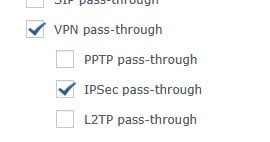
The router needs the settings VPN Passthrough: IPSEC enabled, otherwise VoWi-Fi won't work.


Referral links: Quic Broadband (free setup code: R587125ERQ6VE) | Samsung | AliExpress | Wise | Sharesies 


Support Geekzone by subscribing (browse ads-free), or making a one-off or recurring donation through PressPatron.


Shop now for Lego sets and other gifts (affiliate link).
ajbw

131 posts

Master Geek
+1 received by user: 11

Lifetime subscriber

  #3470611 15-Mar-2026 17:02
Send private message quote this post

freitasm:

yitz:


Is internet access via the Wi-Fi firewalled?


Could be blocking IPsec tunnel traffic.


Could be worth trying a different Wi-Fi router.


The router needs the settings VPN Passthrough: IPSEC enabled, otherwise VoWi-Fi won't work.


On our router (NetComm NF19WV) I don't see those settings...

freitasm
BDFL - Memuneh
80646 posts

Uber Geek
+1 received by user: 41024

Administrator
ID Verified
Trusted
Geekzone
Lifetime subscriber

  #3470612 15-Mar-2026 17:05
Send private message quote this post

Look for this under Firewall or Security settings, if you have these options. There may be an option with a different name, such as NAT ALG or VPN passthrough. You might have to check the box "Enable SIP".


Referral links: Quic Broadband (free setup code: R587125ERQ6VE) | Samsung | AliExpress | Wise | Sharesies 


Support Geekzone by subscribing (browse ads-free), or making a one-off or recurring donation through PressPatron.


ajbw

131 posts

Master Geek
+1 received by user: 11

Lifetime subscriber

  #3470613 15-Mar-2026 17:15
Send private message quote this post

freitasm:

Look for this under Firewall or Security settings, if you have these options. There may be an option with a different name, such as NAT ALG or VPN passthrough. You might have to check the box "Enable SIP".


OK, thank you for the clarification.
ALG has SIP enabled and IPSEC enabled.
I know SIP works because that's now our 'landline'.

And Security has "By default, all outgoing IP traffic from LAN is allowed,"

SaltyNZ
8862 posts

Uber Geek
+1 received by user: 9539

Trusted
2degrees
Lifetime subscriber

  #3470744 16-Mar-2026 09:55
Send private message quote this post

ajbw: 

As a test, yesterday I went to the local library and tried from there - same result, so it doesn't look like it's our router


Sounds like your handset then.


iPad Pro 11" + iPhone 15 Pro Max + 2degrees 4tw!


These comments are my own and do not represent the opinions of 2degrees.


 1 | 2
View this topic in a long page with up to 500 replies per page Create new topic


Geekzone Live »

Try automatic live updates from Geekzone directly in your browser, without refreshing the page, with Geekzone Live now.


Are you subscribed to our RSS feed? You can download the latest headlines and summaries from our stories directly to your computer or smartphone by using a feed reader.