Geekzone: technology news, blogs, forums
Guest
Welcome Guest.
You haven't logged in yet. If you don't have an account you can register now.


mysticalxo

11 posts

Geek


#324848 2-Jun-2026 14:12
Send private message

Hi everyone, Hoping a local network engineer or 2degrees rep can shed some light on a sudden international routing issue that kicked off overnight. My baseline ping to Oceania game servers (specifically Battlefield 6, which utilizes Amazon Web Services Sydney infrastructure) suddenly jumped from ~30ms to a flat 100+ms without any changes to my local hardware or software setup. (For reference if needed I am Hyperfibre 4) My Setup:


  • ISP: 2degrees (Vocus network backbone)
  • Connection Type: Fibre (ONT and router have been fully power-cycled)
  • Location: NZ

To troubleshoot, I ran a fresh traceroute targeting the primary AWS Sydney data block (54.252.0.0). As you can see below, the packets hit an absolute brick wall and time out completely the moment they try to leave the Vocus international edge gateway at Hop 5. There are also some highly unstable latency spikes on the first probes inside the core network at Hops 3 and 4.


```Tracing route to ://amazonaws.com
over a maximum of 30 hops:


  1    10 ms     1 ms     1 ms  HB810
  2     3 ms     2 ms     2 ms  v1.cpcch-ric-bng1.tranzpeer.net
  3   123 ms    22 ms    21 ms  192.168.255.237
  4    60 ms    22 ms    22 ms  192.168.255.233
  5   131 ms    22 ms    21 ms  default-rdns.vocus.co.nz
  6     *        *        *     Request timed out.
  7     *        *        *     Request timed out.
  8     *        *        *     Request timed out.
  9     *        *        *     Request timed out.```
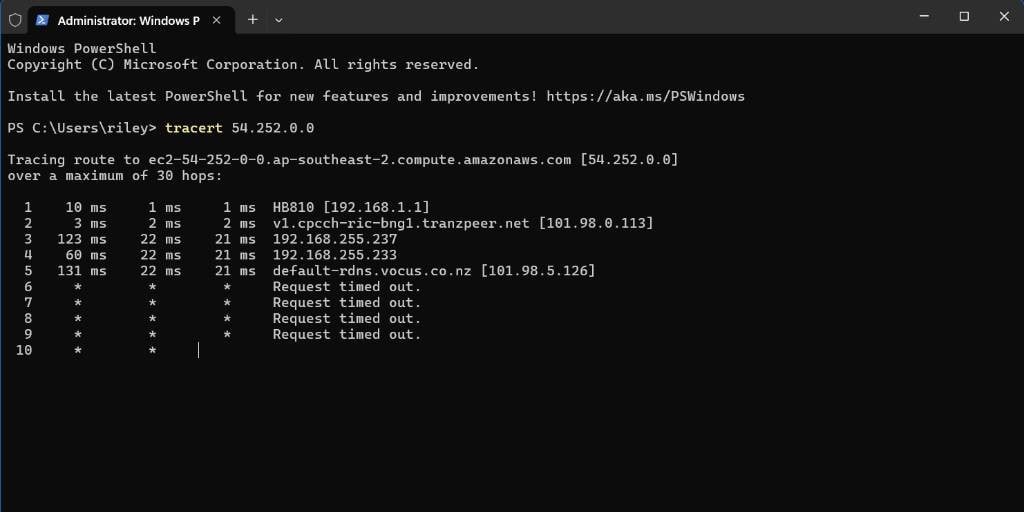


(Hop 3 cut off with static IP) > 
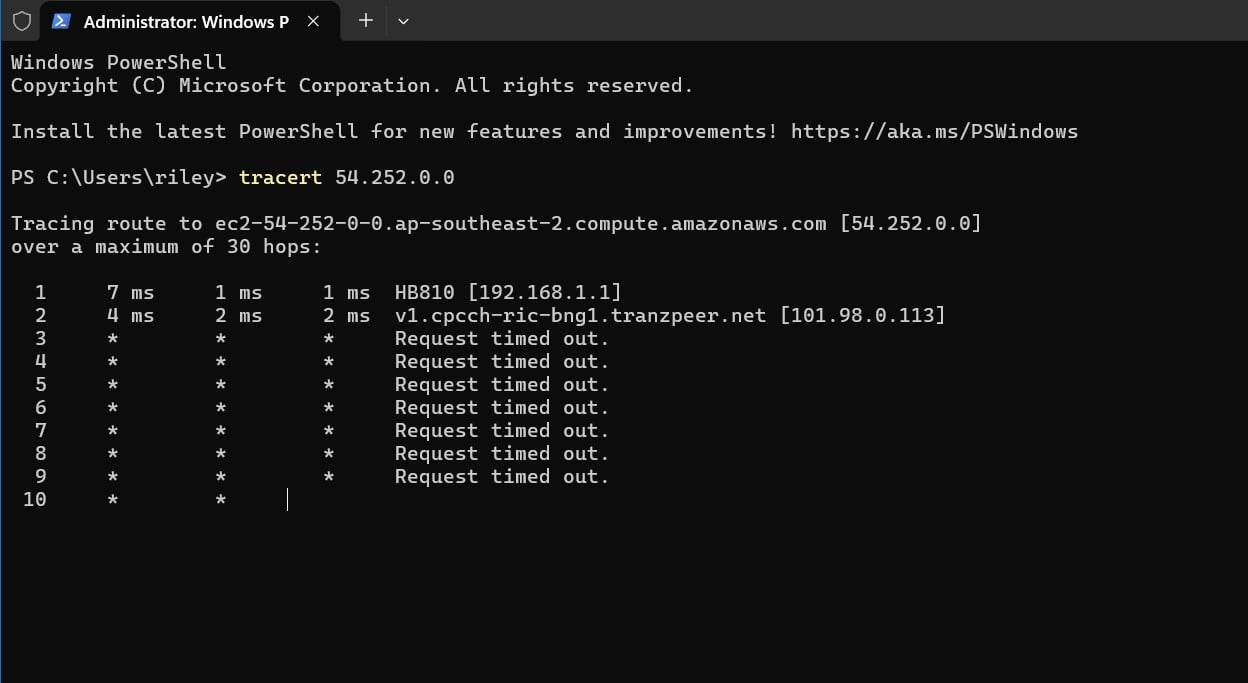


Cross-Testing Done:


  1. Mobile Hotspot Test: Confirmed that switching my PC over to a mobile hotspot on a different cellular network drops the baseline ping straight back down to normal (~50-60ms over cellular). This rules out my PC, Wi-Fi hardware, or game client, proving the drop-off is strictly happening inside the Vocus infrastructure.
  2. Cloudflare WARP: Attempted to use Cloudflare WARP to find an alternate route, but the traffic still hits the exact same high-ping detour or drop-off.
  3. 2degrees Support Call: I spent time on the phone with 2degrees support. They initially attempted to apply a Static IP profile to my account, but it completely black-holed all traffic right at Hop 3. They have since reverted me to a standard dynamic IP, and the frontline agent has escalated the case to the Network Assurance Team (they quoted an SLA turnaround of up to 7 working days).


It feels like a major trans-Tasman peering or border gateway protocol (BGP) routing breakdown pushing my data onto a slow international backup loop. While I wait for the Assurance Team ticket to move through the corporate queue, is there anything else I can do on my end to bypass this? Cheers!



Filter this topic showing only the reply marked as answer View this topic in a long page with up to 500 replies per page Create new topic
 1 | 2
yitz
2277 posts

Uber Geek
+1 received by user: 608


  #3499518 2-Jun-2026 14:58
Send private message

Is 54.252.0.0 actually the IP of the game server? Or is it dynamic and changes. If you need a AWS IP range to ping then use the one supplied at http://ec2-reachability.amazonaws.com/ so if the IP starts 54.252 or is within 54.252.0.0/16 then use 54.252.88.8


I'm getting about 40 ms from Christchurch via 2degrees.
--- 54.252.88.8 ping statistics ---
11 packets transmitted, 11 packets received, 0% packet loss
round-trip min/avg/max = 39.155/39.726/40.299 ms


mysticalxo

11 posts

Geek


  #3499553 2-Jun-2026 16:49
Send private message

Thanks for the tip and the test address. I just ran a fresh traceroute targeting that specific Amazon check IP (54.252.88.8).


Unfortunately, the result remains exactly the same on my end. It clears the local network handover points but hits a total brick wall with complete timeouts the second it passes Hop 5 (101.98.5.126). I am also seeing some wild initial packet spikes across the internal hops (hitting 131ms, 150ms, and 135ms on the first columns).


The fact that you are getting a clean 40ms from Christchurch over 2degrees completely confirms that this isn't a nationwide AWS outage, but a localized regional routing or account-level profile breakdown on the Vocus backbone here in my area. Or maybe something else entirely! I am no rocket scientist after all. If you have any other ideas or an extension of this one let me know please and thanks!


Here is the text block of the fresh traceroute to 54.252.88.8:

```


Tracing route to ec2-54-252-88-8.ap-southeast-2.compute.amazonaws.com
over a maximum of 30 hops:


  1   131 ms     1 ms     1 ms  HB810
  2     4 ms     2 ms     1 ms  v1.cpcch-ric-bng1.tranzpeer.net
  3    23 ms   150 ms    21 ms  192.168.255.237
  4    68 ms    23 ms    22 ms  192.168.255.233
  5   135 ms    23 ms    23 ms  default-rdns.vocus.co.nz
  6     *        *        *     Request timed out.
  7     *        *        *     Request timed out.```


Linux
12364 posts

Uber Geek
+1 received by user: 8658

Trusted
Lifetime subscriber

  #3499566 2-Jun-2026 17:43
Send private message

@aspired can you add any value here?


Thanks


boosacnoodle
1394 posts

Uber Geek
+1 received by user: 931


  #3499567 2-Jun-2026 17:48
Send private message

What's the actual IP address?


yitz
2277 posts

Uber Geek
+1 received by user: 608


  #3499570 2-Jun-2026 18:12
Send private message

192.168.255.237 192.168.255.233 and 101.98.5.126 are probably related to CG-NAT, it would be interesting to know what city those hops are located at. Their CG-NAT appears to be on a separate core network going by that 101.98.5.126 hop. A static IP could be worth trying again if can get it to work.


I'm getting a response quite a few hops in - make sure you have waited long enough.


Tracing route to 54.252.88.8 over a maximum of 30 hops


  1     3 ms    <1 ms    <1 ms  192.168.1.1
  2     3 ms     1 ms     1 ms  101.98.0.123
  3     *        *        *     Request timed out.
  4     *        *        *     Request timed out.
  5     *        *        *     Request timed out.
  6     *        *        *     Request timed out.
  7     *        *        *     Request timed out.
  8     *        *        *     Request timed out.
  9     *        *        *     Request timed out.
 10     *        *        *     Request timed out.
 11     *        *        *     Request timed out.
 12    39 ms    38 ms    38 ms  54.252.88.8


Trace complete.


aspired
37 posts

Geek
+1 received by user: 54

ID Verified
Trusted
2degrees

  #3499581 2-Jun-2026 18:56
Send private message

Are you still experiencing issues?


Shop now on Samsung phones, tablets, TVs and more (affiliate link).
mysticalxo

11 posts

Geek


  #3499588 2-Jun-2026 19:07
Send private message

I just ran another traceroute to 54.252.88.8 and the route has changed. Before it was simply going through all 30 hops and staying timed out, now it connects at hop 14. However, the first 5 hops have fluctuating ms values, which means the issue may be intermittent, hence me still being able to connect to AWS but with a major unstable ping increase.


The latency is incredibly unstable. My three columns on the final hops are fluctuating wildly between 1ms-170ms per column. Hops 6 through 13 are completely timing out before the final handshake. This heavy jitter confirms the CG-NAT or gateway routing path is still bottlenecked or queuing packets severely.


It looks like the network is trying to heal, but the path is incredibly congested. I'll still be calling 2degrees tomorrow morning to get a proper Static IP provisioned to pull me off this loop entirely (hopefully).

Bufferbloat perhaps? We will see tomorrow.


Linux
12364 posts

Uber Geek
+1 received by user: 8658

Trusted
Lifetime subscriber

  #3499593 2-Jun-2026 19:16
Send private message

@mysticalxo 2degrees engineer has responded above! @aspired


aspired
37 posts

Geek
+1 received by user: 54

ID Verified
Trusted
2degrees

  #3499603 2-Jun-2026 19:49
Send private message

Cool, yes a change was made so route will be different now.
Don’t worry about the intermediate hops, routers deprioritise ICMP responses, the destination IP is the true indicator of latency and packet loss. Let me know how that final hop/54.252.88.8 looks


mysticalxo

11 posts

Geek


  #3499607 2-Jun-2026 20:07
Send private message

Hi aspired, thanks for tweaking the route! It looks like my connection went back to the .242 gateway at Hop 5 and is reaching Australia on Hop 14, but the severe jitter and queuing are still completely breaking the line. The final hop is fluctuating wildly between 59ms, 136ms, and 55ms. I'm also seeing massive spikes right from Hop 1 (133ms) and Hop 5 hitting 228ms on the first probes before settling down.

My Steam download is also hitting a hard, artificial ceiling at exactly 209 Mbps on my Hyperfibre 2* (I previously had Hyperfibre 4 and forgot I downgraded when I moved LOL.) connection. It strongly looks like my profile is trapped on a severely congested CG-NAT cluster that is heavily queuing packets and throttling bandwidth if the idea applies from previous forum replies?

Is there any way you can check the load on this specific pool, or would opting me out via a Static IP tomorrow be the cleanest fix? Here is the full text of the trace following your change:


```Tracing route to ec2-54-252-88-8.ap-southeast-2.compute.amazonaws.com [54.252.88.8]
over a maximum of 30 hops:


  1   133 ms    26 ms    23 ms  HB810 [192.168.1.1]
  2    26 ms    13 ms     4 ms  v1.cpcch-ric-bng1.tranzpeer.net [101.98.0.113]
  3    29 ms   129 ms    32 ms  192.168.255.237
  4   177 ms    27 ms   140 ms  192.168.255.234
  5   228 ms    32 ms    35 ms  default-rdns.vocus.co.nz [101.98.5.242]
  6     *        *        *     Request timed out.
  7     *        *        *     Request timed out.
  8     *        *        *     Request timed out.
  9     *        *        *     Request timed out.
 10     *        *        *     Request timed out.
 11     *        *        *     Request timed out.
 12     *        *        *     Request timed out.
 13     *        *        *     Request timed out.
 14    59 ms   136 ms    55 ms  ec2-54-252-88-8.ap-southeast-2.compute.amazonaws.com [54.252.88.8]```


RunningMan
9329 posts

Uber Geek
+1 received by user: 4968


  #3499608 2-Jun-2026 20:11
Send private message

mysticalxo:[snip] I'm also seeing massive spikes right from Hop 1 (133ms) 


That's your own router.


Shop now on Samsung phones, tablets, TVs and more (affiliate link).
RunningMan
9329 posts

Uber Geek
+1 received by user: 4968


  #3499610 2-Jun-2026 20:19
Send private message

What's the connection between your router & computer?


mysticalxo

11 posts

Geek


  #3499611 2-Jun-2026 20:27
Send private message

Packets: Sent = 33, Received = 33, Lost = 0 (0% loss),
Approximate round trip times in milli-seconds:
    Minimum = 2ms, Maximum = 129ms, Average = 37ms

Wifi only unfortunately, in the past I ran a cat7 cable but don't have that option at new apartment. I am running 6G band only via my network adapters settings which is a Archer TBE400E V1 with latest drivers. These issues have not been experienced before and are only recent within the past 3 days. 

Typical download speeds were 900mbps on steam before this weekend, now they are 250approx.


quickymart
15117 posts

Uber Geek
+1 received by user: 14335

ID Verified

  #3499667 2-Jun-2026 21:54
Send private message

This is my trace (using Spark), I get to it in 12 hops:


Not sure where "vdsl.sparkbb" comes from, I'm on fibre 😁


aspired
37 posts

Geek
+1 received by user: 54

ID Verified
Trusted
2degrees

  #3499682 3-Jun-2026 00:31
Send private message

mysticalxo:


Packets: Sent = 33, Received = 33, Lost = 0 (0% loss),
Approximate round trip times in milli-seconds:
    Minimum = 2ms, Maximum = 129ms, Average = 37ms

Wifi only unfortunately


WiFi.. is your likely problem now. Find an ethernet cable and test again please


 1 | 2
Filter this topic showing only the reply marked as answer View this topic in a long page with up to 500 replies per page Create new topic


Geekzone Live »

Try automatic live updates from Geekzone directly in your browser, without refreshing the page, with Geekzone Live now.


Are you subscribed to our RSS feed? You can download the latest headlines and summaries from our stories directly to your computer or smartphone by using a feed reader.