Geekzone: technology news, blogs, forums
Guest
Welcome Guest.
You haven't logged in yet. If you don't have an account you can register now.


Hinko

282 posts

Ultimate Geek
+1 received by user: 3


#65228 31-Jul-2010 13:04
Send private message

Also as in Text "bal" to 333 for XT

I know one could use a phone and dial *100# and then press Call, Press 1 for balance. 

Its a bit hard to press 1 on a PC card, but then perhaps it can be done somehow with a script or networking dial in?

Is there a way to do this from a mobile connect PC card? 

View this topic in a long page with up to 500 replies per page Create new topic
 1 | 2
SaltyNZ
8865 posts

Uber Geek
+1 received by user: 9545

Trusted
2degrees
Lifetime subscriber

  #360614 31-Jul-2010 13:14
Send private message

No, there isn't, sorry.


iPad Pro 11" + iPhone 15 Pro Max + 2degrees 4tw!


These comments are my own and do not represent the opinions of 2degrees.


manhinli
2483 posts

Uber Geek
+1 received by user: 4

Trusted

  #360616 31-Jul-2010 13:18
Send private message

Some mobile data software have USSD functionality - so you can use *100# to check your balance. I was able to use the hidden USSD functionality for the Telecom MF626/636 software to do that for my 2degrees connection.

Otherwise I guess you'll need to use "Your 2degrees" online (which inherently uses data)


Find me on Twitter!

I posted 1, 2 x 10^3 times!

Hinko

282 posts

Ultimate Geek
+1 received by user: 3


  #360655 31-Jul-2010 15:17
Send private message

manhinli: Some mobile data software have USSD functionality - so you can use *100# to check your balance.


Ahh so USSD is the key here, thank you manhinli.  Maybe something like GSM-USSD  might work?  (And presumably avoid internet data cost)


bazzer
3438 posts

Uber Geek
+1 received by user: 267

Trusted

  #360686 31-Jul-2010 16:31
Send private message

manhinli: Some mobile data software have USSD functionality - so you can use *100# to check your balance. I was able to use the hidden USSD functionality for the Telecom MF626/636 software to do that for my 2degrees connection.

Otherwise I guess you'll need to use "Your 2degrees" online (which inherently uses data)

How does that work?

manhinli
2483 posts

Uber Geek
+1 received by user: 4

Trusted

  #360704 31-Jul-2010 17:06
Send private message

Hinko:
manhinli: Some mobile data software have USSD functionality - so you can use *100# to check your balance.

Ahh so USSD is the key here, thank you manhinli.  Maybe something like GSM-USSD  might work?  (And presumably avoid internet data cost)


Yes

bazzer: How does that work?


I'm not sure what you mean by "that"...


Find me on Twitter!

I posted 1, 2 x 10^3 times!

Hinko

282 posts

Ultimate Geek
+1 received by user: 3


  #360712 31-Jul-2010 17:19
Send private message

bazzer: How does that work?


perhaps you mean this?  https://secure.2degreesmobile.co.nz/web/ip/login


Shop on-line at New World now for your groceries (affiliate link).
bazzer
3438 posts

Uber Geek
+1 received by user: 267

Trusted

  #360747 31-Jul-2010 18:36
Send private message

My apologies...

manhinli: Some mobile data software have USSD functionality - so you can use *100# to check your balance. I was able to use the hidden USSD functionality for the Telecom MF626/636 software to do that for my 2degrees connection.

How does that work?

manhinli
2483 posts

Uber Geek
+1 received by user: 4

Trusted

  #360752 31-Jul-2010 18:59
Send private message

bazzer: My apologies...

manhinli: Some mobile data software have USSD functionality - so you can use *100# to check your balance. I was able to use the hidden USSD functionality for the Telecom MF626/636 software to do that for my 2degrees connection.

How does that work?

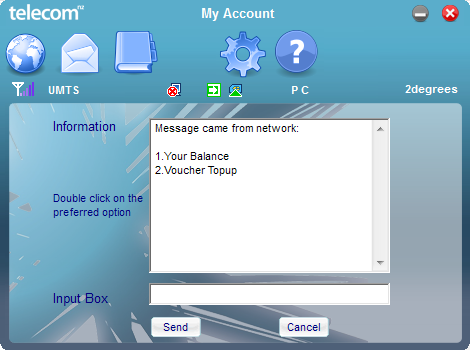
The ZTE MF626/636 software we're given is based off a common one which they write for other providers (lazy bums) and just left the USSD functionality there, but hidden away.

It's called "My Account" because a lot of providers use USSD services to provide account details to mobiles.
The value it came with was "#125#" - I simply changed it to "*100#".

Here's a screenshot of it (I'm using my own theme which doesn't have the My Account icon in there yet):


I could easily just put "*100#1#" and get it to spurt out the balance without any work.


Find me on Twitter!

I posted 1, 2 x 10^3 times!

SaltyNZ
8865 posts

Uber Geek
+1 received by user: 9545

Trusted
2degrees
Lifetime subscriber

  #360772 31-Jul-2010 19:51
Send private message

Interesting, that must be a ZTE thing. Most dongles don't support USSD.


iPad Pro 11" + iPhone 15 Pro Max + 2degrees 4tw!


These comments are my own and do not represent the opinions of 2degrees.


manhinli
2483 posts

Uber Geek
+1 received by user: 4

Trusted

  #360773 31-Jul-2010 19:58
Send private message

SaltyNZ: Interesting, that must be a ZTE thing. Most dongles don't support USSD.

The Huawei modems that you guys are launching 3G with also support USSD too from what I've seen...


Find me on Twitter!

I posted 1, 2 x 10^3 times!

SaltyNZ
8865 posts

Uber Geek
+1 received by user: 9545

Trusted
2degrees
Lifetime subscriber

  #360783 31-Jul-2010 20:08
Send private message

manhinli:
The Huawei modems that you guys are launching 3G with also support USSD too from what I've seen...


Possibly; I've only played with the previous model.


iPad Pro 11" + iPhone 15 Pro Max + 2degrees 4tw!


These comments are my own and do not represent the opinions of 2degrees.


Move to New Zealand's best fibre broadband service (affiliate link). Free setup code: R587125ERQ6VE. Note that to use Quic Broadband you must be comfortable with configuring your own router.
bazzer
3438 posts

Uber Geek
+1 received by user: 267

Trusted

  #360904 1-Aug-2010 04:35
Send private message

For anyone else who sees this and is keen, you just need to modify the CONFIG.INI file for the Connection Manager.

You need to add StkButton.ENABLED=1 in the appropriate place (and probably change the LEFT value of all the buttons). At least, that's what I did, seemed OK.

How did you change the #125#? I didn't see that any any of the config files? I currently have to wait for it to try #125# before doing *100#1#. Did you change it in the .exe?

The skin looks great, BTW. What would it take to change the notification tray icon, do you think?

manhinli
2483 posts

Uber Geek
+1 received by user: 4

Trusted

  #361003 1-Aug-2010 13:12
Send private message

bazzer: For anyone else who sees this and is keen, you just need to modify the CONFIG.INI file for the Connection Manager.

You need to add StkButton.ENABLED=1 in the appropriate place (and probably change the LEFT value of all the buttons). At least, that's what I did, seemed OK.

How did you change the #125#? I didn't see that any any of the config files? I currently have to wait for it to try #125# before doing *100#1#. Did you change it in the .exe?

The skin looks great, BTW. What would it take to change the notification tray icon, do you think?

Yep - I had to alter the executable to get *100#. I used Notepad++ to open it, replaced #125# with *100# and it worked!

I'm trying to find where the notification tray icons are stored/encoded - at the moment I haven't found it yet.


Find me on Twitter!

I posted 1, 2 x 10^3 times!

bazzer
3438 posts

Uber Geek
+1 received by user: 267

Trusted

  #361039 1-Aug-2010 14:52
Send private message

manhinli: Yep - I had to alter the executable to get *100#. I used Notepad++ to open it, replaced #125# with *100# and it worked!

I'm trying to find where the notification tray icons are stored/encoded - at the moment I haven't found it yet.

Did you replace all of them?  And what about increasing it to *100#1#, what did you do about the string lengths?  Did you use the apparent null padding around the strings or insert extra characters?  I guess I can just try it but if youve already done the experimenting...

It's weird that the tray icons (well, most of them) are in the main.png file but it doesn't use them, does it?  Anyway, I'm working on this too and should have something shortly.  I'll let you know.

manhinli
2483 posts

Uber Geek
+1 received by user: 4

Trusted

  #361065 1-Aug-2010 16:01
Send private message

bazzer:
manhinli: Yep - I had to alter the executable to get *100#. I used Notepad++ to open it, replaced #125# with *100# and it worked!

I'm trying to find where the notification tray icons are stored/encoded - at the moment I haven't found it yet.

Did you replace all of them?  And what about increasing it to *100#1#, what did you do about the string lengths?  Did you use the apparent null padding around the strings or insert extra characters?  I guess I can just try it but if youve already done the experimenting...

It's weird that the tray icons (well, most of them) are in the main.png file but it doesn't use them, does it?  Anyway, I'm working on this too and should have something shortly.  I'll let you know.

Run into the NUL[L] characters when inputting *100#1# - otherwise the executable will fail to launch.

And yes, the tray icons do not come from Main.png - I've tried to do that last year and it failed. 


Find me on Twitter!

I posted 1, 2 x 10^3 times!

 1 | 2
View this topic in a long page with up to 500 replies per page Create new topic


Geekzone Live »

Try automatic live updates from Geekzone directly in your browser, without refreshing the page, with Geekzone Live now.


Are you subscribed to our RSS feed? You can download the latest headlines and summaries from our stories directly to your computer or smartphone by using a feed reader.