Geekzone: technology news, blogs, forums
Guest
Welcome Guest.
You haven't logged in yet. If you don't have an account you can register now.


mruane

420 posts

Ultimate Geek
+1 received by user: 2


#69978 15-Oct-2010 22:40
Send private message

I am looking for help from those who have transfered an iPhone on an iPhone plan from Vodafone to 2Degrees.  I bought my iPhone 12 months ago so I am expecting to have to pay a $250 early termination fee.

I want to be sure that I do this in the right sequence so that I get my old number ported before my VF account is closed. Do I create the 2Degrees account and then request the number transfer and then close the VF account and pay the early termination fee in that order, or does this have to be done a different way.

Any guidance would be appreciated.

Cheers Mike

Create new topic
nzbnw
2374 posts

Uber Geek
+1 received by user: 22

Trusted
Spark NZ

  #392411 15-Oct-2010 22:46
Send private message

Typically you shouldn't need to contact the loosing service provider in my experience; at least with the 2 main Telco's anyway. Once you port your number you should be sent a final account.

Feel free to contact VF; but wait until everything has successfully completed with your new carrier.

nzbnw


mruane

420 posts

Ultimate Geek
+1 received by user: 2


  #392418 15-Oct-2010 23:07
Send private message

Great thanks nzbnw - appreciate the feedback.

Cheers Mike

Chenlevi21
1 post

Wannabe Geek


  #392426 15-Oct-2010 23:31
Send private message

Hi mate,

Awhile ago I did the same thing. The process is quite simple to be honest..

1. Buy a 2degrees sim card.(any)
2. Follow instructions on pack to activate the sim card.
3. Submit a request online to transfer your number. (it's called bring your number from memory..) you mentioned that you are on a plan so you will need your account number..
4. Once number is transferred you will get a text message (cut over usually takes a few hours if you fill the form correctly , can take 24 hours or more depending on how soon vf release the number to 2degrees)

Hope it helped you :-)

Chen


nigelramsay
80 posts

Master Geek
+1 received by user: 18


#392491 16-Oct-2010 09:08
Send private message

I ported my iPhone to 2degrees yesterday. Here are the steps I followed...

  1. Got a SIM card from Dick Smiths for $5

  2. Removed my Vodafone SIM from the iPhone, and inserted the 2degrees SIM

  3. Made a quick call to test it worked. 

  4. 2degrees asks your to activate your SIM, which I did

  5. Signed up as a First Time User at http://www.2degreesmobile.co.nz

  6. After signup, I clicked the "Bring your number" link on their website

  7. Entered my 021 number, and my Vodafone account number

  8. The porting process then starts

  9. After about 2 hours, you get a text from 2degrees saying that my number had been ported

  10. Tried out TXT and calls, and sure enough - it was all working


I then followed the iPhone setup instructions here - sets up Internet, and MMS (PXT) services. 

http://www.2degreesmobile.co.nz/iphone

Tried those out too, and they worked fine. 

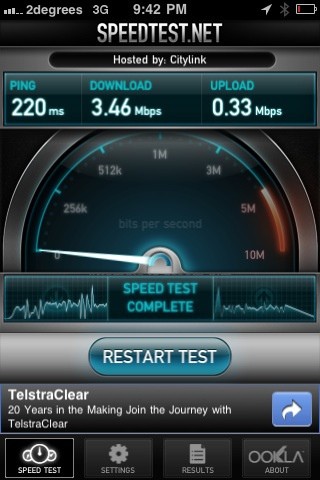
I ran a Speedtest last night, and have found the latency to be very low. This is great, as it has the biggest impact on perceived browsing speed.  


--

Nigel Ramsay
Wellington, NZ

Twitter: @nigelramsay

Read my blog at https://nigel.ramsay.org.nz
I work on AddressFinder at Abletech


z2k

z2k
321 posts

Ultimate Geek
+1 received by user: 24

Trusted

  #392503 16-Oct-2010 10:15
Send private message

mruane: I am looking for help from those who have transfered an iPhone on an iPhone plan from Vodafone to 2Degrees.  I bought my iPhone 12 months ago so I am expecting to have to pay a $250 early termination fee.

I want to be sure that I do this in the right sequence so that I get my old number ported before my VF account is closed. Do I create the 2Degrees account and then request the number transfer and then close the VF account and pay the early termination fee in that order, or does this have to be done a different way.

Any guidance would be appreciated.

Cheers Mike


If you're planning to go onto the postpay plan, make sure you do the prepay to postpay switch first before you port your number.

Last thing you want is a failed credit check when your number is already ported over and your Vodafone account terminated. 

mruane

420 posts

Ultimate Geek
+1 received by user: 2


  #392521 16-Oct-2010 11:29
Send private message

Thanks Gents, Nigel - a great set of instructions. Should be a piece of cake.

Cheers Mike


Shop now at Mighty Ape (affiliate link).
mruane

420 posts

Ultimate Geek
+1 received by user: 2


  #392617 16-Oct-2010 15:12
Send private message

Update:

I activated the 2Degrees SIM and did the number port following Nigel's set of steps and it was all completed within 2 hours (and on a Saturday!). Nothing wrong with that service...

Thanks for the help people. Appreciate it.

Cheers Mike

iamspark
47 posts

Geek
+1 received by user: 3


  #393082 18-Oct-2010 10:33
Send private message

Not sure if you have already but I'd call VF and cancel the account just to be 100% sure they're not still charging you. According to the LMNP rules the account cancellation is not tied to the number port itself (although operators may well enforce this process internally).

mruane

420 posts

Ultimate Geek
+1 received by user: 2


  #393365 18-Oct-2010 22:26
Send private message

Thanks iamspark.

My account renews on the 21st of the month so I will call them before that day and ensure that the account is closed. For sure they have closed the SIM card down. When I reloaded the SIM on the weekend, it reported "No Service", so it will be hard to argue with that however I can still log into the VF website, so no point in assuming that it is cancelled!

Thanks for the tip...

Cheers Mike

Create new topic


Geekzone Live »

Try automatic live updates from Geekzone directly in your browser, without refreshing the page, with Geekzone Live now.


Are you subscribed to our RSS feed? You can download the latest headlines and summaries from our stories directly to your computer or smartphone by using a feed reader.