Geekzone: technology news, blogs, forums
Guest
Welcome Guest.
You haven't logged in yet. If you don't have an account you can register now.


Admincorp

4 posts

Wannabe Geek


#81266 10-Apr-2011 12:31
Send private message

We have just moved from Canterbury Telstra to Gulf Harbour Orcon. 

In Canterbury I would use approx 60gig / month which included business usage, xbox live, international tv. We would watch a few hours tv online a day so we did go through quite a bit.

In moving to Gulf Harbour we get normal TV so I have only purchased 30gig / month broadband and only doing business usage and xbox live.

I have queried with Orcon that we seem to have excessive use and I have gone through the router details and can't see anyone else connected to the wifi. The usage is random and is at 2.5gig per day down to around 700mb on other days.

Below is the usage. I'm just about out of broadband and have several days left to run but I can't find anywhere what I can do to find out what is going on. 

On the 9th April below, there was a lot of xbox live usage but we didn't use that much broadband. I can't think for the life of me what is going on as we don't watch tv online anymore either. We don't host any xbox live games either. 

Does anyone have any suggestions of what I can do to find out what is going on. I'm at the point of connecting another provider to see if actually there is something wrong with Orcon, bearing in mind Orcon stuffed up our broadband connection and then stuffed up our phone line connection also.





View this topic in a long page with up to 500 replies per page Create new topic
 1 | 2
Ragnor
8287 posts

Uber Geek
+1 received by user: 591

Trusted

  #457210 10-Apr-2011 12:38
Send private message

What modem/router do you have? You might be able to pull stats out of it to compare with Orcon's stats.

Also you can install Networx on each pc to keep an eye on usage and check for anomolies
http://www.softperfect.com/products/networx/

Remember to check ignore lan traffic in the options of networx


Admincorp

4 posts

Wannabe Geek


  #457239 10-Apr-2011 15:46
Send private message

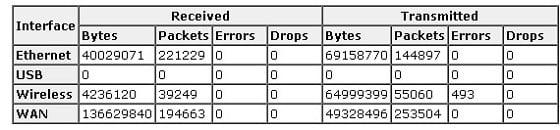
We have an Orcon issued Dynalink RTA1025WE, quite basic. Below is the table of what it is showing. I am assuming that it is from when we turned it on as I haven't reset it but not entirely sure how to work this out and how to work out how it all equates to gigabytes and do I include all those numbers?

Truly I'm really good at some things but I have no idea when it comes to broadband :)

I did try a metering program for my computer but wasn't sure how that worked so I have stopped it but I will try the one you have recommended.

Many thanks :)


Admincorp

4 posts

Wannabe Geek


  #457282 10-Apr-2011 19:20
Send private message

Just realised that perhaps the readings from the router are from when it re-connects


freitasm
BDFL - Memuneh
80944 posts

Uber Geek
+1 received by user: 41696

Administrator
ID Verified
Trusted
Geekzone
Lifetime subscriber

  #457283 10-Apr-2011 19:26
Send private message

Is the Wireless LAN protected with WPA? Are you willing to turn the wireless LAN off for a few days and use only ethernet?

How many PCs on the network? When was the last time you ran a full antivirus scan? Have you checked the startup programs in each PC to see if nothing is running that shouldn't? Do you run any server at home? Any ports being forwarded on the router?

Are all PCs updated with the latest Service Packs and updates?


Referral links: Quic Broadband (free setup code: R587125ERQ6VE) | Samsung | AliExpress | Wise | Sharesies 


Support Geekzone by subscribing (browse ads-free), or making a one-off or recurring donation through PressPatron.


Admincorp

4 posts

Wannabe Geek


  #457287 10-Apr-2011 19:37
Send private message

Yes the wireless is protected and I changed the password and hid it.
All pc's protected, all running latest updates and service packs.
Checked all programs to ensure nothing out of ordinary is running.

I have two PCs, 2 laptops, 1 xbox live, 2 iPhones.

Yes, am going to turn wireless off tomorrow and limit usage to 2 pcs and xbox live on ethernet tomorrow. Will see what happens but the usage is so random, may have to do it for the week?

Orcon are saying nothing is wrong but I do find it very odd and with all the issues we've had with Orcon its hard to trust them.


xpd

xpd
Geek of Coastguard
14193 posts

Uber Geek
+1 received by user: 4659

Retired Mod
ID Verified
Trusted
Lifetime subscriber

  #457365 11-Apr-2011 08:51
Send private message

Youve reminded me....Ive actually got to check mine... last few weeks or so my usage has seemed quite high even on days I havent been home - only thing different is that Ive been using the wifi on the TrueNet router rather than my 3Com as its PSU died.

2x laptops, iPhone and PS3.


XPD / Gavin


LinkTree


Shop now for Dell laptops and other devices (affiliate link).
freitasm
BDFL - Memuneh
80944 posts

Uber Geek
+1 received by user: 41696

Administrator
ID Verified
Trusted
Geekzone
Lifetime subscriber

  #457368 11-Apr-2011 08:53
Send private message

Is the WiFi on your TrueNet router enabled? It's not on mine...


Referral links: Quic Broadband (free setup code: R587125ERQ6VE) | Samsung | AliExpress | Wise | Sharesies 


Support Geekzone by subscribing (browse ads-free), or making a one-off or recurring donation through PressPatron.


xpd

xpd
Geek of Coastguard
14193 posts

Uber Geek
+1 received by user: 4659

Retired Mod
ID Verified
Trusted
Lifetime subscriber

  #457373 11-Apr-2011 09:02
Send private message

freitasm: Is the WiFi on your TrueNet router enabled? It's not on mine...


Yup...has been since the Chch quakes - access it via your TrueNet control panel on their site.

Connection Details -> Edit


XPD / Gavin


LinkTree


freitasm
BDFL - Memuneh
80944 posts

Uber Geek
+1 received by user: 41696

Administrator
ID Verified
Trusted
Geekzone
Lifetime subscriber

  #457377 11-Apr-2011 09:16
Send private message

Ok, I see...


Referral links: Quic Broadband (free setup code: R587125ERQ6VE) | Samsung | AliExpress | Wise | Sharesies 


Support Geekzone by subscribing (browse ads-free), or making a one-off or recurring donation through PressPatron.


Ragnor
8287 posts

Uber Geek
+1 received by user: 591

Trusted

  #457638 11-Apr-2011 21:32
Send private message

Hmm when did they add wifi settings via the website? Didn't notice that before.

Guess we can now disable wireless on our main router (WRT54GL running Tomato) and have the wireless clients connect via the Truenet unit which should help the timing of the automated speed tests.

Hmm looking the reports in the site, 100K upload... the result is always 0 Mb/s and domestic website test there are no results at all for our connection, the rest are normal.

Weird.


xpd

xpd
Geek of Coastguard
14193 posts

Uber Geek
+1 received by user: 4659

Retired Mod
ID Verified
Trusted
Lifetime subscriber

  #457690 12-Apr-2011 08:28
Send private message

Checked BitMeterOS on my laptop which ive been running for about a week and none of the figures match up with what Orcon's usage meter shows.... some days it seems to work in my favour, others it dosent.

Have taken PS3 off the Wifi for now and will monitor a bit more closely and see what happens over the next week.


XPD / Gavin


LinkTree


Support Geekzone with one-off or recurring donations Donate via PressPatron.
Ragnor
8287 posts

Uber Geek
+1 received by user: 591

Trusted

  #457809 12-Apr-2011 13:25
Send private message

They basically take logs from their BRAS or routers and save them somewhere (typically a SAN)... then they parse the logs and store the data against user accounts in a database/their billing systems.

Because of the above ISP usage monitoring isn't real time, due the processing time required. Some ISP's obviously have better systems than others.

You may find  Orcon does something annoying like record the usage against the day it processes the usage not when the usage occurred.  There are some valid reasons for doing that like simpler/cleaner handling when billing dates cutover if the processing is running behind.

Maybe Sounddude can comment on this if he's around?

You may also find lots of data is sent to the ISP from connections you started but later closed, all that traffic is still recorded.

Classic example is bit torrent, lots of peers will keep trying to connect to you for hours after you close utorrent. That data will be recorded by your ISP but not recorded by your usage monitoring even if you record at your router/modem as that traffic is simply dropped by your router/modem.

Athlonite
1828 posts

Uber Geek
+1 received by user: 210
Inactive user


  #457965 12-Apr-2011 18:54
Send private message

If that's the case then IF no connection is made to his PC then no DATA should be recorded for it

Ragnor
8287 posts

Uber Geek
+1 received by user: 591

Trusted

  #458031 12-Apr-2011 22:41
Send private message

Athlonite: If that's the case then IF no connection is made to his PC then no DATA should be recorded for it


The ISP has sent data to your router/modem, they have no idea what your router/modem does with it... how would they tell that you shouldn't be charged for it?


gingerman93
30 posts

Geek
+1 received by user: 1


  #459557 16-Apr-2011 21:53

Could be multiple things going on here.

It could be programs like uTorrent, Limewire, etc loading when your computer starts up. Your upload-values are regularly over 100M per day. This would indicate to me that you are either using Skype regularly, you are sending heaps of emails or emails with attachments ... or you've got P2P software running in the background and people are leaching from you without you realising.

All P2P and Torrent clients have the option in their preferences to "disable on startup". Try this.

Also, if you are worried that someone is using your wireless without your knowledge, try keeping your computers off for a day and see if you have any usage recorded for that day.

 1 | 2
View this topic in a long page with up to 500 replies per page Create new topic


Geekzone Live »

Try automatic live updates from Geekzone directly in your browser, without refreshing the page, with Geekzone Live now.


Are you subscribed to our RSS feed? You can download the latest headlines and summaries from our stories directly to your computer or smartphone by using a feed reader.