Geekzone: technology news, blogs, forums
Guest
Welcome Guest.
You haven't logged in yet. If you don't have an account you can register now.


duduwaka

19 posts

Geek


#98228 27-Feb-2012 16:25
Send private message

Hi there
I have just got orcon genius wireless in my new flat in palmerston north and the internet speed is far slower than my last house just around the corner. I am in ADSL2+ area and the speed is so slow that it cannot stream youtube or tvnz on demand in time. Can anyone offer advice on what i can possibly do to improve my internet speed
Thanks

Here is my speedtest 
https://www.speedtest.net/result/1798976579.png

Create new topic
Athlonite
1828 posts

Uber Geek
+1 received by user: 210
Inactive user


  #587450 27-Feb-2012 16:46
Send private message

Phone Orcon and get them to send out a tech

also can you post your modems stats
ie:
sync speed up/down
attenuation
noise


johnr
19282 posts

Uber Geek
+1 received by user: 2526
Inactive user


  #587452 27-Feb-2012 16:48
Send private message

Have you read the 5000+ other threads on basic fault checking?


duduwaka

19 posts

Geek


  #587543 27-Feb-2012 20:05
Send private message

I read through alot of other threads but could not recongise or understand if any were the same problem as i have. 

Download:  12032 Kbps.
Upload:  682 Kbps. 
I dont know where to find sync speed, attentuation or noise in my modem settings 


duduwaka

19 posts

Geek


  #587549 27-Feb-2012 20:21
Send private message

I was also wondering how much low wireless signal affects internet speed and if there is some easy way i can the increase signal i receive without moving my computer.

 note that the slow internet speed i have is also when i have full signal

Phexx
420 posts

Ultimate Geek
+1 received by user: 6


  #587550 27-Feb-2012 20:24
Send private message

duduwaka: I read through alot of other threads but could not recongise or understand if any were the same problem as i have. 

Download:  12032 Kbps.
Upload:  682 Kbps. 
I dont know where to find sync speed, attentuation or noise in my modem settings 

What modem are you using, the speed definitely isn't slow, if I'm reading it correct.

duduwaka

19 posts

Geek


  #587556 27-Feb-2012 20:42
Send private message

Its the orcon genius modem. I have read that they have wireless n. I wouldnt think the speed is the modems fault 


Want to support Geekzone and browse the site without the ads? Subscribe to Geekzone now (monthly, annual and lifetime options).
bameron
305 posts

Ultimate Geek
+1 received by user: 105

Trusted
2degrees

  #587738 28-Feb-2012 10:33
Send private message

Hi Tim,

Your best bet here is to give our Helpdesk a call on 0800 13 14 15. They'll be able to run you through some basic troubleshooting steps before we start to look at escalating this issue to a technician.

As mentioned in this thread though, GeekZone is a great source of tips that you can use yourself to see if you can improve your speeds before you call in to the Helpdesk.

Cheers,

Cam

kyhwana2
2572 posts

Uber Geek
+1 received by user: 233


  #587744 28-Feb-2012 10:40
Send private message

You're using wireless and then doing speed tests?

Try using an ethernet cable and testing again..

Phexx
420 posts

Ultimate Geek
+1 received by user: 6


  #588809 1-Mar-2012 12:52
Send private message

bameron: Hi Tim,

Your best bet here is to give our Helpdesk a call on 0800 13 14 15. They'll be able to run you through some basic troubleshooting steps before we start to look at escalating this issue to a technician.

As mentioned in this thread though, GeekZone is a great source of tips that you can use yourself to see if you can improve your speeds before you call in to the Helpdesk.

Cheers,

Cam

Hi, sorry to invade this thread, but did you get my message? I need some help quickly.

xpd

xpd
Geek of Coastguard
14115 posts

Uber Geek
+1 received by user: 4574

Retired Mod
ID Verified
Trusted
Lifetime subscriber

  #588885 1-Mar-2012 14:38
Send private message

Yup, try via cable first - if thats fine, then you have some wifi interference or distance issues.


XPD / Gavin


LinkTree


seeyouaunty
4 posts

Wannabe Geek


  #590067 3-Mar-2012 23:41
Send private message

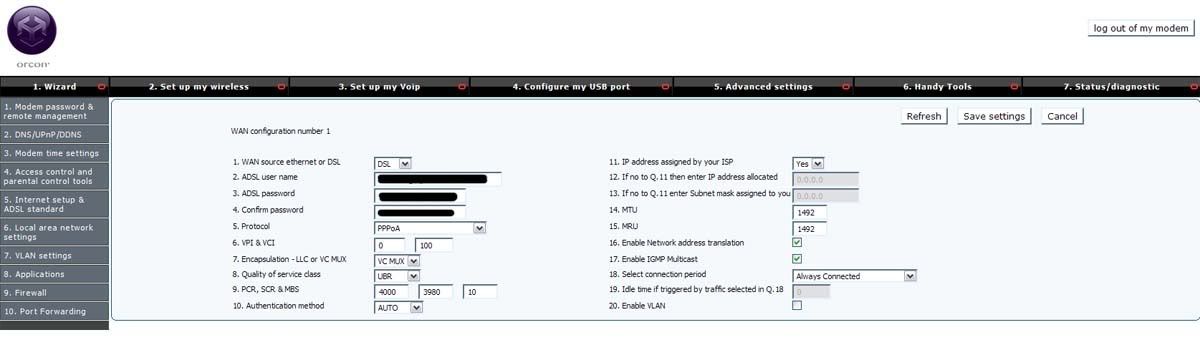
I'm in palmy with the same problem.  I got off the phone with a technician and he changed my adsl modem settings so it used VC MUX instead of LLC.  Its only been a few hours but i can stream video no problem now.

If you log into the modem the setting is found in: 5.Advanced Settings / 5.Internet setup & ADSL standard / WAN configuration #1.  Then select the dropdown box by 7. Encapsulation - LLC or VC MUX

Save and reboot.

Edit: Heres a screenshot of my modem settings

Create new topic


Geekzone Live »

Try automatic live updates from Geekzone directly in your browser, without refreshing the page, with Geekzone Live now.


Are you subscribed to our RSS feed? You can download the latest headlines and summaries from our stories directly to your computer or smartphone by using a feed reader.