
Geekzone: technology news, blogs, forums
Guest
Welcome Guest.
You haven't logged in yet. If you don't have an account you can register now.


View this topic in a long page with up to 500 replies per page Create new topic
1 | ... | 17 | 18 | 19 | 20 | 21 | 22 | 23 | 24 | 25 | 26 | 27 | ... | 36
freitasm

BDFL - Memuneh
80658 posts

Uber Geek
+1 received by user: 41071

Administrator
ID Verified
Trusted
Geekzone
Lifetime subscriber

  #2260329 18-Jun-2019 15:36
Send private message

@RichardJ1: The funny thing is the dongle says it is connected to the wifi but nothing works like it isnt connected.


Yes, and here is another possibility: you router (which we don't know the model) could just be underpowered - if you have a computer running lots of torrents for example, it could simply not have enough power to process all the packets going around.


It's really hard to diagnose these kinds of problems - the little streamer device works for everyone else. So something in your network is making this happen. It could be the things I mentioned before - distance, interference, routing capacity, Internet service (what speeds? Is it fibre or DSL? If you have lots of torrents with uploads it could be flooding the upstream, causing the incoming packets to be dropped).


There are so many things - we can only give you ideas and you will have to check your environment for these things I've mentioned.




Referral links: Quic Broadband (free setup code: R587125ERQ6VE) | Samsung | AliExpress | Wise | Sharesies 


Support Geekzone by subscribing (browse ads-free), or making a one-off or recurring donation through PressPatron.


RichardJ1
17 posts

Geek
+1 received by user: 2


  #2260376 18-Jun-2019 15:50
Send private message

Appreciate the help.

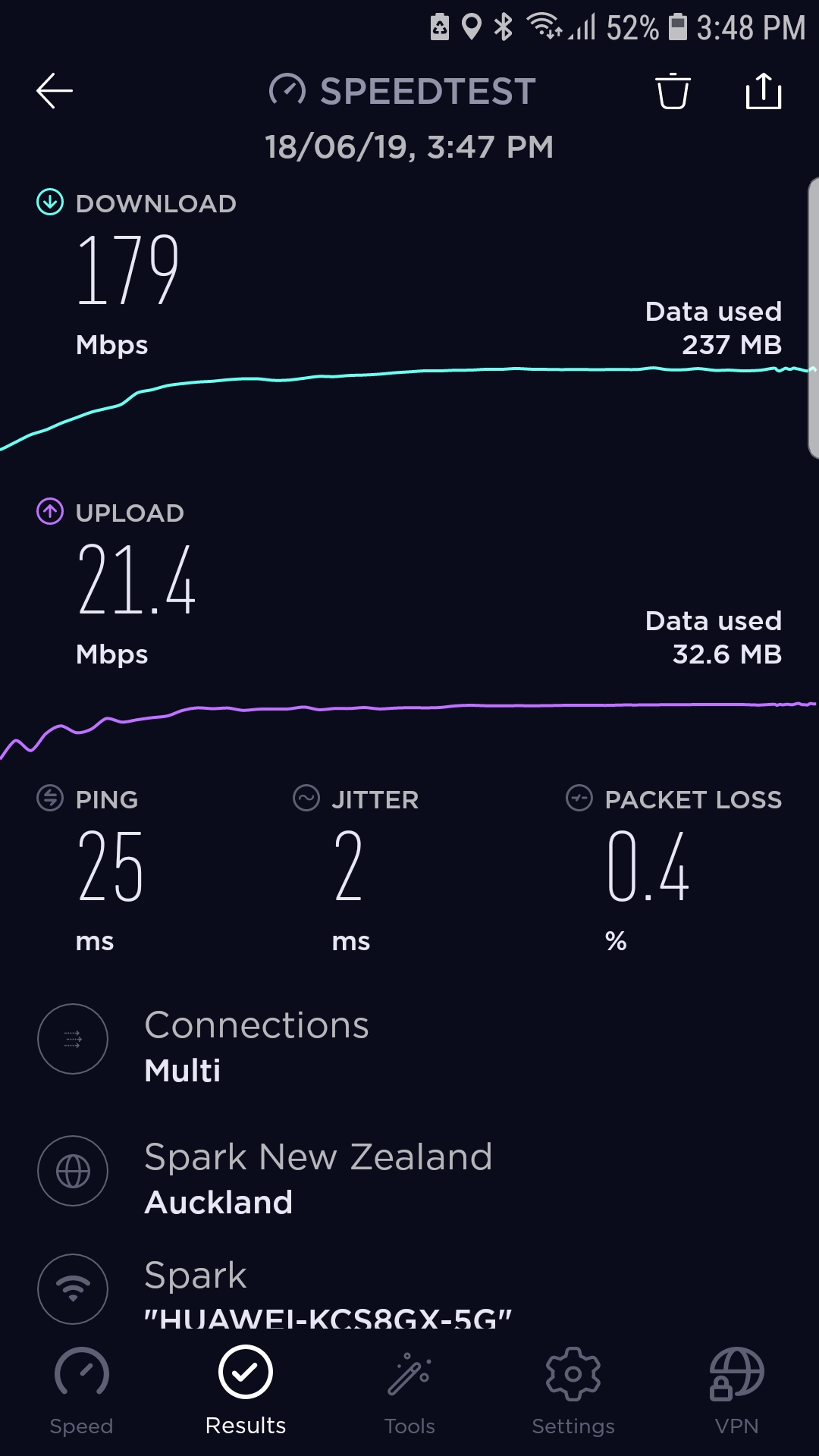
I'm on fibre 200
Modem is Huawei HG659
Dongle is 3mtr away from modem
Currently no computer in the house

Attached is a speed test

freitasm

BDFL - Memuneh
80658 posts

Uber Geek
+1 received by user: 41071

Administrator
ID Verified
Trusted
Geekzone
Lifetime subscriber

  #2260377 18-Jun-2019 15:51
Send private message

Ok, sounds like it should work then. Next step is test for interferences using a mobile WiFi analyser.


Referral links: Quic Broadband (free setup code: R587125ERQ6VE) | Samsung | AliExpress | Wise | Sharesies 


Support Geekzone by subscribing (browse ads-free), or making a one-off or recurring donation through PressPatron.


RichardJ1
17 posts

Geek
+1 received by user: 2


  #2260378 18-Jun-2019 15:51
Send private message


RichardJ1
17 posts

Geek
+1 received by user: 2


  #2260380 18-Jun-2019 15:53
Send private message

freitasm: Ok, sounds like it should work then. Next step is test for interferences using a mobile WiFi analyser.


Which do you recommend?

freitasm

BDFL - Memuneh
80658 posts

Uber Geek
+1 received by user: 41071

Administrator
ID Verified
Trusted
Geekzone
Lifetime subscriber

  #2260382 18-Jun-2019 15:55
Send private message

WiFi Analyzer by corem.

You should create another thread in the LAN/routers forum just for this.


Referral links: Quic Broadband (free setup code: R587125ERQ6VE) | Samsung | AliExpress | Wise | Sharesies 


Support Geekzone by subscribing (browse ads-free), or making a one-off or recurring donation through PressPatron.


Move to New Zealand's best fibre broadband service (affiliate link). Free setup code: R587125ERQ6VE. Note that to use Quic Broadband you must be comfortable with configuring your own router.
RichardJ1
17 posts

Geek
+1 received by user: 2


  #2260430 18-Jun-2019 17:49
Send private message

So I have found the answer!

I had selected in the settings that the date and time automatically update using my network settings however that was switched off so I did it manually and what do you know it is now working!!!

SJPONeill
4 posts

Wannabe Geek
+1 received by user: 1


  #2260462 18-Jun-2019 19:16
Send private message

I had the same with mine, took me a while to figure it out by changing one setting after another...the 'instructions' leave a bit to be desired. Would be interested to know if your widescreen files are playing fullscreen or letterboxed: mine has defaulted to fullscreen and I can't find the switch to set it back. It is definitely the Smartvu and the Chromecast plugged into the same TV plays the same files fine...


RichardJ1
17 posts

Geek
+1 received by user: 2


  #2260479 18-Jun-2019 20:08
Send private message

Everything with mine plays fine it was only the internet connection/data and time was obviously the issue.

Let me know where you'd like me to check in mine to see if they're the same.

freitasm

BDFL - Memuneh
80658 posts

Uber Geek
+1 received by user: 41071

Administrator
ID Verified
Trusted
Geekzone
Lifetime subscriber

  #2260480 18-Jun-2019 20:09
Send private message

The problem with date and time is that they need to be correct so that the system can establish a connection to secure servers - date/time and timezone are essential when negotiating encryption between client and servers.


Referral links: Quic Broadband (free setup code: R587125ERQ6VE) | Samsung | AliExpress | Wise | Sharesies 


Support Geekzone by subscribing (browse ads-free), or making a one-off or recurring donation through PressPatron.


RichardJ1
17 posts

Geek
+1 received by user: 2


  #2260482 18-Jun-2019 20:16
Send private message

freitasm:

The problem with date and time is that they need to be correct so that the system can establish a connection to secure servers - date/time and timezone are essential when negotiating encryption between client and servers.


I'm just glad it was a simple fix! 😀

Thanks very much for your help!!


Move to New Zealand's best fibre broadband service (affiliate link). Free setup code: R587125ERQ6VE. Note that to use Quic Broadband you must be comfortable with configuring your own router.
aerir
61 posts

Master Geek
+1 received by user: 8


  #2261348 20-Jun-2019 10:49
Send private message

How is this compared with MiBox at similar price range?


Looking for a box to replace my Nexus Player that supports 4k streaming


mattwnz
20520 posts

Uber Geek
+1 received by user: 4797


  #2262044 21-Jun-2019 15:44
Send private message

How many other devices will stream freeview TV live? Does it do prime TV live?


mattwnz
20520 posts

Uber Geek
+1 received by user: 4797


  #2262108 21-Jun-2019 17:46
Send private message

Interesting how lacking information the Freeview TV NZ website is, on what streaming live boxes and TV are available. It doesn't do prime. The big issue I have with it, is that you can't really use it as an aerial replacement if you have a PVR. A PVR still needs an aerial feed into it, so it is hopeless for recording, unless that feature is built in and you can record to a USB stick or card. But they are generally not as user friendly as  PVR such as a tivo, or panasonics PVRs


Benoire
2878 posts

Uber Geek
+1 received by user: 681


  #2262111 21-Jun-2019 18:01
Send private message

That's where Kodi with the freeview IPTV plugins are better as they can record, or use a TV Engine such as TVheadend as that can record and then stream to other clients... Prime isn't on IPTV as far as I know, only OTA.


1 | ... | 17 | 18 | 19 | 20 | 21 | 22 | 23 | 24 | 25 | 26 | 27 | ... | 36
View this topic in a long page with up to 500 replies per page Create new topic


Geekzone Live »

Try automatic live updates from Geekzone directly in your browser, without refreshing the page, with Geekzone Live now.


Are you subscribed to our RSS feed? You can download the latest headlines and summaries from our stories directly to your computer or smartphone by using a feed reader.