Geekzone: technology news, blogs, forums
Guest
Welcome Guest.
You haven't logged in yet. If you don't have an account you can register now.


View this topic in a long page with up to 500 replies per page Create new topic
1 | 2 | 3 | 4 | 5 | 6 | 7 | 8 | 9 | ... | 10
Jasonsbx
24 posts

Geek


  #247206 16-Aug-2009 15:14
Send private message

No, don't think anything that records does HDMI in. Basic specs for DMR-BW850 at Panasonic


butlerboy
457 posts

Ultimate Geek
+1 received by user: 53


  #249060 20-Aug-2009 14:54
Send private message

Mauricio, did you get round to writing a review yet? I'd be interested to know what you think of it.

freitasm
BDFL - Memuneh
80657 posts

Uber Geek
+1 received by user: 41062

Administrator
ID Verified
Trusted
Geekzone
Lifetime subscriber

  #249061 20-Aug-2009 15:02
Send private message

Not yet. Had some changes made to our antenna and still testing.

So far so good. As a PVR - with no MHEG5 support - it's ok. Can record two events at the same time, or record one while watching another program. Very good picture over HDMI, and reproduced a couple of DIVX files I put on a USB memory key. Read photos from SD cards out of Nikon and Kodak cameras and played Bluray without problem.

Quite slow between changes - press the Guide button and it takes its time thinking... Loading a Bluray disc seems like the whole world will turn another round. Changing channels is fast though.

I really don't like it can connect to our LAN but only to access YouTube and Picasa. It would be great if it could actually access SMB shares from a server and play contents from there...

More on a full review later.


Referral links: Quic Broadband (free setup code: R587125ERQ6VE) | Samsung | AliExpress | Wise | Sharesies 


Support Geekzone by subscribing (browse ads-free), or making a one-off or recurring donation through PressPatron.



RustyViewer
298 posts

Ultimate Geek
+1 received by user: 33


  #249103 20-Aug-2009 16:52
Send private message

My way of thinking is that the Panasonic is still the best option right now. Tivo is not going to let you skip ads and has no direct transferable media to save to. Sony PlayTV will only record one channel.

To the best of my knowledge, the Panasonic is the only BluRay BURNER on the market. Considering most BulRay PLAYERS ONLY cost in the vicinity of $700, the HN salesman told me they was surprised at the price as they thought it would probably be about $2500 but that may just be sales talk.

freitasm
BDFL - Memuneh
80657 posts

Uber Geek
+1 received by user: 41062

Administrator
ID Verified
Trusted
Geekzone
Lifetime subscriber

  #249107 20-Aug-2009 17:01
Send private message

More informaton: the Panasonic won't play ISO, VOB or WTV (Media Center Live TV Recording) files...


Referral links: Quic Broadband (free setup code: R587125ERQ6VE) | Samsung | AliExpress | Wise | Sharesies 


Support Geekzone by subscribing (browse ads-free), or making a one-off or recurring donation through PressPatron.


RustyViewer
298 posts

Ultimate Geek
+1 received by user: 33


  #249115 20-Aug-2009 17:08
Send private message

Will it play FLV files? And can it play NTCS or DivX discs while recording in PAL?


Support Geekzone with one-off or recurring donations Donate via PressPatron.
freitasm
BDFL - Memuneh
80657 posts

Uber Geek
+1 received by user: 41062

Administrator
ID Verified
Trusted
Geekzone
Lifetime subscriber

  #249123 20-Aug-2009 17:22
Send private message

I don't have a DIVX disc - only DIVX files.

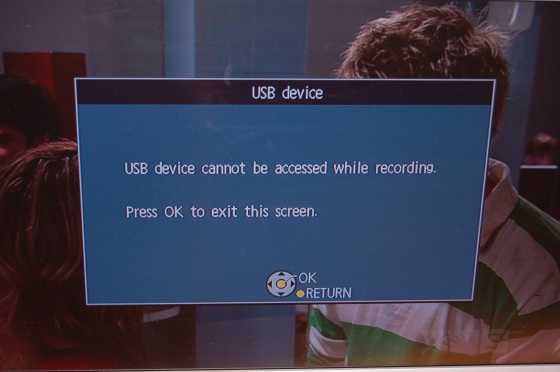
You can only play Freeview while recording - no Bluray, DVD or USB content.


Referral links: Quic Broadband (free setup code: R587125ERQ6VE) | Samsung | AliExpress | Wise | Sharesies 


Support Geekzone by subscribing (browse ads-free), or making a one-off or recurring donation through PressPatron.


RustyViewer
298 posts

Ultimate Geek
+1 received by user: 33


  #249125 20-Aug-2009 17:27
Send private message

What? That makes no sense. I'm sure you can play a disc or USB drive while recording one or two channels. Otherwise it's just about pointless. And of course, you should be able to play chase or play what you've already recorded while other channels are being recorded. Are you sure you're doing it right?

freitasm
BDFL - Memuneh
80657 posts

Uber Geek
+1 received by user: 41062

Administrator
ID Verified
Trusted
Geekzone
Lifetime subscriber

#249126 20-Aug-2009 17:32
Send private message

RustyViewer: What? That makes no sense. I'm sure you can play a disc or USB drive while recording one or two channels. Otherwise it's just about pointless. And of course, you should be able to play chase or play what you've already recorded while other channels are being recorded. Are you sure you're doing it right?


"Are you sure you're doing it right?"


Referral links: Quic Broadband (free setup code: R587125ERQ6VE) | Samsung | AliExpress | Wise | Sharesies 


Support Geekzone by subscribing (browse ads-free), or making a one-off or recurring donation through PressPatron.


freitasm
BDFL - Memuneh
80657 posts

Uber Geek
+1 received by user: 41062

Administrator
ID Verified
Trusted
Geekzone
Lifetime subscriber

  #249129 20-Aug-2009 17:35
Send private message

RustyViewer: And of course, you should be able to play chase or play what you've already recorded while other channels are being recorded.


You can watch a channel while recording another one. You can record two channels, in which case you can only watch those two channels being recorded (logical since both tuners will be in use).

You can watch a DVD or Bluray disc, but no access to USB or SD card while recording.


Referral links: Quic Broadband (free setup code: R587125ERQ6VE) | Samsung | AliExpress | Wise | Sharesies 


Support Geekzone by subscribing (browse ads-free), or making a one-off or recurring donation through PressPatron.


RustyViewer
298 posts

Ultimate Geek
+1 received by user: 33


  #249130 20-Aug-2009 17:35
Send private message

But you should also be able to play something you've recorded to the hard disk or are currently recording (play chase) while one or two recordings are in progress?


Shop now for Lenovo laptops and other devices (affiliate link).
RustyViewer
298 posts

Ultimate Geek
+1 received by user: 33


  #249138 20-Aug-2009 17:50
Send private message

And can it play an NTCS format DVD while recording?

freitasm
BDFL - Memuneh
80657 posts

Uber Geek
+1 received by user: 41062

Administrator
ID Verified
Trusted
Geekzone
Lifetime subscriber

  #249141 20-Aug-2009 17:54
Send private message

RustyViewer: And can it play an NTCS format DVD while recording?


You mean NTSC? I don't have a NTSC DVD handy to test. PAL DVD and BluRay play ok.


Referral links: Quic Broadband (free setup code: R587125ERQ6VE) | Samsung | AliExpress | Wise | Sharesies 


Support Geekzone by subscribing (browse ads-free), or making a one-off or recurring donation through PressPatron.


freitasm
BDFL - Memuneh
80657 posts

Uber Geek
+1 received by user: 41062

Administrator
ID Verified
Trusted
Geekzone
Lifetime subscriber

#249144 20-Aug-2009 17:58
Send private message

RustyViewer: But you should also be able to play something you've recorded to the hard disk or are currently recording (play chase) while one or two recordings are in progress?


Yes, you can play a recorded programme while recording on two channels and you can play a current recording file.


Referral links: Quic Broadband (free setup code: R587125ERQ6VE) | Samsung | AliExpress | Wise | Sharesies 


Support Geekzone by subscribing (browse ads-free), or making a one-off or recurring donation through PressPatron.


RustyViewer
298 posts

Ultimate Geek
+1 received by user: 33


  #249156 20-Aug-2009 18:39
Send private message

Ok, so the only real downside appears to be not being able to access USB while recording. Since I already have a separate player to do that - a Phillips which I got for $150 from Dick Smiths and actually plays DivX Ultra so it can play WMV files - that shouldn't be a problem.

1 | 2 | 3 | 4 | 5 | 6 | 7 | 8 | 9 | ... | 10
View this topic in a long page with up to 500 replies per page Create new topic


Geekzone Live »

Try automatic live updates from Geekzone directly in your browser, without refreshing the page, with Geekzone Live now.


Are you subscribed to our RSS feed? You can download the latest headlines and summaries from our stories directly to your computer or smartphone by using a feed reader.