Geekzone: technology news, blogs, forums
Guest
Welcome Guest.
You haven't logged in yet. If you don't have an account you can register now.


deadstar6

30 posts

Geek
+1 received by user: 3


#138094 19-Dec-2013 16:28
Send private message

Hi there,

Just bought new TV. We already have a Freeview box and a TV in the living room but this new TV is for the bedroom and has Freeview built in. What sort of HDMI cables do I need to buy? Results from these forums and internet searching seem to bring mixed results - some say that the cheap cables are the same as the pricier ones but some say you can actually see a difference in quality. 

Also, if Freeview is built in and we already have an aerial. What do I need to do now? Do I still need a splitter? Obviously don't want to watch the same channels on both TVs.

Cheers!

Create new topic
kobiak
1615 posts

Uber Geek
+1 received by user: 551

Trusted

  #954969 19-Dec-2013 16:35
Send private message

plug aerial cable to TV and search channels

$10 hdmi cable will be just fine.


helping others at evgenyk.nz


Oblivian
7345 posts

Uber Geek
+1 received by user: 2117

ID Verified

  #954974 19-Dec-2013 16:37
Send private message

HDMI connectors can corrode and stick, but thats about it. It's still 0's and 1's being encoded/decoded at each end. And they still get from one end to the other be it by ferrari or scooter.

Spliiter won't locked you to a channel. Thats what can happen off satelite transponders however as they have different polarities to deal with. UHF - The full width of signal comes from the antenna and your TV pics and chooses from that what it listens to at the time and blocks the rest.

Using an output from another device and daisy chaning can change this however.

wellygary
8813 posts

Uber Geek
+1 received by user: 5298


  #954977 19-Dec-2013 16:39
Send private message

Assuming that your Freeview Box is for UHF then all you need is an Aerial splitter and some RG6 cable and connectors to run a feed to the new TV.

If on the other hand you freeview box is satellite, then you will need a UHF aerial and cabling to the new TV 


B1GGLZ
1961 posts

Uber Geek
+1 received by user: 136


  #954998 19-Dec-2013 17:30
Send private message

Why do you need an HDMI cable for your new TV?

DarthKermit
5346 posts

Uber Geek
+1 received by user: 3317

Trusted

  #955008 19-Dec-2013 18:13
Send private message

B1GGLZ: Why do you need an HDMI cable for your new TV?


Indeed. You'd only need one to connect something like a DVD player to the new TV. For an external aerial you just need the appropriate type of aerial cable.


Whatifthespacekeyhadneverbeeninvented?


deadstar6

30 posts

Geek
+1 received by user: 3


  #955056 19-Dec-2013 19:52
Send private message

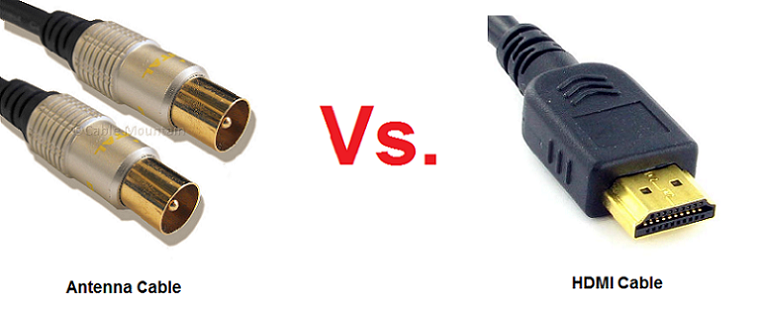
Ah yeah. The instruction manual says I need to connect one end of the antenna cable to the ANT 75 in the rear of the TV, and to plug the other end of the antenna cable into a desired antenna wall socket. It also says the antenna cable is not included. 

Sorry for not being very knowledgeable. So this is a different cable to a HDMI cable then?


Shop now at Mighty Ape (affiliate link).
sonyxperiageek
2984 posts

Uber Geek
+1 received by user: 397

Trusted

  #955068 19-Dec-2013 20:04
Send private message

deadstar6: Ah yeah. The instruction manual says I need to connect one end of the antenna cable to the ANT 75 in the rear of the TV, and to plug the other end of the antenna cable into a desired antenna wall socket. It also says the antenna cable is not included. 

Sorry for not being very knowledgeable. So this is a different cable to a HDMI cable then?


Yep, image for your reference below. You are looking to buy (or get) the left cable below to be able to watch Freeview channels on your TV.


Sony


deadstar6

30 posts

Geek
+1 received by user: 3


  #957412 26-Dec-2013 08:33
Send private message

Ah thanks guys! 

Batman
Mad Scientist
30014 posts

Uber Geek
+1 received by user: 6217

Trusted
Lifetime subscriber

  #957417 26-Dec-2013 08:43
Send private message

bought a new tv - now what?

turn it on!

deadstar6

30 posts

Geek
+1 received by user: 3


  #1079747 4-Jul-2014 08:35
Send private message

Hello everyone. Sorry to bring up an old thread! I kind of got busy and neglected the new TV. Yesterday I assembled it and connected it to the wall (but not the aerial) and the TV works and says no signal (obviously). How do I connect it to the aerial? I have a coax plug or something... the TV in the living room has a plug that goes down under the carpet. So what do I do to connect to the same aerial?

kiwiharry
1064 posts

Uber Geek
+1 received by user: 476

ID Verified
Subscriber

  #1079770 4-Jul-2014 09:24
Send private message

deadstar6: Hello everyone. Sorry to bring up an old thread! I kind of got busy and neglected the new TV. Yesterday I assembled it and connected it to the wall (but not the aerial) and the TV works and says no signal (obviously). How do I connect it to the aerial? I have a coax plug or something... the TV in the living room has a plug that goes down under the carpet. So what do I do to connect to the same aerial?


So you don't currently have an antenna wall outlet or cable in your bedroom?

Looks like you may need a splitter and more coax cable. You'll need to trace back the current cable from the main TV to see if it is a direct cable from the antenna or if there is already a splitter in circuit.


If you can't laugh at yourself then you probably shouldn't laugh at others.


Shop now for Dell laptops and other devices (affiliate link).
trig42
5889 posts

Uber Geek
+1 received by user: 2094

ID Verified

  #1079783 4-Jul-2014 09:52
Send private message

Do you have an Aerial or a Dish? You said earlier on you had a Freeview decoder box - Satellite or UHF?

Call in an expert.
They will sort it all out for you.


deadstar6

30 posts

Geek
+1 received by user: 3


  #1080852 4-Jul-2014 11:49
Send private message

Yeah that might be the easiest thing to do! We have a UHF aerial which the TV in the living room uses. That TV has a freeview box whereas my new TV has freeview built in but I don't think that makes any difference, does it?

trig42
5889 posts

Uber Geek
+1 received by user: 2094

ID Verified

  #1080855 4-Jul-2014 11:52
Send private message

No, you just need to split the signal from your UHF aerial to go to both locations, then you will be away.

Create new topic


Geekzone Live »

Try automatic live updates from Geekzone directly in your browser, without refreshing the page, with Geekzone Live now.


Are you subscribed to our RSS feed? You can download the latest headlines and summaries from our stories directly to your computer or smartphone by using a feed reader.