Geekzone: technology news, blogs, forums
Guest
Welcome Guest.
You haven't logged in yet. If you don't have an account you can register now.


vinny414

8 posts

Wannabe Geek


#230650 6-Mar-2018 18:13
Send private message

Hiya!
So our fibre was set up (we believe) in the tv port hole. We are trying to now set up the tv to get tv channels/freeview. How do we do this? Is there a way to connect both lines, one to the internet and one to the tv to get signal. Can we split the connection with splitter? Or are we missing some other device like a decoder?
So lost!
Thanks
Vinny


Filter this topic showing only the reply marked as answer View this topic in a long page with up to 500 replies per page Create new topic
 1 | 2 | 3
sbiddle
30853 posts

Uber Geek
+1 received by user: 9996

Retired Mod
Trusted
Biddle Corp
Lifetime subscriber

  #1970077 6-Mar-2018 18:17
Send private message

Fibre has nothing to do with TV.


To watch Freeview on your TV you need either a UHF TV aerial or a satellite dish.


Dial111
979 posts

Ultimate Geek
+1 received by user: 656


  #1970078 6-Mar-2018 18:19
Send private message

Fibre from the street will enter the house to a white box called the ONT located somewhere on a wall inside, from there a data cable will be connected to your router. The coax cable for your tv is totally separate and will feed back to the aerial on your roof.

Unless I'm missing something you're confusing one or the other as doing both.

RunningMan
9184 posts

Uber Geek
+1 received by user: 4833


  #1970079 6-Mar-2018 18:20
Send private message

Bit (actually, completely!) lost as to what you mean - any chance of photo to explain?


vinny414

8 posts

Wannabe Geek


  #1970080 6-Mar-2018 18:25
Send private message

Its possible we dont have a tv port, just the fibre and we assumed it did both! Vodafone guy said we needed a decoder as the fibre was plugged into the tv port so this is why we thought that!


Behodar
11093 posts

Uber Geek
+1 received by user: 6070

Trusted
Lifetime subscriber

  #1970081 6-Mar-2018 18:26
Send private message

Does Vodafone still offer Freeview over fibre and could that be a source of confusion?


sbiddle
30853 posts

Uber Geek
+1 received by user: 9996

Retired Mod
Trusted
Biddle Corp
Lifetime subscriber

  #1970083 6-Mar-2018 18:27
Send private message

vinny414:


Its possible we dont have a tv port, just the fibre and we assumed it did both! Vodafone guy said we needed a decoder as the fibre was plugged into the tv port so this is why we thought that!


If you are with Vodafone as a provider they sell TV services over the Internet that use a Vodafone TV box. You need to pay extra for this, which I'm presuming you haven't done.


Shop now for Lego sets and other gifts (affiliate link).
vinny414

8 posts

Wannabe Geek


  #1970084 6-Mar-2018 18:32
Send private message

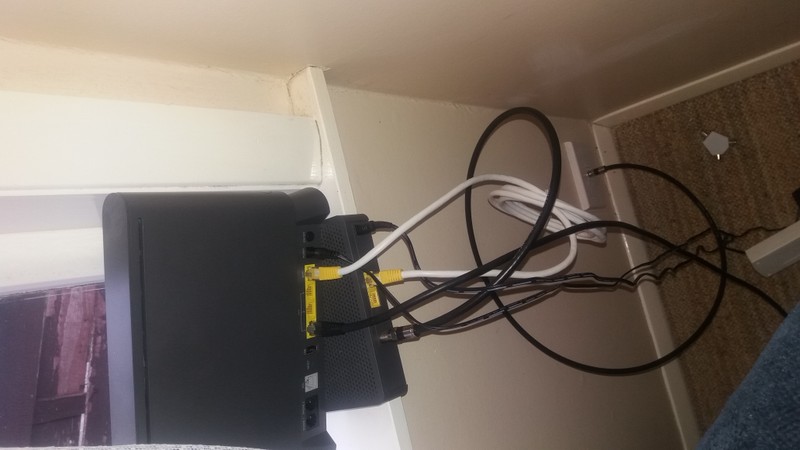
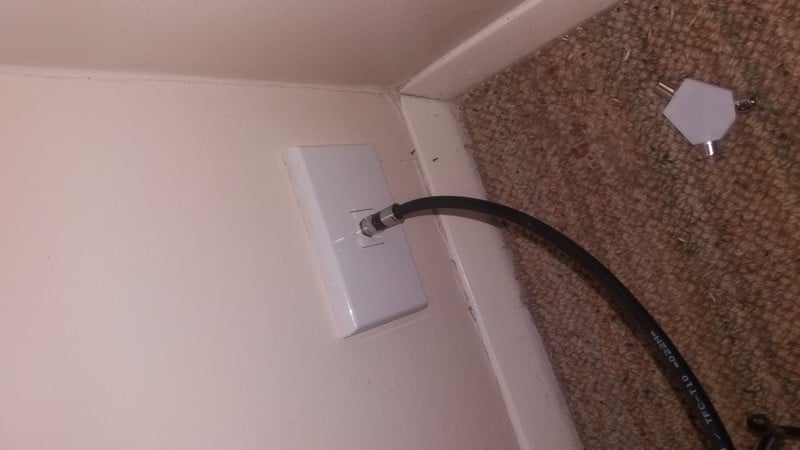
Here are some pics of what are fibre is plugged into that was set up by Vodafone


Thanks everyone!


Behodar
11093 posts

Uber Geek
+1 received by user: 6070

Trusted
Lifetime subscriber

  #1970086 6-Mar-2018 18:34
Send private message

Hang on... is this actually fibre or is it HFC cable? There is no fibre in that picture and I wonder whether the smaller box is a cable modem (I've never actually seen one so I'm not sure what they look like!)


vinny414

8 posts

Wannabe Geek


  #1970089 6-Mar-2018 18:38
Send private message

We were told this was fibre by Vodafone set up guy! 


skewt
752 posts

Ultimate Geek
+1 received by user: 215


  #1970090 6-Mar-2018 18:40
Send private message

Yay for bad marketing to confuse everyone "FibreX"


mdf

mdf
3566 posts

Uber Geek
+1 received by user: 1519

Trusted

  #1970091 6-Mar-2018 18:41
Send private message

FibreX strikes again! That's HFC and the smaller box is the new Cisco modem.

You need a Vodafone TV box to get free to air TV over that.


Shop now on AliExpress (affiliate link).
Peppery
919 posts

Ultimate Geek
+1 received by user: 188

Trusted

  #1970093 6-Mar-2018 18:42
Send private message

That's HFC cable, sold by Vodafone as FibreX. I don't blame you for being confused by them!


Linux
12173 posts

Uber Geek
+1 received by user: 8469

Trusted
Lifetime subscriber

  #1970094 6-Mar-2018 18:43
Send private message

That is not Fibre but HFC (Hybrid fiber-coaxial) which is a mix of Coax and Fibre


Linux


toejam316
1516 posts

Uber Geek
+1 received by user: 888

Trusted
Lifetime subscriber

  #1970095 6-Mar-2018 18:43
Send private message

The "Vodafone" guy is a Downer technician, and Vodafone's branding for the service you're on is Fibre X, so you're using their HFC cable network. You'll find you'll need a cable compatible STB to get TV outta there, and odds are good the only one on the market here is the Vodafone TV service, so you can either opt for Vodafone TV or find another connection point for your FTA aerial (assuming you have one).


Edit: Hah - all within minutes.


Join Quic Broadband with my referral - no sign up fee and gives me account credit


Anything I say is the ramblings of an ill informed, opinionated so-and-so, and not representative of any of my past, present or future employers, and is also probably best disregarded.


Behodar
11093 posts

Uber Geek
+1 received by user: 6070

Trusted
Lifetime subscriber

  #1970097 6-Mar-2018 18:45
Send private message

Linux:


That is not Fibre but HFC (Hybrid fiber-coaxial) which is a mix of Coax and Fibre


Linux


Even that name is a bit of a misnomer (assuming that I understand it correctly); it's fibre to the node but the cable that enters your house is just coax, not a hybrid cable. From that perspective it's as much "fibre" as ADSL is!


 1 | 2 | 3
Filter this topic showing only the reply marked as answer View this topic in a long page with up to 500 replies per page Create new topic


Geekzone Live »

Try automatic live updates from Geekzone directly in your browser, without refreshing the page, with Geekzone Live now.


Are you subscribed to our RSS feed? You can download the latest headlines and summaries from our stories directly to your computer or smartphone by using a feed reader.