Geekzone: technology news, blogs, forums
Guest
Welcome Guest.
You haven't logged in yet. If you don't have an account you can register now.


FineWine

3111 posts

Uber Geek
+1 received by user: 2440

Trusted
Nurse (R)
Lifetime subscriber

#250803 26-May-2019 13:31
Send private message

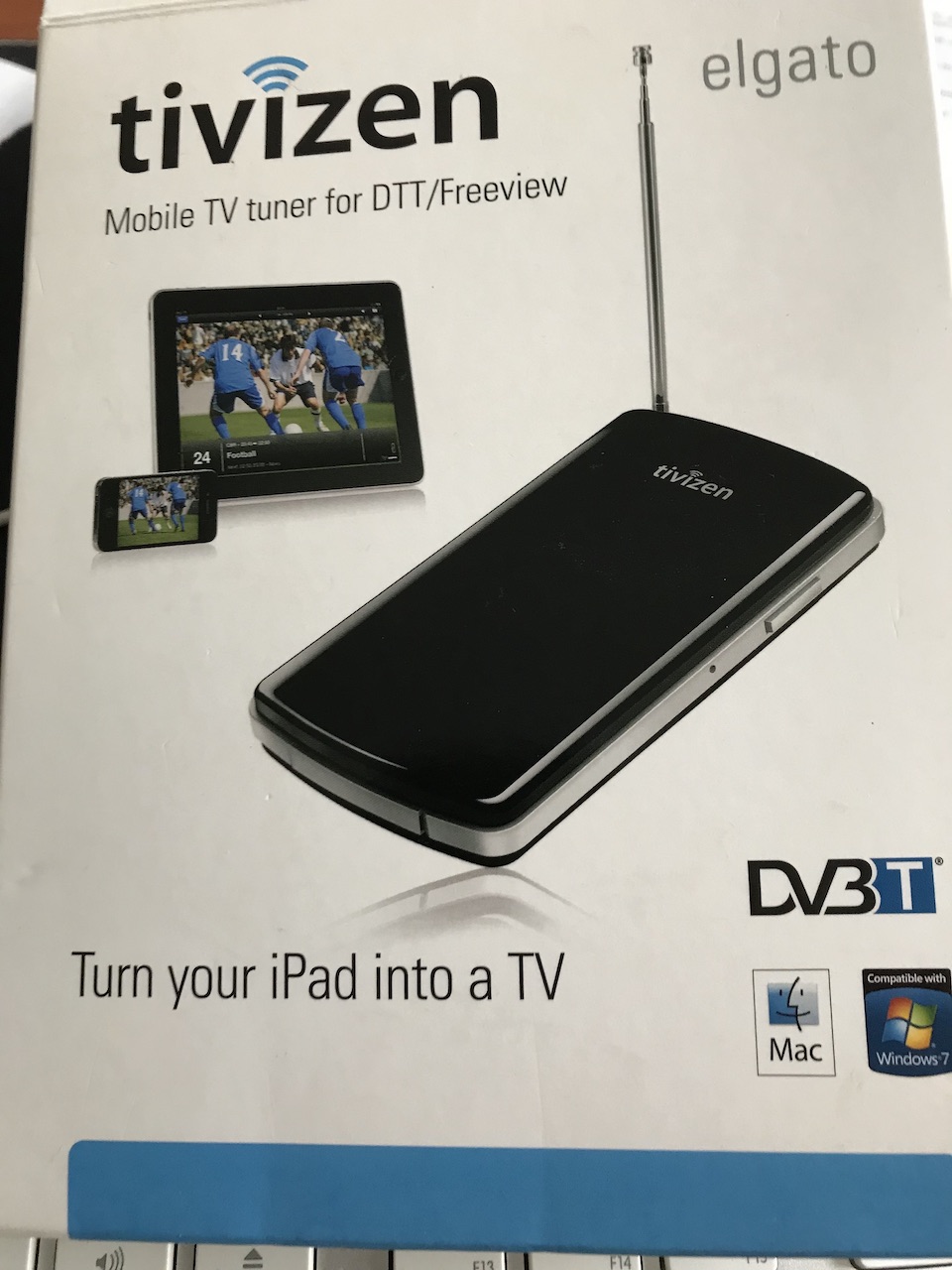
Was rummaging around in my electronics storage cupboard and came across a Elgato Tivizen Mobile TV tuner for DTT/Freeview (DV3T) which we had bought in Aussie years ago. Downloaded the latest macOS software.


It fails to pick up any DVB-T services.


Do I have a small brick ?


Whilst the difficult we can do immediately, the impossible takes a bit longer. However, miracles you will have to wait for.


Create new topic
JoshWright
404 posts

Ultimate Geek
+1 received by user: 113

ID Verified
Trusted

  #2245851 26-May-2019 13:57
Send private message

Are you using it with the built in antenna, or connecting directly to a proper one? 


Most DVB-T devices I've used that have a built in antenna do need to be connected to a proper external one to pick anything up.


I use a PCTV nanostick with EyeTV and this the case for me.


richms
29098 posts

Uber Geek
+1 received by user: 10208

Trusted
Lifetime subscriber

  #2245855 26-May-2019 14:24
Send private message

I had a generic wifi DVB tuner and it worked fine-ish. Needed to be outside to get good TV reception, but then the wifi was trash since it was only a 2.4GHz device and seems to choose stupid non overlapping channels to try to operate on. I guess if you were in the middle of nowhere it might be ok. No use for it really since broadcast TV is so unappealing but it did "work" when operating with line of sight to the transmitter.


Richard rich.ms

FineWine

3111 posts

Uber Geek
+1 received by user: 2440

Trusted
Nurse (R)
Lifetime subscriber

  #2245856 26-May-2019 14:37
Send private message

JoshWright:


Are you using it with the built in antenna, or connecting directly to a proper one? 


Most DVB-T devices I've used that have a built in antenna do need to be connected to a proper external one to pick anything up.


I use a PCTV nanostick with EyeTV and this the case for me.


Using the supplied antenna as per the photo on the box. As far as I can see there is no where to attach it an ext aerial.


Whilst the difficult we can do immediately, the impossible takes a bit longer. However, miracles you will have to wait for.


robjg63
4161 posts

Uber Geek
+1 received by user: 1425

Subscriber

  #2245857 26-May-2019 14:43
Send private message

Has it ever worked here?


If it was an Aussie model remember their Freeview broadcast specs are different to ours.


Something like the channel spacings are different.


https://en.wikipedia.org/wiki/Australian_and_New_Zealand_television_frequencies


and


http://www.nzdtv.com/forum/showthread.php?3461-Actual-Frequency-(mhz)-List-Required-for-Manual-Tuning


No idea whether you can do a 'manual' tune and stick the frequencies in directly...


Don't know how up to date it is, but this might help:


http://www.freeviewshop.co.nz/digital-terrestrial-i-8.html


Nothing is impossible for the man who doesn't have to do it himself - A. H. Weiler


fe31nz
1294 posts

Uber Geek
+1 received by user: 423


  #2246222 26-May-2019 22:29
Send private message

For it to work in New Zealand, it will need to be switched to use 8 MHz bandwidth per multiplex.  The Aussies are a bit different from most of the world in having their DVB-T using 7 MHz per multiplex, which results in fewer channels per multiplex but more multiplexes.  It also means that the centre frequencies that must be tuned to are different.  So if you can find some settings in it to switch it to 8 MHz, or to a country setting for New Zealand or somewhere else that uses 8 MHz, it will likely work.


B1GGLZ
1961 posts

Uber Geek
+1 received by user: 136


  #2246271 27-May-2019 08:21
Send private message

FineWine:


Using the supplied antenna as per the photo on the box. As far as I can see there is no where to attach it an ext aerial.


There's a review of it here


https://www.techradar.com/au/reviews/pc-mac/pc-components/tv-tuner-cards/elgato-tivizen-963061/review


It doesn't have any way to connect an external antenna so unless you are very near a TV TX it's pretty much useless.


As a generic tuner it probably works for Oz and NZ protocols.


Move to New Zealand's best fibre broadband service (affiliate link). Free setup code: R587125ERQ6VE. Note that to use Quic Broadband you must be comfortable with configuring your own router.
FineWine

3111 posts

Uber Geek
+1 received by user: 2440

Trusted
Nurse (R)
Lifetime subscriber

  #2246526 27-May-2019 14:07
Send private message

fe31nz:


For it to work in New Zealand, it will need to be switched to use 8 MHz bandwidth per multiplex.  The Aussies are a bit different from most of the world in having their DVB-T using 7 MHz per multiplex, which results in fewer channels per multiplex but more multiplexes.  It also means that the centre frequencies that must be tuned to are different.  So if you can find some settings in it to switch it to 8 MHz, or to a country setting for New Zealand or somewhere else that uses 8 MHz, it will likely work.


It automatically selected NZ during setup. The only service selection available in setup is DVB-T. I have done Auto tune and manual tune.


Whilst the difficult we can do immediately, the impossible takes a bit longer. However, miracles you will have to wait for.


FineWine

3111 posts

Uber Geek
+1 received by user: 2440

Trusted
Nurse (R)
Lifetime subscriber

  #2256789 12-Jun-2019 15:15
Send private message

OK this now FREE to a good home in Bay of Plenty area for pick up only.


PM me if interested.


Whilst the difficult we can do immediately, the impossible takes a bit longer. However, miracles you will have to wait for.


Create new topic


Geekzone Live »

Try automatic live updates from Geekzone directly in your browser, without refreshing the page, with Geekzone Live now.


Are you subscribed to our RSS feed? You can download the latest headlines and summaries from our stories directly to your computer or smartphone by using a feed reader.
