Geekzone: technology news, blogs, forums
Guest
Welcome Guest.
You haven't logged in yet. If you don't have an account you can register now.


theHackiNZ

12 posts

Geek
+1 received by user: 3


#282696 6-Mar-2021 15:38
Send private message

So you get your new box home..
You think it has a red dot RECORD button, and DVBs DVBt tuners

IT must record right? You went to the trouble but could only view the Quick Start Guide before purchasing


Perhaps a deliberate decision to not take sales away from the twice as expensive A2 1TB recorder box - so the A7070 is currently crippled from recording

On the back of box...

Filter this topic showing only the reply marked as answer Create new topic
theHackiNZ

12 posts

Geek
+1 received by user: 3


  #2669067 6-Mar-2021 15:51
Send private message

"The A7070 cannot record or pause Live TV at the moment. The USB ports are for playing back media from external storage devices, through suitable apps or performing USB software updates etc... "


There is a work around...

To make the A7070 record...


Hidden in th AndroidTV system apps is one called HDTV
Go to Settings, Apps, See all apps...
Scroll down to Show system apps
Scroll down to HDTV


Insert a blank USB stick - it will be formatted as removeable media (NTFS but not have a logical drive letter assigned - probably because of Copy Protection rights and licensing issues needed on any recordings so they cant be relocated to a PC or plain storage)

Use the HDTV app to view terres/satellite DVB and the RECORD button will function, as well as EPG, PVR and channel renaming etc

There is no STOP button...


theHackiNZ

12 posts

Geek
+1 received by user: 3


  #2669071 6-Mar-2021 16:10
Send private message

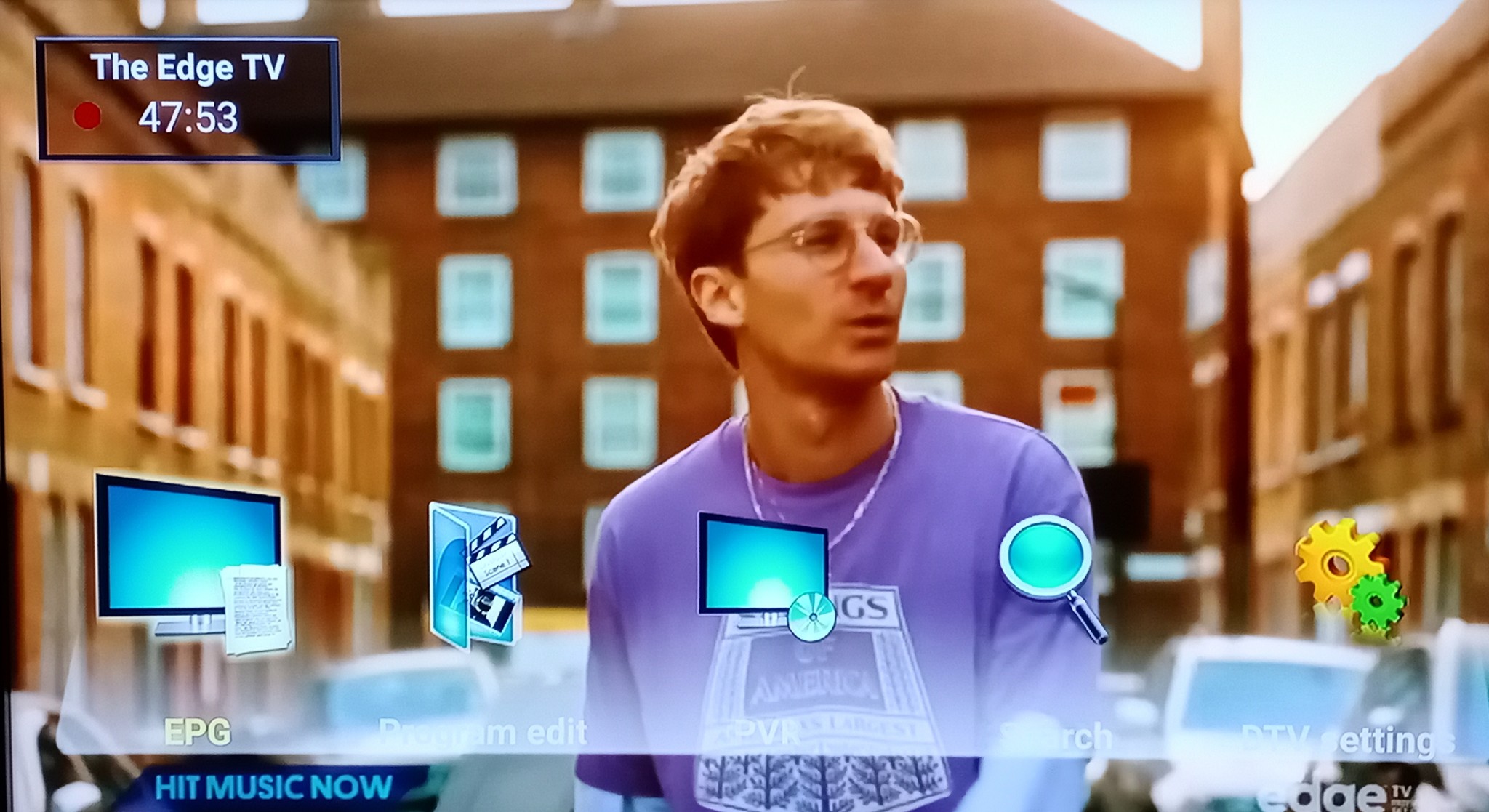
in HDTV app, use MENU button on your remote to see this on screen menu...

EPG.... Program Edit... PVR... Search... DTV Editing


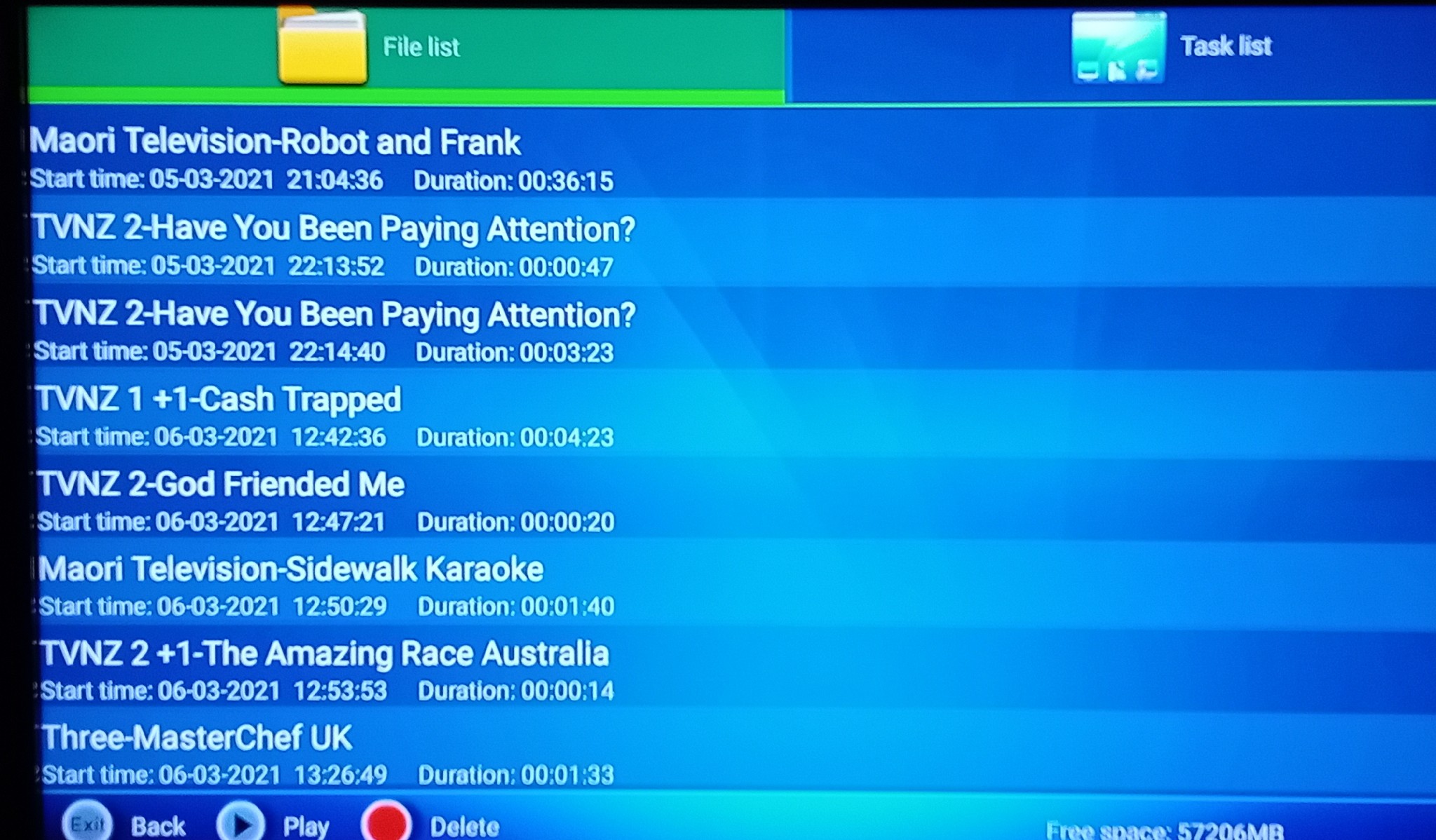
in the PVR section you can see and play back the recordings you have made


BUT

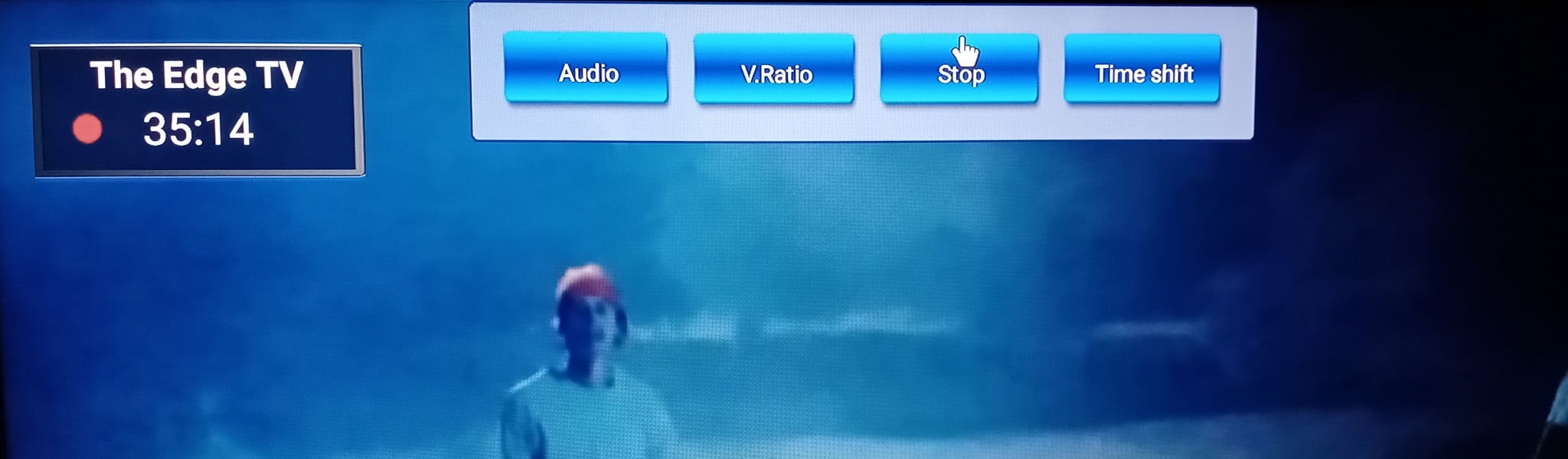
There is no button to STOP a recording !?
...You need a bluetooth app on you phone with pad/mouse control
Move pointer up to top of screen and click
Revealing a hidden menu


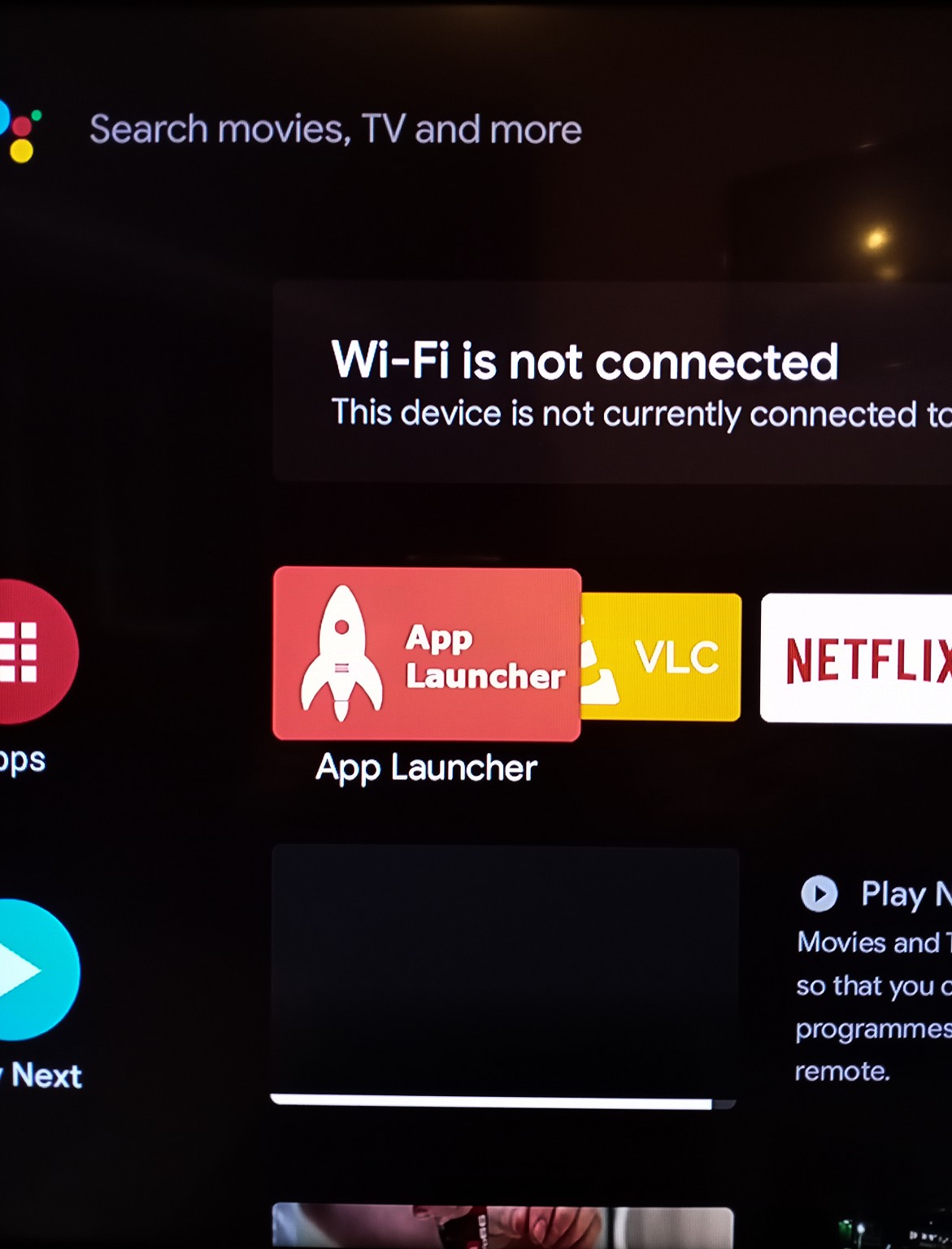
Front the home screen of your box, use a launcher app that can shortcut to HDTV so you can open it quickly FORGET the FREEVIEW app (although its EPG is much nicer but still a bit awkward)

outdoorsnz
694 posts

Ultimate Geek
+1 received by user: 303

ID Verified

  #2670128 8-Mar-2021 14:40
Send private message

theHackiNZ: in HDTV app, use MENU button on your remote to see this on screen menu...

BUT

There is no button to STOP a recording !?
...You need a bluetooth app on you phone with pad/mouse control
Move pointer up to top of screen and click
Revealing a hidden menu


I just had a play with this and the record feature works pretty well! Little clunky but works. You don't need to manually record start / stop etc.


You can just press the remote control record button when in the EPG and will record highlighted program. Pressing record button again cancels the recording.


Tested and works well as a basic schedule recorder.


theHackiNZ

12 posts

Geek
+1 received by user: 3


  #2670273 8-Mar-2021 19:52
Send private message

The removable storage can be put into a PC.
Then use a disk restorer/undelete to access the recorded files from the USB drive.

The files are .TS mpeg Transport Streams which can simply be played in VLC or preferred media player

Start stopping bluetooth remote keyboard/pad can cause a momentary break in Sat reception (recording pause)

Its compact size allows it to be mounted to any cheap monitor to turn it imto a reasonanly smart TV. Use bluetooth headphones for listening. Quite a good option for outfitting a mobile home/boat etc for DVBs/t

When puchased on special (PB) its pretty decent value (apart from slight audio sync issue on TV)

Notsure21
2 posts

Wannabe Geek


  #2677717 20-Mar-2021 18:54
Send private message

Hi there,


everything in your post works for mine except that it says there is no recording device.  In the settings of the device itself, the stick is formatted and ready for use as expected.


Does anyone have any ideas?


Thanks in advance


theHackiNZ

12 posts

Geek
+1 received by user: 3


  #2677795 21-Mar-2021 10:11
Send private message

When you insert a new USB drive there are two choices
Format as

1. Removeable storage
Or
2. Format expandable storage ( for apps and system)

Choose 1.


Shop now on Samsung phones, tablets, TVs and more (affiliate link).

vs2

vs2
7 posts

Wannabe Geek


  #2811464 12-Nov-2021 09:44
Send private message

Sorry to reopen this but how do you move the 'system app' HDTV so it shows as a installed app?


It is just a hassle to go to settings - apps - more apps - system apps to get to the HDTV app.


I do have a keyboard connected to my Smartvu+ A7070.


Thank you.


theHackiNZ

12 posts

Geek
+1 received by user: 3


  #2811482 12-Nov-2021 10:52
Send private message

I Installed App Launcher
This can be placed on Home screen, and then used to quickly access the HDTV app (or another favourite)
Its not a single click opening, but minimises cursor clicking
Browse to a system package and it become an accessible Icon

Playstore, another to try is ATV Launcher (DStudio Canada)

There are many out there for AndroidTV
Just pick and try one that you like


vs2

vs2
7 posts

Wannabe Geek


  #2811517 12-Nov-2021 12:11
Send private message

Thanks. That works. Takes away a few clicks that were needed before.


theHackiNZ

12 posts

Geek
+1 received by user: 3


  #2854339 20-Jan-2022 18:55
Send private message

There OS was updated in July
firmware 9.1.88
build pi.20210729

This update makes the recorded videos from HDTV a proprietary format and non mp4 compliant. Meaning your preferred media players wont know how to deal with the recordings. You can only play them back within HDTV app (poor controls)

Anyone with an older version of the OS?

HDTV 6.1.11 mp4 compatible
HDTV 6.1.14 unknown video format

Eva888
2761 posts

Uber Geek
+1 received by user: 2422

Lifetime subscriber

  #2859082 31-Jan-2022 10:57
Send private message

Am thinking to buy the dish smartvu + A7070 instead of an android TV off trade me for the spare room.

Is this a wise option now that freeview is ending. Will I still be able to watch live TV with it on a non smart TV or does it need to be connected to a satellite dish which we have, but has no cable into that room.

I would also side load Kodi. Thanks.


Stream your favourite shows now on Apple TV (affiliate link).
theHackiNZ

12 posts

Geek
+1 received by user: 3


  #2859340 31-Jan-2022 15:33
Send private message

Only Freeview ON DEMAND is sunsetting (IP-TV internet streaming)

You would buy the SmartVU+ for its Live TV via Satellite (DVB-S) or terrestrial receivers (DVB-T) connections (dish or digital aerial)

If you just going to internet stream (IP-TV) your content buy something cheaper such as Xiaomi TV
Or 75% cheaper a box from china

freeview ondemand ending

Filter this topic showing only the reply marked as answer Create new topic


Geekzone Live »

Try automatic live updates from Geekzone directly in your browser, without refreshing the page, with Geekzone Live now.


Are you subscribed to our RSS feed? You can download the latest headlines and summaries from our stories directly to your computer or smartphone by using a feed reader.