Geekzone: technology news, blogs, forums
Guest
Welcome Guest.
You haven't logged in yet. If you don't have an account you can register now.


RedactedRetracted

98 posts

Master Geek
+1 received by user: 45


#318511 25-Jan-2025 10:33
Send private message

I'm attempting to connect my satellite dish to my PC in order to pick up DVB-S signals on my PC, however I can't seem to get any channels working. I'm using a TBS 5930 USB tuner, plus what I think it a former SKY satellite dish (although as I don't own any other DVB-S equipment, I'm not able to verify whether it works).


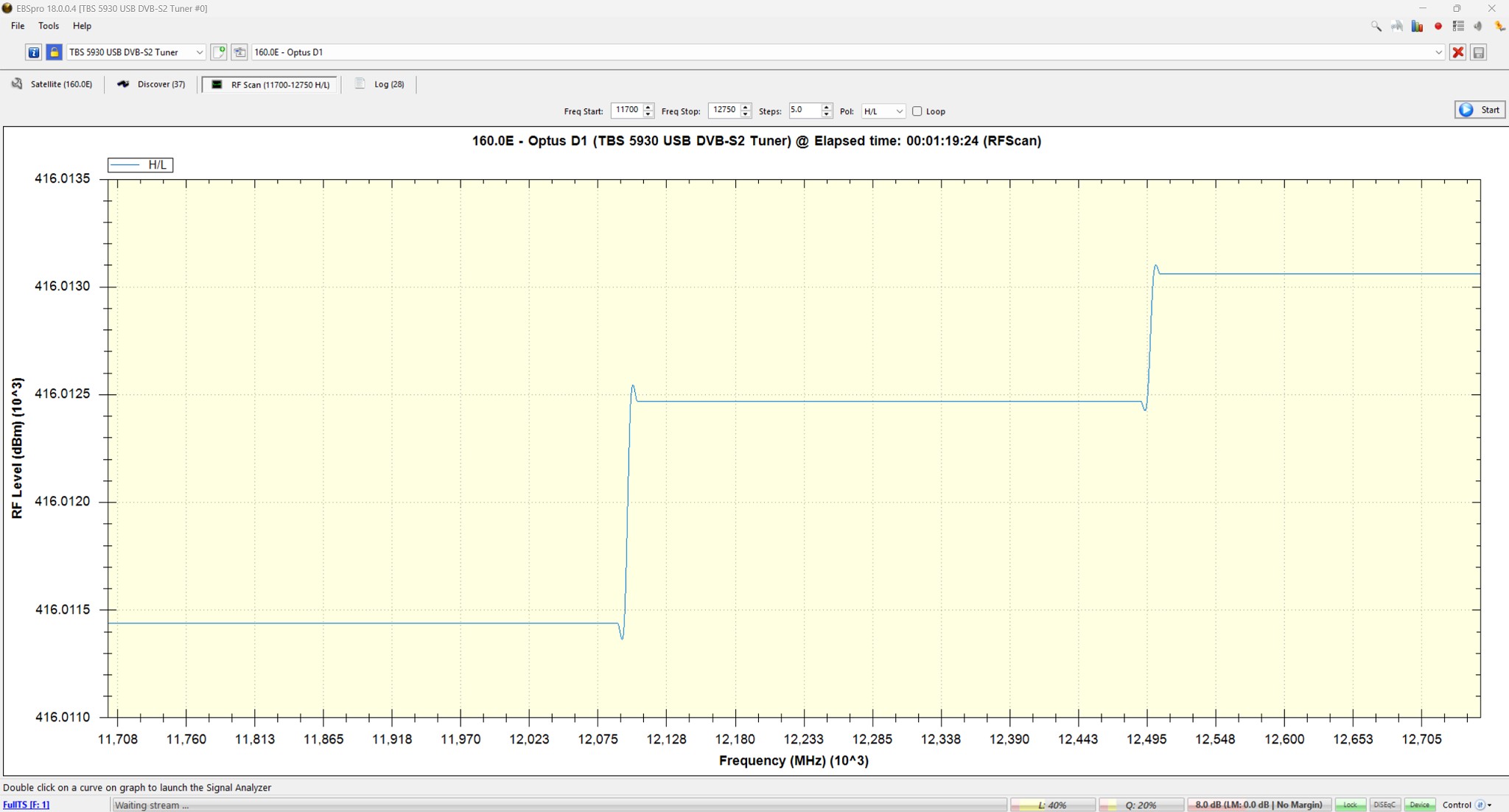
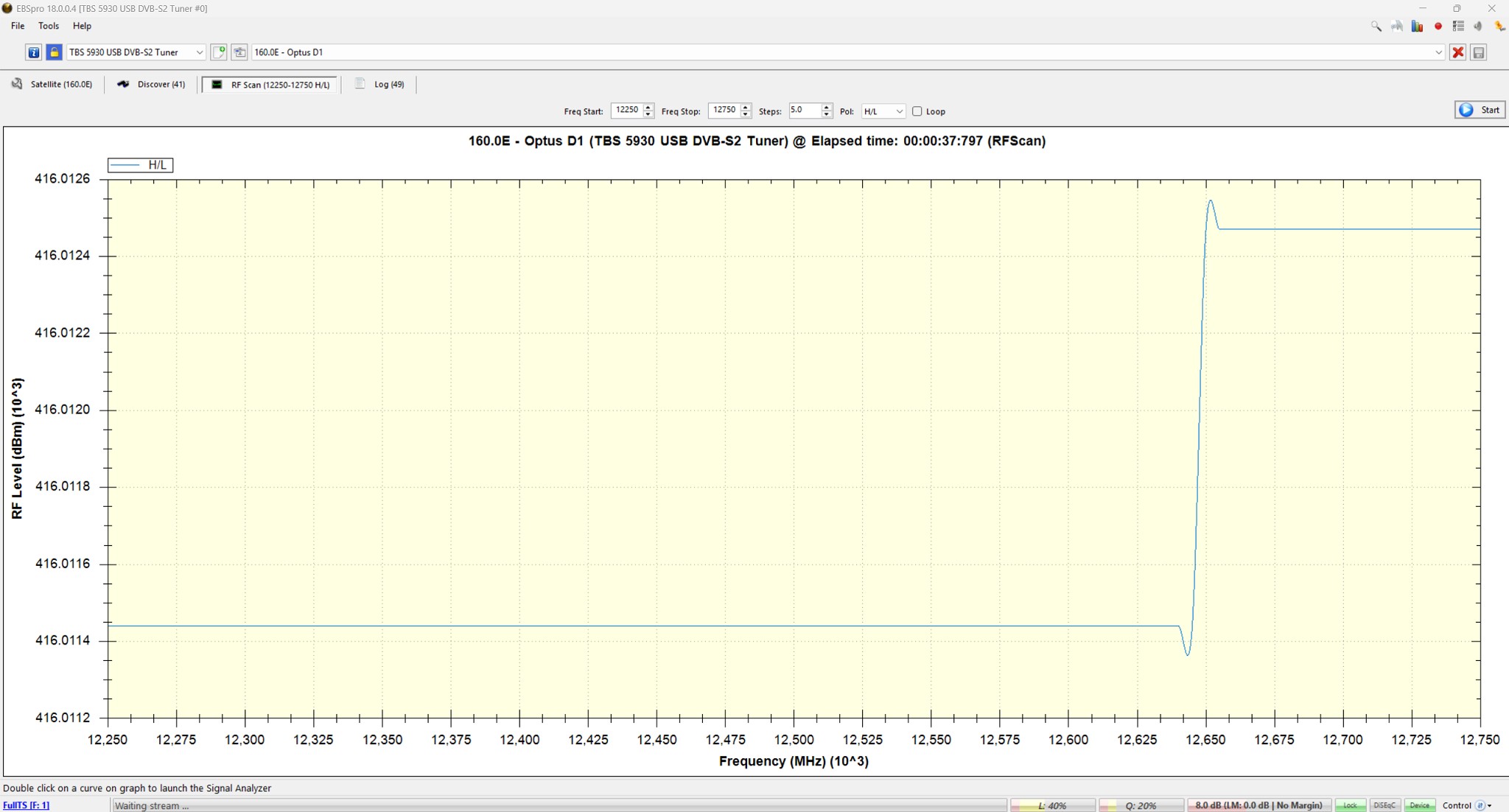
Based on some advice I found in older Geekzone threads, I tried to do a blind scan and an RF scan. The RF scan looked like the following:
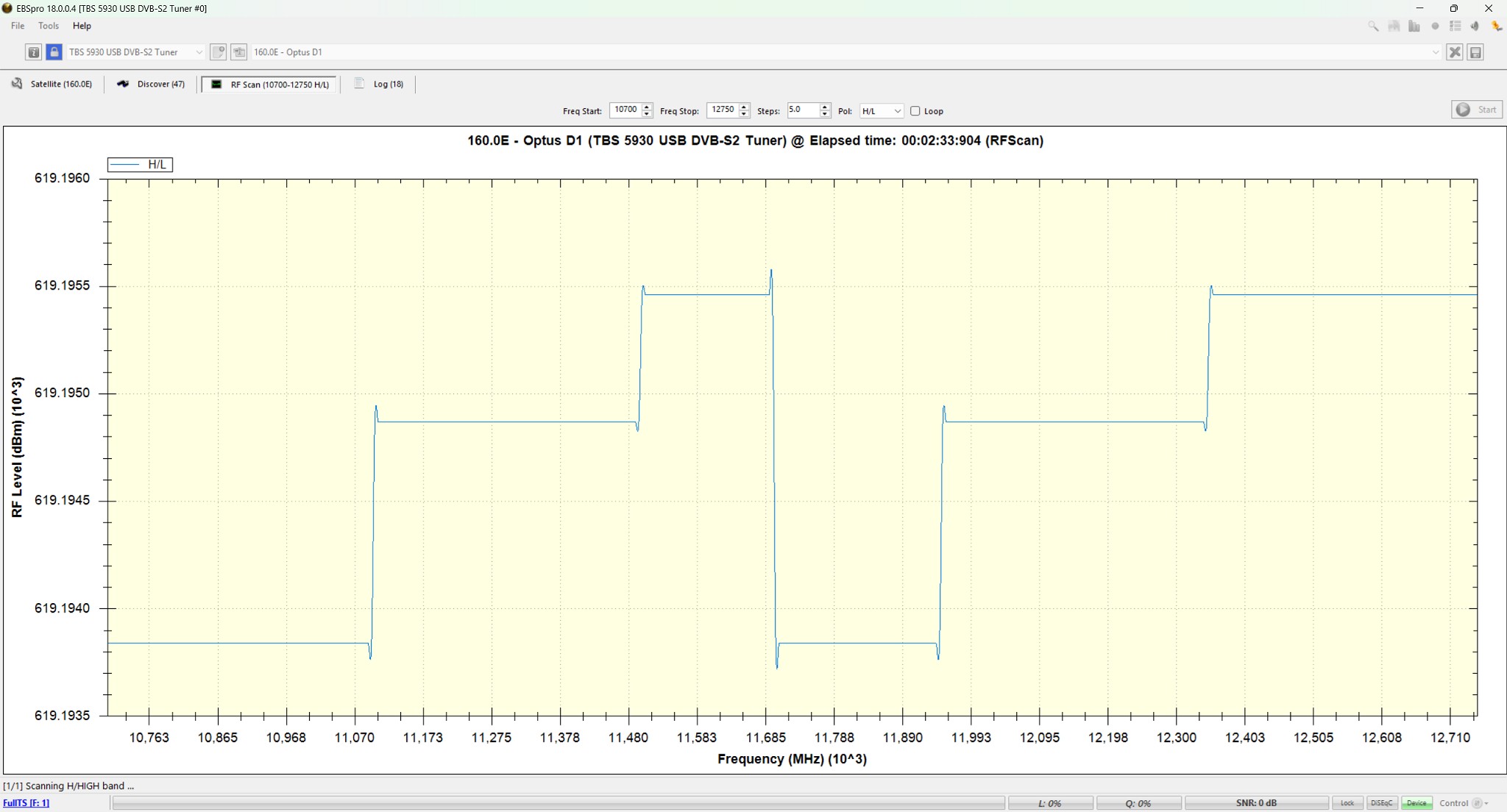


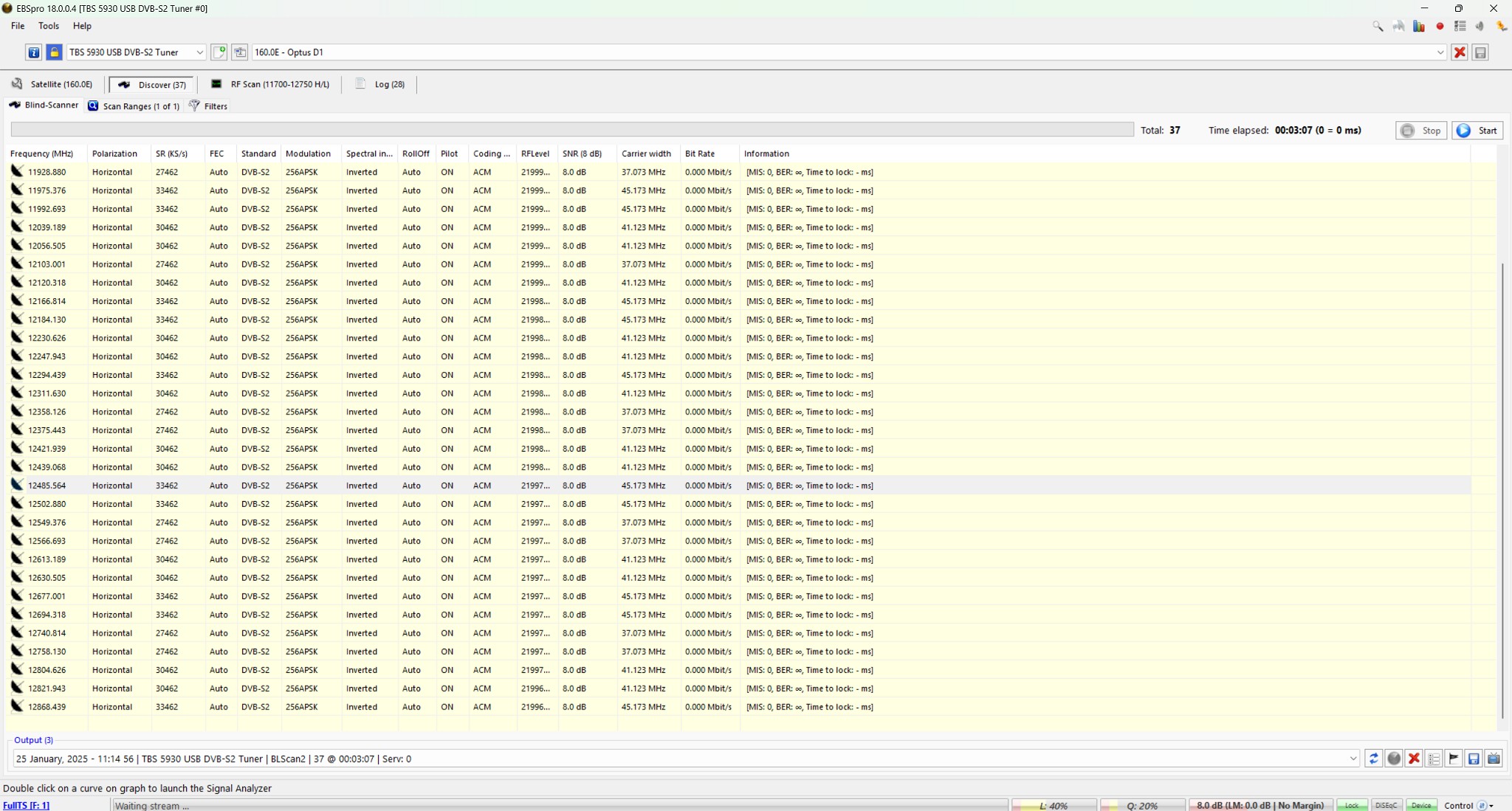
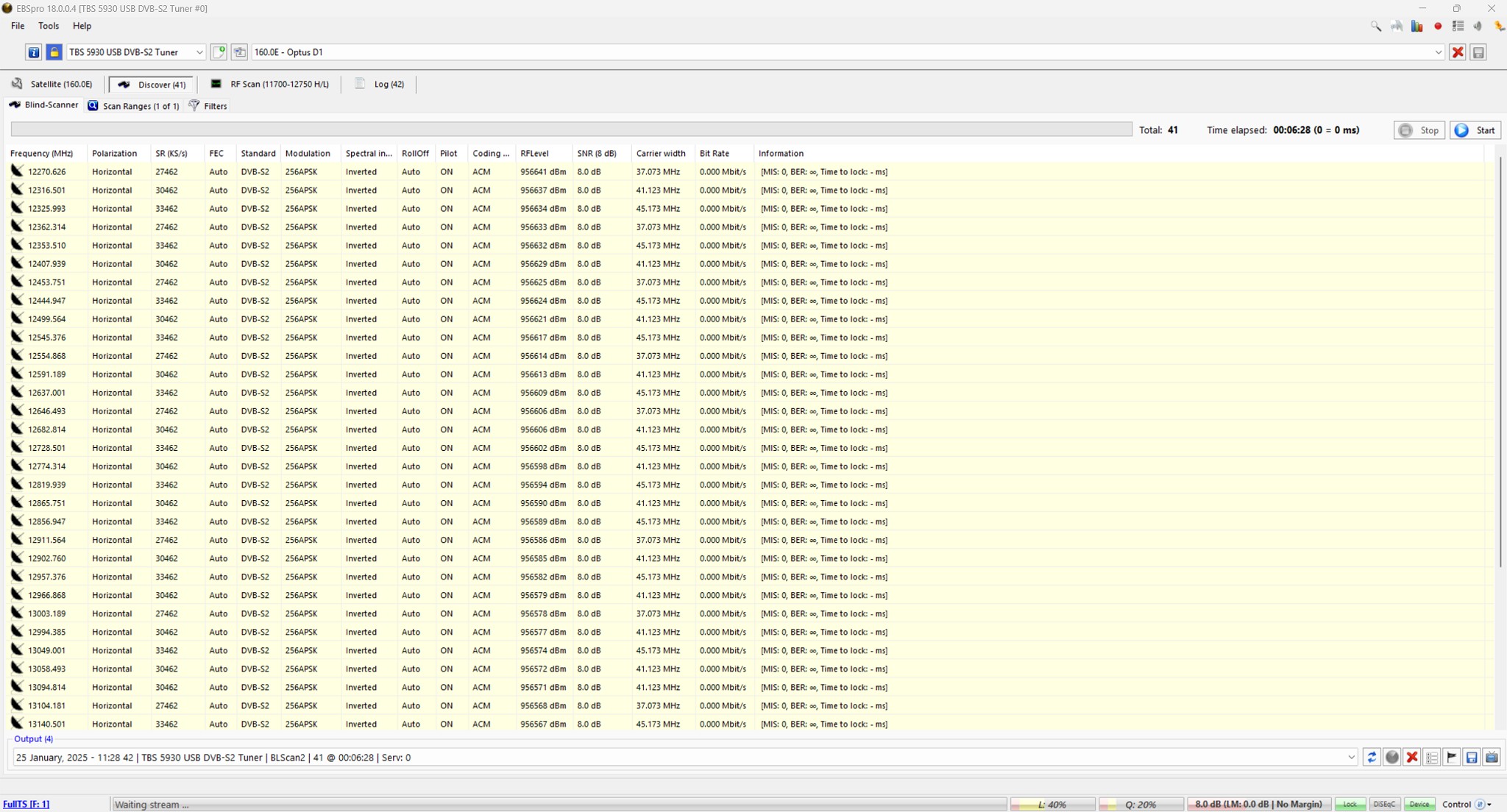
and the blind scan returned these results (I've just shown the ones in the ~12000 MHz range as my understanding is that where I should be seeing Freeview signals):
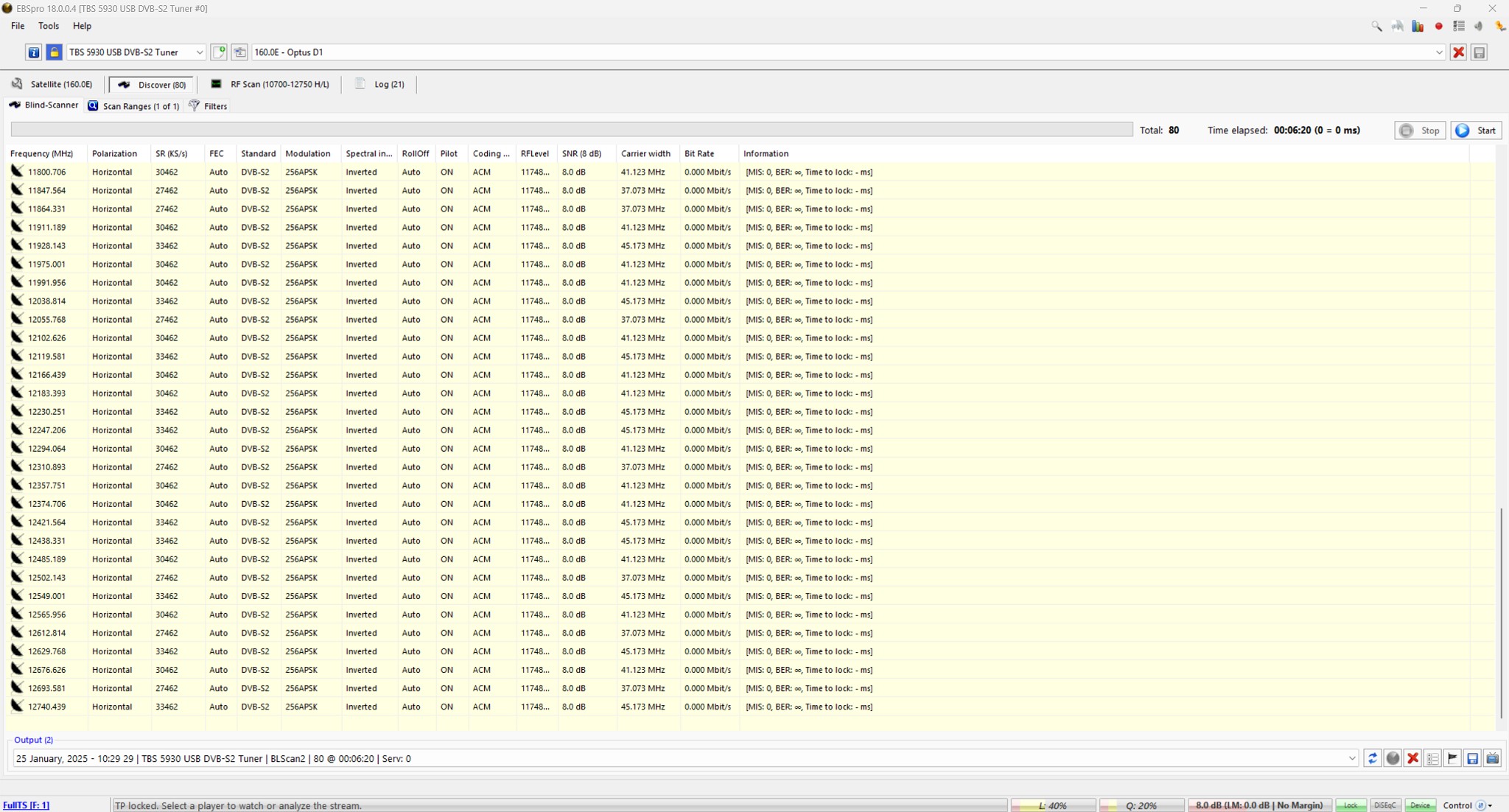


All of the frequencies listed all had bitrates of 0 Mbit/s. I also tried manually tuning to a channel based on the info I found in LyngSat, but that didn't work either. Based on what I could find online (and other frequency graphs I found) both of these results seem incorrect and point towards faulty equipment. I assume it could be a bad LNB, but I thought it would be worth double checking that I haven't set something up wrong before I go out and buy another LNB!


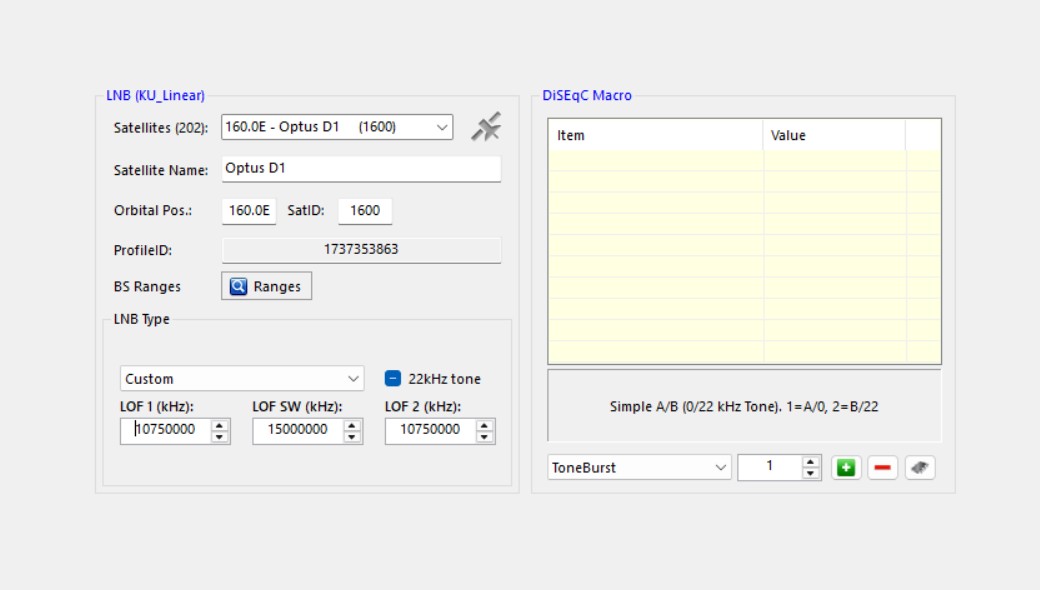
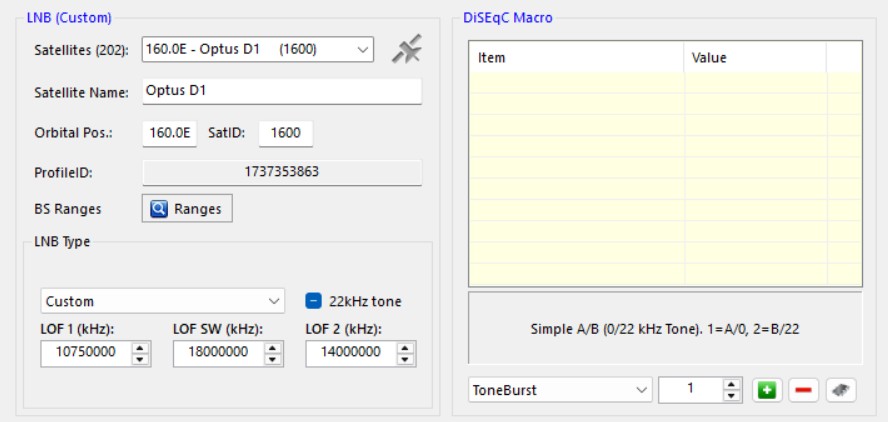
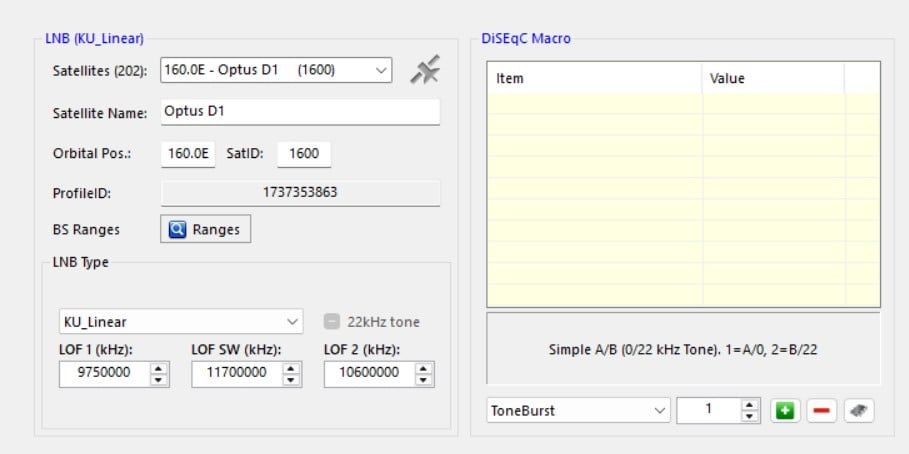
Finally, these are the satellite settings I used in EBSpro:


I would greatly appreciate if anyone has any pointers for anything I need to tweak or look at to try and get this working!


Edit: I should add I also tried the Optus D2 setting in EBSpro and got the same results


View this topic in a long page with up to 500 replies per page Create new topic
 1 | 2
Spyware
3818 posts

Uber Geek
+1 received by user: 1366

Lifetime subscriber

  #3335523 25-Jan-2025 10:49
Send private message

Typical LNB oscillator frequency used by Sky LNBs is 10750 MHz. Other common frequency used is 11300.


Note: D2 has replaced D1 at 160E.


Spark Max Fibre using Mikrotik CCR1009-8G-1S-1S+, CRS125-24G-1S, Unifi UAP, U6-Pro, UAP-AC-M-Pro, Apple TV 4K (2022), Apple TV 4K (2017), iPad Air 1st gen, iPad Air 4th gen, iPhone 13, SkyNZ3151 (the white box). If it doesn't move then it's data cabled.


RedactedRetracted

98 posts

Master Geek
+1 received by user: 45


  #3335533 25-Jan-2025 11:38
Send private message

Gave both of those a go as well.


10750 MHz:


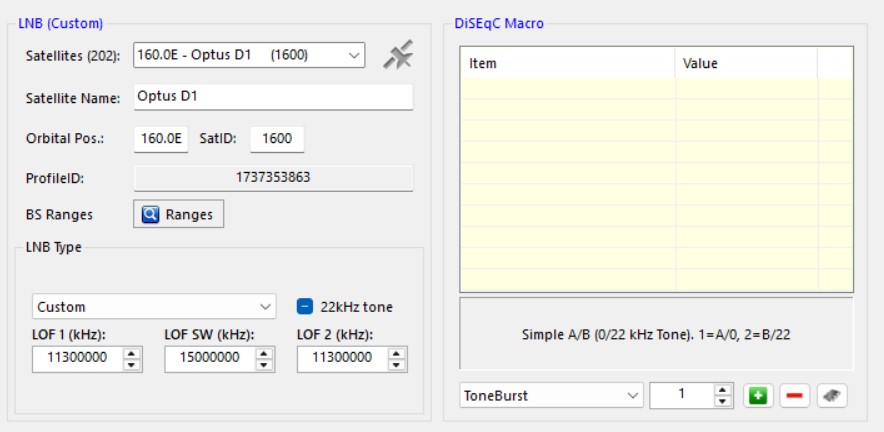
11300:


Also tried to manually tune to 12456 MHz, and while I could get a lock and a 8dbm signal, there were no transport streams and the bitrate showed at 0 Mbit/s. Is it worth trying to adjust the oscillator frequency in case it has drifted slightly?


RunningMan
9184 posts

Uber Geek
+1 received by user: 4834


  #3335535 25-Jan-2025 11:58
Send private message

Your LOF/LOH/switch settings are wrong.


LOF(1) should be set to your LNB LO frequency - usually 10750 or 11300, but 10700 and 10600 are floating around too.


LO switch is not used in NZ, so it needs to be set higher than any transponder you would see here - 18000 is safe. That means is should never switch to the LOH (2) frequency, so that is not needed.


RedactedRetracted

98 posts

Master Geek
+1 received by user: 45


  #3335664 25-Jan-2025 15:19
Send private message

RunningMan:


Your LOF/LOH/switch settings are wrong.


LOF(1) should be set to your LNB LO frequency - usually 10750 or 11300, but 10700 and 10600 are floating around too.


LO switch is not used in NZ, so it needs to be set higher than any transponder you would see here - 18000 is safe. That means is should never switch to the LOH (2) frequency, so that is not needed.


I've put it these values for 10750. I think this lines up with what you're saying, but I'm still getting the same results:


RunningMan
9184 posts

Uber Geek
+1 received by user: 4834


  #3335665 25-Jan-2025 15:54
Send private message

Looks better. You shouldn't need any DiSEqC settings either, they can interfere with 22kHz switches too. Set as it looks to be, it shouldn't be sending 22kHz, but perhaps remove those settings if you can.


You can try sliding the LO frequency by a few MHz as old LNBs can drift with temperature, but most tuners are OK locking on if it's little out. The other issue to watch for is the Optus D2 wobble at the moment which is affecting Sky and Freeeview DBB-S(2) transmissions - at parts of the day you may lose signal if the dish isn't really accurately aligned.


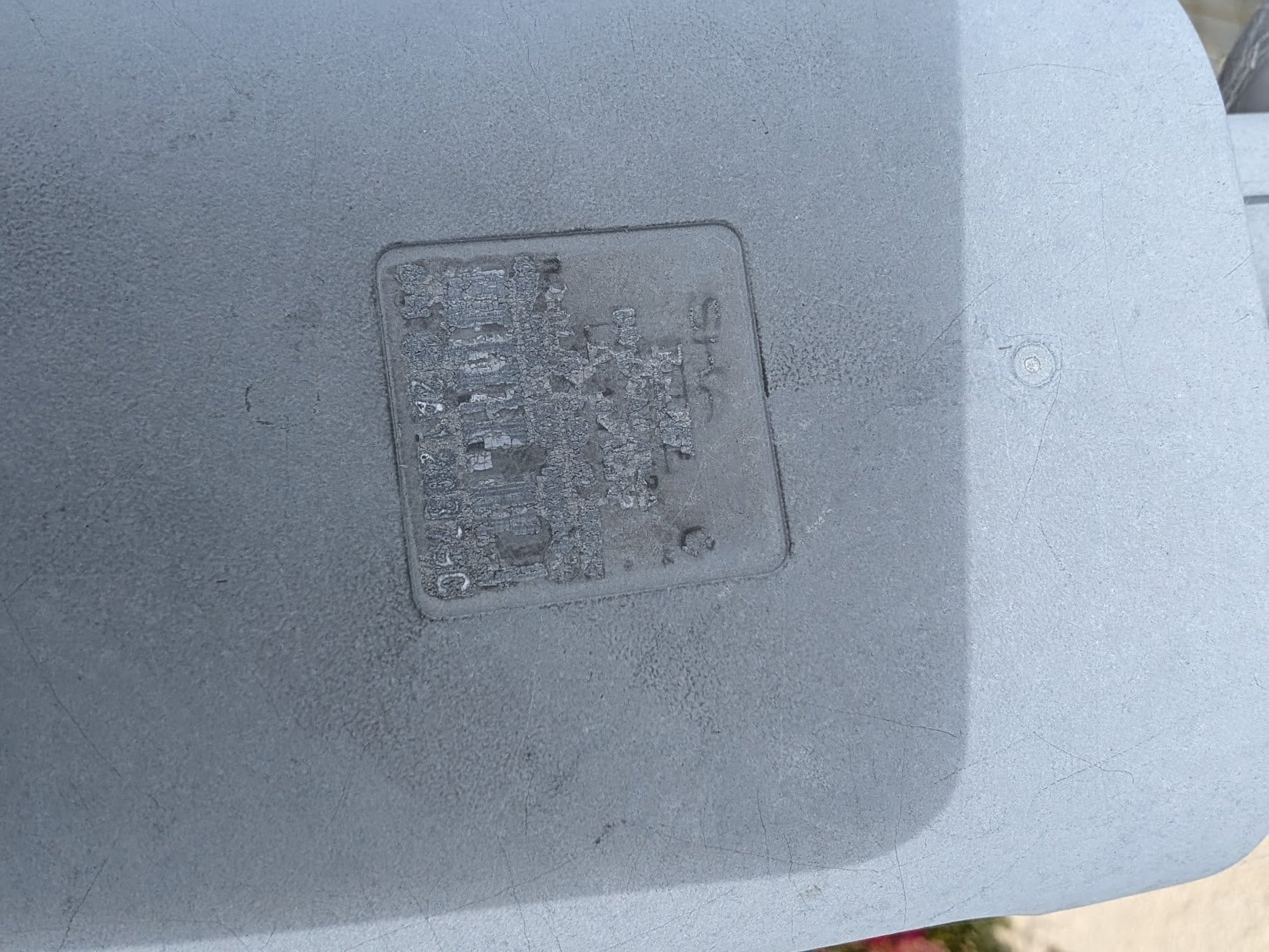
Can you post a photo of your LNB, or better yet just read the LO frequency off the label to confirm you have that right?


Oblivian
7345 posts

Uber Geek
+1 received by user: 2117

ID Verified

  #3335667 25-Jan-2025 16:00
Send private message

They're showing as S2?. That'll be all the new sky channels on the new satellite I suspect - and encrypted.


Although your settings are set for one sat, the dish is probably off slightly and pointing at the other. (They're just a bookmark, with blind scan it's LNB settings and direction of the dish you change)


Shop now on Samsung phones, tablets, TVs and more (affiliate link).
RunningMan
9184 posts

Uber Geek
+1 received by user: 4834


  #3335670 25-Jan-2025 16:04
Send private message

Unlikely to be the dish out, more likely the config is sending 22kHz and switching to the 2nd LNB throat.


Oblivian
7345 posts

Uber Geek
+1 received by user: 2117

ID Verified

  #3335718 25-Jan-2025 16:11
Send private message

See now thats the way I've always thought they worked And was how it was easy to toggle a few degrees between satellites via config, Until someone here was saying the dual throat switching only works if you use a diseqc with 2 cables on the LNB which got me confudled.


RedactedRetracted

98 posts

Master Geek
+1 received by user: 45


  #3335720 25-Jan-2025 16:25
Send private message

Tried disabling the tone and got the same results.


I suspect it might actually be a problem with my tuner (or the connection to the dish). If I unplug the coax cable, I get exactly the same results. I'm not sure why the tuner would show frequencies etc when there's nothing plugged in though. Either way, I'm going to try and get a different DVB-S device to just test if the dish/LNB/connection is working at all.


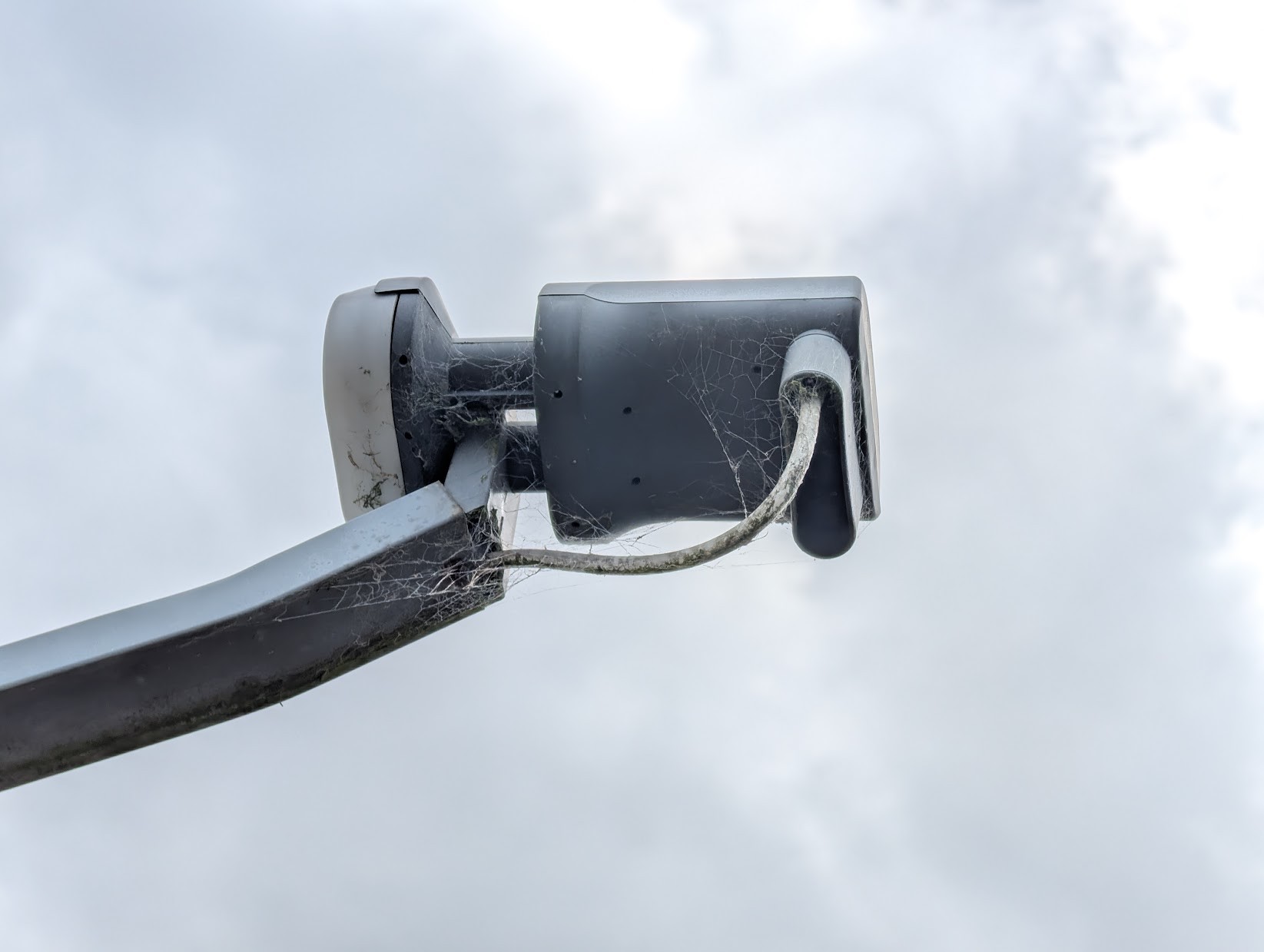
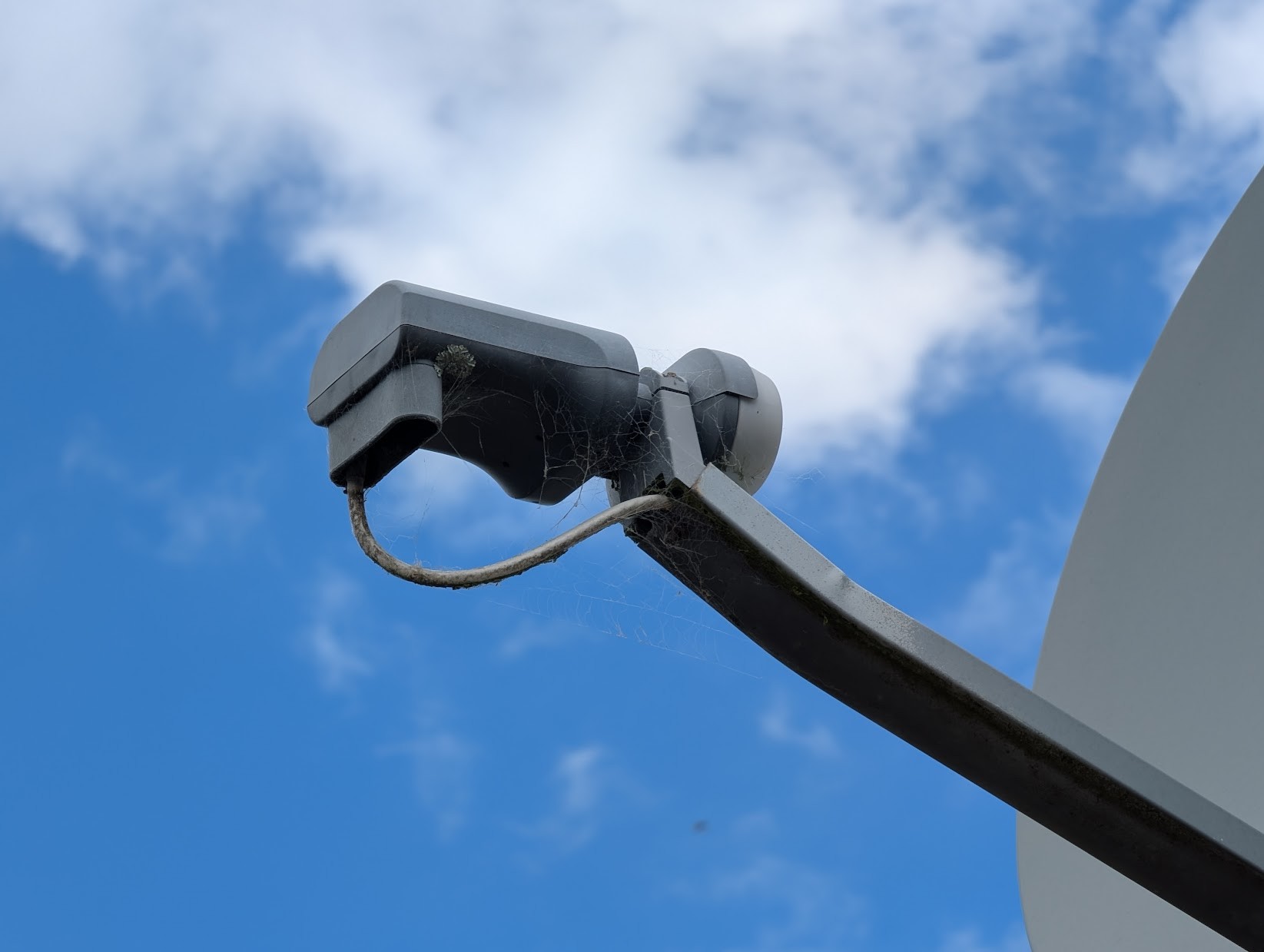
Here's the pics of the LNB regardless:


and the remains of the label on top (don't think there's much to see on this anymore!)


RunningMan
9184 posts

Uber Geek
+1 received by user: 4834


  #3335738 25-Jan-2025 17:54
Send private message

Oblivian:


See now thats the way I've always thought they worked And was how it was easy to toggle a few degrees between satellites via config, Until someone here was saying the dual throat switching only works if you use a diseqc with 2 cables on the LNB which got me confudled.


You had it right the first time! Where the multiswitch/multi cables etc comes in is where you want to watch different polarities and/or different orbital positions at the same time on different recievers. Any given cable can only do one polarity/position at a time because the signalling (be it voltage for H/V, 22kHz for tone, or DiSEqC) runs in the opposite direction down the same cable as the signal from the LNB to the receiver. You end up with as many cables as you have positions/polarities from the LNB to the switch, then each tuner has a cable back to the switch.


RunningMan
9184 posts

Uber Geek
+1 received by user: 4834


  #3335739 25-Jan-2025 18:03
Send private message

RedactedRetracted:


Standard late model Sky Sharp branded LNB. 10750 LO. 22kHz to switch to second throat. Depending on the exact model, probably has 4 separate outputs in that rear housing, giving the ability as in the post above to connect a multiswitch.


With 22kHz off then you should get the throat pointed at 160E, with 22kHz activated, you should get 156E. It's always possible the dish has been re-aimed at a different location, but this would be pretty uncommon.


There's plenty of DVB-S2 transponders at 160E though, so you are probably pointing at the right location. See https://www.lyngsat.com/Optus-D2.html 


Shop on-line at New World now for your groceries (affiliate link).
RedactedRetracted

98 posts

Master Geek
+1 received by user: 45


  #3335855 25-Jan-2025 22:30
Send private message

RunningMan:


Standard late model Sky Sharp branded LNB. 10750 LO. 22kHz to switch to second throat. Depending on the exact model, probably has 4 separate outputs in that rear housing, giving the ability as in the post above to connect a multiswitch.


With 22kHz off then you should get the throat pointed at 160E, with 22kHz activated, you should get 156E. It's always possible the dish has been re-aimed at a different location, but this would be pretty uncommon.


There's plenty of DVB-S2 transponders at 160E though, so you are probably pointing at the right location. See https://www.lyngsat.com/Optus-D2.html 


Thanks for the info around the LNB that is helpful. I did see what I thought might be port covers, but I don't know for certain.


Regardless, I seem to be getting the same results whether I have the dish plugged in or not into my tuner, so I suspect I mustn't be actually picking up any real transponders


RunningMan
9184 posts

Uber Geek
+1 received by user: 4834


  #3335856 25-Jan-2025 22:37
Send private message

In that case, back to basics. 


Is the tuner outputting voltage to power the LNB? Should be 14vdc for V polarity, 18vdc for H polarity. This should be in your settings somewhere.


Is the cable to the dish OK? Do you have more than one outlet around the house? If so, where is the splitter (or switch)? Check the splitter is passing DC power from the outlet you are connected to (a lot only pass DC on one port, so only 1 tuner powers the LNB). If you have some sort of switch or splitter in place, grab a photo for us to see and check.


That tuner you're using should also have a DC power supply as well as the USB - confirm that's connected OK, as that is where it will be powering the LNB from.


EDIT: if you do have a splitter and checking it for power pass, it will usually be written on the label, or have an extra red line or similar between an input and output port to signify the DC circuit.


RedactedRetracted

98 posts

Master Geek
+1 received by user: 45


  #3335859 25-Jan-2025 22:44
Send private message

In that case, back to basics. 


Is the tuner outputting voltage to power the LNB? Should be 14vdc for V polarity, 18vdc for H polarity. This should be in your settings somewhere.


I'll get a multimeter and check this when I have a chance. I will also try a spare tuner I have (same model) just in case it's a fault with this one in particular.


Is the cable to the dish OK? Do you have more than one outlet around the house? If so, where is the splitter (or switch)? Check the splitter is passing DC power from the outlet you are connected to (a lot only pass DC on one port, so only 1 tuner powers the LNB). If you have some sort of switch or splitter in place, grab a photo for us to see and check.


No splitters, just a straight cable run from the LNB to the tuner - there's no even a wall socket in between, just a single cable through the floor. I've also checked under the house and the cable appears to be in good shape (at least visually). Like I say I plan to try and get a different DVB-S device to try and test if that works.


That tuner you're using should also have a DC power supply as well as the USB - confirm that's connected OK, as that is where it will be powering the LNB from.


Yep can confirm there's a power indicator light on the tuner which is lit up. The power supply also have a power indicator on it.


(Thanks for your help by the way, I appreciate it)


Apsattv
2452 posts

Uber Geek
+1 received by user: 724


  #3336843 29-Jan-2025 04:49
Send private message


Make sure you have the correct current TBS driver
https://www.tbsdtv.com/download/index.html?path=7&id=139


This is what i use in EEBS PRO on a remote pc which i think has wideband on it


LOF 1
9750000
LOF SW
11700000
LOF 2
10600000


also for ebspro you need the current streamreader  dll package for the 5930 (there are 2 model 5930s i think...)


see here


https://sourceforge.net/p/crazyscan/discussion/general/thread/7de420eb5d/


 1 | 2
View this topic in a long page with up to 500 replies per page Create new topic


Geekzone Live »

Try automatic live updates from Geekzone directly in your browser, without refreshing the page, with Geekzone Live now.


Are you subscribed to our RSS feed? You can download the latest headlines and summaries from our stories directly to your computer or smartphone by using a feed reader.