Geekzone: technology news, blogs, forums
Guest
Welcome Guest.
You haven't logged in yet. If you don't have an account you can register now.


View this topic in a long page with up to 500 replies per page Create new topic
1 | 2 
AllenG

441 posts

Ultimate Geek
+1 received by user: 1


  #532134 11-Oct-2011 22:17
Send private message

rockingstarfish: Eeek Allen it sounds like you're having major dilemmas. Maybe it's time for a rebuild? :)
Matt


Hi Matt. I added the registry change last night. Crashed tonight.
I have now separated the sat channels back out. I guess I'll run out of guide data in a week for the freeview channels but if it survives the week without glitching I'll change the freeview listings back to sat tuner channels without merging the tuner and see how that goes.

I recently reinstalled windows from scratch after replacing HDD. I've more recently (after installing second Hauppauge Tuner) deleted the media centre database and rescanned and merged from scratch. 

Tried to request support from Micro$oft only to find that because I have an OEM copy of Windows I don't get any free support. I have to get support from the PC manufacturer. I bought Windows 7 OEM when I bought the bits and built the PC myself. Really helpful micro$oft.

Regards Allen.


mthand
148 posts

Master Geek


  #532166 12-Oct-2011 00:28

AllenG:
mthand: I switched to mheg collection and the recording is rock solid now.

Are you are using a third part app or plugin? can you point me in the right direction please?

Regards Allen. 


@mthand how are you getting the MHEG guide?


EPG Collector http://www.geekzone.co.nz/forums.asp?forumid=126&topicid=58935

Guidehound http://www.geekzone.co.nz/forums.asp?forumid=126&topicid=66666

You need EPG Collector to take the data off the broadcast, and produce an xml file, and then use Guidehound to import. I personally use Big Screen EPG instead of Guidehound.

Here is a link to a how to guide for EPG in Win7 MC http://www.geekzone.co.nz/forums.asp?forumid=126&topicid=70325

AllenG:
mthand: 
I just have two dvb-t tuners now (nova t 500, hvr-2200). I get multiple entries as well from these though which doesn't affect my recordings.


Hi mthand. What do you mean by "I get multiple entries as well"? Multiple entries for some channels in the EPG, or multiple merged sources in a channel?  with three tuners you should have three merged DVB-T sources per channel. Do you have more?


This is different from a clean install to a re-scan, so I'm sorry if I'm not 100% on this. It's been a while since the last clean install. In both situations, check you have the latest drivers for your cards.

When I set up the TV signal, I set up the two dvb-t tuners on one card and set up the two tuners on the other card separately.

From a clean install, I think when they scan they will find a channel for each physical card, i.e. 2 x TV ONE and I merge them. On a re-scan, it remembers this and the guide already has them merged.

When you edit the channel and then edit sources, I will have multiple sources for each tuner, i.e Prime: card#1-tuner#1 666MHz, card#1-tuner#2 666Mhz at 100%, card#2-tuner#1 666MHz, card#2-tuner#2 666MHz at 100% (I get my broadcasts from Waiatarua in AKL), and I also get the offsets of 167KHz above and below that (about 71%). I am also "blessed" to get a 40MHz offset below which can sometimes confuse me as they might say 100% also. Scanning Prime, for example, presents 16 different sources for my four tuners (two cards), and I have selected the 666MHz at 100%.

My recommendation, install these tools as linked above, play with them, get them working how you like it, making notes as you go, and then do a clean install after a while.

mthand
148 posts

Master Geek


  #532167 12-Oct-2011 00:33

AllenG:

Tried to request support from Micro$oft only to find that because I have an OEM copy of Windows I don't get any free support. I have to get support from the PC manufacturer. I bought Windows 7 OEM when I bought the bits and built the PC myself. Really helpful micro$oft.

Regards Allen.


Hey Allen, I think that this is a case of caveat emptor. There should have been a lot of fine print on that OEM indicating that it was only for distribution by manufacturers, and would not be supported directly by Microsoft. Legally, it shouldn't even be used in your situation.

I'm not the software police, just wanted to let you know that there is another side to their stance. :o)


AllenG

441 posts

Ultimate Geek
+1 received by user: 1


  #532192 12-Oct-2011 07:44
Send private message

mthand: 

Hey Allen, I think that this is a case of caveat emptor. There should have been a lot of fine print on that OEM indicating that it was only for distribution by manufacturers, and would not be supported directly by Microsoft. Legally, it shouldn't even be used in your situation.
:o)

Hi. I bought the software legally. all that was required was to purchase it with a system or specific hardware eg Motherboard.  I do see the fine print now and you are correct the online retailers(s) shouldn't be selling it now that  I read the licence info.

Regards Allen. 

AllenG

441 posts

Ultimate Geek
+1 received by user: 1


  #532193 12-Oct-2011 07:48
Send private message

mthand: 
You need EPG Collector to take the data off the broadcast, and produce an xml file, and then use Guidehound to import. I personally use Big Screen EPG instead of Guidehound.


I'll try with separate sat & UHF channels for a while. then try your suggestions. I'm just a bit disappointed that media centre can't gather the guide info from the Sat for the UHF channels reliably. there should be no third party software required. media centre has this functionality. It should work properly.

Regards Allen.

AllenG

441 posts

Ultimate Geek
+1 received by user: 1


  #533072 13-Oct-2011 20:12
Send private message

Just an update:

I have separated the Sat sources from the merged channels. The merged UHF channels are set to use the sat channels guide listings. The problem I am now having is that with the periodic scan disabled in registry the EPG data isn't being updated. I can however get the guide to update by enabling one channel from each satellite Mux in the guide and "viewing" for a couple of minutes to allow guide data to be gathered. I guess I could schedule a short recording on each Sat Mux twice a week to gather guide data!

Some more research tonight has found that by disabling the BackgroundScanner in registry you disable the periodic scanning for new or changed channels and also the gathering of in-channel guide data.

Found an interesting thread about this issue at the following link. Apparently it is known my microsoft but no proper fix yet though. 
http://www.pcmediacenter.com.au/forum/topic/41404-changing-to-wrong-tuner-sources-problem-information-gathering/

Looks like i'll have to give EPG collector a go over the weekend.


Regards Allen


Shop now for Lenovo laptops and other devices (affiliate link).
Nety
2584 posts

Uber Geek
+1 received by user: 5

Retired Mod
Trusted
Lifetime subscriber

  #533099 13-Oct-2011 21:33
Send private message

EPG collector will do exactly what you want. I use that + BSE to inject the data into media centre.


Media centre PC - Case Silverstone LC16M with 2 X 80mm AcoustiFan DustPROOF, MOBO Gigabyte MA785GT-UD3H, CPU AMD X2 240 under volted, RAM 4 Gig DDR3 1033, HDD 120Gig System/512Gig data, Tuners 2 X Hauppauge HVR-3000, 1 X HVR-2200, Video Palit GT 220, Sound Realtek 886A HD (onboard), Optical LiteOn DH-401S Blue-ray using TotalMedia Theatre Power Corsair VX Series, 450W ATX PSU OS Windows 7 x64

AllenG

441 posts

Ultimate Geek
+1 received by user: 1


  #533101 13-Oct-2011 21:48
Send private message

Nety: EPG collector will do exactly what you want. I use that + BSE to inject the data into media centre.


In a nutshell what are the pros and cons of Guidehound Vs Big Screen EPG? (I'll do some homework but some advice would be appreciated)

Regards Allen. 

mthand
148 posts

Master Geek


  #533115 13-Oct-2011 22:13

I have never used Guidehound.

The link provided previously has a good summary of the pros by the two authors.

I have only used BSE because prior to that, there was a LOT of experimentation with other "solutions", and I was so happy to have something that just worked that I didn't look at Guidehound when it came out in finished version.

To be honest, this is something that only you can decide that you like. They both have free trial versions and both just work.

I hope this helps you with the recording issues. Any more about the EPG tools, and I recommend discussing under that Forum :-)

AllenG

441 posts

Ultimate Geek
+1 received by user: 1


  #535833 20-Oct-2011 21:14
Send private message

AllenG: Just an update:

I have separated the Sat sources from the merged channels. The merged UHF channels are set to use the sat channels guide listings. The problem I am now having is that with the periodic scan disabled in registry the EPG data isn't being updated. I can however get the guide to update by enabling one channel from each satellite Mux in the guide and "viewing" for a couple of minutes to allow guide data to be gathered. I guess I could schedule a short recording on each Sat Mux twice a week to gather guide data! ...
Regards Allen


I think I have found a stable solution that didn't require a third party guide data collector. 5 days so far and no recording failures in around 100 recordings. I'll put together a guide with screendumps in the weekend but in a nutshell...
___________________________________________________________________________________
To avoid using a third party guide collector you need at least one working satellite tuner. This is the source of the freeview Guide Data.

1. Edit the registry to disable media centre background scanning. Instructions here
http://answers.microsoft.com/en-us/windows/forum/windows_7-tv/media-center-guide-keeps-losing-clear-qam-channels/f650a689-b7f1-4382-ac3a-4d9ddcbe75d3
The background scanner is problematic for a lot of people using UHF (DVB-T) because as well as scanning for in band program guide data, it also (for DVB-T) scans for new or changed channels/frequencies every three hours as well. This channel rescan appears to be what causes unexplained changes to your guide channel configuration and the failure of some recordings with "No signal" or fragmented recording with the "Your recording stopped early due to a schedule change" error. Disabling the background scanning prevents any unexpected changes to your channel configuration. If you need to rescan channels in the future you may need to re-enable this background scanner while you rescan.

2. Delete the media centre guide configuration files following the instructions here http://www.hack7mc.com/2009/09/clearing-guide-data-and-tuner-setup-from-windows-7-media-center.html

3. Rescan the satellite and UHF channels.
If you get offset frequencies added to your UHF channels, manually select the correct frequency sources and unselect the offset ones.

4. Do a manual transponder scan for the missing freeview sat channels and Aus sat channels. 

5. Renumber the sat channels so that they are different from the UHF channels. IE unique.  Leave all channels enabled at this point.

6. Edit the guide source for all the UHF channels to use the program guide from the equivilent satellite channel. Important!: Choose to "Copy Guide Data", Do NOT merge sources.

7. Disable the UHF channels that you don't ever want to use eg parliament TV

8. Optionally Disable the Satellite versions of the freeview channels  Important! Do NOT disable TV1 & TV3  needed for step 10. 
If you have insufficient UHF tuners for your freeview recordings you should leave the satellite freeview channels enabled. You can then schedule freeview recordings on the satellite tuner. If you have them selected in one of your favourites lists they will appear and behave as a separate channel. 

9. Reorder the channels as you like them placing the satellite duplicates at the end of the list.

10. Important! schedule a short manual daily recording for the satellite versions of TV1, TV3, one of the SBS channels and one of the Nine network channels if you have them. 
I scheduled a manual daily 4 minute recording for each starting at 6 pm for the first, 6:05 for the second etc. I named the recordings" EPG Scan 1" etc.
I selected to keep one recording only so you don't get hundreds of EPG scan recordings.
I moved the manual recordings to the bottom of the series priority list so that another scheduled recording will take priority.

It is this 4 minute recording that replaces the guide scan function of the background scan that was disabled in step1. Media centre uses opportunistic guide data scan  to collect in band guide data from each satellite transponder multiplex. You do not need to schedule recordings for all channels, only one channel from each transponder.

11. If you want to hide the duplicate freeview satellite channels from your on screen guide create a favourites list that doesn't include them.


I don't think I've left anything out? I'll put together a full guide and post it in the EPG forum. I'll put a link here when I've done it.
___________________________________________________________________________________

In the next 7 days have 130 recordings scheduled with 4 concurrent recordings at times. I don't watch live TV any more. record everything I want to watch and skip the ads.

I have 3 UHF and 1 Satellite tuner. All Freeview UHF recordings have 2 minutes of prepadding and 10 minutes (always) of postpadding. Choosing "Stop 10 minutes after" or larger forces media centre to obey padding and use another tuner for adjacent programs. Use this where you have multiple tuners available. If you use this option with a single tuner you will not be able to record adjacent programs.
The "Where possible" options do not enforce padding and allows media centre to drop the padding when it needs to for adjacent recordings.  
I only have one sat tuner so I have set the sat recordings to have 2 minutes of prepadding and 5 minutes of postpadding (where possible). This allows media centre to disregard the padding if necessary to record adjacent programs on the single sat tuner.

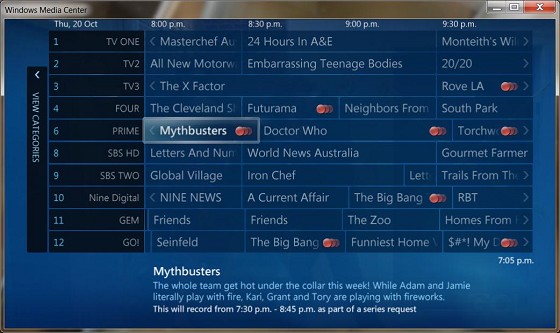
Here is an example of tonight's scheduleAt 9:30 pm it will be recording:
UHF: RoveLA with 2 mins pre and 10 mins post
UHF: Dr Who with 2 mins pre and 10 mis post
UHF: Torchwood with 2 mins pre and 10 mins post
Sat:  The Big Bang Theory (Nine Digital) with 2 mins pre and no post
sat:  S#*!My Dad Says (GO!) with no pre and no post (another episode is scheduled adjascent)

I'm not sure what is going to happen with the 2 sat recordings because they overlap by 3 minutes and there is only a single sat tuner? media centre is not reporting any conflicts.

EDIT: with the overlapping sat recordings (single tuner) Big bang theory ended on time (no post pad) and S#*! My Dad Said started late at 9:36 pm when Big Bang ended.
I'm pleasantly surprised that it did this. 


Regards Allen.

AllenG

441 posts

Ultimate Geek
+1 received by user: 1


  #539349 30-Oct-2011 20:51
Send private message

Sorry I havn't done the full step by step I promised yet but the previous post should provide enough info for most people.

I hope it proves helpful for others. Post or PM me if you have any questions.

By the way, I havn't had a recording glitch since doing this.


1 | 2 
View this topic in a long page with up to 500 replies per page Create new topic


Geekzone Live »

Try automatic live updates from Geekzone directly in your browser, without refreshing the page, with Geekzone Live now.


Are you subscribed to our RSS feed? You can download the latest headlines and summaries from our stories directly to your computer or smartphone by using a feed reader.