Geekzone: technology news, blogs, forums
Guest
Welcome Guest.
You haven't logged in yet. If you don't have an account you can register now.


timmmay

20858 posts

Uber Geek
+1 received by user: 5350

Trusted
Lifetime subscriber

#272020 5-Jun-2020 19:08
Send private message

I'm having a heck of a problem installing Ubuntu 18 / 20 on Virtualbox 6.1 / 6.2. I've installed Ubuntu plenty of times with no problems in the past, but I've tried about ten times across two computers in the past few hours with nothing but problems. I've validated the SHA256 so I know the image is fine. I'm trying on a brand new surface laptop 2 and on my old workhorse the i7 2060K.


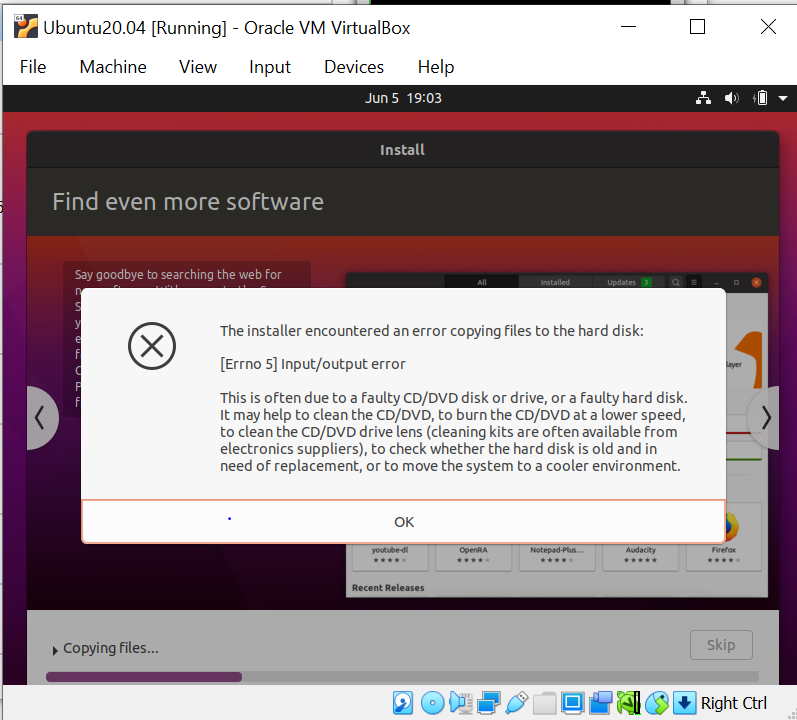
Mostly the installation black screens before the proper install starts. Sometimes I get part or all of the way through the install. Sometimes the install finishes but when I run the OS I get messages like "fsck required". This time I got the message below.


I've tried 1GB - 8GB of RAM. I've tried different video RAM amounts. I've tried 1 - 4 CPUs. I've tried default and no virtualisation acceleration. I get different results but I haven't noticed any correlation yet.


Any ideas at all? Not really sure where to go from here other than back to VirtualBox 5.x, which has worked fine in the past.


View this topic in a long page with up to 500 replies per page Create new topic
 1 | 2
darylblake
1172 posts

Uber Geek
+1 received by user: 410

Trusted

  #2499253 5-Jun-2020 19:13
Send private message

TBH My experience with virtual box was never really that flash hot. 

I ran it natively, Ran it with vagrant and sometimes it just didnt quite work well. Doing the exact thing you described with it wanting to do virual disk checks etc. 


Dont use any thin provisioning.... that just makes it worse. Use a fixed disk size.


If possible just run it on a R Pi. Or if you dont need a gui use a docker container.


timmmay

20858 posts

Uber Geek
+1 received by user: 5350

Trusted
Lifetime subscriber

  #2499272 5-Jun-2020 20:10
Send private message

I've always had good luck with it in the past, no problems at all. I am using variable disk sizes.


I need it on my work laptop, and I do find a GUI helpful at times for what I do with them, so container not so useful.


I've just found a tip to turn Windows features "Hyper-V" and "Virtual Machine Features" off, even though it's meant to work with VirtualBox 6. One was enabled on each machine. I'll give that a shot now.


nztim
4013 posts

Uber Geek
+1 received by user: 2710

ID Verified
Trusted
TEAMnetwork
Subscriber

  #2499276 5-Jun-2020 20:20
Send private message

Hyper-V is free under Windows10, use that :)


Any views expressed on these forums are my own and don't necessarily reflect those of my employer. 


michaelmurfy
meow
13580 posts

Uber Geek
+1 received by user: 10912

Moderator
ID Verified
Trusted
Lifetime subscriber

  #2499278 5-Jun-2020 20:30
Send private message

Are you using the Linux for Windows subsystem?


I'm having a problem with Virtualbox + VMWare as I am using the Linux for Windows subsystem (version 2) which uses Hyper-V for parts of it behind the scenes, looking online it appears this basically causes virtualization conflicts. I've never had the best of luck with Virtualbox as a whole but had this exact problem with VMWare on my PC.


Michael Murphy | https://murfy.nz
Referral Links: Quic Broadband (use R122101E7CV7Q for free setup)

Are you happy with what you get from Geekzone? Please consider supporting us by subscribing.
Opinions are my own and not the views of my employer.


timmmay

20858 posts

Uber Geek
+1 received by user: 5350

Trusted
Lifetime subscriber

  #2499281 5-Jun-2020 20:36
Send private message

I did enable Windows Subsystem for Linux on the laptop today, but not on the PC. The laptop is working with Ubuntu 20 now I turned Hyper-V and "Virtual Machine Features" off, with WSL enabled. All three are off on the desktop and it's not working. I get a black screen instead of the Ubuntu install window.


Ubuntu 16 that I created with my old PC was working fine until I broke it during an upgrade to Ubuntu 20 today. I figured I'd just install a new one in a few minutes. Hours later...


I don't much care which virtualisation product I use, I've just always used Virtualbox. Can I run Ubuntu within Hyper-V in much the same way as virtualbox @nztim?


TwoSeven
1712 posts

Uber Geek
+1 received by user: 304

Subscriber

  #2499291 5-Jun-2020 21:22
Send private message

I use ubuntu on hyper-v.  More recently I have been trying out WSL (2.0) with the Ubuntu shell to see how it works.


Software Engineer
   (the practice of real science, engineering and management)
A.I.  (Automation rebranded)
Gender Neutral
   (a person who believes in equality and who does not believe in/use stereotypes. Examples such as gender, binary, nonbinary, male/female etc.)


 ...they/their/them...


Stream your favourite shows now on Apple TV (affiliate link).
timmmay

20858 posts

Uber Geek
+1 received by user: 5350

Trusted
Lifetime subscriber

  #2499292 5-Jun-2020 21:25
Send private message

I have Ubuntu 20 installing on Hyper-V on my PC now, that worked fine. I might try it on the laptop as well, instead of VirtualBox.


I also had WSL2 running, but prefer an actual VM for some things. WSL is fairly immature, after you use it I found I had to reboot as it kept using a lot of RAM.


michaelmurfy
meow
13580 posts

Uber Geek
+1 received by user: 10912

Moderator
ID Verified
Trusted
Lifetime subscriber

  #2499294 5-Jun-2020 21:40
Send private message

The black screen issue sounds like a conflict likely because Hyper-V is enabled or running. I have the same thing currently.


Michael Murphy | https://murfy.nz
Referral Links: Quic Broadband (use R122101E7CV7Q for free setup)

Are you happy with what you get from Geekzone? Please consider supporting us by subscribing.
Opinions are my own and not the views of my employer.


nztim
4013 posts

Uber Geek
+1 received by user: 2710

ID Verified
Trusted
TEAMnetwork
Subscriber

  #2499295 5-Jun-2020 21:41
Send private message

timmmay:


Can I run Ubuntu within Hyper-V in much the same way as virtualbox @nztim?


Trying it now


Any views expressed on these forums are my own and don't necessarily reflect those of my employer. 


nztim
4013 posts

Uber Geek
+1 received by user: 2710

ID Verified
Trusted
TEAMnetwork
Subscriber

  #2499296 5-Jun-2020 21:42
Send private message

michaelmurfy:


The black screen issue sounds like a conflict likely because Hyper-V is enabled or running. I have the same thing currently.


I have had the black screen with Ubuntu on virtual box (with no other Hypervisor Running)


Any views expressed on these forums are my own and don't necessarily reflect those of my employer. 


michaelmurfy
meow
13580 posts

Uber Geek
+1 received by user: 10912

Moderator
ID Verified
Trusted
Lifetime subscriber

  #2499297 5-Jun-2020 21:43
Send private message

nztim:


I have had the black screen with Ubuntu on virtual box (with no other Hypervisor Running)


Interesting - could it be perhaps GPU acceleration? I'll attempt to install it within Hyper-V at a later stage but WSL works incredibly well for my needs now anyway.


Michael Murphy | https://murfy.nz
Referral Links: Quic Broadband (use R122101E7CV7Q for free setup)

Are you happy with what you get from Geekzone? Please consider supporting us by subscribing.
Opinions are my own and not the views of my employer.


Shop now for Dyson appliances (affiliate link).
timmmay

20858 posts

Uber Geek
+1 received by user: 5350

Trusted
Lifetime subscriber

  #2499300 5-Jun-2020 22:01
Send private message

Hyper-V is installing Ubuntu fine. It's incredibly slow - it took about 15 minutes to install on my laptop SSD, I decided to install on a spinning disk on my PC and it's got to have taken an hour with the disks chugging along.


I like that with a VM I can copy / move the VM to other PCs. I don't think I can do that with WSL.


nztim
4013 posts

Uber Geek
+1 received by user: 2710

ID Verified
Trusted
TEAMnetwork
Subscriber

  #2499301 5-Jun-2020 22:12
Send private message

@timmmay @michaelmurfy Installed 20.04 straight away on Hyper-V on my laptop (HP EliteBook G2)


Click to see full size


Interestingly it wouldn't boot the ISO as a Generation2 Virtual Machine (might need to tweak secure boot)


Any views expressed on these forums are my own and don't necessarily reflect those of my employer. 


timmmay

20858 posts

Uber Geek
+1 received by user: 5350

Trusted
Lifetime subscriber

  #2499304 5-Jun-2020 22:31
Send private message

Yeah I had to use Gen1 as well. It's working fine. I think I'll get rid of Virtualbox and just use Hyper-V for this now. Thanks for the suggestion, really helpful @nztim!


nzkc
1634 posts

Uber Geek
+1 received by user: 1041


  #2499380 6-Jun-2020 08:45
Send private message

nztim:


Interestingly it wouldn't boot the ISO as a Generation2 Virtual Machine (might need to tweak secure boot)


You can use Gen 2 (and probably should). See the note about secure boot here: https://docs.microsoft.com/en-us/windows-server/virtualization/hyper-v/plan/should-i-create-a-generation-1-or-2-virtual-machine-in-hyper-v  Looking at my VM I've disabled secure boot (probably cause I didnt realise changing it as in the docs would work 😊)


You will also want to get xrdp going on your VMs. This'll make the experience of using the Linux desktop MUCH better.  E.g. you can copy paste from your Windows into your Linux desktop.  There's some scripts for that here: https://github.com/microsoft/linux-vm-tools  I followed a set of instructions online somewhere (cant find them now of course but similar to this https://www.phillipsj.net/posts/hyper-v-enhanced-session-with-popos/).


 1 | 2
View this topic in a long page with up to 500 replies per page Create new topic


Geekzone Live »

Try automatic live updates from Geekzone directly in your browser, without refreshing the page, with Geekzone Live now.


Are you subscribed to our RSS feed? You can download the latest headlines and summaries from our stories directly to your computer or smartphone by using a feed reader.
