Geekzone: technology news, blogs, forums
Guest
Welcome Guest.
You haven't logged in yet. If you don't have an account you can register now.


View this topic in a long page with up to 500 replies per page Create new topic
1 | 2 | 3 | 4 | 5 | 6
openmedia
3449 posts

Uber Geek
+1 received by user: 878

Trusted

  #903070 26-Sep-2013 13:21
Send private message

Looks like there is very little difference from a CPU performance perspective

http://www.cpu-world.com/Compare/149/Intel_Celeron_Dual-Core_G1610_vs_Intel_Pentium_Dual-Core_G2020.html

I'll be very interested in a review of this.


Generally known online as OpenMedia, now working for Red Hat APAC as a Technology Evangelist and Portfolio Architect. Still playing with MythTV and digital media on the side.


Inphinity
2780 posts

Uber Geek
+1 received by user: 1184


  #903072 26-Sep-2013 13:28
Send private message

Mark: 

Hmmm ... does the RAID controller give the option to pass through the drives with no RAID wrapper ?  One of the features of ZFS I'm keen to implement is the bitrot detection which it can't do when the storage is in a volume handled by a RAID controller.

I'm surpirised the Gen7 is not faster, my current NAS is an Atom D525 based unit (not as good as the AMD ?) and with 4 * 2TB in software RAID-5 I can pull 200Mbytes/second+ off of it over the LAN (LACP trunk with 2 * 1Gbit ports), I havn't benchmarked the LVM performance on the unit directly just over my LAN... I know ZFS is quite heavy but wouldn't think it would impact so much ?


You can just disable RAID, and run them as individual SATA drives. It's really just the sort of integrated RAID options you get on many mid- and high-end desktop boards, it's not a dedicated SmartArray controller or anything (though the SmartArray P212 ZM and some others is supported, but is not included in the base setup). So yes, FreeNAS can handle them as it would any SATA disks. As for the speed, it may well be capable of higher, and I have seen spikes to higher (~100MB/sec or so) - the 80ish is the 'norm', I never really get any less. That said, I only have a single gigabit link on it, and the switch it's on only has a single uplink and I do have other traffic going through the switch, so getting ~700-800Mbps throughput or so on a shared 1Gbps connection is pretty good imo.

HiTM4N
256 posts

Ultimate Geek
+1 received by user: 22

Trusted

  #903439 27-Sep-2013 00:29
Send private message

Nice! I looked at getting of these to replace my aging file server but ended up going with an IBM Express x3100 M4 instead because of price.
Would love to see how this performs for you and if possible i'd love to do a comparison with my IBM!
I'm running server 2012 with 2 x 4TB Seagate 5900RPM + 2 x 2TB WD Green 5400RPM disks in a single mirrored storage pool. 2GB DDR3, G850 CPU, dual Gbit NICs w/ IMM and a 120GB SSD for OS. Its smooth sailing


Love of all phones, computers and gadgets


Inphinity
2780 posts

Uber Geek
+1 received by user: 1184


  #903462 27-Sep-2013 07:33
Send private message

HiTM4N: Nice! I looked at getting of these to replace my aging file server but ended up going with an IBM Express x3100 M4 instead because of price.
Would love to see how this performs for you and if possible i'd love to do a comparison with my IBM!
I'm running server 2012 with 2 x 4TB Seagate 5900RPM + 2 x 2TB WD Green 5400RPM disks in a single mirrored storage pool. 2GB DDR3, G850 CPU, dual Gbit NICs w/ IMM and a 120GB SSD for OS. Its smooth sailing


I'm curious now - and sorry to go a bit OT - did you have to mount the SSD in one of the 5.25" bays, with bay adapters? That's what I've done in the N40L Gen7, heh. Thus my wish for a proper 2.5" bay in the next lot :)

freitasm

BDFL - Memuneh
80657 posts

Uber Geek
+1 received by user: 41065

Administrator
ID Verified
Trusted
Geekzone
Lifetime subscriber

  #903463 27-Sep-2013 07:40
Send private message

I am about to get some HDD for storage. Any suggestions for 2TB drives?


Referral links: Quic Broadband (free setup code: R587125ERQ6VE) | Samsung | AliExpress | Wise | Sharesies 


Support Geekzone by subscribing (browse ads-free), or making a one-off or recurring donation through PressPatron.


Inphinity
2780 posts

Uber Geek
+1 received by user: 1184


  #903467 27-Sep-2013 07:55
Send private message

freitasm: I am about to get some HDD for storage. Any suggestions for 2TB drives?


Depends on budget a bit... for the cheaper option, I'd go with Barracudas (ST2000DM001's) from Seagate... decent performance, reliable, good price. If budget is not relevant, WD's RE series, but they'll run about twice the $/GB as the Seagate. Assuming you're going to use any sort of storage pooling, be it RAID, ZFS, whatever, just don't get WD Greens. Overall, in order of preference for a SATA storage device, I'd go Seagate Barracuda, WD SE, WD Red, Seagate NAS, WD RE. I'm yet to try Seagate's newer SSHD drives in a storage environment, but the earlier ones were terrible. 


Shop on-line at New World now for your groceries (affiliate link).
HiTM4N
256 posts

Ultimate Geek
+1 received by user: 22

Trusted

  #903492 27-Sep-2013 08:42
Send private message

Inphinity:
HiTM4N: Nice! I looked at getting of these to replace my aging file server but ended up going with an IBM Express x3100 M4 instead because of price.
Would love to see how this performs for you and if possible i'd love to do a comparison with my IBM!
I'm running server 2012 with 2 x 4TB Seagate 5900RPM + 2 x 2TB WD Green 5400RPM disks in a single mirrored storage pool. 2GB DDR3, G850 CPU, dual Gbit NICs w/ IMM and a 120GB SSD for OS. Its smooth sailing


I'm curious now - and sorry to go a bit OT - did you have to mount the SSD in one of the 5.25" bays, with bay adapters? That's what I've done in the N40L Gen7, heh. Thus my wish for a proper 2.5" bay in the next lot :)

Got one of these lovely IcyDock bays => http://www.icydock.com/goods.php?id=141
W
orks a treat and allows me to also throw an extra 3.5" disk in as well


Love of all phones, computers and gadgets


kiwifidget
"Cookie"
3640 posts

Uber Geek
+1 received by user: 1969

Lifetime subscriber

  #903615 27-Sep-2013 11:19
Send private message

Inphinity:
freitasm: I am about to get some HDD for storage. Any suggestions for 2TB drives?


Depends on budget a bit... for the cheaper option, I'd go with Barracudas (ST2000DM001's) from Seagate... decent performance, reliable, good price. If budget is not relevant, WD's RE series, but they'll run about twice the $/GB as the Seagate. Assuming you're going to use any sort of storage pooling, be it RAID, ZFS, whatever, just don't get WD Greens. Overall, in order of preference for a SATA storage device, I'd go Seagate Barracuda, WD SE, WD Red, Seagate NAS, WD RE. I'm yet to try Seagate's newer SSHD drives in a storage environment, but the earlier ones were terrible. 


I am in the market for a HDD or few as well. What is your opinion of the WD AV-GP drives?
I have a WD10EADS that is being reported as critical by Home Server SMART 2013, so was thinking of replacing it with a 2TB or 3TB drive.


Delete cookies?! Are you insane?!


Inphinity
2780 posts

Uber Geek
+1 received by user: 1184


  #903622 27-Sep-2013 11:33
Send private message

kiwifidget:
I am in the market for a HDD or few as well. What is your opinion of the WD AV-GP drives?
I have a WD10EADS that is being reported as critical by Home Server SMART 2013, so was thinking of replacing it with a 2TB or 3TB drive.


As a single, stand-alone drive they seem pretty good - low power, good performance (albeit not necessarily consistent), and reliable. Like most of the low-power type drives with a variable spindle speed, there are situations in which latency and performance can take a big hit, but most of the time they're very good. However, I'm yet to see drives of this type perform well in any sort of storage pool - there is a tendency to cause inconsistency on volumes on many types of RAID implementation, and I've also seen it in ZFS pools and in Synology's Hybrid-RAID implementation. I do note the AV-GP EURS-series are only SATAII-capable, and while I doubt they'd even get close to saturating that connection, to me it's an interesting decision given that the drive it's derived from, EADS, is SATAIII. EURX is SATAIII. 

Ok, so, sorry, summary: Standalone drive, they're great. Storage pool, go for the WD RED instead, or Seagate NAS series, both of which are only marginally more expensive but will perform far better in a multi-disk environment. 

freitasm

BDFL - Memuneh
80657 posts

Uber Geek
+1 received by user: 41065

Administrator
ID Verified
Trusted
Geekzone
Lifetime subscriber

  #904805 29-Sep-2013 22:23
Send private message

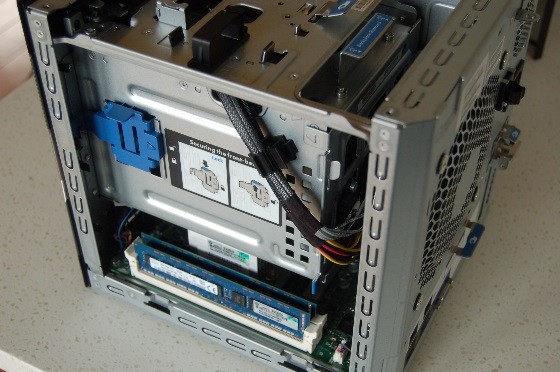
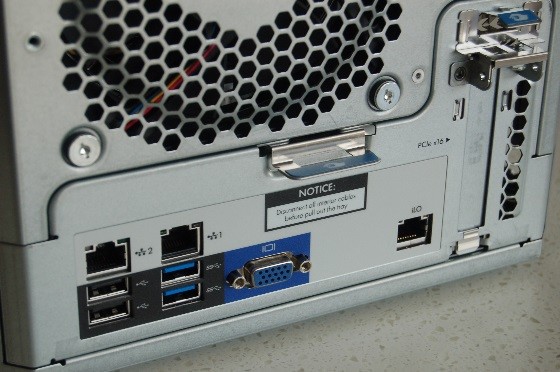
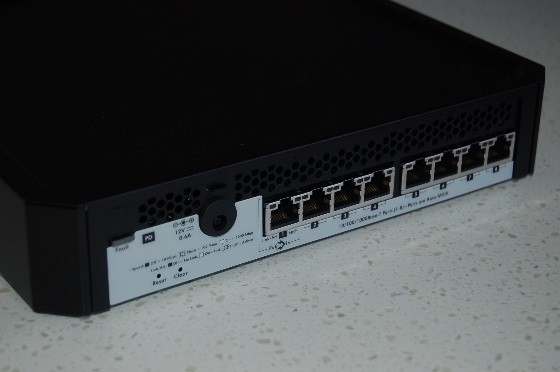
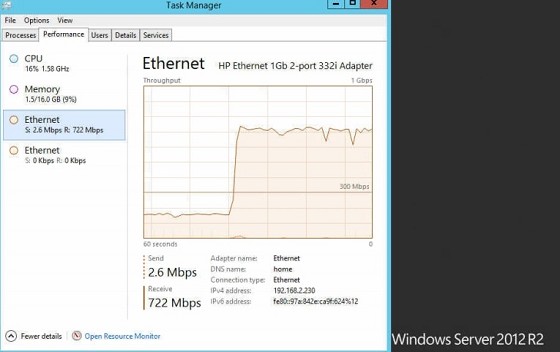
Some HP MicroServer Gen8 pr0n:


And this is with two file copy tasks running at the same time - one ethernet port only (no bonding configured yet):


Referral links: Quic Broadband (free setup code: R587125ERQ6VE) | Samsung | AliExpress | Wise | Sharesies 


Support Geekzone by subscribing (browse ads-free), or making a one-off or recurring donation through PressPatron.


HiTM4N
256 posts

Ultimate Geek
+1 received by user: 22

Trusted

  #904806 29-Sep-2013 22:30
Send private message

Man that thing looks good!

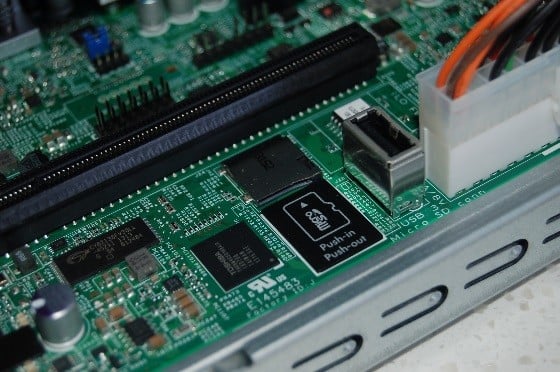
Bootable microSD slot?
How do we get in to win that puppy?


Love of all phones, computers and gadgets


Want to support Geekzone and browse the site without the ads? Subscribe to Geekzone now (monthly, annual and lifetime options).
freitasm

BDFL - Memuneh
80657 posts

Uber Geek
+1 received by user: 41065

Administrator
ID Verified
Trusted
Geekzone
Lifetime subscriber

  #904809 29-Sep-2013 22:33
Send private message

Yes, bootable microSD, which seems to be useful for hypervisor-type platforms. It's not hot swappable, so you can only insert/eject when the machine is powered off, but to get to it you need to open it so I don't think people would do it anyway.

Stay tuned for instructions later in October on how to win one of these boxes. 


Referral links: Quic Broadband (free setup code: R587125ERQ6VE) | Samsung | AliExpress | Wise | Sharesies 


Support Geekzone by subscribing (browse ads-free), or making a one-off or recurring donation through PressPatron.


HiTM4N
256 posts

Ultimate Geek
+1 received by user: 22

Trusted

  #904811 29-Sep-2013 22:38
Send private message

Yeah I'm all for hypervisors even on file servers.

Throw a free copy of esxi on there and then pass through everything it needs. Then if you find you have excess resources you can throw a second VM on there beside the file server. Also allows for easier backups in my opinion.


Love of all phones, computers and gadgets


freitasm

BDFL - Memuneh
80657 posts

Uber Geek
+1 received by user: 41065

Administrator
ID Verified
Trusted
Geekzone
Lifetime subscriber

  #904813 29-Sep-2013 22:39
Send private message

Note the internal USB port, next to the microSD slot - it can also be used for boot.


Referral links: Quic Broadband (free setup code: R587125ERQ6VE) | Samsung | AliExpress | Wise | Sharesies 


Support Geekzone by subscribing (browse ads-free), or making a one-off or recurring donation through PressPatron.



Nety
2584 posts

Uber Geek
+1 received by user: 5

Retired Mod
Trusted
Lifetime subscriber

  #904877 30-Sep-2013 09:09
Send private message

freitasm does it support S3 sleep? The old one only supported S4 even though the chipset did include S3 but HP had disabled it.


Media centre PC - Case Silverstone LC16M with 2 X 80mm AcoustiFan DustPROOF, MOBO Gigabyte MA785GT-UD3H, CPU AMD X2 240 under volted, RAM 4 Gig DDR3 1033, HDD 120Gig System/512Gig data, Tuners 2 X Hauppauge HVR-3000, 1 X HVR-2200, Video Palit GT 220, Sound Realtek 886A HD (onboard), Optical LiteOn DH-401S Blue-ray using TotalMedia Theatre Power Corsair VX Series, 450W ATX PSU OS Windows 7 x64

1 | 2 | 3 | 4 | 5 | 6
View this topic in a long page with up to 500 replies per page Create new topic


Geekzone Live »

Try automatic live updates from Geekzone directly in your browser, without refreshing the page, with Geekzone Live now.


Are you subscribed to our RSS feed? You can download the latest headlines and summaries from our stories directly to your computer or smartphone by using a feed reader.