Geekzone: technology news, blogs, forums
Guest
Welcome Guest.
You haven't logged in yet. If you don't have an account you can register now.


lyonrouge

1993 posts

Uber Geek
+1 received by user: 20

Trusted
Lifetime subscriber

#104980 24-Jun-2012 11:54
Send private message

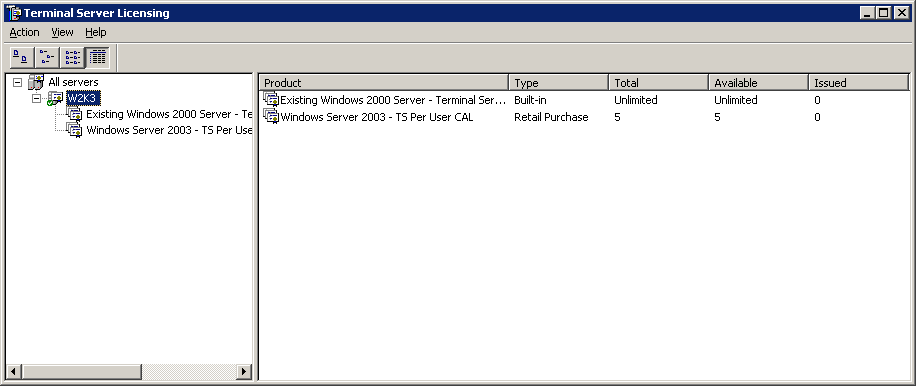
I have a Server 2003 Terminal Services with 5 CALs installed (per user configuration), but realised today (because it expired) that all this time it has been issuing temporary licenses. I've reactivated against the Microsoft clearing house successfully, but licenses are still not being issued from the CAL pool. Can anyone advise how I change the issuance to the CAL pool?


Filter this topic showing only the reply marked as answer Create new topic
shadsnz
29 posts

Geek
+1 received by user: 2

ID Verified

  #645375 24-Jun-2012 12:13
Send private message

Are you sure you have loaded the Ts licenses? These differ to the windows cals that come with the os.


lyonrouge

1993 posts

Uber Geek
+1 received by user: 20

Trusted
Lifetime subscriber

  #646037 25-Jun-2012 18:17
Send private message

Indeed, opened up the CAL envelope, entered them in and went through the clearing and activation process.

insane
3324 posts

Uber Geek
+1 received by user: 1006

ID Verified
Trusted
2degrees
Subscriber

  #646038 25-Jun-2012 18:19
Send private message

Have you specified the licensing server?


raytaylor
4076 posts

Uber Geek
+1 received by user: 1296

Trusted

  #646136 25-Jun-2012 23:21
Send private message

A temporary license will be issued for 90 days, after which the device or user will claim a permanant license if there are any avaliable.

edit: you have to wait 90 days before the permanant licence will be used.


Ray Taylor

There is no place like localhost

Spreadsheet for Comparing Electricity Plans Here


lyonrouge

1993 posts

Uber Geek
+1 received by user: 20

Trusted
Lifetime subscriber

  #647041 27-Jun-2012 15:14
Send private message

raytaylor: A temporary license will be issued for 90 days, after which the device or user will claim a permanant license if there are any avaliable.

edit: you have to wait 90 days before the permanant licence will be used.


What happened is that after 90 days it would not issue licenses. I selected re-activate by that had just reactivated the temporary licenses, so now I'll wait another 90 days and try something different next time.

raytaylor
4076 posts

Uber Geek
+1 received by user: 1296

Trusted

  #647124 27-Jun-2012 17:06
Send private message

Its always confused me also.
What is really annoying is after installing a terminal server, users log on and get a message saying "Your temporary license will expire in 3 days" and then they call complaining. Trying to explain to them that they shouldnt worry, it enables the CALs they bought with the server is something they never seem to believe.


Ray Taylor

There is no place like localhost

Spreadsheet for Comparing Electricity Plans Here


Move to New Zealand's best fibre broadband service (affiliate link). Free setup code: R587125ERQ6VE. Note that to use Quic Broadband you must be comfortable with configuring your own router.
lyonrouge

1993 posts

Uber Geek
+1 received by user: 20

Trusted
Lifetime subscriber

  #651436 5-Jul-2012 17:12
Send private message

I've installed another W2K3R2sp2 server and configured it to use a W2K8R2SP1 license server, when configured it returns a message saying it can use the server, but it still returns the "120 days remaining" message, is this an invalid configuration or is it simply a continuation of the same symptom.

raytaylor
4076 posts

Uber Geek
+1 received by user: 1296

Trusted

  #651485 5-Jul-2012 19:50
Send private message

lyonrouge: I've installed another W2K3R2sp2 server and configured it to use a W2K8R2SP1 license server, when configured it returns a message saying it can use the server, but it still returns the "120 days remaining" message, is this an invalid configuration or is it simply a continuation of the same symptom.


I would assume because they are both 2k8 R2, then it would just be the same symptom.


Ray Taylor

There is no place like localhost

Spreadsheet for Comparing Electricity Plans Here


lyonrouge

1993 posts

Uber Geek
+1 received by user: 20

Trusted
Lifetime subscriber

  #672617 15-Aug-2012 09:07
Send private message

I'm now getting this event (Event ID 46)

"One or more RD Licensing certificates has expired. Please re-register"

I've checked licmgr.exe and the license server Activation Status = "Activated", any suggestions?

I would really like to get to the bottom of how these CALs are intended to be issued and how to stop the cycle of pain.

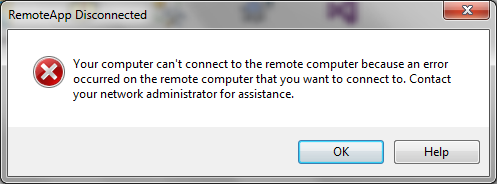
Resolution was to reactivate (even though it was active). MS KB advised that there was a fix for expired certificate chain that caused License Server need to be reactivated, and this appears to work as I can render the RD Host via the RD Web Access on the LAN, but when I attempt remote access, I get this message.


lyonrouge

1993 posts

Uber Geek
+1 received by user: 20

Trusted
Lifetime subscriber

  #673999 18-Aug-2012 15:55
Send private message

I've had to remove digital application signing to alleviate this issue, which now means I don't have SSO anymore. I suspect that the issue is related to the license sever symptom, i.e. expired certificate chain, but I'm unable to repair it so I have left it without SSO for now

lyonrouge

1993 posts

Uber Geek
+1 received by user: 20

Trusted
Lifetime subscriber

  #871598 4-Aug-2013 16:03
Send private message

This appears to have resolved the problem, http://support.microsoft.com/kb/2448846.

I'll wait for three months to verify. It appears to be working, however it still does not display license issuance.


Filter this topic showing only the reply marked as answer Create new topic


Geekzone Live »

Try automatic live updates from Geekzone directly in your browser, without refreshing the page, with Geekzone Live now.


Are you subscribed to our RSS feed? You can download the latest headlines and summaries from our stories directly to your computer or smartphone by using a feed reader.