Geekzone: technology news, blogs, forums
Guest
Welcome Guest.
You haven't logged in yet. If you don't have an account you can register now.


bigal_nz

635 posts

Ultimate Geek
+1 received by user: 32
Inactive user


#119070 19-May-2013 15:53
Send private message

I have to admit I am a bit of a fan of Office 365.

When the new portal got launched it looked ok and I heard that you can create shared mailboxes without using PowerShell. Oh cool I thought!

So why in gods name did they not create a link to the web page where you create shared mailboxes?

You have to apparently know to go to http://pod51012.outlook.com/ecp

Presumably ECP stands for Exchange Control Panel - but I just cant fathom why you cant click to this link but seem to have to just "know" it ?

Or am I missing something?

-Al

Create new topic
Regs
4066 posts

Uber Geek
+1 received by user: 206

Trusted
Snowflake

  #822143 19-May-2013 21:55
Send private message

you could just use the Admin/Exchange link from the toolbar to get you there....


bigal_nz

635 posts

Ultimate Geek
+1 received by user: 32
Inactive user


  #822188 20-May-2013 02:55
Send private message

Regs: you could just use the Admin/Exchange link from the toolbar to get you there....


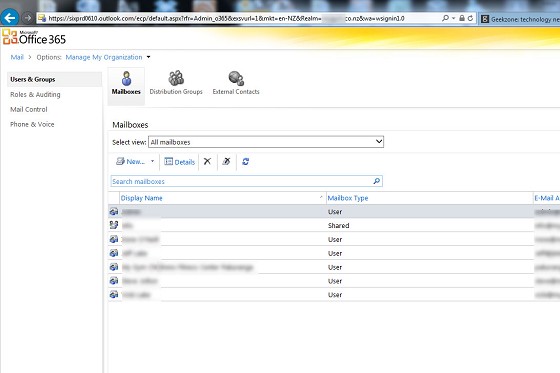
I know what you are talking about but that takes you here:


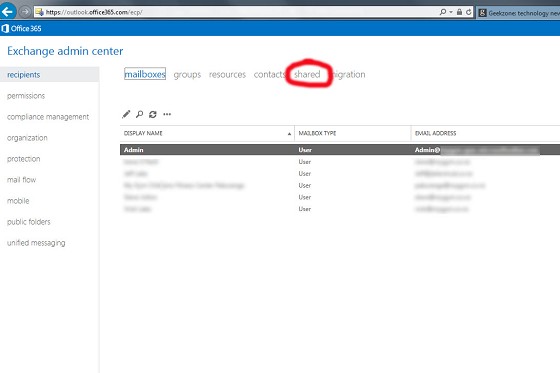
and the "hidden link" I am talking about takes you here (these screens are from same customer):


Only the second one I think allows adding a shared mailbox via the web portal?

-AL

bigal_nz

635 posts

Ultimate Geek
+1 received by user: 32
Inactive user


  #822189 20-May-2013 02:57
Send private message

Regs: you could just use the Admin/Exchange link from the toolbar to get you there....


A similar question here:

http://community.office365.com/en-us/wikis/exchange/4077.aspx

Why hidden?

-Al


CYaBro
4708 posts

Uber Geek
+1 received by user: 1182

ID Verified
Trusted

  #822195 20-May-2013 07:20
Send private message

If those screenshots are from the same customer it looks like their account is still going through the upgrade to the new office 365.
You shouldn't see any screens like your first one any more (yellow colour)


Opinions are my own and not the views of my employer.


bigal_nz

635 posts

Ultimate Geek
+1 received by user: 32
Inactive user


  #822224 20-May-2013 08:46
Send private message

Well only if they have been in upgrade for the last 3 weeks!

Yes they are from same customer, but more to the point you cant get to the /ecp as far as I can see from the new (blue) admin interface - ADMIN > EXCHANGE > takes you to the old (yellow) screen.

-Al

CYaBro
4708 posts

Uber Geek
+1 received by user: 1182

ID Verified
Trusted

  #822263 20-May-2013 10:06
Send private message

bigal_nz: Well only if they have been in upgrade for the last 3 weeks!

Yes they are from same customer, but more to the point you cant get to the /ecp as far as I can see from the new (blue) admin interface - ADMIN > EXCHANGE > takes you to the old (yellow) screen.

-Al


Not on my upgraded office 365 clients it doesn't, I get the new blue / white screen.


Opinions are my own and not the views of my employer.


Shop now for Lenovo laptops and other devices (affiliate link).
bigal_nz

635 posts

Ultimate Geek
+1 received by user: 32
Inactive user


  #822341 20-May-2013 11:53
Send private message

CYaBro:
bigal_nz: Well only if they have been in upgrade for the last 3 weeks!

Yes they are from same customer, but more to the point you cant get to the /ecp as far as I can see from the new (blue) admin interface - ADMIN > EXCHANGE > takes you to the old (yellow) screen.

-Al


Not on my upgraded office 365 clients it doesn't, I get the new blue / white screen.


Maybe its a bug? Will put a SR in.

-Al

Klathman
302 posts

Ultimate Geek
+1 received by user: 78


  #822377 20-May-2013 12:48
Send private message

Would second an incomplete migration. For me if I go to admin and then users on the main portal page there's an option to add a shared mailbox.

bigal_nz

635 posts

Ultimate Geek
+1 received by user: 32
Inactive user


  #822395 20-May-2013 13:26
Send private message

Klathman: Would second an incomplete migration. For me if I go to admin and then users on the main portal page there's an option to add a shared mailbox.


Thats +1 - thanks.

Regs
4066 posts

Uber Geek
+1 received by user: 206

Trusted
Snowflake

  #822667 20-May-2013 20:52
Send private message

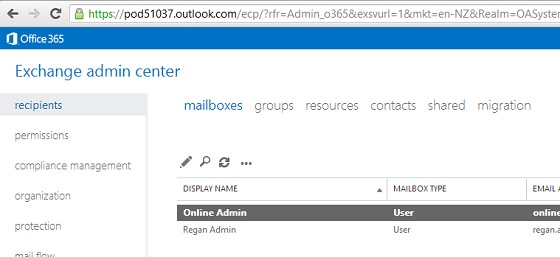
this is what my page looks like directly off that link:


Question: is this an Office 365 "P" Plan (small business plan)?  (maybe the control panels for the 'shared' P service are yet to be migrated properly)

Question: have you cleared your browser cache, or tried opening site in "In Private" mode? (maybe a cache/css issue)


Create new topic


Geekzone Live »

Try automatic live updates from Geekzone directly in your browser, without refreshing the page, with Geekzone Live now.


Are you subscribed to our RSS feed? You can download the latest headlines and summaries from our stories directly to your computer or smartphone by using a feed reader.