Geekzone: technology news, blogs, forums
Guest
Welcome Guest.
You haven't logged in yet. If you don't have an account you can register now.


Ellipsis

142 posts

Master Geek


#13897 3-Jun-2007 16:03
Send private message

Hey there,
I have tried installing Sharepoint Services onto my Server (Running Server 2003 Standard), but have recieved the following error

Setup is unable to proceed due to the following error(s):
This product requires ASP.NET v2.0 to be set to 'Allow' in the list of Internet Information Services (IIS) Web Server Extensions. If it is not available in the list, re-install ASP.NET v2.0
Correct the issue(s) listed above and re-run setup

I dont even know if I have ASP.NET on my server. How do I find out? I have tried reinstalling it, and still doesnt work. Can someone please help? I am really stuck.


Create new topic
freitasm
BDFL - Memuneh
80646 posts

Uber Geek
+1 received by user: 41030

Administrator
ID Verified
Trusted
Geekzone
Lifetime subscriber

  #73326 3-Jun-2007 20:03
Send private message

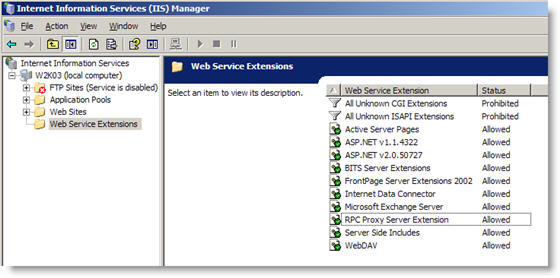
You want something that looks like this on your IIS Manager:

Open IIS Manager, click Web Service Extensions and you will see this list. You can find some very detailed explanation on ASP .Net and Sharepoint installation from Microsoft.

Note, this is not a Geekzone server screenshot, it's a test server...


Referral links: Quic Broadband (free setup code: R587125ERQ6VE) | Samsung | AliExpress | Wise | Sharesies 


Support Geekzone by subscribing (browse ads-free), or making a one-off or recurring donation through PressPatron.


Ellipsis

142 posts

Master Geek


  #73336 3-Jun-2007 21:46
Send private message

When I get into the Internet Information Services and click on my server, none of those folders under my computer pop up.
What havnt I installed?

freitasm
BDFL - Memuneh
80646 posts

Uber Geek
+1 received by user: 41030

Administrator
ID Verified
Trusted
Geekzone
Lifetime subscriber

#73337 3-Jun-2007 22:01
Send private message

Do you mean that none of these are showing up?

+ FTP Site
+ Application pools
+ Web sites
+ Web Services Extensions

Perhaps your IIS Manager is connected to the wrong server (local?). Perhaps IIS is not fully installed?


Referral links: Quic Broadband (free setup code: R587125ERQ6VE) | Samsung | AliExpress | Wise | Sharesies 


Support Geekzone by subscribing (browse ads-free), or making a one-off or recurring donation through PressPatron.


Ellipsis

142 posts

Master Geek


  #74176 10-Jun-2007 13:35
Send private message

Yeah, they arent showing up. Its connected to local. How do I see if it is fully installed and/or install it?

Ellipsis

142 posts

Master Geek


  #74422 12-Jun-2007 18:02
Send private message

Update:

Figured out how to install. Thanks

freitasm
BDFL - Memuneh
80646 posts

Uber Geek
+1 received by user: 41030

Administrator
ID Verified
Trusted
Geekzone
Lifetime subscriber

#74423 12-Jun-2007 18:04
Send private message

Good... And is it working ok now?


Referral links: Quic Broadband (free setup code: R587125ERQ6VE) | Samsung | AliExpress | Wise | Sharesies 


Support Geekzone by subscribing (browse ads-free), or making a one-off or recurring donation through PressPatron.


Shop now for Dyson appliances (affiliate link).
Ellipsis

142 posts

Master Geek


  #74731 14-Jun-2007 21:38
Send private message

Its working. But how do I upload something like vBulliten?

freitasm
BDFL - Memuneh
80646 posts

Uber Geek
+1 received by user: 41030

Administrator
ID Verified
Trusted
Geekzone
Lifetime subscriber

#74737 14-Jun-2007 22:31
Send private message

Well, vBulletin has nothing to do with Sharepoint services. You will need PHP and MySQL. Better check their page directly: http://www.vbulletin.com/


Referral links: Quic Broadband (free setup code: R587125ERQ6VE) | Samsung | AliExpress | Wise | Sharesies 


Support Geekzone by subscribing (browse ads-free), or making a one-off or recurring donation through PressPatron.


Create new topic


Geekzone Live »

Try automatic live updates from Geekzone directly in your browser, without refreshing the page, with Geekzone Live now.


Are you subscribed to our RSS feed? You can download the latest headlines and summaries from our stories directly to your computer or smartphone by using a feed reader.