Geekzone: technology news, blogs, forums
Guest
Welcome Guest.
You haven't logged in yet. If you don't have an account you can register now.


JC4401A

3 posts

Wannabe Geek


#153914 12-Oct-2014 19:19
Send private message

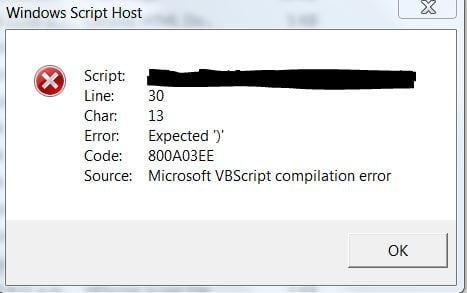
I am trying to use windows VBScript to write a webpage. I have another Windows VBScript file that creates a user on my website, but now I want a Windows VBScript file that will write the template for the webpage so it is a lot easier for me. After editing it, I opened it and it gave the following message: 

 Error

Please look over the code below and find the problem.
The code I used is:


Option Explicit
Dim filename, Title, h1
Dim fs, f
While NOT IsAlphaNumeric(filename)
If filename <> "" AND NOT IsAlphaNumeric(filename) Then
MsgBox "FileName must be alphanumeric, without spaces!",16,"PageCreator"
End If
filename = InputBox("Enter FileName (without file extenison):","PageCreator")
Wend


While NOT IsAlphaNumeric(Title)
If Title <> "" AND NOT IsAlphaNumeric(Title) Then
MsgBox "Title must be alphanumeric, without spaces!",16,"PageCreator"
End If

Wend
While NOT IsAlphaNumeric(h1)
If filename <> "" AND NOT IsAlphaNumeric(h1) Then
MsgBox "Heading must be alphanumeric, without spaces!",16,"PageCreator"
End If
h1 = InputBox("Enter Heading to appear on page:","PageCreator")
Wend
Set fs = CreateObject("Scripting.FileSystemObject")
Set f = fs.OpenTextFile(Trim(filename) & ".html",2,True)
f.WriteLine("<!DOCTYPE html>
<html>
<head>")
f.Write("<title>""" & Title & """</title>
<link rel="shortcut icon" href="favicon.png">
<link href="Site.css" rel="stylesheet"></head>
<body>
<nav id="nav01"></nav>
<div id="main">
<h1>""" & Heading & """</h1>
<footer id="foot01"></footer>
</div>
<script src="Script.js"></script>
</body>
</html>;")
Set f = Nothing
Set fs = Nothing
MsgBox "Password file created!"

Function IsAlphaNumeric(str)
Dim ianRegEx
Set ianRegEx = New RegExp
ianRegEx.Pattern = "^[a-zA-Z0-9]+$"
ianRegEx.Global = True
IsAlphaNumeric = ianRegEx.Test(str)
End Function

Create new topic
freitasm
BDFL - Memuneh
80646 posts

Uber Geek
+1 received by user: 41025

Administrator
ID Verified
Trusted
Geekzone
Lifetime subscriber

  #1152342 12-Oct-2014 19:31
Send private message

You're missing the inputbox for the title.

Are those f.Write split into multiple line? If yes, have you added "_" to the end of the lines to signify a split line?


f.WriteLine("<!DOCTYPE html>
<html>
<head>")


should really be something like 

f.WriteLine("<!DOCTYPE html>" & _ 
"<html>" & _
"<head>")

And the output will all be in a single line since there's not VBCRLF in there.


Referral links: Quic Broadband (free setup code: R587125ERQ6VE) | Samsung | AliExpress | Wise | Sharesies 


Support Geekzone by subscribing (browse ads-free), or making a one-off or recurring donation through PressPatron.


JC4401A

3 posts

Wannabe Geek


  #1153715 14-Oct-2014 15:54
Send private message

freitasm: You're missing the inputbox for the title.

Are those f.Write split into multiple line? If yes, have you added "_" to the end of the lines to signify a split line?


f.WriteLine("<!DOCTYPE html>
<html>
<head>")


should really be something like 

f.WriteLine("<!DOCTYPE html>" & _ 
"<html>" & _
"<head>")

And the output will all be in a single line since there's not VBCRLF in there.


Now it gives the following error:


LesF
176 posts

Master Geek
+1 received by user: 25


  #1159884 22-Oct-2014 11:42
Send private message

While it may look pretty to have all those tags on separate lines, you can just write out a bunch of them on one line, for example:
"<html><head><title>the title</title></head><body>"  can all be on one line.  This will make your scripting a little easier.


--
Les


JC4401A

3 posts

Wannabe Geek


#1160165 22-Oct-2014 17:32
Send private message

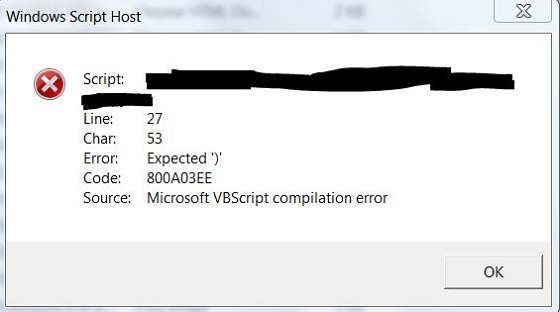
Now it shows this error when trying to execute the .vbs file


HELP

Ragnor
8279 posts

Uber Geek
+1 received by user: 585

Trusted

  #1160174 22-Oct-2014 17:48
Send private message

What's the overall thing you are trying to achieve? 

The reason I ask is because writing an actual html file/page per user is arse backwards when you could write a user row/record to a database and use a server side language like asp.net, php or ruby to have a dynamic database driven page/app.

Create new topic


Geekzone Live »

Try automatic live updates from Geekzone directly in your browser, without refreshing the page, with Geekzone Live now.


Are you subscribed to our RSS feed? You can download the latest headlines and summaries from our stories directly to your computer or smartphone by using a feed reader.