Geekzone: technology news, blogs, forums
Guest
Welcome Guest.
You haven't logged in yet. If you don't have an account you can register now.


jonathan18

7419 posts

Uber Geek
+1 received by user: 2850

ID Verified
Trusted

#204410 30-Sep-2016 13:04
Send private message

I've struck a problem when trying to redirect two domains for my wife's business to her website set up on Strikingly.com - hopefully someone can point me in the direction of a solution.


The domains are registered with Metaname.net; in the settings for the main domain is the HTTP redirection field, into which I understand, going by the instructions from Strikingly, I should put (based on a "naked" domain of careerboost.nz) http://www.careerboost.nz. When I try to save this I get the message "Redirection is only possible when using Metaname DNS".


The DNS Name Server is indeed set to Microsoft, which is what I needed to do when setting up Microsoft 365 Business to manage email using the business's domain. I'd imagine changing back to using Metaname's DNS will stuff up the email, and that took me quite some time to sort out in the first place!


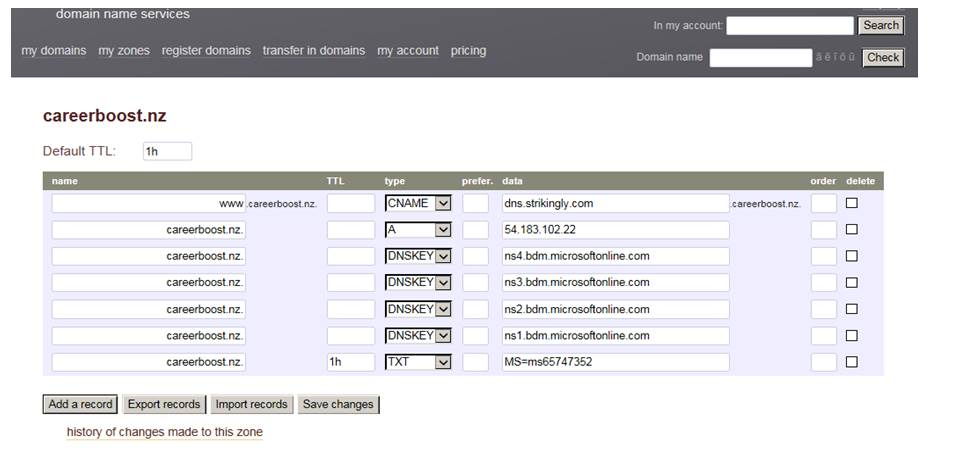
What I have tried as a workaround is based on the Strikingly instructions for when the registrar doesn't allow URL forwarding; I've inserted this line under the "my zones" for the specific domain, under those related to the Microsoft DNS settings. I've also tried to follow the second step of Strikingly's instructions, which relates to adding a CNAME record.
 

Click to see full size


The problem is I'm not sure I've translated the fields correctly for both of these lines (or even if this will work whether or not the right information's entered), or how to check if it will work (given Strikingly say it can take up to 48 hours).


Can anyone provide tips as to exactly what I should be putting in these lines, or how I can solve the overall issue? This is all French to me, and I've had no luck in getting hold of anyone from Metaname to offer advice. 


Many thanks.


The other potential problem I am likely to have relates to how I am best to set up the alternative domain also held through Metaname (simply for redirection), but I think I'll sort that out once the above issue is sorted!


View this topic in a long page with up to 500 replies per page Create new topic
 1 | 2
darylblake
1175 posts

Uber Geek
+1 received by user: 413

Trusted

  #1643291 30-Sep-2016 13:07
Send private message

if the host supports PHP you can make a file index.php in the site root and put this inside.


<?php 
header('Location: www.sitetoredirectto.com');


 Edit


You can do the same thing with asp.net, sent an HTTP 302 redirection header, I am just not sure how to do it, someone here will.


timmmay
20923 posts

Uber Geek
+1 received by user: 5395

Trusted
Lifetime subscriber

  #1643296 30-Sep-2016 13:12
Send private message

I don't think you need to use Microsoft DNS to enable Office 365 email, I've done this in the past using CloudFlare and other DNS providers. You typically just set up the appropriate MX records, sometimes with TXT/CNAME to confirm domain ownership. It's usually really simple, but sometimes fiddly the first time you do it. Redirection using an html file is sub optimal. Redirection using 301 permanent redirects using a .htaccess file or similar is generally ok, but you need to maintain hosting for that to work.


What I'd do is use the free CloudFlare DNS without their CDN features, and just set up a redirection using a page rule. Or just take it back to metaname.


jonathan18

7419 posts

Uber Geek
+1 received by user: 2850

ID Verified
Trusted

  #1643338 30-Sep-2016 14:17
Send private message

Thanks for the replies; I'm not sure if the first one is an option in these circumstances, as Strikingly is a deliberately basic webhost service so I doubt I'd have access to make those kinds of additions.


timmmay:


I don't think you need to use Microsoft DNS to enable Office 365 email, I've done this in the past using CloudFlare and other DNS providers. You typically just set up the appropriate MX records, sometimes with TXT/CNAME to confirm domain ownership. It's usually really simple, but sometimes fiddly the first time you do it. Redirection using an html file is sub optimal. Redirection using 301 permanent redirects using a .htaccess file or similar is generally ok, but you need to maintain hosting for that to work.


What I'd do is use the free CloudFlare DNS without their CDN features, and just set up a redirection using a page rule. Or just take it back to metaname.


Yep, I do get that going back to use Metaname's DNS would be the most straight-forward, but that will then lead to needing to provide an alternative solution to the problem I had in the first place with getting Office 365 to work - I can't remember why I ended up there, but I recall it was many hours of pain until I got to that point!


Well, I reckon I could follow the Office 355 instructions to set up CloudFlare DNS, but I understand that simply replaces using Microsoft's DNS with CloudFlare, which in and of itself won't allow me to se up the URL redirection from within Metaname's settings.


But you go on to say "just set up a direction using a page rule" - googling that, it seems that page rules are a feature of CloudFlare that can be used to redirect URLs, as in https://blog.cloudflare.com/introducing-pagerules-url-forwarding/ - is this correct, and would it work in my case? (I'm confused by whether I'd also need to add the CNAME record pointing to dns.strikingly.com as advised in that link in my original post and, if so, where this is added?)


So, essentially, in Metaname I'd set up CloudFlare to act as the DNS, and in turn within CloudFlare I'd use a page redirect to redirect the URL?


I note you also mention not using their CDN features - is there a particular reason why not? I recall using this feature was recommended here on GZ, but I'm not sure as to whether Strikingly websites would be able to use this?


Thanks again for the help.


timmmay
20923 posts

Uber Geek
+1 received by user: 5395

Trusted
Lifetime subscriber

  #1643347 30-Sep-2016 14:50
Send private message

Yes a page rule for a domain will let you forward all traffic anywhere you like. It reads your current DNS and copies it, so you don't have to set it up from scratch. Your steps would be:


  • Change DNS TTL times down to 5 minutes, then wait for a while - the longest TTL would be a good wait time, usually a couple of hours or maybe a day
  • Set up CloudFlare, optionally including the forwarding page rule
  • Change Metaname name servers to CloudFlare
  • Ensure page rule and email still work.

jonathan18

7419 posts

Uber Geek
+1 received by user: 2850

ID Verified
Trusted

  #1643350 30-Sep-2016 15:10
Send private message

timmmay:


Yes a page rule for a domain will let you forward all traffic anywhere you like. It reads your current DNS and copies it, so you don't have to set it up from scratch. Your steps would be:


  • Change DNS TTL times down to 5 minutes, then wait for a while - the longest TTL would be a good wait time, usually a couple of hours or maybe a day
  • Set up CloudFlare, optionally including the forwarding page rule
  • Change Metaname name servers to CloudFlare
  • Ensure page rule and email still work.


Thanks for the further details!


By "Change DNS TTL times down to 5 minutes, then wait for a while", I take it that is just by adding "5" to the TTL field in Metaname and saving this?


I think I @#$@#%ed that up by already having started down the track of changing the DNS in Metaname to the CloudFlare ones without changing the TTL field first, so I'll be stuck waiting a few hours for the change to populate! Serves me right for being impatient and jumping the gun.


My first focus will be to ensure the email's still working once the DNS change happens, and then I can try to sort the page rule issue - that's because there's up a 48 hour delay with user-provided URL being sorted from Strikingly's end as well, so at least I can ensure my wife still has access to email which she's already using, whereas the website doesn't have to be live yet.


And then there'll be the matter of ensuring the alternate domain is appropriately forwarded - if I want to make anyone who visits www.careerboost.co.nz to be redirected to www.careerboost.nz, is that something that can just be sorted out within metaname, or should it too be managed within CloudFlare? (At the moment I've got it set up as a redirect in metaname, but of course have no idea if this is working!). Would it best be managed in just the same way as I'm setting up the .nz site, in that I'd manage the careerboost.co.nz URL within CloudFlare, and use a page redirect to redirect it to careerboost.nz?


Thanks again for your assistance, Tim - much appreciated.


yitz
2277 posts

Uber Geek
+1 received by user: 608


  #1643353 30-Sep-2016 15:44
Send private message

TTL values are in seconds, so the value for 5 minutes would be 300.


Also for the CNAME record add a '.' at the end so it is dns.strikingly.com. 


Shop now for Dyson appliances (affiliate link).
timmmay
20923 posts

Uber Geek
+1 received by user: 5395

Trusted
Lifetime subscriber

  #1643388 30-Sep-2016 17:19
Send private message

Not all DNS providers have a . (dot) at the end of the domain, and yep 300 = 5 minutes. The www forward can be done within CloudFlare as well, again as a page rule. It can also be done with Apache/Nginx if you have hosting, and if you're already hosting a site on the domain I'd just do it with the web server. I know a fair bit about Nginx, but not so much about Apache.


jonathan18

7419 posts

Uber Geek
+1 received by user: 2850

ID Verified
Trusted

  #1643596 1-Oct-2016 00:51
Send private message

So I've managed to sort out Office 365 using CloudFlare, but am struggling with the website (edit: this DNS check confirms the connectivity issue). I have nil prior experience with this stuff, so it's all new to me.


First off, the site is registered ok with Strikingly, so I don't think it's that end (I've registered it on Strikingly as www.careerboost.nz - or does it need to be http://www.careerboost.nz?); rather, I think it's likely a setting in CloudFlare, given I don't know what I'm doing!


The DNS records page in CloudFlare reports the following: "An A, AAAA or CNAME record was not found pointing to the root domain. The careerboost.nz domain will not resolve." 


I've based the following current settings off the Strikingly tutorial and the CloudFlare page rules guide (with / marking separate fields):


* adding a CNAME record to the DNS settings - name: www / value: dns.strikingly.com / TTL: automatic (can't see any specific setting for this?)
* adding a page rule - *careerboost.nz/+ / forwarding URL / 301 - Permanent Redirect / http://www.careerboost.nz


The first of these is straight-forward (and adding it got rid of the error message regarding www), but I'm concerned I've done something wrong in the page rule - exactly what settings should I be entering here?


I've also assumed that, given I'm trying to do this via a page rule, I don't need to also set up an A records in the DNS settings (pointing careerboost.nz directly to 54.183.102.22) - is this correct?


Any further assistance will be really appreciated!


timmmay
20923 posts

Uber Geek
+1 received by user: 5395

Trusted
Lifetime subscriber

  #1643635 1-Oct-2016 07:06
Send private message

I'm not entirely clear on your end goal or what's not working. careerboost.nz is working fine for me, showing a nice page.


I think you do need an A record for CloudFlare page rules to work, and probably a cname for the www subdomain. In the DNS screen you need the little orange cloud beside it to be turned on, not gray/inactive. This is because until the orange cloud is on PageRules don't work.


Can you post a list of all the domains in question, what should display on them, where that content is hosted, and any applicable IP?


I've sent you a PM as well.


jonathan18

7419 posts

Uber Geek
+1 received by user: 2850

ID Verified
Trusted

  #1643636 1-Oct-2016 07:16
Send private message

Thanks for the post and PM, Tim; I'm just working up a response to your PM.


So you're able to view the actual careerboost site? I'm completely confused, as any attempts I make to visit www.careerboost.nz or careerboost.nz result in a 


This site can’t be reached


www.careerboost.nz’s server DNS address could not be found.


Willl be in contact soon!


Cheers


Jonathan


timmmay
20923 posts

Uber Geek
+1 received by user: 5395

Trusted
Lifetime subscriber

  #1643637 1-Oct-2016 07:23
Send private message

It was working 15 minutes ago, I got a full graphic nice looking page that looked appropriate. Now I get an error, as below. DNS is resolving to 104.27.136.57.


The requested URL "[no URL]", is invalid.


Reference #9.967e1cb8.1475259733.6f2a7bb


Shop now on Samsung phones, tablets, TVs and more (affiliate link).
jonathan18

7419 posts

Uber Geek
+1 received by user: 2850

ID Verified
Trusted

  #1643638 1-Oct-2016 07:24
Send private message

timmmay:


It was working 15 minutes ago, I got a full graphic nice looking page that looked appropriate. Now I get an error, as below. DNS is resolving to 104.27.136.57.


The requested URL "[no URL]", is invalid.


Reference #9.967e1cb8.1475259733.6f2a7bb


Oh, FFS! I've never had it showing, so am not sure what I've done in the interim to stuff it up. Will stop fiddling now!


yitz
2277 posts

Uber Geek
+1 received by user: 608


  #1643671 1-Oct-2016 09:38
Send private message

Your DNS looks fine.


The requested URL "[no URL]", is invalid.
is an Akamai error which seems to be causing some confusion but it most likely has to do with Strikingly's end. It seems not all Akamai cache servers around the world are able to request the site back on the Strikingly origin servers.


timmmay
20923 posts

Uber Geek
+1 received by user: 5395

Trusted
Lifetime subscriber

  #1643672 1-Oct-2016 09:39
Send private message

I've fixed this up for Jonathan. Is his website now visible to everyone? It works for me and on webpagetest.org


jonathan18

7419 posts

Uber Geek
+1 received by user: 2850

ID Verified
Trusted

  #1643673 1-Oct-2016 09:48
Send private message

Yep, Tim's been a great help in sorting this out - his assistance is really appreciated!


The weird thing is the site's not working for me on Chrome; I can see it fine on Edge (first time I've used it!), but it doesn't work on Firefox either). I'm sure this is specific to my network/devices, so would be great to confirm whether others can access it ok (www.careerboost.nz). 


Specifically, it doesn't work on Chrome (or Firefox) on my wife's laptop, my iPad or phone, but works on Edge on the same laptop, and is fine on Chrome and Safari on my son's iPad.


i've tried clearing Chrome's own DNS cache, reset the Windows DNS cache, rebooted the PC, restarted the router... but no luck with these things. Tim's suggested it may come right with a bit of time.


Cheers


Jonathan


 1 | 2
View this topic in a long page with up to 500 replies per page Create new topic


Geekzone Live »

Try automatic live updates from Geekzone directly in your browser, without refreshing the page, with Geekzone Live now.


Are you subscribed to our RSS feed? You can download the latest headlines and summaries from our stories directly to your computer or smartphone by using a feed reader.