Geekzone: technology news, blogs, forums
Guest
Welcome Guest.
You haven't logged in yet. If you don't have an account you can register now.


xpd

xpd

Geek of Coastguard
14116 posts

Uber Geek
+1 received by user: 4578

Retired Mod
ID Verified
Trusted
Lifetime subscriber

#295548 6-Apr-2022 07:54
Send private message

I hate printers and associated functions they perform....


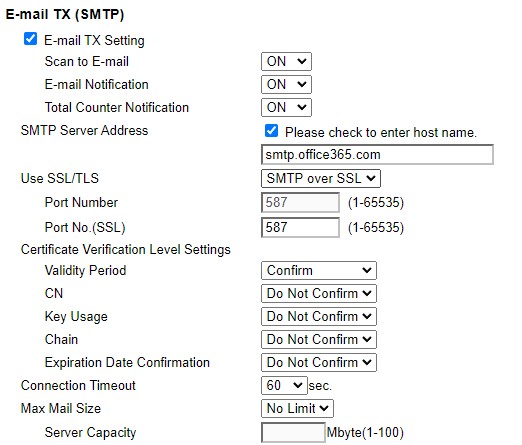
Anyway, got a Ricoh MFC office unit, that runs fine except for some reason its decided to no longer do scan to email.


Checked settings and found for some reason it had reverted back to some old settings that were no longer valid.


So set back to what they should be.


Did a test, and while the printer gave no error, and according to the useless logs, it was successful. But no emails ever arrive at O365. They're not marked as spam etc, they use the same email details as the other 5 similar printers around the company which are running fine. They just vanish.


Apparently this unit did this a while back, and all my colleague did then, was reset the SMTP settings to the same as what I have.


Any ideas ?


XPD / Gavin


LinkTree


View this topic in a long page with up to 500 replies per page Create new topic
 1 | 2
cyril7
9075 posts

Uber Geek
+1 received by user: 2499

ID Verified
Trusted
Subscriber

  #2897402 6-Apr-2022 08:10
Send private message

What SMTP record are you using, the one detailed in the o365 admin console or SMTP.office365.com

I recently encountered a similar situation and had to use the generic one above and all was good.

Cyril


nztim
4012 posts

Uber Geek
+1 received by user: 2710

ID Verified
Trusted
TEAMnetwork
Subscriber

  #2897410 6-Apr-2022 08:28
Send private message

Get an exchange Online P1 license for the scanner and use this account for Scan to Email


without authenticated SMTP you will always have issues


if you don't/cant get get an EXO P1 license for the copier you need to have your static ip in the SPF record for the domain and you can only scan to your own email addresses not externally 


Any views expressed on these forums are my own and don't necessarily reflect those of my employer. 


xpd

xpd

Geek of Coastguard
14116 posts

Uber Geek
+1 received by user: 4578

Retired Mod
ID Verified
Trusted
Lifetime subscriber

  #2897412 6-Apr-2022 08:35
Send private message

Sorry its a Konica, not Ricoh....  bah :)


XPD / Gavin


LinkTree


xpd

xpd

Geek of Coastguard
14116 posts

Uber Geek
+1 received by user: 4578

Retired Mod
ID Verified
Trusted
Lifetime subscriber

  #2897413 6-Apr-2022 08:36
Send private message

nztim:


Get an exchange Online P1 license for the scanner and use this account for Scan to Email


without authenticated SMTP you will always have issues


if you don't/cant get get an EXO P1 license for the copier you need to have your static ip in the SPF record for the domain and you can only scan to your own email addresses not externally 


Thing is ALL our scanners nationwide are setup the same, and none are having this problem except this one :)


XPD / Gavin


LinkTree


cyril7
9075 posts

Uber Geek
+1 received by user: 2499

ID Verified
Trusted
Subscriber

  #2897419 6-Apr-2022 08:46
Send private message

nztim:


Get an exchange Online P1 license for the scanner and use this account for Scan to Email


without authenticated SMTP you will always have issues


if you don't/cant get get an EXO P1 license for the copier you need to have your static ip in the SPF record for the domain and you can only scan to your own email addresses not externally 


Ahh, should point out in my case it was using a P1 account and authenticating, I still find it odd that the customers domain related SMTP entry (ie xxxxx-co-nz.mail.protection.outlook.com did not work, yet had previosuly, I am keeping an eye on it.


Cyril


engedib
254 posts

Ultimate Geek
+1 received by user: 93


  #2897420 6-Apr-2022 08:48
Send private message

xpd:


nztim:


Get an exchange Online P1 license for the scanner and use this account for Scan to Email


without authenticated SMTP you will always have issues


if you don't/cant get get an EXO P1 license for the copier you need to have your static ip in the SPF record for the domain and you can only scan to your own email addresses not externally 


Thing is ALL our scanners nationwide are setup the same, and none are having this problem except this one :)


Most likely the site's IP address got blacklisted somewhere.


Shop now on Samsung phones, tablets, TVs and more (affiliate link).
MadEngineer
4591 posts

Uber Geek
+1 received by user: 2570

Trusted

  #2897421 6-Apr-2022 08:52
Send private message

Grab a simple email client and try connecting to that smtp server with the same credentials, ports etc.


You're not on Atlantis anymore, Duncan Idaho.

xpd

xpd

Geek of Coastguard
14116 posts

Uber Geek
+1 received by user: 4578

Retired Mod
ID Verified
Trusted
Lifetime subscriber

  #2897504 6-Apr-2022 10:18
Send private message

Tested account, all fine - other printers using same account with no issue. Not on any blacklists.


Set all account fields to use same login/password.


Now getting back to original error message which is just "error".


*&%(*%&()*57(*&%^(*^%$ PRINTERS!!!


XPD / Gavin


LinkTree


nztim
4012 posts

Uber Geek
+1 received by user: 2710

ID Verified
Trusted
TEAMnetwork
Subscriber

  #2897511 6-Apr-2022 10:26
Send private message

cyril7:


Ahh, should point out in my case it was using a P1 account and authenticating, I still find it odd that the customers domain related SMTP entry (ie xxxxx-co-nz.mail.protection.outlook.com did not work, yet had previosuly, I am keeping an eye on it.


Cyril


to use xxxxx-co-nz.mail.protection.outlook.com you can only send to your own domain, AND your external IP must be in the SPF record


@xpd another thing is has someone in your org created a conditional access policy to disable legacy authentication?


TBH All printers should now be using modern authentication to talk to azure and NOT imap/smtp and if the printer doesn't support it then the printer should be replaced  


Any views expressed on these forums are my own and don't necessarily reflect those of my employer. 


tehgerbil
1110 posts

Uber Geek
+1 received by user: 884

ID Verified
Subscriber

  #2897512 6-Apr-2022 10:28
Send private message

Same issue with BW and Colour scans? - We had this issue whereby 1 printer/scanner was set to a higher DPI for colour scans and they were huge so was being caught up the attachment file size limit. 

Don't know if this helps, but putting it out there. :)


1101
3141 posts

Uber Geek
+1 received by user: 1143


  #2897599 6-Apr-2022 11:58
Send private message

Some commercial printers just dont work well scanning to 365 . I used to see that often (not so much now).

Often easier to setup a free smtp2go a/c & use that
(or use a gmail a/c if scan email adress doesnt matter)


is this printer exactly the same as all the others ? incl same firmware version. ?


Shop now on AliExpress (affiliate link).
nztim
4012 posts

Uber Geek
+1 received by user: 2710

ID Verified
Trusted
TEAMnetwork
Subscriber

  #2897608 6-Apr-2022 12:09
Send private message

1101:


Some commercial printers just dont work well scanning to 365 . I used to see that often (not so much now).

Often easier to setup a free smtp2go a/c & use that
(or use a gmail a/c if scan email adress doesnt matter)


is this printer exactly the same as all the others ? incl same firmware version. ?


no no no no & no


the printer should support modern azure authentication and have an exchange online P1 license


this is the proper way of doing things, if the printer doesn't support it then replace it


Any views expressed on these forums are my own and don't necessarily reflect those of my employer. 


xpd

xpd

Geek of Coastguard
14116 posts

Uber Geek
+1 received by user: 4578

Retired Mod
ID Verified
Trusted
Lifetime subscriber

  #2897634 6-Apr-2022 13:08
Send private message

I'm over it now, its with Konica support. 


:D


XPD / Gavin


LinkTree


ANglEAUT
altered-ego
2436 posts

Uber Geek
+1 received by user: 842

Trusted
Lifetime subscriber

  #2897648 6-Apr-2022 13:41
Send private message

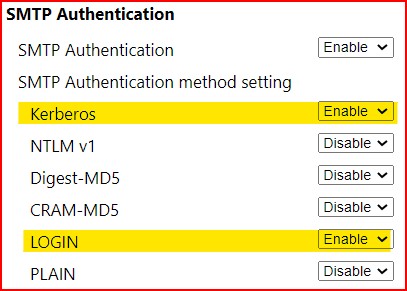
Fur us, it helped changing the SMTP authentication.


Only enable Kerberos & LOGIN


We used an internal SMTP server address & I don't know where that pointed.


Please keep this GZ community vibrant by contributing in a constructive & respectful manner.


MadEngineer
4591 posts

Uber Geek
+1 received by user: 2570

Trusted

  #2897693 6-Apr-2022 14:57
Send private message

Is the date and time and timezone set correctly on the printer?


You're not on Atlantis anymore, Duncan Idaho.

 1 | 2
View this topic in a long page with up to 500 replies per page Create new topic


Geekzone Live »

Try automatic live updates from Geekzone directly in your browser, without refreshing the page, with Geekzone Live now.


Are you subscribed to our RSS feed? You can download the latest headlines and summaries from our stories directly to your computer or smartphone by using a feed reader.