Geekzone: technology news, blogs, forums
Guest
Welcome Guest.
You haven't logged in yet. If you don't have an account you can register now.


JamesN

108 posts

Master Geek
+1 received by user: 25


#303122 17-Jan-2023 19:48
Send private message

I'm fresh to terraform so checking if I am doing something wrong here.


I have a bunch of resource groups already created before I implemented Terraform.


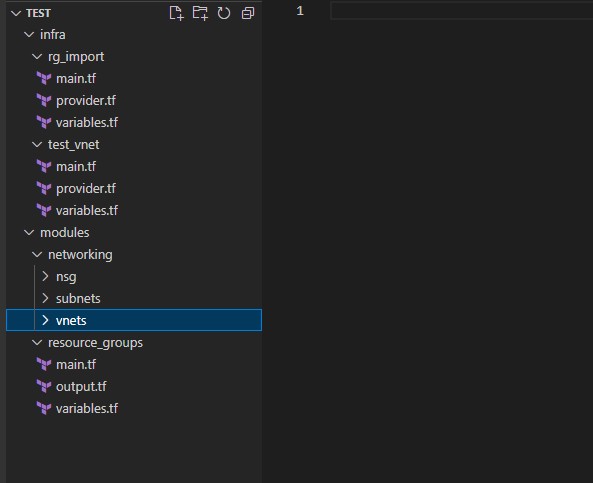
I imported them in the 'rg_import' module which is using a RG module I built and 'for_each' against what is filled in on the variables.tf


This all imported and the backend state file sitting in the cloud updated.


example command: terraform import 'module.rg["test/repository/abc"]'.azurerm_resource_group.rg_import <subscription Id>


Now, on test_vnet module, I went to deploy a Vnet with Subnet, NSG etc.


I've done a data connection to one of the imported RGs


Using the same backend state, I run 'terraform plan' while in the 'test_vnet' directory and it shows as wanting to destroy the Resource Groups.


Since I am not touching those resources, My impression is they would stay there?


Any help would be appreciated


This link is also similar to what I am experiencing


https://github.com/hashicorp/terraform-provider-google/issues/11043


Create new topic
nzkc
1634 posts

Uber Geek
+1 received by user: 1041


  #3023004 17-Jan-2023 22:45
Send private message

I think this is your problem:


Using the same backend state, I run 'terraform plan' while in the 'test_vnet' directory


You're using state that was set up from a different set of terraform infrastructure.  The stuff you imported if I followed you correctly - which I may not have as I struggled to follow it sorry.


The way terraform state works is that the state info describes to terraform (plan, apply, destroy etc) what has already been set up. Sometimes terraform will interrogate the destination infrastructure but it seems to depend on provider and resource type in my experience.  In your case here, the new directory doesnt contain terraform .tf files describing the infrastructure in the state. So your terraform plan says "oh, this needs to now be removed".


The simplest solution is to combine all your terraform together and continue to use that single state.  There are other approaches you can use. Multiple state files/destinations/keys (we do this at work and its very common - we're on AWS not Azure though). You can also use the output of one stack as inputs to another. Not really used this too much so cant comment if it'll work for you.


JamesN

108 posts

Master Geek
+1 received by user: 25


  #3024151 19-Jan-2023 17:05
Send private message

I got it sorted, user issue.


I am trying to run this with multiple state files but how I was breaking it up wouldn't work with what I intended.


Cheers


Create new topic


Geekzone Live »

Try automatic live updates from Geekzone directly in your browser, without refreshing the page, with Geekzone Live now.


Are you subscribed to our RSS feed? You can download the latest headlines and summaries from our stories directly to your computer or smartphone by using a feed reader.
