According to this article
this line in terminal
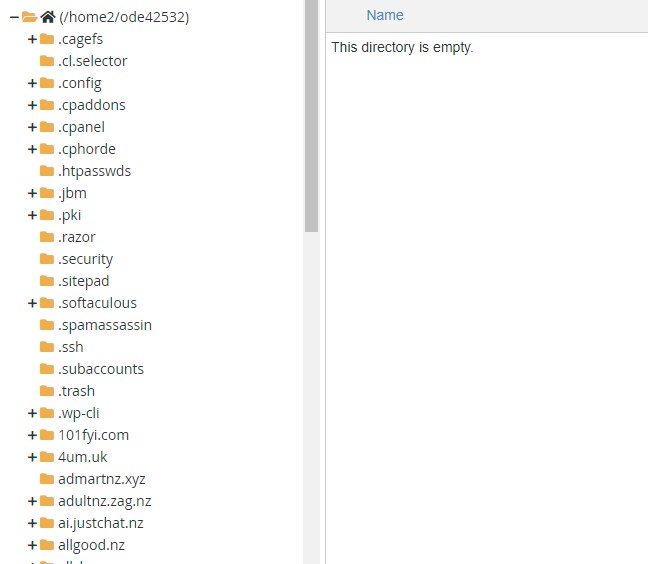
will clear all ".htaccess" files from the server. What if I only want to clear them from one folder? the allgood.nz folder What would I enter in the terminal window? 
According to this article
this line in terminal
will clear all ".htaccess" files from the server. What if I only want to clear them from one folder? the allgood.nz folder What would I enter in the terminal window? 
Is an English Man living in New Zealand. Not a writer, an Observer he says. Graham is a seasoned 'traveler" with his sometimes arrogant, but honest opinion on life. He loves the Internet!.
I have two shops online allshop.nz patchpinflag.nz
Email Me

|
|
You should just be able to do "cd allgood.nz" then the "find" command... but I'd like someone else to double-check that before you try it :)
The first argument to find is the directory to search in. In the provided example, the dot means the current directory. So to delete from just one directory, you'd replace the dot with the directory path:
find /home2/ode42532/allgood.nz -name ".htaccess" -exec rm -rf {} \;
But I'd recommend changing the rm command to rm -i (it'll ask for confirmation or each file, which is less risky, as there's no undo or Recycle Bin):
find /home2/ode42532/allgood.nz -name ".htaccess" -exec rm -i {} \;
Aaron2222:
@freitasm Looks like this post's messed up the page formatting.
Apologies if I messed something up
Is an English Man living in New Zealand. Not a writer, an Observer he says. Graham is a seasoned 'traveler" with his sometimes arrogant, but honest opinion on life. He loves the Internet!.
I have two shops online allshop.nz patchpinflag.nz
Email Me
Aaron2222:
The first argument to find is the directory to search in. In the provided example, the dot means the current directory. So to delete from just one directory, you'd replace the dot with the directory path:
find /home2/ode42532/allgood.nz -name ".htaccess" -exec rm -rf {} \;
But I'd recommend changing the rm command to rm -i (it'll ask for confirmation or each file, which is less risky, as there's no undo or Recycle Bin):
find /home2/ode42532/allgood.nz -name ".htaccess" -exec rm -i {} \;
Geez thanks mate!
I thought I would do something like suggested cd allgood.nz so I could see I was in the correct directory
If i use "find /home2/ode42532/allgood.nz -name ".htaccess" -exec rm -i {} \;" It will show me the first file i am deleting? if by somehow I am in the wrong place I can then stop and go back, having lost just one file Is that about it?
Is an English Man living in New Zealand. Not a writer, an Observer he says. Graham is a seasoned 'traveler" with his sometimes arrogant, but honest opinion on life. He loves the Internet!.
I have two shops online allshop.nz patchpinflag.nz
Email Me
gnfb:
Geez thanks mate!
I thought I would do something like suggested cd allgood.nz so I could see I was in the correct directory
If i use "find /home2/ode42532/allgood.nz -name ".htaccess" -exec rm -i {} \;" It will show me the first file i am deleting? if by somehow I am in the wrong place I can then stop and go back, having lost just one file Is that about it?
With the -i option, rm will ask for confirmation on every file before you delete it. If it's not too many files, then you can just look at each one just to be sure, then confirm it. The other option is to run find /home2/ode42532/allgood.nz -name ".htaccess" -exec echo rm {} \; to have it print out the commands it's going to run, then run it again without the echo to actually do the deletion. This is mostly just to be completely sure you're doing the right thing, especially as you can't go back afterwards (except restoring from backups).
Since you want confirmation, without any potential damage, first you can change the rm to an echo command:
find /home2/ode42532/allgood.nz -name ".htaccess" -exec echo {} \;
That'll display the files it finds for you so you can confirm your "find" part is correct first.
Once you're happy just swap echo for rm and away you go.
nzkc:
Since you want confirmation, without any potential damage, first you can change the rm to an echo command:
find /home2/ode42532/allgood.nz -name ".htaccess" -exec echo {} \;
That'll display the files it finds for you so you can confirm your "find" part is correct first.
Once you're happy just swap echo for rm and away you go.
Thanks again for help However this really is above my "pay grade"
I tried the code
find /home2/ode42532/allgood.nz -name ".htaccess" -exec rm -i {} \;
but it didn't seem to remove all the .htaccess files I must have been doing wrong.
Anyway, I do appreciate the comments but the whole hosting site has been malwared Hostgator solution is approx $30000 USD to "clean it up" and provide security.
Fortunately, none of it is mission-critical, just me playing around in my retirement.
I may just wipe it all and reinstall just a few.
The comment from Hostgator " That may not help as the malware will now know the domain names" (hmmm not sure I believe that comment)
So Such is life Thanks for your help one and all.
Gaham
Is an English Man living in New Zealand. Not a writer, an Observer he says. Graham is a seasoned 'traveler" with his sometimes arrogant, but honest opinion on life. He loves the Internet!.
I have two shops online allshop.nz patchpinflag.nz
Email Me
Aaron2222:
gnfb:
Geez thanks mate!
I thought I would do something like suggested cd allgood.nz so I could see I was in the correct directory
If i use "find /home2/ode42532/allgood.nz -name ".htaccess" -exec rm -i {} \;" It will show me the first file i am deleting? if by somehow I am in the wrong place I can then stop and go back, having lost just one file Is that about it?
With the -i option, rm will ask for confirmation on every file before you delete it. If it's not too many files, then you can just look at each one just to be sure, then confirm it. The other option is to run find /home2/ode42532/allgood.nz -name ".htaccess" -exec echo rm {} \; to have it print out the commands it's going to run, then run it again without the echo to actually do the deletion. This is mostly just to be completely sure you're doing the right thing, especially as you can't go back afterwards (except restoring from backups).
Sorry to bother you I may be doing something wrong
I just ran find /home2/ode42532/bidnow.nz -name ".htaccess" -exec rm -i {} \;
on terminal and holding the enter key down it went through each file on the install in that directory BUT did not delete or remove the file?
what am I doing incorrect?
G
Is an English Man living in New Zealand. Not a writer, an Observer he says. Graham is a seasoned 'traveler" with his sometimes arrogant, but honest opinion on life. He loves the Internet!.
I have two shops online allshop.nz patchpinflag.nz
Email Me
gnfb:
Sorry to bother you I may be doing something wrong
I just ran find /home2/ode42532/bidnow.nz -name ".htaccess" -exec rm -i {} \;
on terminal and holding the enter key down it went through each file on the install in that directory BUT did not delete or remove the file?
what am I doing incorrect?
G
Probably need to see some output. Suspect its permissions. Easiest way to test that is to manually cd into one of the directories with the .htaccess file and just run: rm -i .htaccess
Then you'll see if:
a) its deleted or not
b) whether any errors (likely permission errors) are being thrown
gnfb:
Sorry to bother you I may be doing something wrong
I just ran find /home2/ode42532/bidnow.nz -name ".htaccess" -exec rm -i {} \;
on terminal and holding the enter key down it went through each file on the install in that directory BUT did not delete or remove the file?
what am I doing incorrect?
G
With rm -i, you have to press y for each file.
Aaron2222:
gnfb:
Sorry to bother you I may be doing something wrong
I just ran find /home2/ode42532/bidnow.nz -name ".htaccess" -exec rm -i {} \;
on terminal and holding the enter key down it went through each file on the install in that directory BUT did not delete or remove the file?
what am I doing incorrect?
G
With rm -i, you have to press y for each file.
Ok thanks
Is an English Man living in New Zealand. Not a writer, an Observer he says. Graham is a seasoned 'traveler" with his sometimes arrogant, but honest opinion on life. He loves the Internet!.
I have two shops online allshop.nz patchpinflag.nz
Email Me
|
|