Geekzone: technology news, blogs, forums
Guest
Welcome Guest.
You haven't logged in yet. If you don't have an account you can register now.


View this topic in a long page with up to 500 replies per page Create new topic
1 | ... | 20 | 21 | 22 | 23 | 24 | 25 
zerkms
124 posts

Master Geek
+1 received by user: 9


  #3247768 12-Jun-2024 11:04
Send private message

disease:


zerkms:


Pixel 6 on mightymobile (onenz/vodafone) with june update: still no wifi calling :-(


Gutted, I can't either, on p6 pro with Kogan & june update. Are you able to enable WIFI Calling under Settings > Calls & SMS > Calls as the user above suggests on the P7P?


For me both those menu items are greyed out...


Nope, for me it's not provisioned and no wifi-calling menu item in the menu at all.


disease
41 posts

Geek
+1 received by user: 19


  #3247778 12-Jun-2024 11:31
Send private message

Thanks team.


Perhaps there is something wrong with the P6 modem that prohibits this, or perhaps it didn't get the modem update the other devices got.


Quite a shame as I could really do with WIFI Calling, can't be bohered with the patcher, and don't want to upgrade my P6P until the Pixel 10.


muppet
2644 posts

Uber Geek
+1 received by user: 1662

Trusted

  #3247779 12-Jun-2024 11:36
Send private message

disease:


Thanks team.


Perhaps there is something wrong with the P6 modem that prohibits this, or perhaps it didn't get the modem update the other devices got.


Quite a shame as I could really do with WIFI Calling, can't be bohered with the patcher, and don't want to upgrade my P6P until the Pixel 10.


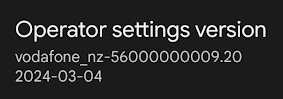
It's not the modem firmware that defines this (Sorry I realise my original post makes it seem it does) but rather the "Operator Settings Version"


For my P7Pro, that's "2024-03-04"


zerkms
124 posts

Master Geek
+1 received by user: 9


  #3247780 12-Jun-2024 11:36
Send private message

disease:


Thanks team.


Perhaps there is something wrong with the P6 modem that prohibits this, or perhaps it didn't get the modem update the other devices got.


Quite a shame as I could really do with WIFI Calling, can't be bohered with the patcher, and don't want to upgrade my P6P until the Pixel 10.


Actually it's nothing wrong with pixel 6 itself: I had wifi calling working with skinny (spark). I guess it's onenz (vodafone) is to blame 🤷


zerkms
124 posts

Master Geek
+1 received by user: 9


  #3247781 12-Jun-2024 11:38
Send private message

muppet:


disease:


Thanks team.


Perhaps there is something wrong with the P6 modem that prohibits this, or perhaps it didn't get the modem update the other devices got.


Quite a shame as I could really do with WIFI Calling, can't be bohered with the patcher, and don't want to upgrade my P6P until the Pixel 10.


It's not the modem firmware that defines this (Sorry I realise my original post makes it seem it does) but rather the "Operator Settings Version"


For my P7Pro, that's "2024-03-04"


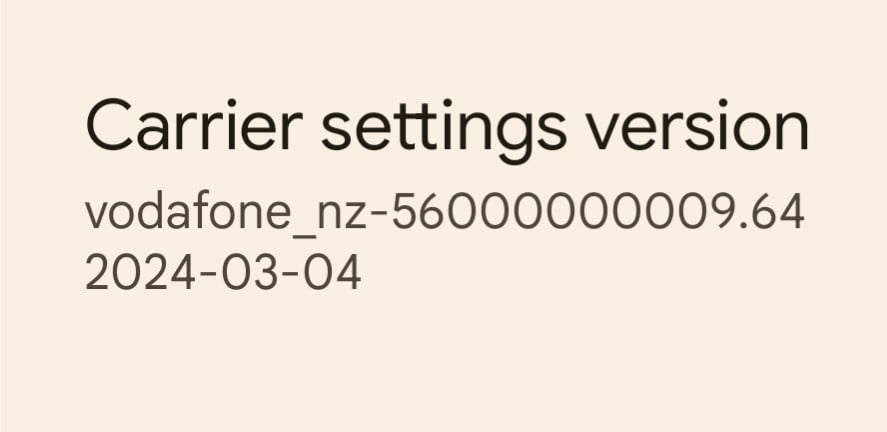
The same date here, the first number ends with `09.64` though (and does not provision vowifi).


disease
41 posts

Geek
+1 received by user: 19


  #3247782 12-Jun-2024 11:42
Send private message

muppet:


It's not the modem firmware that defines this (Sorry I realise my original post makes it seem it does) but rather the "Operator Settings Version"


For my P7Pro, that's "2024-03-04"


Is this the same as Carrier Settings version under Settings > Sims > Kogan?


I have the following:


Does this mean we potentially just have to bug someone at One NZ to provision it?


Shop on-line at New World now for your groceries (affiliate link).
zerkms
124 posts

Master Geek
+1 received by user: 9


  #3247784 12-Jun-2024 11:46
Send private message

disease:


muppet:


It's not the modem firmware that defines this (Sorry I realise my original post makes it seem it does) but rather the "Operator Settings Version"


For my P7Pro, that's "2024-03-04"


Is this the same as Carrier Settings version under Settings > Sims > Kogan?


I have the following:


Does this mean we potentially just have to bug someone at One NZ to provision it?


I think they cherry-pick devices (or rather devices' hardware). Would be cool if at least some details on how they decide who goes next and if there is a roadmap available. I'm currently with the mightymobile, and I could not get any details through them.


Behodar
11101 posts

Uber Geek
+1 received by user: 6092

Trusted
Lifetime subscriber

  #3435143 17-Nov-2025 09:09
Send private message

Echoe:


For anyone still looking I believe I have enabled VoWifi on One using the method linked below from XDA. It was very easy and does not require root access. 


https://xdaforums.com/t/enable-volte-vowifi-in-unsupported-countries-without-root-requires-shizuku.4550299/


Does anyone know whether this advice is still current? A friend has a Pixel 4 XL on Skinny and it's dropping to 3G when he makes a call. Going into Phone Information by dialling *#*#4636## shows "VoLTE provisioned" as off, and the slider is greyed out.


Before I go down the rabbit hole of messing around with the command line, does anyone know whether the method given above A) still works and B) is the "best" way to do it these days?


MaxineN
Max
2056 posts

Uber Geek
+1 received by user: 1675

ID Verified
Trusted
Subscriber

  #3435150 17-Nov-2025 09:52
Send private message

disease:


muppet:


It's not the modem firmware that defines this (Sorry I realise my original post makes it seem it does) but rather the "Operator Settings Version"


For my P7Pro, that's "2024-03-04"


Is this the same as Carrier Settings version under Settings > Sims > Kogan?


I have the following:


Does this mean we potentially just have to bug someone at One NZ to provision it?


If they have VoLTE, they should have VoWiFI.


In saying that, that is an ancient carrier build as were on June of this year.


Ramblings from a mysterious lady who's into tech. Warning I may often create zingers.


Behodar
11101 posts

Uber Geek
+1 received by user: 6092

Trusted
Lifetime subscriber

  #3436920 23-Nov-2025 08:37
Send private message

Behodar:


Echoe:


For anyone still looking I believe I have enabled VoWifi on One using the method linked below from XDA. It was very easy and does not require root access. 


https://xdaforums.com/t/enable-volte-vowifi-in-unsupported-countries-without-root-requires-shizuku.4550299/


Does anyone know whether this advice is still current? A friend has a Pixel 4 XL on Skinny and it's dropping to 3G when he makes a call. Going into Phone Information by dialling *#*#4636## shows "VoLTE provisioned" as off, and the slider is greyed out.


Before I go down the rabbit hole of messing around with the command line, does anyone know whether the method given above A) still works and B) is the "best" way to do it these days?


Alas, it seems like it doesn't work on a Pixel 4 (although I haven't actually tried it, but the readme file for "Pixel IMS" says it needs a 6 or newer).


Behodar
11101 posts

Uber Geek
+1 received by user: 6092

Trusted
Lifetime subscriber

  #3443013 12-Dec-2025 10:02
Send private message

My question is now moot: He replaced the phone with a Pixel 8A and it does VoLTE successfully.


1 | ... | 20 | 21 | 22 | 23 | 24 | 25 
View this topic in a long page with up to 500 replies per page Create new topic


Geekzone Live »

Try automatic live updates from Geekzone directly in your browser, without refreshing the page, with Geekzone Live now.


Are you subscribed to our RSS feed? You can download the latest headlines and summaries from our stories directly to your computer or smartphone by using a feed reader.